Our Top Picks


As an Amazon Associate we earn from qualifying purchases.
Disclosure: This article contains affiliate links, and we may earn a commission if you buy through them, at no extra cost to you.
HughesNet is satellite internet, and that shapes everything about choosing a router for it. The signal travels from your dish to a satellite and back, so latency is far higher than on cable or fiber, and monthly data allowances make wasted traffic more costly than on an unlimited wired plan. No router can change the physics of that link. What a good third-party router can change is everything that happens inside your home: how far the Wi-Fi reaches, how fairly the limited bandwidth is shared between a gaming PC, a console, phones, and a television, and how much control you have over which devices get priority when the connection is busy.
There is one point that has to be clear before any pick makes sense. A third-party router does not replace the HughesNet modem or gateway. HughesNet service requires its own gateway, which handles the satellite connection itself. The routers in this guide plug in behind that gateway, usually with an Ethernet cable from a LAN port on the HughesNet gateway to the WAN port on the new router. The gateway stays in place and keeps doing the satellite work, while the new router takes over your home Wi-Fi, your wired ports, and your traffic management. Some households also turn off the Wi-Fi radio on the HughesNet gateway so the two networks do not compete, and some place the gateway in a bridge-style setup where the provider allows it. Either way, the gateway itself is not removed.
A faster router will not make satellite latency feel like fiber or raise your plan speed. What it can do is stop your local network from becoming the bottleneck: better antennas, OFDMA, MU-MIMO, and quality of service controls make the same connection feel more orderly when a gaming PC shares it with streaming and video calls.
The four routers below are all the same type: standalone dual-band units that connect by Ethernet to an existing gateway. They were chosen on wireless class, ports, processor strength, and traffic controls listed by each maker. None is presented as an officially endorsed HughesNet accessory, because the listings do not make that claim.
Quick Picks
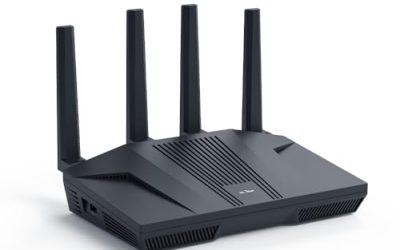
- Best overall for most HughesNet homes: TP-Link Archer AX55 — A dual-band Wi-Fi 6 AX3000 router with four high-gain antennas, a USB 3.0 port, OFDMA, and MU-MIMO, giving balanced coverage and device handling without overspending on capacity a satellite plan cannot use.
- Best for gaming households: ASUS RT-AX86U Pro — An AX5700 Wi-Fi 6 router with a 2.5 Gbps port, a dedicated gaming port, and adaptive quality of service features aimed at prioritizing game traffic on a shared connection.
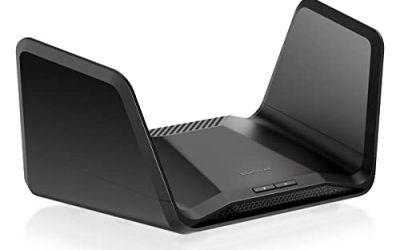
- Best for larger homes and many devices: NETGEAR Nighthawk RAX50 — An AX5400 six-stream Wi-Fi 6 router rated by its maker for coverage up to 2,500 square feet, suited to busier homes with many connected devices.
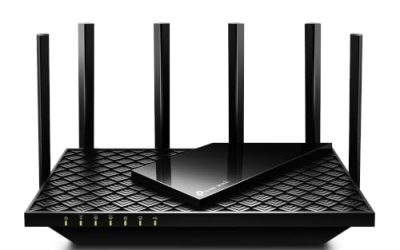
- Best step-up for streaming-heavy homes: TP-Link Archer AX73 — An AX5400 Wi-Fi 6 router with six antennas, a USB 3.0 port, and beamforming, built for long-range coverage and several simultaneous streams.
1. TP-Link Archer AX55 — Best Overall for Most HughesNet Homes

The Archer AX55 is the most balanced starting point for a HughesNet household. It is a dual-band Wi-Fi 6 router in the AX3000 class, rated at up to 2,402 Mbps on the 5 GHz band and 574 Mbps on the 2.4 GHz band. Those headline numbers are far above what a satellite plan delivers, and that is fine. The value here is not raw internet speed, which the gateway and the plan decide, but local capacity: the AX55 can move traffic between your devices, a network drive, or a wired PC without becoming the weak link, and its Wi-Fi 6 features keep many devices sharing the airtime more efficiently.
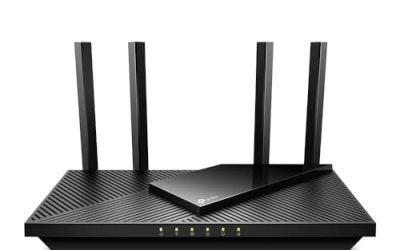
Four high-gain antennas and beamforming push a usable signal toward the rooms where people sit. OFDMA and MU-MIMO let it serve multiple clients efficiently, so devices finish transfers sooner and retry less often, wasting less of a limited data allowance.
Gigabit ports let a gaming PC or console bypass Wi-Fi for the most stable path to the gateway. The listing also notes a USB 3.0 port, VPN server and client support, HomeShield features, and WPA3. Setup runs through the Tether app or a web interface.
For HughesNet use, the AX55 is the sensible default: better coverage and device handling without paying for extreme wireless classes a satellite link will never feed.
Key specifications
- Wireless class: Wi-Fi 6, AX3000 dual-band
- Bands: 5 GHz up to 2,402 Mbps; 2.4 GHz up to 574 Mbps
- Antennas: 4 high-gain external antennas with beamforming
- Features: OFDMA, MU-MIMO, USB 3.0 port, VPN server and client support, WPA3
- Ethernet: Gigabit WAN and LAN ports
- Management: TP-Link Tether app and web interface
Pros
- Balanced Wi-Fi 6 feature set for a mixed gaming and streaming home
- Four antennas and beamforming for wider indoor coverage
- USB 3.0 port for local storage sharing
- Gigabit ports for wiring a PC or console directly
Cons
- No multi-gigabit port for faster local wired transfers
- Dual-band only, so no separate 6 GHz band
- Advanced security features may require an account or subscription tier from the maker
View the TP-Link Archer AX55 on Amazon
2. ASUS RT-AX86U Pro — Best for Gaming Households
The RT-AX86U Pro is the pick for a HughesNet home where gaming traffic has to compete with everything else. It is a dual-band Wi-Fi 6 router in the AX5700 class, rated at up to 4,804 Mbps on 5 GHz and 861 Mbps on 2.4 GHz, driven by a 2.0 GHz quad-core processor with 1 GB of RAM according to ASUS specifications. That processing headroom matters less for internet speed on satellite and more for handling many simultaneous connections, encryption, and traffic rules without the router itself stuttering.
Its gaming focus is concrete: a dedicated gaming port that prioritizes a wired device, a 2.5 Gbps port for a gaming PC, adaptive quality of service to favor game traffic over downloads, and Mobile Game Mode in the ASUS app. None of this lowers satellite latency, but it controls delay inside your home and stops a large download from crowding out a game session as easily.
It also supports AiMesh for adding a compatible ASUS node later, AiProtection Pro and parental controls without a separate subscription according to the listing, VPN functions, port forwarding, and two USB 3.2 ports.
Choose it if your household games daily and wants the strongest prioritization tools here.
Key specifications
- Wireless class: Wi-Fi 6, AX5700 dual-band
- Bands: 5 GHz up to 4,804 Mbps; 2.4 GHz up to 861 Mbps
- Processor: 2.0 GHz quad-core; 1 GB RAM; 256 MB flash
- Ports: 1 x 2.5 Gbps port, gigabit WAN, 4 x gigabit LAN, 2 x USB 3.2 ports
- Features: Dedicated gaming port, adaptive quality of service, AiMesh support, AiProtection Pro, VPN support
- Security: WPA3, parental controls
Pros
- Strongest gaming-oriented traffic controls in this guide
- 2.5 Gbps port plus a dedicated prioritized gaming port
- Powerful processor for busy, multi-device homes
- AiMesh support allows coverage expansion later
Cons
- Larger and more complex to configure than basic routers
- Many features are unnecessary for a small, light-use home
- Dual-band only despite the high wireless class
View the ASUS RT-AX86U Pro on Amazon
3. NETGEAR Nighthawk RAX50 — Best for Larger Homes and Many Devices

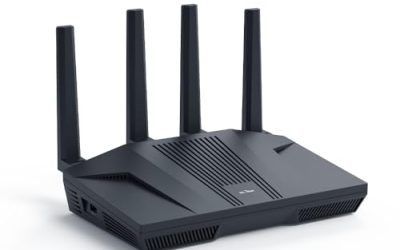
The Nighthawk RAX50 is built for the household with a lot going on at once. It is a six-stream dual-band Wi-Fi 6 router in the AX5400 class, rated at up to 5.4 Gbps of combined wireless throughput, and NETGEAR rates its coverage at up to 2,500 square feet. Four amplified antennas and beamforming on both bands help it hold connections across a larger floor plan, which is a common need for HughesNet customers in detached rural homes where the gateway may sit in one corner of the house.
Six streams and a 1.5 GHz triple-core processor keep up when phones, laptops, televisions, and smart devices are all active. That local capacity will not create more internet bandwidth, but it prevents the router from being the reason a device drops. OFDMA helps it serve many small smart-home requests efficiently.
Management runs through the Nighthawk app. The listing notes WPA3, guest networks, and VPN support, and NETGEAR Armor is offered under the maker’s terms. Gigabit ports allow cabled connections for a work computer or console.
Pick the RAX50 if coverage and device count are your main problems.
Key specifications
- Wireless class: Wi-Fi 6, AX5400 dual-band, 6 streams
- Bands: Combined wireless speed up to 5.4 Gbps
- Coverage: Rated by the maker at up to 2,500 square feet
- Processor: 1.5 GHz triple-core
- Antennas: 4 amplified external antennas with beamforming
- Features: OFDMA, WPA3, guest network, VPN support, Nighthawk app management
Pros
- Six streams suit homes with many simultaneous devices
- Strong stated coverage for larger floor plans
- Beamforming on both bands helps distant rooms
- Simple app-based setup and management
Cons
- No multi-gigabit Ethernet port
- Security service features depend on the maker’s subscription terms
- Larger footprint than compact routers
View the NETGEAR Nighthawk RAX50 on Amazon
4. TP-Link Archer AX73 — Best Step-Up for Streaming-Heavy Homes
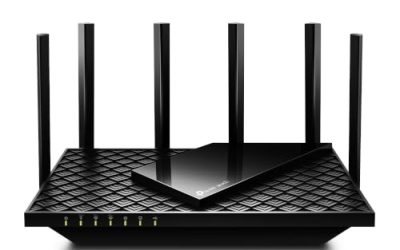
The Archer AX73 sits a step above the AX55 for homes where several screens are active at once. It is a dual-band Wi-Fi 6 router in the AX5400 class, rated at up to 4,804 Mbps on 5 GHz and 574 Mbps on 2.4 GHz. Six high-gain antennas, beamforming, and a high-power front-end module design are aimed at longer-range coverage, so a television in a far bedroom or a console in a den has a better chance of holding a stable connection to the router.
That stability matters on HughesNet, where streaming already copes with satellite latency. MU-MIMO and OFDMA serve multiple devices efficiently, and a faster local network also helps move files between your own devices, which uses no satellite data.
It includes a USB 3.0 port, gigabit ports, HomeShield parental and quality of service controls, and WPA3, managed through the Tether app or a browser.
Choose the AX73 if you stream on more than one screen or need stronger coverage than a four-antenna router provides, without needing the ASUS gaming port layout.
Key specifications
- Wireless class: Wi-Fi 6, AX5400 dual-band
- Bands: 5 GHz up to 4,804 Mbps; 2.4 GHz up to 574 Mbps
- Antennas: 6 high-gain external antennas with beamforming
- Features: OFDMA, MU-MIMO, USB 3.0 port, HomeShield controls, WPA3
- Ethernet: Gigabit WAN and LAN ports
- Management: TP-Link Tether app and web interface
Pros
- Six antennas aimed at longer-range coverage
- Higher wireless class for several simultaneous streams
- USB 3.0 port for local storage sharing
- Quality of service controls for prioritizing key devices
Cons
- No multi-gigabit port for fast wired local transfers
- Dual-band only, with no 6 GHz band
- Some HomeShield features sit behind the maker’s service tiers
View the TP-Link Archer AX73 on Amazon
How to Choose a Router for HughesNet
Start by accepting what the router cannot do, because that prevents wasted money. It cannot replace the HughesNet gateway, it cannot remove satellite latency, and it cannot exceed the speed or data allowance of your plan. Shop instead for the things a router genuinely controls: coverage inside your home, how many devices it handles at once, how many wired ports it offers, and how well it lets you prioritize traffic.
Coverage comes first for most satellite households. Rural homes are often larger or more spread out, and the gateway location is chosen for the dish cabling, not for ideal Wi-Fi placement. Look for multiple high-gain antennas, beamforming, and, if the home is very large, a router that can grow into a mesh system later, such as the AiMesh support on the ASUS model or EasyMesh compatibility on the TP-Link models. A router you can place centrally, connected to the gateway by a longer Ethernet run, will usually beat a stronger router left in a corner.
Next, match the wireless class to your device count rather than your plan speed. Even an AX1800 router is far faster locally than a satellite link, so the reason to step up to AX3000 or AX5400 is simultaneous capacity: more streams, OFDMA, and MU-MIMO to keep many devices from queuing behind each other. A quiet home with a handful of devices can choose the simpler end of this guide, while a family home full of phones, laptops, cameras, and smart devices benefits from the higher classes.
Wired ports matter more than many buyers expect. Gaming on satellite already carries high latency, so removing Wi-Fi from the path between your PC or console and the gateway is one of the few real improvements available. Any router here offers gigabit LAN ports, and the ASUS model adds a 2.5 Gbps port and a dedicated gaming port. If you can run a cable, do it for the machine you game on, and save Wi-Fi for devices that move around.
Finally, look at traffic controls. Quality of service settings, device prioritization, and parental controls help a household share a limited satellite allowance sensibly. Prioritize the gaming PC or a work laptop, schedule or limit background-heavy devices, and use guest networks to keep visitors and smart devices separated from your main machines. Also plan the gateway settings: once the new router is running, turning off the Wi-Fi on the HughesNet gateway avoids two networks competing, and connecting the router WAN port to the gateway LAN port is the standard arrangement described by most router setup guides.
Frequently Asked Questions
Can a third-party router replace the HughesNet modem or gateway?
No. HughesNet service requires the HughesNet gateway to handle the satellite connection. A third-party router connects behind that gateway by Ethernet and manages your home Wi-Fi and wired network. Removing the gateway would remove the satellite link itself.
Will a better router make HughesNet faster?
It will not raise the speed HughesNet delivers to your home or remove satellite latency. It can improve coverage, stability, and device handling inside the home, so the connection you already have is used more efficiently and reaches rooms the gateway Wi-Fi may not serve well.
How do I connect a new router to a HughesNet gateway?
Run an Ethernet cable from a LAN port on the HughesNet gateway to the WAN or internet port on the new router, then follow the router maker’s setup steps in its app or web interface. Many households then disable the Wi-Fi radio on the HughesNet gateway so only the new router broadcasts a home network.
Is Wi-Fi 6 worth it on a satellite connection?
Yes, for local reasons. Wi-Fi 6 features such as OFDMA and MU-MIMO help many devices share the network efficiently, and newer routers usually have better antennas and processors than older gateway radios. The benefit is smoother handling of your household devices, not a faster satellite link.
Should I wire my gaming PC to the router on HughesNet?
If you can, yes. A wired connection removes local Wi-Fi interference and drops from the path, leaving only the satellite latency you cannot change. It is the most reliable arrangement for a gaming PC or console used at a fixed desk or entertainment center.
Do these routers work with any HughesNet plan?
These are standard Ethernet routers, and they connect to the gateway the same way regardless of plan tier, because the plan affects the satellite link rather than the home network side. Check the router listing for its current port and feature details before buying, since makers revise hardware versions over time.
Conclusion
The best routers for HughesNet are not the ones with the biggest speed claims, but the ones that organize a limited satellite connection most effectively inside your home. The TP-Link Archer AX55 is the balanced default for most households, the ASUS RT-AX86U Pro gives gaming homes the strongest prioritization tools, the NETGEAR Nighthawk RAX50 suits larger homes with many devices, and the TP-Link Archer AX73 serves streaming-heavy homes that need wider coverage. Whichever you choose, keep the HughesNet gateway in place, cable the router behind it, wire your gaming machine where possible, and use the traffic controls to decide what gets the shared bandwidth first. That combination gets the most from the connection satellite internet can actually deliver.
FAQ
Can a third-party router replace the HughesNet modem or gateway?
Will a better router make HughesNet faster?
How do I connect a new router to a HughesNet gateway?
Is Wi-Fi 6 worth it on a satellite connection?
Should I wire my gaming PC to the router on HughesNet?
Do these routers work with any HughesNet plan?
More from Amazon
Programs that pair well with the guide above. Offers and eligibility are set by Amazon and may change.
Free shipping on eligible items, Prime Video and more. Eligible new members can start with a free trial.
Start a Prime free trialAd-free music streaming. Eligible new subscribers can start with a free trial.
Try Music Unlimited freeA Prime membership for ages 18-24 with a trial period. Eligibility is set by Amazon.
See Prime for Young AdultsAudiobooks and podcasts to listen to on the go. Eligible new members can start with a free trial.
Try Audible freeAs an Amazon Associate we earn from qualifying purchases.