Our Top Picks
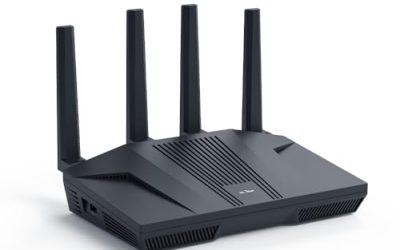
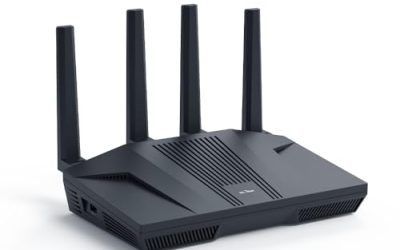
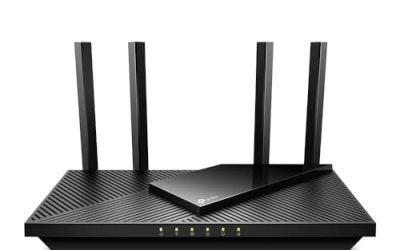
 TP-Link AXE5400 Tri-Band WiFi 6E RouterWiFi 6E, Tri-Band AXE540012.91 x 10.43 x 4.72 inches1.5 poundsCheck on Amazon



As an Amazon Associate we earn from qualifying purchases.
Disclosure: This article contains affiliate links to products on Amazon. If you buy through those links, this site may earn a commission at no additional cost to you.
Streaming on one screen is easy for almost any modern router. Streaming on several screens at the same time is a different problem. A living-room television in 4K, a bedroom television, a tablet in the kitchen, phones that keep playing video in the background, and a game download running on a PC all ask for airtime at once. When the router can only serve one device efficiently at a time, the picture drops to a lower resolution, buffering circles appear, and the stream that started last often suffers first.
That is why the best routers for streaming multiple devices are not chosen on headline speed alone. That number is a combined total across every band, and no single device will ever use all of it. What matters is how well the router shares what it has: how many bands it can spread devices across, how many simultaneous streams its radios support, and whether it includes the Wi-Fi 6, 6E, and 7 features designed for crowded networks.
The four routers below were selected on those criteria. Each is a standalone Wi-Fi router of the same product type, each supports MU-MIMO and OFDMA, and each offers either a third band or a strong dual-band layout so several streams are not forced through one channel.
Quick Picks
- Best Wi-Fi 7 pick: TP-Link Archer BE550 (BE9300) — a tri-band Wi-Fi 7 router with Multi-Link Operation, a 6 GHz band, and five 2.5 Gbps Ethernet ports, suited to homes that want the newest standard and wired backhaul options.
- Best Wi-Fi 6E value in features: TP-Link Archer AXE75 (AXE5400) — a tri-band Wi-Fi 6E router that adds the 6 GHz band at a simpler specification level, with six antennas and OneMesh support.
- Best dual-band pick: ASUS RT-AX86U Pro (AX5700) — a Wi-Fi 6 router with a 4×4 radio on 5 GHz, a 2.5 Gbps port, and detailed traffic controls, suited to homes whose devices are still mostly Wi-Fi 6 and older.
- Best for many devices: NETGEAR Nighthawk RAXE300 (AXE7800) — an eight-stream tri-band Wi-Fi 6E router whose listing describes coverage for larger homes and dozens of connected devices.
Why Multi-Device Streaming Stresses a Router
Video is continuous, unlike a file download. If packets arrive late, the player either pauses to buffer or lowers picture quality. When three or four players pull video through the same radio on the same band, they take turns in a way older Wi-Fi standards handled inefficiently.
Two technologies changed that. OFDMA, introduced with Wi-Fi 6, lets the router divide a channel into smaller units and serve several devices within a single transmission window. MU-MIMO lets the router talk to multiple devices at the same time using separate spatial streams. Together they are why a Wi-Fi 6, 6E, or 7 router usually feels calmer in a busy home than an older Wi-Fi 5 model with a similar headline speed.
Bands matter just as much. The 2.4 GHz band travels farther but is crowded and slow, so it suits smart home gadgets better than televisions. The 5 GHz band carries most streaming today. The 6 GHz band on Wi-Fi 6E and Wi-Fi 7 routers is wider and less crowded, giving newer devices a cleaner lane while leaving 5 GHz freer for everything else.
1. TP-Link Archer BE550 — Best Wi-Fi 7 Pick
The Archer BE550 is the forward-looking pick in this group. It is a tri-band Wi-Fi 7 router in the BE9300 class, and Wi-Fi 7 brings two features that help directly when many devices stream at once. Multi-Link Operation allows a compatible client to use more than one band in a coordinated way, which can improve consistency when one band becomes busy. Wider 320 MHz channels on the 6 GHz band and 4K-QAM modulation raise the ceiling that the listing states for that band, giving newer devices more headroom so they finish their bursts of traffic quickly and free the air sooner.
For a streaming household, the practical appeal is separation. Put the newest television on 6 GHz, keep laptops and phones on 5 GHz, and leave 2.4 GHz for smart bulbs and plugs. The BE550 also stands out on the wired side: all five Ethernet ports are 2.5 Gbps, so wired televisions, consoles, and a faster-than-gigabit internet connection are not held back by gigabit ports.
Specifications
- Wi-Fi standard: Wi-Fi 7 (802.11be), tri-band
- Stated speeds: up to 5760 Mbps on 6 GHz, 2880 Mbps on 5 GHz, and 574 Mbps on 2.4 GHz (BE9300 class total)
- Streams: 6-stream design with six internal antennas
- Key features: Multi-Link Operation, 320 MHz channels, 4K-QAM, OFDMA, MU-MIMO, EasyMesh support, VPN support
- Wired ports: five 2.5 Gbps ports in total, covering WAN and LAN duties as listed
- Coverage: listing describes coverage up to 2,000 square feet
Pros
- Wi-Fi 7 with a 6 GHz band gives the newest streaming devices a separate, wide lane
- Multi-Link Operation and wide channels suit homes where several streams start at once
- Every Ethernet port is 2.5 Gbps, which suits multi-gigabit plans and wired televisions
- EasyMesh support allows coverage to be extended with a compatible unit later
Cons
- Wi-Fi 7 and 6 GHz benefits only reach client devices that support those standards
- Internal antennas and a single unit still have limits in large or multi-storey homes
- The feature set is more than a small apartment with two screens will ever use
Check the TP-Link Archer BE550 on Amazon
2. TP-Link Archer AXE75 — Best Wi-Fi 6E Pick
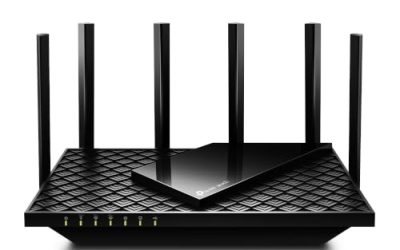
The Archer AXE75 takes the same basic idea — three bands, including 6 GHz — and delivers it on Wi-Fi 6E instead of Wi-Fi 7. For many homes that is the sensible balance. A growing number of phones, laptops, and premium streaming devices already support Wi-Fi 6E, and moving even a few of them onto 6 GHz noticeably unloads the 5 GHz band that televisions and older devices depend on. The result is not a magic speed increase for any one stream, but fewer streams competing in the same space.
TP-Link rates the AXE75 in the AXE5400 class and fits six external antennas. It supports OFDMA and MU-MIMO, along with 160 MHz channels on its faster bands. OneMesh support means a compatible extender can be added under the same network name if a back bedroom turns out to be a weak spot, which is a common discovery once another simultaneous stream moves into that room. A USB 3.0 port is included for sharing storage on the local network.
Specifications
- Wi-Fi standard: Wi-Fi 6E (802.11ax), tri-band
- Stated speeds: AXE5400 class, split across 6 GHz, 5 GHz, and 2.4 GHz bands, with 160 MHz channel support
- Antennas: six high-performance external antennas
- Processor: quad-core processor as listed
- Key features: OFDMA, MU-MIMO, OneMesh support, WPA3 security, VPN support
- Ports: gigabit WAN and LAN ports as listed, plus a USB 3.0 port
Pros
- The 6 GHz band separates newer devices from crowded 5 GHz traffic
- OFDMA and MU-MIMO are aimed squarely at serving many devices at once
- Six antennas and OneMesh options help with coverage in a typical family home
- A clear step up for streaming without moving to the newest Wi-Fi generation
Cons
- No Wi-Fi 7 features such as Multi-Link Operation
- Wired ports are gigabit class, so multi-gigabit internet plans cannot be passed through in full
- Devices without Wi-Fi 6E cannot use the 6 GHz band at all
Check the TP-Link Archer AXE75 on Amazon
3. ASUS RT-AX86U Pro — Best Dual-Band Pick
Not every streaming home needs a third band. If your televisions, sticks, and boxes are Wi-Fi 6 or Wi-Fi 5 devices, a strong dual-band router with a wide 5 GHz radio can serve several simultaneous streams very well, and that is the case for the RT-AX86U Pro. Its 5 GHz radio is a 4×4 design rated far higher than its 2.4 GHz radio, which matches how streaming traffic actually behaves: the demanding devices belong on 5 GHz, close enough to the router to hold a strong signal, while 2.4 GHz handles range and low-demand gadgets.
ASUS lists this model in the AX5700 class, powered by a 2.0 GHz quad-core processor with 1 GB of RAM, which gives it headroom for handling many connections, traffic monitoring, and quality-of-service rules at the same time. Adaptive QoS is genuinely relevant here rather than a gaming-only extra: you can prioritise streaming as an activity so video traffic is favoured when the network gets busy. A configurable 2.5 Gbps port can serve as the internet connection on a faster plan or as a fast wired link to one device, and AiMesh support allows a second ASUS unit to extend coverage later under one network name.
Specifications
- Wi-Fi standard: Wi-Fi 6 (802.11ax), dual-band
- Stated speeds: up to 4804 Mbps on 5 GHz and 861 Mbps on 2.4 GHz (AX5700 class total)
- Radios: 4×4 on 5 GHz, 3×3 on 2.4 GHz, with 160 MHz channel support
- Processor and memory: 2.0 GHz quad-core processor, 1 GB RAM, 256 MB flash as listed by ASUS
- Key features: OFDMA, MU-MIMO, beamforming, Adaptive QoS, AiMesh support, AiProtection Pro, WPA3
- Ports: one configurable 2.5 Gbps WAN/LAN port, four gigabit LAN ports, one gigabit WAN port, plus USB ports as listed
Pros
- A strong 4×4 radio on 5 GHz suits several televisions and boxes on the main streaming band
- Adaptive QoS can prioritise streaming traffic when the household is busy
- A 2.5 Gbps port helps with faster internet plans or one fast wired device
- AiMesh support gives a straightforward path to wider coverage later
Cons
- No 6 GHz band, so Wi-Fi 6E and Wi-Fi 7 devices cannot move to a cleaner lane
- Dual-band designs have less room to separate competing streams than tri-band models
- Best results need streaming devices placed within good 5 GHz range
Check the ASUS RT-AX86U Pro on Amazon
4. NETGEAR Nighthawk RAXE300 — Best for Many Devices
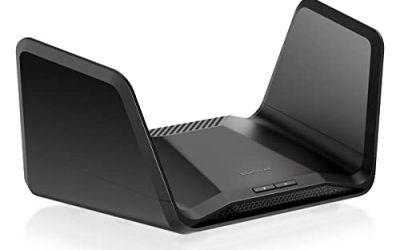
The RAXE300 is built around capacity. It is an eight-stream tri-band Wi-Fi 6E router in the AXE7800 class, and NETGEAR’s listing describes it in terms of larger coverage and dozens of connected devices, which is exactly the language of a house where streaming is only one of many simultaneous demands. Eight streams across three bands give the router more simultaneous conversations to work with, and the 6 GHz band again provides an escape route for the newest devices.
Its stated band speeds are weighted towards 5 GHz, the workhorse band for streaming hardware, while 6 GHz adds a quieter alternative and 2.4 GHz covers distance and smart home traffic. A 2.5 Gbps port can serve a faster internet connection or one fast wired device, alongside four gigabit LAN ports. Management through the Nighthawk app suits households that prefer phone-based setup over a detailed web interface.
Specifications
- Wi-Fi standard: Wi-Fi 6E (802.11ax), tri-band
- Stated speeds: up to 7.8 Gbps in total (AXE7800 class), split across 6 GHz, 5 GHz, and 2.4 GHz bands
- Streams: eight streams, with six antennas in the folding-wing design
- Processor: 1.7 GHz quad-core processor as listed
- Key features: OFDMA, MU-MIMO, 160 MHz channel support, WPA3, VPN support
- Ports: one 2.5 Gbps port and four gigabit Ethernet ports as listed, plus a USB 3.0 port
- Coverage: listing describes coverage up to 2,500 square feet and use with up to 40 devices
Pros
- Eight streams across three bands suit homes with many simultaneous streams and devices
- Tri-band layout with 6 GHz keeps newer devices away from crowded bands
- Listing describes the widest coverage and device count in this group
- A 2.5 Gbps port plus four gigabit ports cover most wired streaming setups
Cons
- The distinctive winged design needs more shelf space than a flat router
- Some advanced NETGEAR services are offered separately from the base router features
- Wi-Fi 6E clients are required to use the 6 GHz band
Check the NETGEAR Nighthawk RAXE300 on Amazon
How to Choose a Router for Streaming on Many Devices
Count bands before headline speed. A tri-band router gives simultaneous streams somewhere to spread out. If several people stream at the same time every evening, that separation usually matters more than a higher combined number on a dual-band box.
Check for OFDMA and MU-MIMO. These are the features that let a router serve several devices efficiently instead of strictly one after another. Every router in this guide lists them, and they should be considered essential for this use case rather than optional extras.
Match the router to your client devices. A 6 GHz band only helps devices that support Wi-Fi 6E or Wi-Fi 7. Check your main television, streaming box, and phones first. If none of them support 6 GHz yet, a strong Wi-Fi 6 dual-band router such as the RT-AX86U Pro may serve you just as well today, while a tri-band pick makes more sense if you are about to upgrade those devices.
Think about wired ports. Streaming devices near the router should be wired whenever possible, because every wired television frees wireless airtime for rooms that cannot be wired. Look at both the number of LAN ports and their speed, especially if your internet plan is faster than gigabit service.
Be realistic about coverage. Stated coverage figures are listing claims for favourable conditions, not guarantees for every wall and floor in your home. If streams buffer only in one far room, placement, a mesh-ready system, or an add-on node will solve more than a faster router in the wrong cupboard. Place the router centrally and in the open where you can.
Remember the internet plan is the ceiling. A router cannot make simultaneous streams faster than the connection entering the house. If several 4K streams already saturate your plan, router features will organise that bandwidth better, but they will not create more of it.
FAQs
How many devices can stream at once through one router?
That depends on the resolution of each stream, your internet plan, and how the streams share the bands, rather than on a single device limit printed on a box. In practice, the routers here are designed for households running several simultaneous video streams alongside phones and smart home devices, provided the internet connection itself is fast enough for the combined demand.
Is Wi-Fi 6E or Wi-Fi 7 worth it for streaming?
It is worth it when your streaming devices support the 6 GHz band, because that band is wider and less crowded, so simultaneous streams interfere with each other less. If all of your streaming hardware is Wi-Fi 5 or Wi-Fi 6 on 5 GHz, a capable Wi-Fi 6 router will deliver the same picture today, and the newer standards become relevant when you replace those devices.
Should I wire my television to the router?
Yes, when the television sits close enough for a cable. A wired connection removes that stream from wireless contention entirely, which helps every other device still using Wi-Fi. Prioritise wiring the most-used television and any fixed streaming box near the router.
Will a better router fix buffering on its own?
Only when the router is the bottleneck. Buffering can also come from a slow internet plan, weak signal in one room, or the streaming service itself. A router with OFDMA, MU-MIMO, and enough bands fixes the sharing and coverage problems inside the home, which are the most common causes when several devices stream at once.
Where should I place the router for multi-room streaming?
Centrally, raised, and out in the open, roughly equidistant from the rooms that stream most. Avoid closed cabinets, the floor behind a television, and spots next to thick masonry or large metal appliances, all of which weaken the 5 GHz and 6 GHz signals that streaming relies on.
Conclusion
For most households where several screens stream at the same time, the choice comes down to bands and sharing features rather than the largest number on the box. Choose the Archer BE550 if you want Wi-Fi 7, Multi-Link Operation, and multi-gigabit ports for the longest service life. Choose the Archer AXE75 for a tri-band Wi-Fi 6E step up that suits the devices many homes already own. Choose the RT-AX86U Pro if your streaming hardware is firmly in the Wi-Fi 6 era and you value strong 5 GHz performance and traffic controls. Choose the Nighthawk RAXE300 if device count and stated coverage are your main pressures. Any of the four will share a connection among simultaneous streams far more gracefully than an older router that makes every device wait its turn.
More from Amazon
Programs that pair well with the guide above. Offers and eligibility are set by Amazon and may change.
Free shipping on eligible items, Prime Video and more. Eligible new members can start with a free trial.
Start a Prime free trialAd-free music streaming. Eligible new subscribers can start with a free trial.
Try Music Unlimited freeA Prime membership for ages 18-24 with a trial period. Eligibility is set by Amazon.
See Prime for Young AdultsAudiobooks and podcasts to listen to on the go. Eligible new members can start with a free trial.
Try Audible freeAs an Amazon Associate we earn from qualifying purchases.