Our Short List of 3

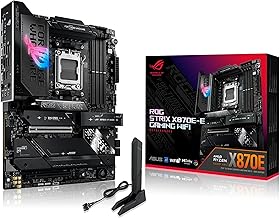
- Socket: AM5 (LGA 1718)
- Chipset: AMD X870
- Memory: DDR5, up to 8200MT/s (OC), 4 DIMM slots, AMD EXPO
- Power design: 16+2+2 twin digital VRM

- Socket: AM5 (LGA 1718)
- Chipset: AMD B850
- Memory: DDR5, up to 8200MT/s (OC), 4 DIMM slots, AMD EXPO
- Power design: 14+2+2 twin digital VRM
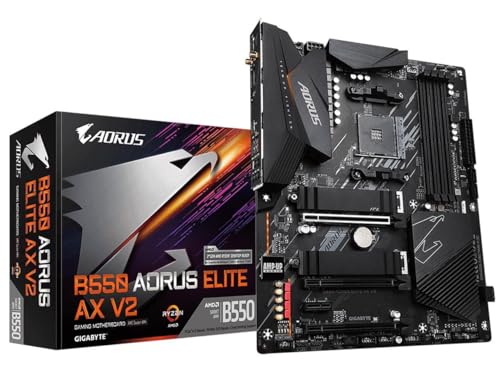
- Socket: AM4
- Chipset: AMD B550
- Memory: DDR4, 4 DIMM slots
- Power design: 12+2 power phase
All 3 Picks at a Glance
| Product | Specs | Action |
|---|---|---|
| 1. GIGABYTE X870 AORUS Elite WIFI7 — Best Overall Gigabyte Motherboard |
| Check price on Amazon |
| 2. GIGABYTE B850 AORUS Elite WIFI7 — Best Mid-Range AM5 Gigabyte Motherboard |
| Check price on Amazon |
| 4. GIGABYTE B550 AORUS Elite AX V2 — Best Budget AM4 Gigabyte Motherboard |
| Check price on Amazon |
Our Top Picks
Gigabyte has been building motherboards for decades, and its AORUS lineup now covers almost every kind of gaming PC, from a first budget build on the mature AM4 platform to a high-end AM5 rig with DDR5 memory, PCIe 5.0 storage, and Wi-Fi 7. The hard part is not finding a good Gigabyte board. It is choosing the right one for your processor, your memory, and the parts you plan to add later.
This guide rounds up the best Gigabyte motherboards for gaming in 2026. Every pick below is a Gigabyte board sold on Amazon US, spanning the X870, B850, B650, and B550 chipsets, so there is an option whether you are building around a Ryzen 9000 series processor or squeezing more life out of a Ryzen 5000 series chip.
How to Choose a Gigabyte Motherboard
Start With the Socket and Chipset
The socket decides which processors a board accepts, and the chipset decides which features you get around that socket. Gigabyte’s current AM5 boards use the LGA 1718 socket for Ryzen 7000, 8000, and 9000 series processors, while its AM4 boards use the older PGA socket for Ryzen 3000, 4000, and 5000 series processors.
On AM5, the chipset ladder runs from B650 at the value end, through B850 in the middle, up to X870 and X870E at the top. The higher chipsets generally bring more USB4 ports, more PCIe 5.0 lanes, and stronger power delivery. On AM4, B550 remains the sensible gaming choice, with PCIe 4.0 support and mature BIOS support for the full Ryzen 5000 lineup.
The practical rule is simple. If you are buying a new processor, build on AM5. If you already own a Ryzen 5000 series chip and a set of DDR4 memory, an AM4 board keeps that investment working and leaves more of your budget for the graphics card.
Memory: DDR4 or DDR5
AM4 boards use DDR4 memory. AM5 boards use DDR5 memory, and the two are not interchangeable. DDR5 kits run at higher speeds, and Gigabyte’s AM5 boards in this guide support DDR5 speeds up to 8200MT/s with overclocking, along with AMD EXPO profiles that apply tested memory settings in a couple of clicks.
If you are starting from scratch, DDR5 is the right call. If you already own a good DDR4 kit, an AM4 board lets you reuse it. Do not buy a board first and memory second. Decide the platform, then match the memory type to the board.
Power Delivery and Cooling
The VRM, or voltage regulator module, feeds clean power to the processor. Its phase count and heatsink size matter most when you pair a board with a high core count Ryzen chip or push an overclock. Gigabyte lists its power designs openly: the boards in this guide range from a 12+2 phase design on the AM4 pick to a 16+2+2 twin digital VRM on the flagship X870 board.
Storage and Expansion
Count the M.2 slots before you buy. A single fast NVMe drive holds the operating system and a handful of games, but modern game installs are large, and a second or third M.2 slot saves you from juggling installs later.
Connectivity: Wi-Fi, LAN, and USB
Every board in this guide includes built-in Wi-Fi and wired Ethernet, so you can skip a separate adapter. The AM5 picks step up to Wi-Fi 7, while the B650 pick uses Wi-Fi 6E and the AM4 pick uses Wi-Fi 6.
BIOS Updates and Q-Flash Plus
Gigabyte’s Q-Flash Plus lets you update the BIOS without a processor, memory, or graphics card installed, using only a USB drive and the power supply. That feature is worth its weight in gold if you buy a board that needs a newer BIOS for your processor. All four picks in this guide support Q-Flash Plus, so a BIOS update is a ten-minute job rather than a reason to return a board.
Form Factor and Case Fit
All four boards below are ATX, the standard full-size form factor. Make sure your case lists ATX support and that you have clearance for the board’s heatsinks and your graphics card. ATX gives you four memory slots and room for multiple expansion cards, which is part of why it remains the default choice for gaming builds.
The Best Gigabyte Motherboards
1. GIGABYTE X870 AORUS Elite WIFI7 — Best Overall Gigabyte Motherboard
- Socket: AM5 (LGA 1718)
- Chipset: AMD X870
- Memory: DDR5, up to 8200MT/s (OC), 4 DIMM slots, AMD EXPO
- Power design: 16+2+2 twin digital VRM
The X870 AORUS Elite WIFI7 is the flagship pick in this guide and the board to choose when you want the fullest AM5 feature set without stepping up to the more expensive X870E tier. It supports Ryzen 9000, 8000, and 7000 series processors on the AM5 socket, with DDR5 memory speeds up to 8200MT/s through overclocking and AMD EXPO support.
Its 16+2+2 twin digital VRM design is the strongest power delivery in this roundup, built on a six-layer PCB with premium chokes and capacitors. That is the kind of power design that stays composed under a Ryzen 9 at full load, and it leaves genuine headroom for overclocking. VRM Thermal Armor and M.2 Thermal Guard heatsinks keep temperatures in check during long gaming sessions.
Storage is a highlight. The board carries four M.2 slots, with three of them running at PCIe 5.0 speeds, plus a PCIe 5.0 x16 slot for the graphics card. That gives you room for a fast boot drive, a large game library drive, and still more slots to spare.
Connectivity is equally generous. Dual USB4 Type-C ports deliver very fast transfer speeds for external drives and docks, Wi-Fi 7 provides the latest wireless standard, and 2.5GbE LAN covers wired play. Eight total USB ports on the rear panel handle the usual collection of gaming peripherals without reaching for a hub.
Gigabyte’s DIY-friendly touches are all present: PCIe EZ-Latch Plus for tool-free graphics card removal, M.2 EZ-Latch Click and M.2 EZ-Latch Plus for screwless drive installation, and Q-Flash Plus for processor-free BIOS updates. The board carries a five-year warranty.
Check the GIGABYTE X870 AORUS Elite WIFI7 on Amazon
2. GIGABYTE B850 AORUS Elite WIFI7 — Best Mid-Range AM5 Gigabyte Motherboard
- Socket: AM5 (LGA 1718)
- Chipset: AMD B850
- Memory: DDR5, up to 8200MT/s (OC), 4 DIMM slots, AMD EXPO
- Power design: 14+2+2 twin digital VRM
The B850 AORUS Elite WIFI7 is the sweet spot of this roundup. It keeps most of what makes the X870 pick great — the AM5 socket, DDR5 memory up to 8200MT/s, Wi-Fi 7, and PCIe 5.0 — while trimming the extras that many builders never use, such as the second USB4 port and the fourth M.2 slot.
Its 14+2+2 power design is a step below the X870 board but still comfortably strong for Ryzen 7 and Ryzen 9 gaming processors. VRM and M.2 Thermal Guard heatsinks are included, so sustained loads are handled without drama. The six-layer PCB and premium power components are shared with the higher tier, which shows in how solid the board feels for the segment.
Storage is well covered with three M.2 slots, including PCIe 5.0 support, and a PCIe 5.0 x16 slot for the graphics card. That is enough for a boot drive and a large game drive, with a spare slot for later. The board also includes a USB-C port, a Sensor Panel Link for add-on displays, and the same EZ-Latch tool-free features as the flagship: PCIe EZ-Latch Plus, M.2 EZ-Latch Click, and M.2 EZ-Latch Plus.
Networking matches the top pick closely, with Wi-Fi 7 for wireless and 2.5GbE LAN for wired connections. Q-Flash Plus is included for BIOS updates without a processor installed, and the board carries a five-year warranty.
Check the GIGABYTE B850 AORUS Elite WIFI7 on Amazon
3. GIGABYTE B650 AORUS Elite AX V2 — Best Value AM5 Gigabyte Motherboard
The B650 AORUS Elite AX V2 is the value pick for builders who want onto the AM5 platform without paying for the newest chipset. It supports Ryzen 9000, 8000, and 7000 series processors, so it covers the same processor range as the boards above, and it pairs that with DDR5 memory speeds up to 8000MHz through overclocking.
Its 12+2+2 power design is the lightest VRM in the AM5 group here, but it is still a proper digital design with enough capacity for Ryzen 5 and Ryzen 7 gaming processors. This is the board for a mid-range build where the graphics card deserves the larger share of the budget.
Storage includes PCIe 5.0 M.2 support, so you can install one of the fastest NVMe drives available, alongside a second M.2 slot for extra capacity. A USB 3.2 Gen 2 Type-C port sits on the rear panel, and the board includes the practical features that make a build easier: EZ-Latch for tool-free M.2 installation, Q-Flash Plus for processor-free BIOS updates, and RGB Fusion for lighting control.
Wireless connectivity steps down a generation to Wi-Fi 6E, which remains fast and stable for online gaming, and wired networking is covered by 2.5GbE LAN.
- Socket: AM5 (LGA 1718)
- Chipset: AMD B650
- Memory: DDR5, up to 8000MHz (OC), 4 DIMM slots, AMD EXPO
- Power design: 12+2+2 digital VRM
- Storage: PCIe 5.0 M.2 slot, additional M.2 slot
- Connectivity: Wi-Fi 6E, 2.5GbE LAN, USB 3.2 Gen 2 Type-C
- Extras: EZ-Latch, Q-Flash Plus, RGB Fusion
Check the GIGABYTE B650 AORUS Elite AX V2 on Amazon
4. GIGABYTE B550 AORUS Elite AX V2 — Best Budget AM4 Gigabyte Motherboard
- Socket: AM4
- Chipset: AMD B550
- Memory: DDR4, 4 DIMM slots
- Power design: 12+2 power phase
The B550 AORUS Elite AX V2 is the pick for builders who already own a Ryzen 5000 series processor and DDR4 memory, or for anyone putting together a capable gaming PC on a tight budget. AM4 is a mature platform with a huge library of compatible processors, and this board covers the Ryzen 5000, 4000, and 3000 series.
Its 12+2 power phase design is a true digital VRM layout, and it is more than enough for the Ryzen 5 5600X class of processors that anchor so many budget gaming builds. Advanced VRM heatsinks and enlarged thermal armor keep the power delivery cool under load.
Memory is DDR4, which keeps costs down if you already own a kit or are buying one. Storage includes two M.2 slots with PCIe 4.0 support, plus SATA ports for additional drives. PCIe 4.0 on the graphics slot is fast enough for current graphics cards, so you give up very little in real gaming performance by staying on AM4.
Connectivity is complete for a budget board: Wi-Fi 6 for wireless play, 2.5GbE LAN for wired play, and a front USB-C header for modern cases. Q-Flash Plus is included, so BIOS updates do not require an older processor, and RGB Fusion handles lighting.
Check the GIGABYTE B550 AORUS Elite AX V2 on Amazon
Gigabyte Motherboards Compared
| Motherboard | Socket / Chipset | Memory | M.2 Slots | Wireless | Best For |
|---|---|---|---|---|---|
| X870 AORUS Elite WIFI7 | AM5 / X870 | DDR5 up to 8200MT/s | 4 | Wi-Fi 7 | High-end AM5 builds |
| B850 AORUS Elite WIFI7 | AM5 / B850 | DDR5 up to 8200MT/s | 3 | Wi-Fi 7 | Mid-range AM5 builds |
| B650 AORUS Elite AX V2 | AM5 / B650 | DDR5 up to 8000MHz | 2 | Wi-Fi 6E | Value AM5 builds |
| B550 AORUS Elite AX V2 | AM4 / B550 | DDR4 | 2 | Wi-Fi 6 | Budget AM4 builds |
The pattern is clear. The X870 board leads on power delivery, storage, and USB4. The B850 board keeps nearly all of it at a lower tier. The B650 board trades a little connectivity and VRM strength for value, and the B550 board trades the new platform entirely for the lowest cost of entry.
Frequently Asked Questions
Should I choose AM4 or AM5 for a new Gigabyte build?
For a new build, choose AM5. It supports Ryzen 7000, 8000, and 9000 series processors, DDR5 memory, and PCIe 5.0, which gives the system a longer upgrade path. Choose AM4 only when you already own a compatible Ryzen processor and DDR4 memory, or when the budget is tight and the savings can go toward a better graphics card.
Do I need Wi-Fi 7 on a motherboard?
Wi-Fi 7 offers more bandwidth and lower latency than Wi-Fi 6E, but only when paired with a Wi-Fi 7 router. For online gaming on a typical home network, Wi-Fi 6E is already fast enough, and a wired 2.5GbE connection is faster and more stable than any wireless standard. Treat Wi-Fi 7 as useful future-proofing, not a requirement.
Does DDR5 actually improve gaming performance?
DDR5 offers higher bandwidth than DDR4, and the difference shows most in processor-heavy games and in tasks outside gaming, such as video editing. For gaming alone, the graphics card matters far more than the memory generation. The real reason to choose DDR5 is that it comes with the AM5 platform, which has the longer upgrade path.
What is Q-Flash Plus and why does it matter?
Q-Flash Plus lets you update the motherboard BIOS from a USB drive without installing a processor, memory, or graphics card. It matters when a board ships with an older BIOS that does not yet support your processor. All four boards in this guide include it, so a BIOS update is straightforward rather than a blocker.
Can I reuse my DDR4 memory with an AM5 Gigabyte board?
No. AM5 boards use DDR5 memory only, and DDR4 modules do not fit in DDR5 slots. Moving from AM4 to AM5 means buying new memory along with the board and processor.
How many M.2 slots do I need?
One fast NVMe drive is enough to start, but two slots are the practical minimum for a gaming PC, with one drive for the operating system and one for games. Three or four slots, as on the X870 and B850 picks, give you room to grow without replacing drives later.
Final Thoughts
Gigabyte’s AORUS lineup makes the choice straightforward. The X870 AORUS Elite WIFI7 is the best overall Gigabyte motherboard for a high-end AM5 build, with the strongest power delivery, four M.2 slots, and dual USB4 ports. The B850 AORUS Elite WIFI7 is the pick for most builders, keeping Wi-Fi 7, DDR5, and PCIe 5.0 while trimming the extras that push the cost up. The B650 AORUS Elite AX V2 is the value route onto AM5, and the B550 AORUS Elite AX V2 is the budget route that keeps AM4 hardware gaming for years to come.
Start with your processor. If it is a Ryzen 7000, 8000, or 9000 series chip, pick from the AM5 boards. If it is a Ryzen 5000 series chip, the B550 board is the natural match. Then check the memory type, count the M.2 slots against your storage plans, and confirm the board fits your case.
Disclosure: As an Amazon Associate, we earn from qualifying purchases.
FAQ
Should I choose AM4 or AM5 for a new Gigabyte build?
Do I need Wi-Fi 7 on a motherboard?
Does DDR5 actually improve gaming performance?
What is Q-Flash Plus and why does it matter?
Can I reuse my DDR4 memory with an AM5 Gigabyte board?
How many M.2 slots do I need?
More from Amazon
Programs that pair well with the guide above. Offers and eligibility are set by Amazon and may change.
Free shipping on eligible items, Prime Video and more. Eligible new members can start with a free trial.
Start a Prime free trialAd-free music streaming. Eligible new subscribers can start with a free trial.
Try Music Unlimited freeA Prime membership for ages 18-24 with a trial period. Eligibility is set by Amazon.
See Prime for Young AdultsAudiobooks and podcasts to listen to on the go. Eligible new members can start with a free trial.
Try Audible freeAs an Amazon Associate we earn from qualifying purchases.