Our Short List of 3
- Best for: Laptop users on a shallow desk who want USB-C power and an aux fallback.
- Brand: Creative
- Configuration: 2.0 desktop speakers
- Power: USB-C powered, up to 8W RMS
- Input: 3.5 mm AUX-in

- Best for: Home workers who split time between laptop calls and Bluetooth audio from a phone.
- Brand: Creative
- Configuration: 2.0 desktop speakers
- Power: Up to 8W RMS, up to 16W peak, as listed
- Drivers: 2.25 inch full-range drivers, as listed

- Best for: A study or gaming desk that has under-desk room for a subwoofer but little surface space.
- Brand: Creative
- Configuration: 2.1 USB-powered desktop speakers
- Power: Up to 8W RMS total power, as stated in the listing title
- Subwoofer: Down-firing subwoofer included, as stated in the listing title
All 4 Picks at a Glance
| Product | Specs | Action |
|---|---|---|
| Creative Pebble V2 |
| Check price on Amazon |
| Creative Pebble V3 |
| Check price on Amazon |
| Creative Pebble Plus |
| Check price on Amazon |
 Edifier R1280T |
| Check price on Amazon |
Key takeaways
- Four small speakers for tight desks and shelves, from USB-C Pebble pairs to a compact powered bookshelf set, with specs taken from each Amazon listing.
Small speakers force a trade that bigger systems never ask about: every inch you give to a cabinet is an inch taken from your keyboard, monitor stand, or notebook, yet a cabinet that is too tiny cannot move enough air for voices and music to sound full at normal listening distance. The real decision is therefore not loudness in the abstract, but how much desk depth you can spare, how you will connect, and whether you need a separate subwoofer box on the floor.
This guide is for laptop users on shallow desks, people in shared rooms who listen at modest volume, and anyone replacing tinny built-in monitor audio without rearranging the whole workspace. Each pick below was chosen from the name and specifications shown on its Amazon product page, and the listings favour compact footprints, simple power, and connections that suit a desk rather than a living-room receiver setup.
Quick Picks
As an Amazon Associate we earn from qualifying purchases
| Product | Best for | Key spec from title |
|---|---|---|
| Creative Pebble V2 | A shallow laptop desk with only USB-C and an aux jack | 2.0 USB-C powered, up to 8W RMS |
| Creative Pebble V3 | Calls and video where dialogue clarity matters most | USB-C, Bluetooth 5.0, 8W RMS, Clear Dialog |
| Creative Pebble Plus | A small desk that still wants low-end weight underneath | 2.1 USB-powered with down-firing subwoofer, up to 8W RMS |
| Edifier R1280T | A shelf or deeper desk needing tone controls and a remote | Powered bookshelf, 42 watts RMS, wooden enclosure |
How to Choose
Measure the footprint, not just the height
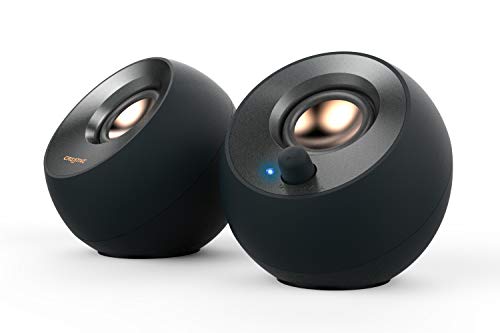
Start with a tape measure, because listings describe a pair in different ways and a photograph can make a deep cabinet look shallow. Check the width and depth of one speaker, then add the space the cable between the two speakers allows, since a short link cable can force both units closer together than your monitor permits. For example, the Pebble models use rounded bodies that sit either side of a laptop, while the Edifier pair needs a flat shelf area for each rectangular cabinet. Leave a little clearance behind any rear port or radiator, and confirm a mug, phone, or keyboard tray will not end up pressed against a driver.
Match the power source to the desk you actually have
Small speakers draw power in very different ways, and that choice decides how tidy the setup stays. USB-powered models such as the Pebble V2 and V3 run from the computer itself, which suits a laptop desk with no spare wall socket, although their output depends on what that USB port can supply. The Pebble V3 listing even notes a gain switch linked to a higher-output USB connection. A mains-powered set like the Edifier R1280T needs an outlet and a power cable, but it does not compete with a hub for limited USB power when several peripherals are already connected.
Pick connections for your second device, not only your PC
Many buyers connect a work laptop all week and then discover a phone, tablet, or handheld console has no easy way in. Look at the full input list on the Amazon page before ordering: the Pebble V2 offers USB-C power with a 3.5 mm aux input, the Pebble V3 adds Bluetooth 5.0 and USB audio, and the Edifier relies on wired inputs suited to a fixed desk. If two sources stay plugged in permanently, say a desktop and a record player or a work machine and a personal laptop, count the inputs carefully rather than planning to swap cables daily.
Decide whether bass should come from a box on the floor
A compact two-speaker pair keeps everything on the desk, which is simpler in a rented room or a shared office, but physics limits how much low end two small drivers can produce. The Pebble Plus answers that limit with a separate down-firing subwoofer in a 2.1 layout, at the cost of floor or under-desk space and another cable run. The Edifier takes a different route, using a larger 4 inch bass driver in each wooden cabinet. Think about where your feet, a PC tower, and a bin already sit before choosing the subwoofer route.
The 4 Best Options
Creative Pebble V2
- Best for: Laptop users on a shallow desk who want USB-C power and an aux fallback.
- Brand: Creative
- Configuration: 2.0 desktop speakers
- Power: USB-C powered, up to 8W RMS
- Input: 3.5 mm AUX-in
Laptop users on a shallow desk who want USB-C power and an aux fallback.
Confirm your computer or adapter can supply suitable USB power, and check that the aux source you plan to use still has a 3.5 mm output.
The Pebble V2 suits the tightest ordinary desk, where a laptop, an external keyboard, and very little else already fill the surface. Its rounded 2.0 design keeps both speakers on the desk with no subwoofer to place, and the single USB-C connection handles power while the aux input covers a device without USB audio. This is a sensible step up from built-in laptop speakers for video, casual music, and game audio at close range, especially for someone who values a clear, uncluttered layout over the deeper bass a larger cabinet or separate subwoofer can provide.
Creative Pebble V3
- Best for: Home workers who split time between laptop calls and Bluetooth audio from a phone.
- Brand: Creative
- Configuration: 2.0 desktop speakers
- Power: Up to 8W RMS, up to 16W peak, as listed
- Drivers: 2.25 inch full-range drivers, as listed
Home workers who split time between laptop calls and Bluetooth audio from a phone.
Full output depends on the USB power available and the gain setting described on the listing, so check your port or adapter before expecting maximum volume.
Choose the Pebble V3 when spoken content dominates your day and you move between a wired computer connection and a phone or tablet. The listing highlights Clear Dialog enhancement, Bluetooth 5.0, and USB audio through USB-C, so a call, a podcast, or a training video can come from more than one source without moving the speakers. It keeps the same compact Pebble idea as the V2 while adding wireless convenience and a gain switch. For a home worker whose desk doubles as an evening listening spot, that flexibility matters more than a small difference in headline power figures.
Creative Pebble Plus
- Best for: A study or gaming desk that has under-desk room for a subwoofer but little surface space.
- Brand: Creative
- Configuration: 2.1 USB-powered desktop speakers
- Power: Up to 8W RMS total power, as stated in the listing title
- Subwoofer: Down-firing subwoofer included, as stated in the listing title
A study or gaming desk that has under-desk room for a subwoofer but little surface space.
Measure the subwoofer space and cable reach before ordering, and avoid placing the subwoofer inside a closed cabinet where its output would be muffled.
The Pebble Plus is for a small room where a plain 2.0 pair feels thin during films and games, yet a full bookshelf system would crowd the desk. Its two desktop speakers stay compact while a down-firing subwoofer handles the low frequencies from under the desk or beside it. The listing describes far-field drivers and up to 8W RMS total power in a USB-powered 2.1 system. This arrangement makes sense for a single-person gaming or study desk, provided you can give the subwoofer a sensible spot on a hard floor rather than squeezing it behind books or a bag.
Edifier R1280T
- Best for: A shelf or deeper desk used for music and video, where tone controls and a remote are useful.
- Brand: Edifier
- Configuration: 2.0 active powered bookshelf speakers
- Power: 42 watts RMS total, 21W plus 21W, as listed
- Bass driver: 4 inch, as listed
A shelf or deeper desk used for music and video, where tone controls and a remote are useful.
Check the per-speaker dimensions against your shelf depth, and confirm you have a mains outlet nearby because this powered set does not run from USB.
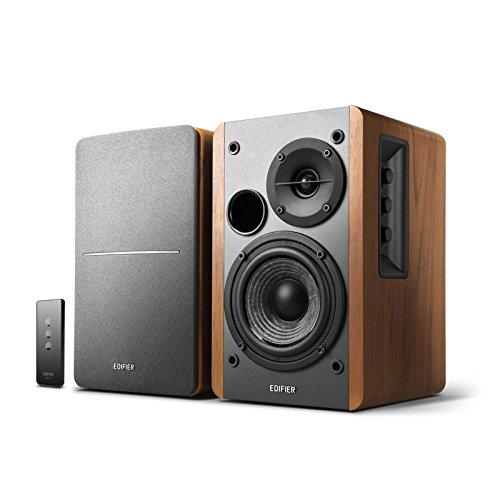
The R1280T is the largest option here and fits a buyer whose small speakers will live on a shelf, a side desk, or a deeper work surface rather than beside a laptop. Its wooden cabinets hold a 4 inch bass driver and a 13 millimetre tweeter in each speaker, and the active design includes tone control on the side of the active speaker plus a compact remote. That makes it better suited to music listening across a small room and to a fixed setup with more than one wired source. It is still compact by bookshelf standards, but it is not a pocket-sized desk accessory.
Which One Fits Your Situation
Your desk barely fits a laptop and keyboard
Pick the Creative Pebble V2. Its two rounded speakers take the least planning, there is no subwoofer competing for floor space, and USB-C power keeps the cable count low. The aux input still gives you a wired option for a monitor or an older device. If your main complaint is thin laptop audio during video and casual listening at close range, this is the most direct fix among the four without changing how your desk is arranged.
You take calls all day, then listen from your phone
Pick the Creative Pebble V3, because its Bluetooth 5.0 connection lets a phone take over after work while USB audio covers the computer during the day. Clear Dialog processing, as described on the listing, is aimed at spoken content, which is the centre of calls, lectures, and podcasts. You also keep a 3.5 mm input for a wired backup. It suits a hybrid worker who does not want separate speakers for meetings and for personal listening in the same small room.
Your small gaming desk feels flat during films
Pick the Creative Pebble Plus if you have a clear patch of floor or under-desk space. The separate down-firing subwoofer gives low frequencies their own cabinet instead of asking two small desktop drivers to do everything. Keep the desktop units themselves if space is tight, but only choose this route when the subwoofer can sit on a firm surface with its cable reaching the desk comfortably. Without that spare spot, one of the 2.0 Pebble models will be easier to live with.
Your speakers belong on a shelf, not beside a screen
Pick the Edifier R1280T when the listening position is a chair across a small room rather than a seat inches from the drivers. Its larger cabinets, 4 inch bass drivers, side tone controls, and remote suit a fixed shelf setup for music and films. Measure the shelf first, because this set needs noticeably more depth than the Pebble pairs. If that space exists, it is the most complete standalone system in this guide and needs no separate amplifier.
Common Mistakes
- Judging size from a lifestyle photograph instead of the listed dimensions, then finding a bookshelf cabinet overhangs a shallow shelf.
- Assuming every USB port supplies the same power, which can leave a USB-powered speaker quieter than the listing headline suggests.
- Buying a 2.1 set before checking where the subwoofer will sit, how its cable runs, and whether a chair or PC tower already occupies that space.
- Counting only the computer connection and forgetting a phone, console, or second laptop that also needs an input.
- Placing small speakers behind a monitor or flat against a wall without leaving the clearance their drivers, ports, or radiators need.
Frequently Asked Questions
Can small speakers fill a room, or are they only for close listening?
Most small speakers in this guide are designed for a desk or a small room at moderate volume, with the listener relatively close. The Edifier R1280T, with larger cabinets and higher listed RMS power, suits a shelf in a small room better than the compact Pebble pairs. Room size, distance, and furnishings still matter, so match the system to where you actually sit rather than to a headline watt figure alone.
Is a subwoofer worth it with small speakers?
A subwoofer helps when films and games feel thin and you have floor space for a separate cabinet, as with the Pebble Plus 2.1 layout. It adds placement and cable decisions, though, and it will not fix speakers positioned badly on the desk. If your listening is mostly calls, news, and podcasts at a desk, a good 2.0 pair such as the Pebble V3 is usually the simpler and more appropriate choice.
Why does the same speaker sound quieter on one computer than another?
USB-powered models depend on the power the connected port or adapter can deliver, and some listings describe a gain setting tied to a higher-output connection. Volume settings in the operating system, the source app, and the speaker control can also differ between machines. Check the listing requirements for your chosen model, try a direct port rather than an unpowered hub, and set the speaker and system volumes in a sensible order before assuming the speakers are faulty.
Do I need Bluetooth in a set of desk speakers?
Bluetooth is useful if a phone or tablet is a regular second source, because it avoids moving a cable whenever you switch devices. The Pebble V3 includes Bluetooth 5.0 alongside USB audio and aux, while the Pebble V2 keeps things wired. If every source stays on the desk permanently, wired inputs may be enough and can be simpler to manage. Choose based on the devices you own now, not on a connection you might use once.
FAQ
Can small speakers fill a room, or are they only for close listening?
Is a subwoofer worth it with small speakers?
Why does the same speaker sound quieter on one computer than another?
Do I need Bluetooth in a set of desk speakers?
More from Amazon
Programs that pair well with the guide above. Offers and eligibility are set by Amazon and may change.
Free shipping on eligible items, Prime Video and more. Eligible new members can start with a free trial.
Start a Prime free trialAd-free music streaming. Eligible new subscribers can start with a free trial.
Try Music Unlimited freeA Prime membership for ages 18-24 with a trial period. Eligibility is set by Amazon.
See Prime for Young AdultsAudiobooks and podcasts to listen to on the go. Eligible new members can start with a free trial.
Try Audible freeAs an Amazon Associate we earn from qualifying purchases.