
Key takeaways
- The best asus gaming laptops under 500 pair TUF toughness with RTX graphics and 144Hz screens. Compare both models and learn what to check first in this guide.
Finding an ASUS gaming laptop in the under-500 class takes patience, because the models that fit are usually older TUF machines rather than the newest releases. That is not a weakness. The TUF line is built around durable chassis, solid cooling, and sensible specifications, and an older TUF with an RTX 2050 still runs popular and older titles well at 1080p. The trick is knowing what to check: the graphics card wattage, the memory, the screen, and whether the listing matches the configuration you expect. Two models meet the bar, both from the TUF family.

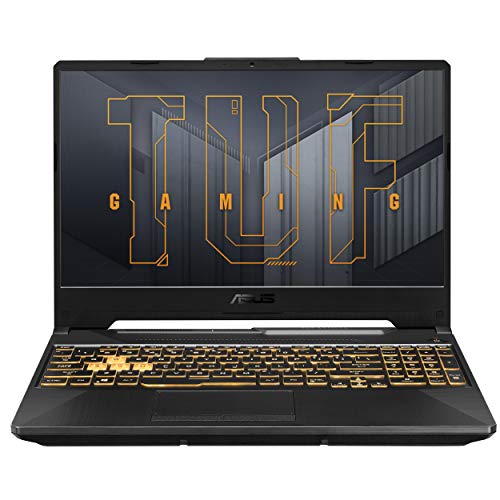
This guide is for students and first-time buyers who want a genuine ASUS gaming laptop without stretching to a flagship, for parents buying a first machine for a young gamer, and for anyone who needs one laptop for schoolwork and play. Both laptops below were chosen from the name and specifications shown on their Amazon pages, with graphics card, screen, memory, and storage weighed together for the under-500 class.
Quick Picks
As an Amazon Associate we earn from qualifying purchases
| Product | Best for | Key spec from title |
|---|---|---|
| ASUS TUF Gaming A15 FA506NF-ES51 | Newer Ryzen power | RTX 2050 70W with 144Hz Full HD display and DDR5 memory |
| ASUS TUF Gaming F15 FX506HF-ES51 | Proven Intel build | RTX 2050 55W with 144Hz IPS-type display and DDR4 memory |
How to Choose
Start with the graphics card and its wattage
The graphics card decides which games run smoothly, so check it first and read the wattage line too. Both laptops here carry an RTX 2050 with four gigabytes of memory, a card that handles popular and older titles well at 1080p and supports upscaling and ray tracing features that keep newer releases playable at modest settings. Wattage matters because the same chip at 70 watts runs faster than at 55 watts, and the two models here differ on exactly that point. A higher-wattage card also runs hotter, so it needs the cooling to match. The card name alone is not enough; the wattage and cooling behind it complete the picture.
Check the screen before anything else
The screen is what you stare at all day, so it deserves as much care as the chip inside. Both models here carry a 15.6-inch Full HD display with a 144Hz refresh rate, which makes motion in games look smoother and scrolling feel calmer than a 60Hz panel. The F15 uses an IPS-type panel, which keeps colours and viewing angles pleasant when you share the screen or watch from the side. A 1080p resolution suits an RTX 2050, since it keeps frame rates healthy without asking the card to push more pixels than it comfortably can. A dim panel can spoil an otherwise strong laptop, so read the screen line twice before deciding.
Memory and storage decide daily speed
How a laptop feels day to day comes down to memory and storage, especially with a game, a browser full of tabs, and a chat app open together. Both laptops here start with eight gigabytes of memory, enough for gaming and schoolwork together, though heavy multitaskers will want to plan a memory upgrade later. The A15 uses faster DDR5 memory while the F15 uses DDR4, a difference you may notice under a heavy load. Both carry a 512-gigabyte solid-state drive, which loads games quickly but fills fast. Check whether the laptop has a second drive slot, since that makes future storage upgrades simple.
Look for a tough chassis and honest cooling
A laptop in this class gets carried, bumped, and used for long stretches, so the chassis and cooling matter as much as the specifications. The TUF line is built around a tougher frame than most budget laptops, with a keyboard and hinge designed to survive travel in a backpack. Cooling deserves a close look too, since an RTX card under load generates heat, and a laptop with good airflow keeps its speed through a long session instead of slowing down as it warms up. Check that the vents sit where your desk or lap will not block them. A sturdy, well-cooled laptop lasts longer and feels better every day.
The 2 Best Options
ASUS TUF Gaming A15 FA506NF-ES51
The TUF Gaming A15 is the newer of the two picks, pairing a Ryzen 5 processor with an RTX 2050 that runs at 70 watts, the stronger graphics configuration here. Its eight gigabytes of DDR5 memory run faster than the DDR4 in the older model, and the 512-gigabyte PCIe 4.0 drive loads games and files quickly. The 15.6-inch Full HD display runs at 144Hz, keeping fast action and scrolling smooth, while Wi-Fi 6 keeps online play steady. Windows 11 comes installed, so it is ready from the first boot. For a buyer who wants the most current TUF hardware, this is the pick.
Specs
- AMD Ryzen 5 7535HS processor
- NVIDIA GeForce RTX 2050 graphics with 4GB memory at 70W
- 8GB DDR5-5600 memory
- 512GB PCIe 4.0 solid-state drive
- 15.6-inch Full HD display with 144Hz refresh rate
- Wi-Fi 6 wireless connectivity
- Windows 11 operating system
- TUF durable chassis design
Best for: Buyers who want the newer Ryzen hardware and the stronger 70-watt graphics configuration for modern titles at 1080p and everyday multitasking.
Watch out for: Eight gigabytes of memory fills up fast with a game and many browser tabs open together, so plan a memory upgrade later when you start multitasking heavily with many programs open.
ASIN: B0CRDF25TQ
ASUS TUF Gaming F15 FX506HF-ES51
The TUF Gaming F15 is the proven older sibling in this guide, a 2023 model whose strengths are well known. Its Intel Core i5 processor and RTX 2050 at 55 watts with Dynamic Boost handle popular titles well at 1080p, and the 144Hz IPS-type display keeps colours pleasant from wider angles. Eight gigabytes of DDR4 memory and a 512-gigabyte PCIe Gen 3 drive cover schoolwork and a modest library, while Wi-Fi 6 keeps online play steady. The chassis carries the same TUF toughness as the newer model, so it survives travel in a backpack. It is a sensible pick for buyers who value a known, steady machine.
Specs
- Intel Core i5-11400H processor with up to 4.5 GHz
- NVIDIA GeForce RTX 2050 graphics with 4GB GDDR6 memory at 55W with Dynamic Boost
- 8GB DDR4 3200MHz memory
- 512GB PCIe NVMe M.2 Gen 3 solid-state drive
- 15.6-inch Full HD IPS-type display with 144Hz refresh rate
- Wi-Fi 6 wireless connectivity
- Windows 11 operating system
- TUF durable chassis design
Best for: Buyers who want a proven, steady TUF machine with an IPS-type display and a pleasant screen for sharing with friends and family.
Watch out for: The 55-watt graphics configuration runs slower than the 70-watt card in the A15, so expect lower frame rates in demanding titles and keep settings modest there for smoother play.
ASIN: B0BWHJQMKH
Which One Fits Your Situation
You want the fastest graphics in this class
Pick the TUF Gaming A15 FA506NF-ES51. Its RTX 2050 runs at 70 watts, which gives it a real edge over the 55-watt card in the F15, and the faster DDR5 memory and PCIe 4.0 drive add to the difference. The 144Hz display keeps motion smooth, and the newer Ryzen processor handles schoolwork and multitasking well for years. Keep the charger in your bag, since gaming laptops drain quickly unplugged.
You want a proven machine with a nicer screen
Pick the TUF Gaming F15 FX506HF-ES51. Its IPS-type display holds colours better from the side, which helps when you share the screen or watch from an angle. The Intel processor and RTX 2050 handle popular titles well at 1080p, and the TUF chassis survives daily travel. Plan a memory upgrade later if you start multitasking heavily, since eight gigabytes fills up fast with a game and many tabs open.
You are buying a first laptop for a student
Pick the TUF Gaming A15 FA506NF-ES51. The newer hardware gives the machine a longer useful life, the tough chassis survives a backpack, and the 144Hz screen makes both games and schoolwork feel smoother. Eight gigabytes of memory covers classwork and play, and a memory upgrade down the road is a simple way to extend the laptop further for years. The faster DDR5 memory keeps multitasking smooth.
You want the most affordable way into ASUS gaming
Pick the TUF Gaming F15 FX506HF-ES51. As the older model in this guide, it is the natural entry point into the TUF line, with a proven Intel build, a pleasant IPS-type display, and the same tough chassis as its newer sibling, built to last. Check the exact configuration on the listing before ordering, since TUF models vary by memory and storage, and confirm the listing matches the one described here.
Common Mistakes
- Buying on the graphics card name alone without checking its wattage, since the same RTX 2050 runs at different speeds in different laptops, and the slower one can disappoint in demanding titles at the settings you actually use every day.
- Assuming every listing with the same model name has the same memory and storage, when TUF configurations vary widely, so read the specification line of the exact listing you are ordering before you commit, and confirm the model number matches the one in this guide.
- Choosing eight gigabytes of memory and then running a game, a browser, and a chat app at the same time without planning an upgrade, and wondering why the machine slows down by the afternoon when the memory fills up during a long session.
- Settling for a dim panel that makes an otherwise strong laptop feel cheap from the first day, instead of checking the screen line of the listing first, and living with a dim screen for years.
- Filling a 512-gigabyte drive with a handful of large games and running out of room sooner than expected, with no second drive slot checked for a future upgrade, or a spare drive ready to install.
Frequently Asked Questions
Is an RTX 2050 laptop good enough for gaming?
Yes, an RTX 2050 laptop handles popular and older titles well at 1080p, with upscaling that keeps newer releases playable. It will not match a higher-tier card in demanding games, but it delivers smooth play on the titles most players spend time on. Paired with a 144Hz display and eight gigabytes of memory, it makes a capable first gaming laptop.
What is the difference between the A15 and the F15 here?
The A15 is newer, with a Ryzen 5 processor, DDR5 memory, a PCIe 4.0 drive, and a 70-watt RTX 2050. The F15 is older, with an Intel Core i5, DDR4 memory, a PCIe Gen 3 drive, and a 55-watt RTX 2050 with Dynamic Boost. Both share a 144Hz screen and the same TUF chassis.
How much memory does a budget gaming laptop need?
Eight gigabytes is the minimum for a budget gaming laptop, enough for a game plus a browser and a chat app. It fills up quickly if you multitask heavily, so plan a memory upgrade later if you stream or edit. Sixteen gigabytes is the comfortable level for most buyers. Check whether the laptop lets you add memory before you buy.
Should I buy an older TUF model or wait for a newer one?
An older TUF model makes sense when it meets your needs today and the configuration matches the listing. The TUF line is built to last, so a 2023 model with an RTX 2050 still plays popular titles well and handles schoolwork. Waiting only helps if a newer model is coming soon and your current machine still works.
FAQ
Is an RTX 2050 laptop good enough for gaming?
What is the difference between the A15 and the F15 here?
How much memory does a budget gaming laptop need?
Should I buy an older TUF model or wait for a newer one?
More from Amazon
Programs that pair well with the guide above. Offers and eligibility are set by Amazon and may change.
Free shipping on eligible items, Prime Video and more. Eligible new members can start with a free trial.
Start a Prime free trialAd-free music streaming. Eligible new subscribers can start with a free trial.
Try Music Unlimited freeA Prime membership for ages 18-24 with a trial period. Eligibility is set by Amazon.
See Prime for Young AdultsAudiobooks and podcasts to listen to on the go. Eligible new members can start with a free trial.
Try Audible freeAs an Amazon Associate we earn from qualifying purchases.









