
Our Short List of 3

- Best for: Competitive players who want the fastest 17.3-inch panel with a direct graphics path.
- Display: 17.3-inch QHD, 240Hz
- CPU: AMD Ryzen 9 7945HX
- GPU: NVIDIA GeForce RTX 4070, 140W Max TGP
- RAM: 16GB DDR5

- Best for: Buyers who want a balanced mid-range machine with generous memory and storage.
- Display: 17.3-inch FHD IPS, 144Hz
- CPU: Intel Core i7-13620H, 13th Gen
- GPU: NVIDIA GeForce RTX 4060
- RAM: 32GB DDR5

- Best for: Budget-minded buyers who want a 165Hz big screen with current DDR5 memory.
- Display: 17.3-inch FHD, 165Hz
- CPU: AMD Ryzen 7 7840HS, 8 cores
- GPU: NVIDIA GeForce RTX 4050
- RAM: 16GB DDR5, listing states up to 64GB
All 4 Picks at a Glance
| Product | Specs | Action |
|---|---|---|
| ASUS ROG Strix G17 (2023) |
| Check price on Amazon |
| MSI Katana 17 |
| Check price on Amazon |
| Acer Nitro 17 |
| Check price on Amazon |
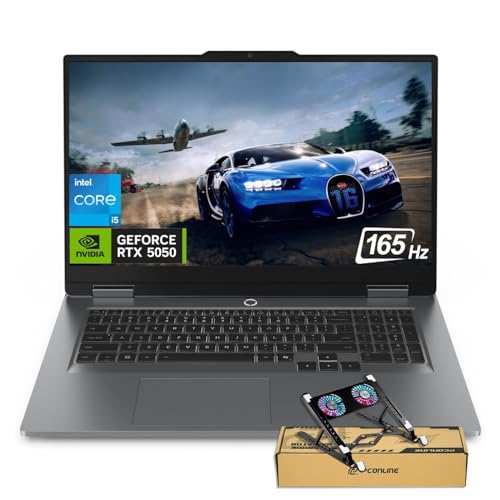 Lenovo LOQ 17IRX10 (2025) |
| Check price on Amazon |
Key takeaways
- Four 17.3-inch gaming laptops compared by panel, graphics card, memory and storage, so you can choose the big-screen machine that fits the way you play.
A 17.3-inch gaming laptop is a commitment to a desk, not just a screen size. The panel is wide enough for two windows side by side, the chassis carries a full keyboard with a numeric keypad, and the machine weighs enough that you notice it in a bag. Buyers who choose this size are usually trading portability for immersion, and the real decision is how to split the budget between the display and the graphics card that drives it.
This guide is for competitive players who want a fast panel, desktop-replacement shoppers who want the biggest screen that still travels, and first-time buyers stepping up from a 15-inch machine. Every laptop below is a genuine 17.3-inch gaming machine with a discrete graphics card, and every specification comes from the title or the spec table of its Amazon listing.
Quick Picks
As an Amazon Associate we earn from qualifying purchases.
| Product | Best for | Key spec |
|---|---|---|
| ASUS ROG Strix G17 (2023) | Competitive play on the fastest panel | 17.3-inch QHD 240Hz, RTX 4070, Ryzen 9 7945HX |
| MSI Katana 17 | Balanced mid-range gaming with roomy memory | 17.3-inch FHD 144Hz, RTX 4060, 32GB DDR5, 1TB SSD |
| Acer Nitro 17 | An entry route into a 165Hz big screen | 17.3-inch FHD 165Hz, RTX 4050, Ryzen 7 7840HS |
| Lenovo LOQ 17IRX10 (2025) | The newest graphics card for first-time buyers | 17.3-inch FHD 165Hz, RTX 5050, 32GB DDR5, 1TB SSD |
How to Choose
Match the panel to the games you play
The panel decides what you actually see, and on a 17.3-inch screen its flaws have nowhere to hide. A 240Hz QHD display suits fast competitive games where motion clarity matters, while a 144Hz or 165Hz Full HD panel suits story-driven and open-world games where a steady frame rate matters more than the last few hertz. Check the resolution and refresh rate on the exact listing, because the same model name can hide several panel variants. A glossy finish looks vivid indoors and glares near a window, and an IPS-type panel keeps colours steady when you view it from an angle.
Balance the graphics card with the screen
A graphics card only needs to be as strong as the panel it feeds. An RTX 4050 suits a Full HD 165Hz screen, an RTX 4060 sits comfortably at the same resolution with headroom to spare, and an RTX 4070 makes sense when the panel is QHD at 240Hz. Buying a stronger card for a Full HD screen wastes money you could have spent on memory or storage, while pairing a weak card with a QHD panel leaves the display underused. Read the card name on the exact configuration, since sellers reuse model names across several graphics tiers.
Check memory and storage before anything else
Sixteen gigabytes of RAM handles most current games, and thirty-two gigabytes gives you room to keep a browser, voice chat, and a game open at once without stuttering. A one-terabyte SSD holds a handful of large modern games alongside Windows, while a 512GB drive fills up fast once you install two or three of them. Look for a second SSD slot or a spare memory slot if you plan to keep the machine for years, because a laptop that cannot grow will feel small long before its processor does.
Measure the desk, the bag, and the ports
A 17.3-inch laptop needs a desk deep enough for its footprint plus a mouse mat, and a bag with a sleeve that genuinely fits the size rather than one labelled for smaller machines. Count the ports before you buy: a spare USB-C port, an HDMI output for a second monitor, and an Ethernet jack all matter once the machine becomes your main computer. Cooling matters too, since a thin chassis with a strong graphics card will run loud under load, so check the fan layout and the vent positions in the listing photos.
The 4 Best Options
ASUS ROG Strix G17 (2023)
- Best for: Competitive players who want the fastest 17.3-inch panel with a direct graphics path.
- Display: 17.3-inch QHD, 240Hz
- CPU: AMD Ryzen 9 7945HX
- GPU: NVIDIA GeForce RTX 4070, 140W Max TGP
- RAM: 16GB DDR5
Competitive players who want the fastest 17.3-inch panel with a direct graphics path.
A 2023 model, so confirm the DS94 configuration with the RTX 4070 on the live listing; the Amazon spec table lists two different native resolutions for this panel, so confirm the exact resolution before ordering.
The Strix G17 leads this group on panel quality, pairing a 17.3-inch QHD display running at 240Hz with an RTX 4070 and a sixteen-core Ryzen 9 processor. That combination suits competitive players who want fast motion on a large canvas, and the MUX switch hands the display directly to the graphics card for the lowest latency path. Sixteen gigabytes of DDR5 memory and a one-terabyte PCIe SSD keep loading times short, while Wi-Fi 6E covers fast wireless play at home.
Watch out for: A 2023 model, so confirm the DS94 configuration with the RTX 4070 on the live listing; the Amazon spec table lists two different native resolutions for this panel, so confirm the exact resolution before ordering.
MSI Katana 17
- Best for: Buyers who want a balanced mid-range machine with generous memory and storage.
- Display: 17.3-inch FHD IPS, 144Hz
- CPU: Intel Core i7-13620H, 13th Gen
- GPU: NVIDIA GeForce RTX 4060
- RAM: 32GB DDR5
Buyers who want a balanced mid-range machine with generous memory and storage.
The panel is Full HD only, so it will not show the sharpness of a QHD screen; MSI sells the Katana 17 in several memory and storage variants, so confirm the 32GB and 1TB configuration on the exact listing.
The Katana 17 is the balanced pick of this group, combining an RTX 4060 with thirty-two gigabytes of DDR5 memory and a one-terabyte NVMe SSD. Its 17.3-inch Full HD IPS panel runs at 144Hz, which suits a wide range of games without demanding a top-tier graphics card, and the Cooler Boost 5 system uses dedicated fans for the processor and graphics card. A USB-C port sits alongside the usual full-size connections, and the RGB keyboard keeps the gaming look without going overboard.
Watch out for: The panel is Full HD only, so it will not show the sharpness of a QHD screen; MSI sells the Katana 17 in several memory and storage variants, so confirm the 32GB and 1TB configuration on the exact listing.
Acer Nitro 17
- Best for: Budget-minded buyers who want a 165Hz big screen with current DDR5 memory.
- Display: 17.3-inch FHD, 165Hz
- CPU: AMD Ryzen 7 7840HS, 8 cores
- GPU: NVIDIA GeForce RTX 4050
- RAM: 16GB DDR5, listing states up to 64GB
Budget-minded buyers who want a 165Hz big screen with current DDR5 memory.
This is a seller-configured bundle that ships with a laptop stand, and the title states Windows 11 Pro while the product details state Windows 11 Home; the listing also states a memory figure for the graphics card that conflicts with the card’s standard configuration, so confirm the operating system and the exact contents on the live listing.
The Nitro 17 is the simplest way into a true 17.3-inch gaming screen, with a 165Hz Full HD panel, a Ryzen 7 processor, and an RTX 4050. Sixteen gigabytes of DDR5 memory and a one-terabyte SSD cover everyday gaming, and the listing states the memory can expand to sixty-four gigabytes later. Wi-Fi 6E and a backlit keyboard round out a machine that focuses on the essentials rather than extras, which keeps it approachable for buyers who want a big screen without a flagship budget.
Watch out for: This is a seller-configured bundle that ships with a laptop stand, and the title states Windows 11 Pro while the product details state Windows 11 Home; the listing also states a memory figure for the graphics card that conflicts with the card’s standard configuration, so confirm the operating system and the exact contents on the live listing.
Lenovo LOQ 17IRX10 (2025)
- Best for: First-time buyers who want a current graphics card on a large, fast screen.
- Display: 17.3-inch FHD, 165Hz
- CPU: Intel Core i5-13450HX, 10 cores, up to 4.6GHz
- GPU: NVIDIA GeForce RTX 5050, 8GB GDDR7
- RAM: 32GB DDR5
First-time buyers who want a current graphics card on a large, fast screen.
This listing is a seller bundle that adds a notebook cooler to upgraded memory and storage, so confirm the base factory configuration and what actually ships in the box on the live listing.
The LOQ 17IRX10 brings the newest graphics card in this group, an RTX 5050, to a 17.3-inch Full HD panel running at 165Hz. Its ten-core Intel Core i5 processor handles modern games and multitasking alike, while thirty-two gigabytes of DDR5 memory and a one-terabyte PCIe SSD leave room for a growing game library. A backlit keyboard, Wi-Fi 6, and a full set of ports including USB-C and HDMI make it a complete first gaming laptop rather than a stripped-down starter machine.
Watch out for: This listing is a seller bundle that adds a notebook cooler to upgraded memory and storage, so confirm the base factory configuration and what actually ships in the box on the live listing.
Which One Fits Your Situation
You play fast competitive games
Pick the ASUS ROG Strix G17. Its 240Hz QHD panel shows motion more clearly than the 144Hz and 165Hz screens here, and the RTX 4070 has the power to feed it. The sixteen-core Ryzen 9 keeps background apps from stealing frames, and the direct graphics path suits players who notice input lag. Just confirm the panel resolution and the DS94 configuration before ordering.
You want one machine for games and everyday work
Pick the MSI Katana 17. Thirty-two gigabytes of memory lets you keep work apps open beside a game, the one-terabyte drive holds both, and the RTX 4060 handles Full HD gaming with room to spare. Its 144Hz IPS panel stays comfortable for long sessions, and the Cooler Boost 5 system keeps the two fans working separately under load.
You want the lowest step into a big gaming screen
Pick the Acer Nitro 17. Its 165Hz panel and RTX 4050 cover Full HD gaming, and the Ryzen 7 processor with sixteen gigabytes of DDR5 memory is a solid base you can expand later. Read the listing carefully first, though: confirm whether the machine ships with Windows 11 Home or Pro, and check the bundle contents.
You are buying your first gaming laptop
Pick the Lenovo LOQ 17IRX10. The RTX 5050 is the newest graphics card in this group, the 165Hz screen suits most games, and thirty-two gigabytes of memory with a one-terabyte SSD means you will not need upgrades soon. The full port selection also means your monitor, headset, and external drive all connect without adapters.
Common Mistakes
- Choosing a graphics card without checking whether the panel can actually use its power.
- Trusting bundle specifications for memory, storage, or the operating system as if they were the factory build.
- Forgetting that a 17.3-inch laptop needs a larger bag, a deeper desk, and a sleeve that truly fits.
- Comparing two listings by model name alone when the same name covers many different configurations.
- Skipping the exact model code and ASIN check, then receiving a variant with a slower panel or smaller drive.
Frequently Asked Questions
Is a 17.3-inch gaming laptop too big to carry every day?
For most people, yes, as a daily carry. A 17.3-inch machine weighs more than a 15-inch one and needs a larger bag with a properly sized sleeve, so it suits a desk that moves occasionally rather than a commute. If you travel daily, a smaller laptop with an external monitor at home usually works better.
Do I need a QHD panel on a 17-inch laptop?
Not necessarily. Full HD looks fine on a 17.3-inch screen at normal viewing distance, and it lets a mid-range graphics card hold high frame rates. QHD only earns its place when the graphics card is strong enough to drive it, as with the RTX 4070 in the Strix G17, and when you play fast games that benefit from 240Hz.
How much RAM and storage should a 17-inch gaming laptop have?
Sixteen gigabytes of RAM and a one-terabyte SSD are the practical minimum for a machine you plan to keep for several years. Thirty-two gigabytes helps if you stream, edit video, or keep many apps open while gaming. Storage matters just as much, since modern games are large and a small drive fills quickly.
Are seller-upgraded bundles safe to buy?
They can be, but the specifications in the title are the seller’s upgrades rather than the factory build. Check what was changed, whether the box was opened for the upgrade, and which operating system actually ships. Confirm the exact configuration on the live listing and keep the listing details for your records.
FAQ
Is a 17.3-inch gaming laptop too big to carry every day?
Do I need a QHD panel on a 17-inch laptop?
How much RAM and storage should a 17-inch gaming laptop have?
Are seller-upgraded bundles safe to buy?
More from Amazon
Programs that pair well with the guide above. Offers and eligibility are set by Amazon and may change.
Free shipping on eligible items, Prime Video and more. Eligible new members can start with a free trial.
Start a Prime free trialAd-free music streaming. Eligible new subscribers can start with a free trial.
Try Music Unlimited freeA Prime membership for ages 18-24 with a trial period. Eligibility is set by Amazon.
See Prime for Young AdultsAudiobooks and podcasts to listen to on the go. Eligible new members can start with a free trial.
Try Audible freeAs an Amazon Associate we earn from qualifying purchases.









