Our Short List of 3
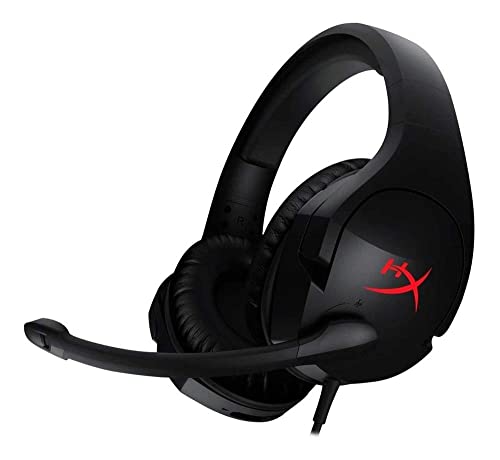
- Best for: Players who want one comfortable headset for long sessions across PC and console.
- 50mm drivers
- Swivel-to-mute microphone
- 90-degree rotating ear cups
- Memory foam ear cushions
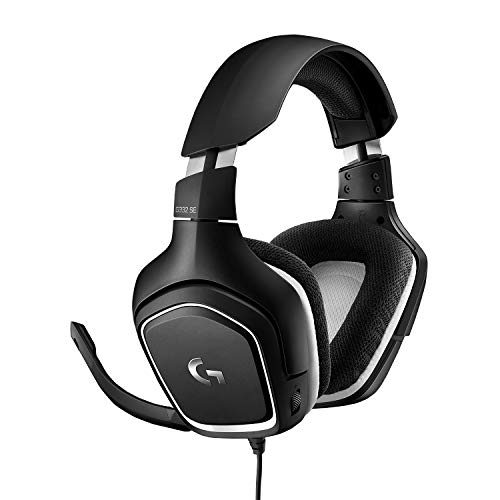
- Best for: Players who want a straightforward plug-and-play headset with no setup fuss.
- 50mm drivers
- 6mm flip-to-mute microphone
- 3.5mm connection
- In-line volume wheel

- Best for: Competitive players who want a light headset with clear positional audio.
- 50mm TriForce drivers
- 7.1 surround sound
- 240 grams
- HyperClear cardioid microphone
All 3 Picks at a Glance
| Product | Specs | Action |
|---|---|---|
| HyperX Cloud Stinger |
| Check price on Amazon |
| Logitech G332 SE |
| Check price on Amazon |
| Razer BlackShark V2 X |
| Check price on Amazon |
Key takeaways
- Find the best cheapest gaming headsets with clear sound, comfortable ear cushions and flip-to-mute mics. Compare four low-cost picks for PC and console play.
A gaming headset does not need a large budget to sound good and feel comfortable through a long session. The real decision at the low end is which corners were cut: some headsets keep big drivers and a decent microphone while saving on extras, while others trim the parts you actually use every day, like the ear cushions and the mic. Knowing what to prioritize lets you spend less without ending up with a headset that hurts after an hour or makes your voice hard to hear.
This guide is for players who want a solid headset for PC and console gaming without stretching their budget, including students, casual players and anyone building a first setup. Every headset below was chosen from the name and specifications shown on its Amazon page, with the focus on sound quality, microphone clarity and comfort during long sessions.
Quick Picks
As an Amazon Associate we earn from qualifying purchases
| Product | Best for | Key spec from title |
|---|---|---|
| HyperX Cloud Stinger | All-round comfort for long sessions | 50mm drivers with swivel-to-mute mic |
| Logitech G332 SE | Simple plug-and-play use | 50mm drivers with flip-to-mute mic |
| Razer BlackShark V2 X | Lightweight fit with surround sound | 50mm TriForce drivers, 240 grams |
| Turtle Beach Recon 70 | Easiest headset for console and PC | 40mm drivers with flip-up mic |
How to Choose
Driver size and sound
Driver size is a useful starting point, since larger drivers usually move more air and give footsteps, engine notes and dialogue a fuller presence. Most headsets in this range use 40mm or 50mm drivers, and a well-tuned 40mm driver can sound clearer than a sloppy 50mm one, so size alone is not the whole story. Surround sound features can help you place sounds in a game, but they only work well when the headset and the game support them together. Listen for a balanced sound that keeps voices clear, because a headset that drowns dialogue in bass will tire you out faster than a neutral one.
Microphone clarity
Your microphone decides whether teammates hear your callouts or ask you to repeat yourself, so it deserves as much attention as the sound. A flip-to-mute or swivel-to-mute mic is practical because you can silence yourself quickly without hunting for a button. Cardioid microphones pick up your voice while rejecting noise from the sides, which helps in a shared room. Check whether the listing names noise cancellation or a unidirectional pattern, and remember that a short boom that sits close to your mouth usually sounds clearer than one that hangs far away.
Comfort for long sessions
Comfort matters more than any feature once a session passes the first hour, and the two parts that decide it are the ear cushions and the weight. Memory foam cushions with a soft covering stay comfortable longer than thin foam pads, and a headset under 300 grams puts less pressure on the top of your head. A flexible headband that spreads the weight evenly helps too, especially for players who wear glasses. If you can, check the ear cup depth in the listing, since shallow cups press on the ears while deeper cups let them sit naturally inside.
Connection and compatibility
Most low-cost gaming headsets use a standard 3.5mm connection, which works across PC, console controllers and mobile devices without extra software. A single 3.5mm plug is the most flexible option, while a headset with separate mic and headphone plugs may need an adapter on a laptop with one combined jack. USB headsets can add surround sound and software controls, but they tie the headset to one platform. Before choosing, check the listing for the platforms it names, and confirm the cable length suits your setup so you are not pulled toward the screen.
The 4 Best Options
HyperX Cloud Stinger
- Best for: Players who want one comfortable headset for long sessions across PC and console.
- 50mm drivers
- Swivel-to-mute microphone
- 90-degree rotating ear cups
- Memory foam ear cushions
Players who want one comfortable headset for long sessions across PC and console.
The microphone has no detachable option, so the boom stays attached even when you only want to listen to music.
The Cloud Stinger earns its place as the all-rounder of this group, with 50mm drivers that deliver clear game audio and a swivel-to-mute microphone that silences itself when you flip it up. The memory foam ear cushions stay comfortable through long sessions, and the ear cups rotate flat so the headset rests neatly around your neck between matches. At 275 grams it is light enough to wear for hours without the headband digging in, and the 3.5mm connection works with PC, console controllers and mobile devices. The adjustable steel slider gives the headband a sturdy feel that cheaper plastic designs often lack.
Watch out for: The microphone has no detachable option, so the boom stays attached even when you only want to listen to music.
Logitech G332 SE
- Best for: Players who want a straightforward plug-and-play headset with no setup fuss.
- 50mm drivers
- 6mm flip-to-mute microphone
- 3.5mm connection
- In-line volume wheel
Players who want a straightforward plug-and-play headset with no setup fuss.
The ear cushions use a firmer foam than memory foam, so very long sessions may feel less plush.
The G332 SE keeps things simple, with 50mm drivers, a flip-to-mute microphone and an in-line volume wheel that puts the basics within easy reach. The large ear cups cover the ears fully, and the lightweight frame stays comfortable during extended play without pressing hard on the head. Its 3.5mm connection plugs straight into a PC, console controller or laptop, and Logitech G HUB software lets you adjust the sound profile when you want a different balance for music or movies. The design is plain and sturdy, with no extra parts to fiddle with before a match starts.
Watch out for: The ear cushions use a firmer foam than memory foam, so very long sessions may feel less plush.
Razer BlackShark V2 X
- Best for: Competitive players who want a light headset with clear positional audio.
- 50mm TriForce drivers
- 7.1 surround sound
- 240 grams
- HyperClear cardioid microphone
Competitive players who want a light headset with clear positional audio.
The surround sound depends on software support, so it may not activate on every platform.
The BlackShark V2 X stands out for its weight, at 240 grams it is one of the lightest headsets in this group, which makes it easy to forget you are wearing it during a long evening of play. Its 50mm TriForce drivers split the sound into separate high, mid and low ranges for a clearer picture of footsteps and dialogue, and the 7.1 surround sound helps you place sounds in competitive games. The HyperClear cardioid microphone focuses on your voice and rejects noise from the sides, and the memory foam ear cushions seal comfortably around the ears. The 3.5mm connection works across PC and console controllers.
Watch out for: The surround sound depends on software support, so it may not activate on every platform.
Turtle Beach Recon 70
The Recon 70 is the easiest headset in this group to pick up and use, with 40mm drivers, a flip-up microphone and an on-ear volume wheel that keeps controls simple. The lightweight frame and soft ear cushions suit long sessions, and the 3.5mm connection works with PC, console controllers and mobile devices without any adapter or software. The microphone flips up to mute, which is a quick and reliable way to go silent between rounds. Its straightforward design makes it a good first headset for younger players or anyone who wants a headset that simply works.
Specs
- 40mm drivers
- Flip-up microphone
- 3.5mm connection
- On-ear volume control
- Lightweight design
- Compatible with PC, console and mobile
Best for: Players who want the simplest headset for console and PC with no setup.
Watch out for: The 40mm drivers give a slightly narrower soundstage than the 50mm models in this group.
Which One Fits Your Situation
You play for hours most evenings
Choose the HyperX Cloud Stinger, since its memory foam cushions, rotating ear cups and 275-gram weight are built for long sessions. The swivel-to-mute mic is handy when you need to go quiet quickly, and the 3.5mm connection works with everything. If weight matters most to you, the BlackShark V2 X is even lighter at 240 grams, though its surround sound needs software support to shine.
You want a headset that just works
Pick the Turtle Beach Recon 70 when you want the least fuss, because it plugs in over 3.5mm, flips up to mute and puts volume control on the ear cup. There is no software to install and no settings to tune before a match. The Logitech G332 SE is the other simple option, with a flip-to-mute mic and an in-line volume wheel, plus optional software if you later want to tweak the sound.
You play competitive games and need to hear footsteps
The Razer BlackShark V2 X is the pick here, with 50mm TriForce drivers and 7.1 surround sound that help you place sounds around you. Its cardioid microphone keeps your callouts clear, and the light frame stays comfortable through long matches. Make sure your platform supports the surround feature, and use the memory foam seal to block out room noise while you play.
You share your headset between PC and console
Any of these four works over 3.5mm, but the HyperX Cloud Stinger and the Turtle Beach Recon 70 are the most flexible, since both are designed around a single plug that fits PC, console controllers and mobile devices. Check your controller jack and your laptop port before choosing, and keep in mind that headsets with separate mic and headphone plugs need an adapter on a combined-jack laptop.
Common Mistakes
- Judging a headset only by driver size and ignoring comfort and microphone quality.
- Buying a headset with separate mic and headphone plugs for a laptop that has one combined jack.
- Expecting surround sound to work on every platform without checking software support.
- Ignoring ear cup depth, which decides whether the headset presses on your ears during long sessions.
- Choosing a heavy headset for all-day wear when a lighter model would stay comfortable longer.
Frequently Asked Questions
Are low-cost gaming headsets good enough for online play?
A well-chosen low-cost headset is good enough for online play when it has clear drivers and a microphone that teammates can understand. The models in this guide use 40mm or 50mm drivers and flip-to-mute mics, which cover the basics of hearing footsteps and making callouts. Spend your attention on comfort and mic clarity rather than extra features you may never use.
What is the difference between 40mm and 50mm drivers?
Driver size affects how much air the speaker moves, so 50mm drivers often give a fuller sound with more presence in footsteps and explosions. A well-tuned 40mm driver can still sound clear and balanced, especially for dialogue and lighter games. Size is one factor among several, so consider the overall tuning and the comfort of the headset alongside it.
Do I need surround sound for gaming?
Surround sound helps in competitive games where hearing the direction of footsteps matters, but it is not essential for casual play. A good stereo headset with clear drivers works well for most games, and some players prefer stereo for music and movies. Check whether your platform supports the surround feature before choosing a headset for that reason alone.
How do I keep a headset comfortable during long sessions?
Choose a light headset with memory foam cushions and deep ear cups that do not press on your ears. Take short breaks every hour, adjust the headband so the weight spreads evenly, and keep the volume at a moderate level to reduce fatigue. A headset under 300 grams with soft cushions is usually comfortable for several hours at a time.
FAQ
Are low-cost gaming headsets good enough for online play?
What is the difference between 40mm and 50mm drivers?
Do I need surround sound for gaming?
How do I keep a headset comfortable during long sessions?
More from Amazon
Programs that pair well with the guide above. Offers and eligibility are set by Amazon and may change.
Free shipping on eligible items, Prime Video and more. Eligible new members can start with a free trial.
Start a Prime free trialAd-free music streaming. Eligible new subscribers can start with a free trial.
Try Music Unlimited freeA Prime membership for ages 18-24 with a trial period. Eligibility is set by Amazon.
See Prime for Young AdultsAudiobooks and podcasts to listen to on the go. Eligible new members can start with a free trial.
Try Audible freeAs an Amazon Associate we earn from qualifying purchases.