
Our Short List of 3
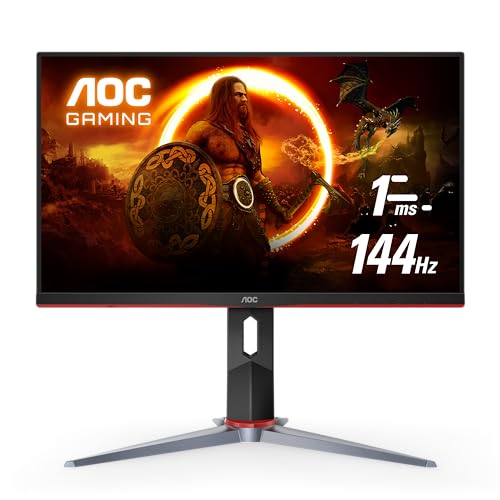
- Best for: Setups that still include a VGA source alongside a modern gaming PC.
- 24-inch FHD 1080P IPS panel, frameless design
- 144Hz refresh rate
- 1ms response time, as stated in the listing title
- FreeSync

- Best for: Players who want full stand adjustment, including a portrait option.
- 24-inch FHD IPS panel
- 144Hz refresh rate
- 1ms (GtG), as listed
- FreeSync Premium

- Best for: Gamers who want ELMB listed alongside the 1ms specification.
- 23.8-inch FHD IPS panel
- 144Hz refresh rate
- 1ms response time, as listed
- ELMB
All 5 Picks at a Glance
| Product | Specs | Action |
|---|---|---|
| AOC 24G2 |
| Check price on Amazon |
| LG 24GN650-B UltraGear |
| Check price on Amazon |
| ASUS TUF Gaming VG249Q |
| Check price on Amazon |
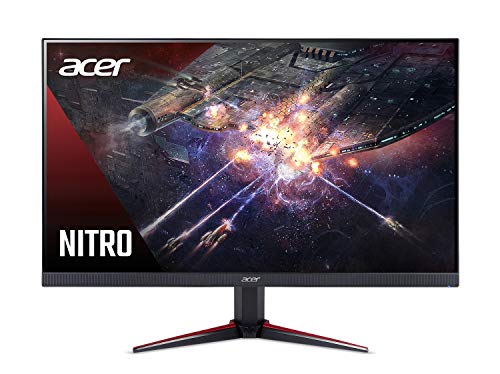 Acer Nitro VG240Y Pbiip |
| Check price on Amazon |
 Samsung Odyssey G3 (G30A) |
| Check price on Amazon |
Key takeaways
- Five monitors whose listings state 144Hz and 1ms, compared by panel type, response-time basis, stand adjustment, inputs and FreeSync tier for PC gaming.
A 144Hz badge and a 1ms claim look like a complete specification, but they hide most of the decision. The 1ms figures in these listings are not all measured the same way, the panels split between IPS and VA, and several of these models are earlier-generation designs whose names closely resemble faster successors still on sale. Choosing well means reading the exact model name, the basis behind the response-time figure, and the stand and input list, rather than trusting the two headline numbers.
This roundup is for PC gamers stepping up from a 60Hz office monitor and for esports-leaning players who want a proven 1080p class without moving to higher refresh tiers. Every monitor below was picked from the product names and specification lists on its Amazon page, and the qualifying rule was strict: the listing itself has to state both 144Hz and 1ms. Where a listing names its measurement basis, that basis is kept attached to the figure throughout.
Quick Picks
As an Amazon Associate we earn from qualifying purchases
| Product | Best for | Key spec from title |
|---|---|---|
| AOC 24G2 | Legacy VGA gear alongside a gaming PC | 24-inch FHD IPS, 1ms, 144Hz, FreeSync |
| LG 24GN650-B UltraGear | Full stand adjustment including pivot | 144Hz with 1ms (GtG) and FreeSync Premium |
| ASUS TUF Gaming VG249Q | ELMB motion clarity on an IPS panel | 144Hz, 1ms, ELMB, FreeSync |
| Acer Nitro VG240Y Pbiip | Two HDMI sources plus DisplayPort | 144Hz with 1ms VRB and FreeSync |
| Samsung Odyssey G3 (G30A) | A VA panel in an IPS-heavy class | 24-inch FHD VA, 144Hz, 1ms, FreeSync Premium |
How to Choose
A 1ms Claim Is Only as Good as Its Measurement Basis
Response time is the slipperiest figure in this class because manufacturers measure it differently, and the listings here prove the point. The LG states 1ms with a GtG label, the Acer states 1ms VRB, and the AOC, ASUS and Samsung listings state 1ms without the same basis attached. GtG, VRB and MPRT numbers come from different test methods, so a 1ms VRB figure and a 1ms GtG figure are not interchangeable scores. Treat the number as a class marker rather than a ranking, and give weight to the basis a listing is willing to name.
IPS or VA Panel
Four of the five monitors here use IPS panels, which is the traditional choice for fast gaming because the technology keeps colours consistent across wide viewing angles, useful when a screen sits beside a second display at an angle. The Samsung Odyssey G3 is the VA entry, a panel type generally chosen for stronger contrast in darker scenes, which flatters films and atmospheric games. Neither choice is wrong, but they suit different desks: pick IPS if the monitor doubles for shared viewing or colour-sensitive work, and consider the VA model if contrast in a dim room matters more.
Stand Adjustment and Desk Fit
A fixed stand quietly ruins an otherwise good monitor, so compare the adjustment lists before the panel numbers. The LG 24GN650-B lists the fullest range here, with tilt, height and pivot, and pivot matters if you ever run the screen in portrait as a second display. The AOC 24G2 lists height adjustment in its title, which covers the most common ergonomic need. The remaining models do not headline the same range, so check the stand description on each listing against your desk, your chair height and any monitor arm you already own before deciding.
Inputs and the FreeSync Tier
Count your sources before you buy. The Acer lists two HDMI ports plus DisplayPort, the AOC and ASUS keep a legacy VGA or D-Sub input alive for older machines, and the Samsung lists HDMI 1.4 and DisplayPort 1.2 in the maker’s specifications. Adaptive sync also splits into tiers in these listings: the AOC, ASUS and Acer state FreeSync, while the LG and Samsung state FreeSync Premium. Both tiers address screen tearing, but the listings present them as different levels, so note which one your shortlist actually carries.
The 5 Best Options
AOC 24G2
- Best for: Setups that still include a VGA source alongside a modern gaming PC.
- 24-inch FHD 1080P IPS panel, frameless design
- 144Hz refresh rate
- 1ms response time, as stated in the listing title
- FreeSync
Setups that still include a VGA source alongside a modern gaming PC.
Confirm the listing is the original 24G2, because a later 24G2SP variant runs at 165Hz and is a different model.
The original 24G2 earned its reputation as the default recommendation in this class, and its listing title shows why: a 24-inch frameless IPS panel at FHD 1080P, a stated 1ms response and 144Hz, FreeSync, and a port list that still includes HDMI, DisplayPort and VGA. That VGA socket looks dated, yet it makes this the easiest pick for anyone keeping an older laptop or work machine in the same setup. Height adjustment is also named in the title, which many rivals in this generation skipped. If your desk mixes new and old hardware, this is the monitor that asks the fewest compromises.
LG 24GN650-B UltraGear
- Best for: Players who want full stand adjustment, including a portrait option.
- 24-inch FHD IPS panel
- 144Hz refresh rate
- 1ms (GtG), as listed
- FreeSync Premium
Players who want full stand adjustment, including a portrait option.
This is an earlier-generation UltraGear model, so check the listing matches the 24GN650-B model name exactly before ordering.
LG’s entry is the ergonomics pick of this group. The listing describes a 24-inch FHD IPS panel running at 144Hz with its 1ms figure labelled GtG, which is the more transparent way to state the claim, and it upgrades the sync tier to FreeSync Premium. The stand is the real differentiator: tilt, height and pivot are all listed, so the screen can sit at eye level for gaming and rotate to portrait for documents, chat or a streaming dashboard. For a desk where one monitor has to do several jobs across the day, that flexibility outweighs small specification differences elsewhere in this class.
ASUS TUF Gaming VG249Q
- Best for: Gamers who want ELMB listed alongside the 1ms specification.
- 23.8-inch FHD IPS panel
- 144Hz refresh rate
- 1ms response time, as listed
- ELMB
Gamers who want ELMB listed alongside the 1ms specification.
The current VG249Q1A and VG249Q1R successors are 165Hz models with near-identical names, so verify the exact model on the listing.
The VG249Q builds its case on motion handling. Alongside the 144Hz refresh and a stated 1ms response, its listing names ELMB, ASUS’s backlight-strobing feature aimed at clearer motion, which gives this model a tool the others here do not list. The panel is a 23.8-inch FHD IPS unit with FreeSync, and the input set covers DisplayPort and HDMI plus a D-Sub port for legacy hardware. As part of the TUF Gaming line it is positioned as a durable, no-frills esports screen. Players who notice blur in fast pans and want a listing that addresses it directly should start here.
Acer Nitro VG240Y Pbiip
- Best for: A PC desk that also hosts two HDMI sources, such as a console and a streaming box.
- 23.8-inch FHD IPS panel
- 144Hz refresh rate
- 1ms VRB, as listed
- FreeSync
A PC desk that also hosts two HDMI sources, such as a console and a streaming box.
A 180Hz VG240Y M3biip shares the family name, so check the model suffix on the listing before you buy.
Acer’s Nitro is the connectivity pick. Its listing states a 23.8-inch FHD IPS panel at 144Hz with the 1ms figure given on a VRB basis, FreeSync, and a port layout of two HDMI inputs plus DisplayPort, which suits a PC flanked by a console and a streaming box without cable swapping. Keep that VRB label in mind when comparing across this page: it is a different measurement from the LG’s GtG figure, so the two 1ms claims should not be read as identical results. Within its own terms, though, the specification is coherent, and the dual-HDMI layout is genuinely scarce in this generation of 144Hz screens.
Samsung Odyssey G3 (G30A)
- Best for: Players who prefer a VA panel’s contrast in a class dominated by IPS.
- 24-inch FHD VA panel
- 144Hz refresh rate
- 1ms response time, as listed
- FreeSync Premium
Players who prefer a VA panel’s contrast in a class dominated by IPS.
Current Odyssey G3 listings are the 180Hz G30D generation, so confirm the listing is the G30A, model LS24AG302NNXZA.
The Odyssey G3 is the panel-type outlier here, and that is its appeal. Its listing describes a 24-inch FHD VA panel at 144Hz with a stated 1ms response and FreeSync Premium, and the maker’s specifications list HDMI 1.4 and DisplayPort 1.2 connections. VA technology is the choice for viewers who prize contrast, so this is the model that flatters films, series and darker game scenes on the same desk. The model code matters more with this one than with any other pick in the roundup, because Samsung’s current Odyssey G3 line has moved on to a faster generation under a very similar name.
Which One Fits Your Situation
You Are Upgrading From a 60Hz Office Monitor
Start with the LG 24GN650-B or the AOC 24G2. Both pair the 144Hz IPS specification with stands that adjust for height, which an office screen rarely offers, and the LG adds pivot on top. Either one turns a work desk into a credible gaming setup without changing anything else about your space.
You Run a Second Screen in Portrait Orientation
Choose the LG 24GN650-B, the only monitor in this roundup whose listing includes pivot adjustment. Rotating to portrait suits chat windows, documents, code and streaming dashboards, and having the motion built into the stock stand saves buying a separate arm for a job the screen only does part of the time.
Your Setup Includes an Older PC or Laptop
Choose the AOC 24G2 for its VGA input, or the ASUS VG249Q for its D-Sub port. Both keep a legacy connection alongside DisplayPort and HDMI, so an ageing work laptop or a retro build can share the screen with your gaming rig instead of needing an adapter chain or a second monitor.
You Watch as Much Video as You Play
Choose the Samsung Odyssey G3 (G30A). Its VA panel is the contrast-first option in this group, which suits films and darker scenes in a dim room, and FreeSync Premium keeps games tear-free on the same screen. Just double-check the model code, since the faster G30D generation now shares the Odyssey G3 name.
Common Mistakes
- Comparing 1ms figures across listings as if they were one measurement, when the bases differ between GtG, VRB and unstated methods.
- Ordering a near-identically named variant, such as the 24G2SP, VG249Q1A, VG240Y M3biip or Odyssey G30D, instead of the exact model listed.
- Assuming every monitor in this class adjusts the same way, when only some listings include height or pivot stands.
- Treating FreeSync and FreeSync Premium listings as the same tier when shortlisting by adaptive-sync features.
- Forgetting to count inputs, then discovering a console or second PC has no free port on a single-HDMI model.
Frequently Asked Questions
Why do these 144Hz monitors state 1ms differently?
Because the figure is produced by different test methods and each listing keeps its own basis. The LG labels its claim GtG, the Acer labels its claim VRB, and the other listings state 1ms without naming a basis. Those numbers describe the same class of fast panel, but they are not interchangeable measurements, so compare them as labels rather than scores.
Is 144Hz still a sensible upgrade from 60Hz?
Yes. Moving from 60Hz to 144Hz more than doubles how often the picture refreshes each second, which is the single most noticeable step up for fast-paced games, and 1080p at this rate is easy for mainstream graphics hardware to drive. Higher refresh classes exist, but 144Hz remains the balanced point for most PC desks.
Which of these monitors can rotate to portrait?
Only the LG 24GN650-B lists pivot among its stand adjustments, alongside tilt and height. The AOC 24G2 lists height adjustment, and the other models do not headline the same stand range, so if portrait use matters, confirm the stand description on the listing or plan on a separate VESA arm.
IPS or VA: which panel suits fast games in this roundup?
Four of the five use IPS, which keeps colours steady at wide angles and is the conventional esports choice. The Samsung Odyssey G3 uses VA, trading some of that angle consistency for contrast that flatters dark scenes. For competitive play most buyers here will pick IPS; for mixed gaming and film in a dim room, the VA model earns its place.
FAQ
Why do these 144Hz monitors state 1ms differently?
Is 144Hz still a sensible upgrade from 60Hz?
Which of these monitors can rotate to portrait?
IPS or VA: which panel suits fast games in this roundup?
More from Amazon
Programs that pair well with the guide above. Offers and eligibility are set by Amazon and may change.
Free shipping on eligible items, Prime Video and more. Eligible new members can start with a free trial.
Start a Prime free trialAd-free music streaming. Eligible new subscribers can start with a free trial.
Try Music Unlimited freeA Prime membership for ages 18-24 with a trial period. Eligibility is set by Amazon.
See Prime for Young AdultsAudiobooks and podcasts to listen to on the go. Eligible new members can start with a free trial.
Try Audible freeAs an Amazon Associate we earn from qualifying purchases.









