Our Short List of 3

- Best for: students who want one full-size laptop with strong performance and generous memory and storage for the whole degree.
- Processor: AMD Ryzen 7 8845HS, 8 cores and 16 threads, up to 5.1GHz
- Graphics: NVIDIA GeForce RTX 4060, 8GB GDDR6
- Memory: 64GB DDR5
- Storage: 1TB PCIe NVMe SSD

- Best for: students crossing a large campus daily who still want RTX 4060 performance and a sharp, fast screen.
- Processor: AMD Ryzen AI 9 HX 370
- Graphics: NVIDIA GeForce RTX 4060
- Memory: 16GB LPDDR5X
- Storage: 1TB SSD
- Best for: students based in halls who want a ready-made desk setup with plenty of memory and storage.
- Processor: Intel Core i5-13420H, 8 cores and 12 threads
- Graphics: NVIDIA GeForce RTX 4050, 6GB GDDR6
- Memory: 32GB DDR4
- Storage: 1TB PCIe SSD
All 3 Picks at a Glance
| Product | Specs | Action |
|---|---|---|
| 1. Lenovo LOQ 15 |
| Check price on Amazon |
| 2. ASUS TUF Gaming A14 |
| Check price on Amazon |
| 3. HP Victus 15 |
| Check price on Amazon |
Key takeaways
- Gaming laptops that also survive the school day: three verified picks balancing RTX graphics, carry weight, screen quality and storage for a full library.
A laptop bought for the school year has two jobs that pull in opposite directions. In lectures and libraries it needs to be portable, quiet and sensible; in the evening it is expected to run the same games as a dedicated gaming machine. Most models lean hard one way or the other, either skimping on graphics to stay light or adding performance inside a chassis nobody wants to carry across campus.
The three laptops below were chosen for balancing both sides of that bargain. Each one carries a GeForce RTX 4060 or RTX 4050, a fast-refresh screen for play, and enough memory and storage for coursework plus a real game library. They differ in size and emphasis: one is a compact 14-inch machine built for carrying, one is a full-size all-rounder, and one arrives in a high-capacity configuration with a docking bundle aimed at a dorm desk.
Quick Picks
As an Amazon Associate we earn from qualifying purchases.
| Product | Best for | Key spec from title |
|---|---|---|
| Lenovo LOQ 15 | All-round performance for study and play | Ryzen 7 8845HS, GeForce RTX 4060, 64GB memory |
| ASUS TUF Gaming A14 | Carrying between classes all day | Ryzen AI 9 HX 370, GeForce RTX 4060, 3.2 lb |
| HP Victus 15 | A dorm desk setup in one box | Core i5-13420H, GeForce RTX 4050, docking station set |
How to Choose
Start with the walk, not the game
The most common back-to-school mistake is choosing by graphics card and only later discovering the laptop is miserable to carry. Weight and size decide whether the machine actually goes to lectures, the library and study groups, or stays plugged in at home. A 14-inch laptop around three pounds disappears into a bag; a 15.6-inch model over five pounds is fine for a short commute but tiring on a big campus. Be honest about your daily route first, then look at performance inside the size class you can genuinely carry every day of the term.
Match graphics power to a student library
Student gaming usually means multiplayer titles with friends, a rotating set of popular releases, and limited time to play. An RTX 4050 covers that pattern well at 1080p, while an RTX 4060 adds headroom for newer single-player games and keeps settings higher for longer. Either is a sensible student choice; the bigger risk is buying far more graphics power than your timetable allows you to use, in a heavier and more expensive machine. Also check the screen refresh rate, because a 144Hz or 165Hz panel makes the games these cards run best feel noticeably smoother than a basic 60Hz display.
Storage and memory outlast the first semester
Course files are small; games are not. A single modern title can consume as much space as years of documents, so drive size shapes how the laptop feels by the second term. Memory matters for the student pattern of a game, a browser full of research tabs, and chat running at once. The configurations here start from 16GB, and the higher-capacity options suit anyone who keeps many games installed or works with large media files for coursework. Where a listing is a seller-upgraded configuration, check exactly what has been changed and what warranty covers the upgrade before you buy.
Plan for desks, libraries and group work
School life moves between desks, so ports and charging shape daily convenience. An HDMI output lets you present or use a dorm monitor, Ethernet gives stable play in halls with crowded wireless, and an SD reader helps anyone handling photos or media coursework. Battery life claims on gaming laptops should be read cautiously: plan to carry the charger for game sessions and judge the machine on light-task endurance instead. A backlit keyboard earns its place during late study sessions, and a numeric pad helps anyone working with spreadsheets or data entry.
The 3 Best Options
1. Lenovo LOQ 15
- Best for: students who want one full-size laptop with strong performance and generous memory and storage for the whole degree.
- Processor: AMD Ryzen 7 8845HS, 8 cores and 16 threads, up to 5.1GHz
- Graphics: NVIDIA GeForce RTX 4060, 8GB GDDR6
- Memory: 64GB DDR5
- Storage: 1TB PCIe NVMe SSD
students who want one full-size laptop with strong performance and generous memory and storage for the whole degree.
at 5.25 pounds it is the heaviest machine here, and this configuration is a bundle listing, so confirm the exact contents before ordering.
The LOQ 15 is the balanced choice for a student who wants one machine to do everything well. This configuration pairs a Ryzen 7 8845HS with a GeForce RTX 4060, and the listing specifies 64GB of DDR5 memory and a 1TB SSD, which is generous headroom for multitasking and a large installed library. The 15.6-inch Full HD panel runs at 144Hz with full sRGB coverage as stated on the listing, so it serves both fast games and colour-sensitive coursework. It is also the heaviest pick here, so it suits students whose daily walk is short.
2. ASUS TUF Gaming A14
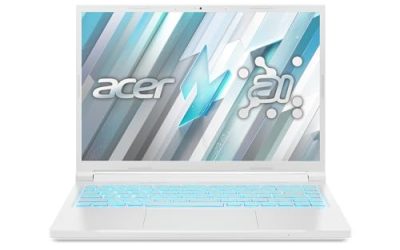
- Best for: students crossing a large campus daily who still want RTX 4060 performance and a sharp, fast screen.
- Processor: AMD Ryzen AI 9 HX 370
- Graphics: NVIDIA GeForce RTX 4060
- Memory: 16GB LPDDR5X
- Storage: 1TB SSD
students crossing a large campus daily who still want RTX 4060 performance and a sharp, fast screen.
the 14-inch screen is small for split-screen coursework, and this is the premium-priced direction in this category, so it fits buyers prioritising portability.
The TUF Gaming A14 is built for the student who is always moving. At 3.2 pounds with a 14-inch screen, it is dramatically easier to carry than a conventional gaming laptop, yet the listing combines a Ryzen AI 9 HX 370 processor with a GeForce RTX 4060 and 16GB of LPDDR5X memory, so performance does not feel like a compromise. The WQXGA display runs at 165Hz, the fastest refresh rate in this guide, and its higher resolution keeps text crisp for reading and writing. The TUF line is also positioned around durability, which suits a machine that lives in a backpack.
3. HP Victus 15
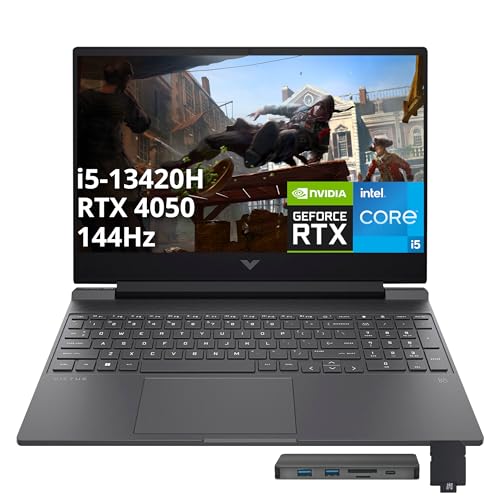
- Best for: students based in halls who want a ready-made desk setup with plenty of memory and storage.
- Processor: Intel Core i5-13420H, 8 cores and 12 threads
- Graphics: NVIDIA GeForce RTX 4050, 6GB GDDR6
- Memory: 32GB DDR4
- Storage: 1TB PCIe SSD
students based in halls who want a ready-made desk setup with plenty of memory and storage.
this is a seller-upgraded configuration, with the seal opened for the upgrade as the listing states, so check the warranty terms for the upgraded parts before buying.
The Victus 15 configuration listed here is aimed at a dorm-room desk. It combines a Core i5-13420H with a GeForce RTX 4050, 32GB of memory and a 1TB SSD, and the listing includes a docking station set with additional storage and cables, which turns the laptop into a small workstation without separate accessory shopping. The 15.6-inch Full HD screen runs at 144Hz, and the backlit keyboard includes a numeric pad for coursework. At 5.1 pounds it is a short-commute machine rather than an all-day carry, which matches a hall-based routine.
Which One Fits Your Situation
You walk or cycle across campus every day
Choose the ASUS TUF Gaming A14. Nothing else here comes close to its 3.2-pound weight, and that difference is felt on every single trip rather than only on the first. You keep RTX 4060 performance and gain the sharpest screen in the group, so the compromise is limited to screen size rather than capability.
You live close to your classes and play demanding games
Choose the Lenovo LOQ 15. With the shortest daily carry, its extra weight stops mattering, and its combination of RTX 4060 graphics, very generous memory and a colour-complete 144Hz screen covers both coursework and a serious game library. The included cooler also suits long desk sessions in a warm room.
Your room is your study, library and gaming space
Choose the HP Victus 15. The docking bundle, numeric pad and large storage fit a fixed desk routine, and the RTX 4050 handles the popular multiplayer titles students actually play together. It is the least portable option here, which is a fair trade when the machine rarely leaves the building.
You are buying for several years of study
Choose between the LOQ 15 and the TUF A14 by carry distance. Both carry the stronger RTX 4060, which gives them the longest useful gaming life, and both have storage that will not feel tight by the final year. The LOQ adds memory headroom for heavy multitasking, while the A14 protects your back; either is a defensible long-term buy.
Common Mistakes
- Choosing a five-pound gaming laptop for a campus that requires twenty minutes of walking between buildings.
- Spending the whole budget on graphics and leaving nothing for a bag, a mouse and the software the course requires.
- Assuming gaming battery claims apply to lectures, when the charger still needs to travel for any real session.
- Buying a small drive and spending the second year deleting games to fit coursework projects and new installs.
- Ignoring whether a high-capacity configuration is a seller upgrade, and what that means for its warranty.
Frequently Asked Questions
Is an RTX 4050 enough for student gaming?
For the way most students play, yes. It runs popular multiplayer and esports titles smoothly at 1080p and handles many single-player releases with adjusted settings. The RTX 4060 models in this guide are the step up for players who buy new releases often and want higher settings to last longer. Both choices are reasonable; the mistake is paying for far more power than your free time can use.
How much does weight really matter for a school laptop?
More than any single specification. A laptop that feels heavy stays in the room, which quietly removes the library sessions, group work and lecture use it was bought for. The difference between the 3.2-pound A14 and the models over five pounds is obvious within one day of carrying. Match the machine to your real route between home and classes, not to the desk it will sit on in the evening.
Can one laptop handle both coursework and games for a full degree?
Yes, if the fundamentals are right at purchase: a current RTX graphics card, at least 16GB of memory and a drive big enough for a growing library. Graphics cannot be upgraded later, so that is where longevity is decided. The LOQ 15 and TUF A14 in this guide were picked with that horizon in mind, pairing the RTX 4060 with 1TB of storage.
Should I worry about seller-upgraded configurations?
Read them carefully rather than avoiding them outright. An upgraded configuration can offer memory and storage combinations the manufacturer does not sell directly, as with the Victus 15 here, whose listing states the seal is opened for the upgrade and describes separate warranty cover for the upgraded parts. Confirm those terms, keep the paperwork, and the arrangement can work well; skip any listing that is vague about who covers what.
FAQ
Is an RTX 4050 enough for student gaming?
How much does weight really matter for a school laptop?
Can one laptop handle both coursework and games for a full degree?
Should I worry about seller-upgraded configurations?
More from Amazon
Programs that pair well with the guide above. Offers and eligibility are set by Amazon and may change.
Free shipping on eligible items, Prime Video and more. Eligible new members can start with a free trial.
Start a Prime free trialAd-free music streaming. Eligible new subscribers can start with a free trial.
Try Music Unlimited freeA Prime membership for ages 18-24 with a trial period. Eligibility is set by Amazon.
See Prime for Young AdultsAudiobooks and podcasts to listen to on the go. Eligible new members can start with a free trial.
Try Audible freeAs an Amazon Associate we earn from qualifying purchases.