Our Short List of 3

- Keyboard: 104 keys, full-size layout
- Connectivity: 2.4 GHz wireless, Bluetooth, and wired USB-C
- Receiver: one 2-in-1 receiver runs both devices
- Backlighting: RGB on the keyboard
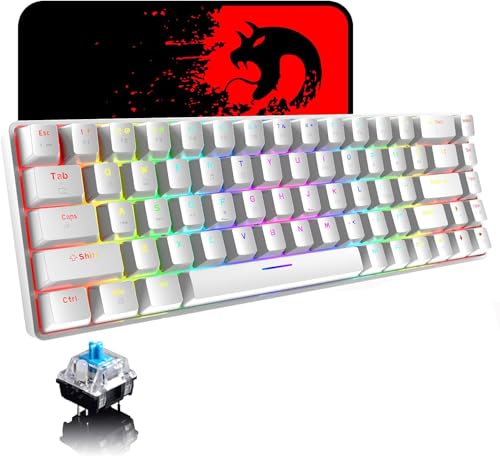
- Keyboard: 68 keys, 65 percent layout
- Switches: mechanical, blue variant, tactile and clicky
- Backlighting: RGB with multiple modes
- Cable: detachable USB-C

- Keyboard: mechanical-feel keys, quiet design, stepped ergonomic layout
- Connectivity: 2.4 GHz wireless, one 2-in-1 receiver for both devices
- Backlighting: RGB with three brightness levels
- Multimedia: 16 shortcuts through FN plus the F keys
All 5 Picks at a Glance
| Product | Specs | Action |
|---|---|---|
| Redragon S101M-KS Wireless Tri-Mode Gaming Keyboard and Mouse Combo |
| Check price on Amazon |
| FELICON 65% Mechanical Gaming Keyboard and Mouse Combo |
| Check price on Amazon |
| MageGee V560 Wireless Gaming Keyboard and Mouse Combo |
| Check price on Amazon |
 Redragon K552-BA Mechanical Gaming Keyboard and Mouse Combo |
| Check price on Amazon |
 RedThunder K10 Wireless Gaming Keyboard and Mouse Combo (Black) |
| Check price on Amazon |
Our Top Picks
A matched keyboard and mouse set is the fastest way to finish a gaming desk in one purchase. The two devices share a design language, the lighting matches without any effort, and wireless sets often run both devices from a single receiver, which leaves a USB port free for a headset or a capture device. The five sets below cover the main directions this category takes: a tri-mode wireless set from Redragon, a compact mechanical set built around a 65 percent board, a tenkeyless set with true mechanical switches, a wireless set with pudding keycaps for players who want the lighting to do the talking, and a quiet wireless set from MageGee in a blue, white, and purple colorway.
The differences that matter are easy to name once you know where to look. Connectivity decides whether cables cross your desk. Switch type decides how each keypress feels and how much noise a late session makes. Layout decides how much room the mouse gets to move. The buying guide after the picks walks through each of those points, and the FAQ answers the questions that come up most often when a first matched set is on the way.
Disclosure: As an Amazon Associate, we earn from qualifying purchases made through links on this page, at no extra cost to you.
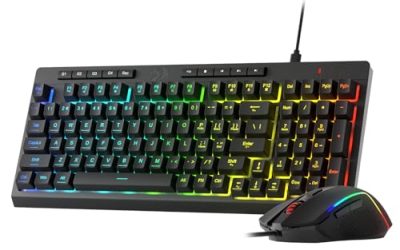
Redragon S101M-KS Wireless Tri-Mode Gaming Keyboard and Mouse Combo
- Keyboard: 104 keys, full-size layout
- Connectivity: 2.4 GHz wireless, Bluetooth, and wired USB-C
- Receiver: one 2-in-1 receiver runs both devices
- Backlighting: RGB on the keyboard
The S101M-KS is the cable-free option in this group. Both devices connect three ways: a 2.4 GHz wireless link, Bluetooth, or a wired USB-C cable, and a single 2-in-1 receiver handles the keyboard and the mouse together on the wireless link. That makes the set easy to move between a gaming PC and a laptop, since Bluetooth pairing covers the second machine without unplugging anything.
The keyboard is a full-size 104-key board with RGB backlighting and ten independent multimedia keys along the top, so volume and playback control never need a function-layer shortcut. The mouse adjusts through five sensitivity steps up to 4800 DPI, carries seven buttons, and reports at up to 1000 Hz on the wired and 2.4 GHz links. Battery life is the headline figure here: Redragon puts the keyboard at up to 300 hours of use with the backlighting turned off, which stretches the gap between charges for anyone who plays in a lit room.
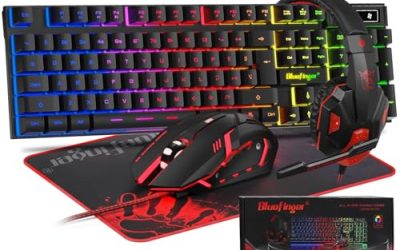
FELICON 65% Mechanical Gaming Keyboard and Mouse Combo
- Keyboard: 68 keys, 65 percent layout
- Switches: mechanical, blue variant, tactile and clicky
- Backlighting: RGB with multiple modes
- Cable: detachable USB-C
The FELICON set is built for smaller desks and for players who sweep the mouse across a wide arc. Its keyboard shrinks to a 68-key, 65 percent layout that drops the number pad and the function row, which pulls the mouse hand closer to the body and frees a large area of desk for aiming. What it keeps is the part players notice most: real mechanical switches, in a blue variant that gives each press a tactile bump and an audible click.
RGB backlighting runs through the board with multiple effects and brightness levels, and the keyboard connects over a detachable USB-C cable, which makes the set easy to pack for a LAN session or a trip. The bundled mouse uses a honeycomb shell to keep weight down, tracks at up to 6400 DPI, and glows to match the keyboard. A mouse pad is in the box as well, so the whole input area is covered in one purchase, and the maker lists support for PC, Mac, PlayStation 4, and Xbox alongside the usual Windows machines.
MageGee V560 Wireless Gaming Keyboard and Mouse Combo
- Keyboard: mechanical-feel keys, quiet design, stepped ergonomic layout
- Connectivity: 2.4 GHz wireless, one 2-in-1 receiver for both devices
- Backlighting: RGB with three brightness levels
- Multimedia: 16 shortcuts through FN plus the F keys
The V560 is the quiet option in this group. Its keyboard uses mechanical-feel keys tuned for low noise under an RGB backlight, which makes it the set to look at when the gaming desk shares a room with other people. Both devices connect over a single 2.4 GHz receiver, and the receiver stores inside the mouse when the set travels, so there is no loose dongle to keep track of.
Both halves of the set are rechargeable over USB-C, and the maker quotes standby times of up to 365 days for the keyboard and 270 days for the mouse, helped by an automatic sleep mode that cuts power draw whenever the set sits idle. The backlight offers three brightness levels and several effects switched from the function layer, and sixteen multimedia shortcuts ride on the F keys. The mouse steps through six sensitivity levels from 600 to 3200 DPI with a seven-color breathing light, and the stepped keycap profile plus foldable feet let you set a typing angle. The listed compatibility runs wider than most here: Windows, Mac OS, Linux, and Android are all covered, with a working range of up to 33 feet from the receiver.
Redragon K552-BA Mechanical Gaming Keyboard and Mouse Combo
- Keyboard: 87 keys, tenkeyless layout
- Switches: Outemu Blue mechanical
- Anti-ghosting: full-key anti-ghosting
- Backlighting: LED with adjustable brightness and breathing effect
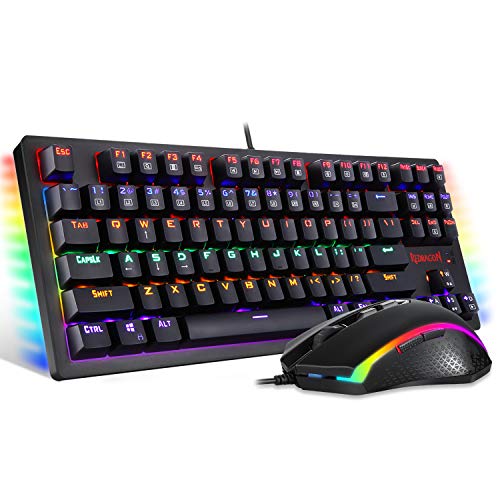
The K552-BA is the pick for players who want genuine mechanical switches in a wired set. Its keyboard is the K552 Kumara, an 87-key tenkeyless board built around Outemu Blue mechanical switches on a rigid plate, with full anti-ghosting so crowded inputs in a team fight all land. Dropping the number pad keeps the footprint compact while leaving the arrow keys and the navigation cluster in their familiar places, which suits players who split time between games and everyday typing.
The backlighting is LED rather than full RGB, with adjustable brightness and a breathing effect, and the pairing mouse is the M602 Griffin, which tracks at up to 7200 DPI and adds programmable buttons for game commands. A large mouse pad rounds out the box, giving the set a consistent surface from edge to edge. Everything connects by wire, so there are no batteries to manage and no receivers to lose, and the set behaves the same on any Windows PC or laptop it is plugged into.
RedThunder K10 Wireless Gaming Keyboard and Mouse Combo (Black)
- Keyboard: full-size layout with pudding keycaps
- Switches: mechanical-feel membrane
- Connectivity: 2.4 GHz wireless, one shared receiver
- Battery: 3800 mAh rechargeable in the keyboard
The wireless K10 takes the opposite route from its wired sibling: one 2.4 GHz receiver runs both the keyboard and the mouse, the keyboard carries a rechargeable 3800 mAh battery, and an automatic sleep mode cuts power draw whenever the set sits idle. Expect roughly eight hours of play per charge with the backlighting running, and far longer stretches with the lights dimmed or off, so a cable on the desk once a week or so keeps it going.
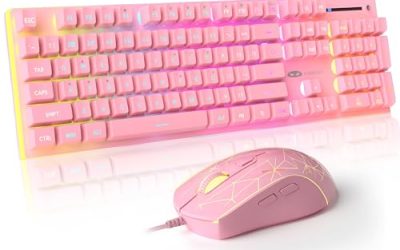
This version wears pudding keycaps, whose translucent sides let the backlight spill out around each key instead of only shining through the legends, which gives the board a much stronger glow in a dark room. The keys are mechanical-feel membrane with anti-ghosting across the main gaming cluster. The mouse offers seven buttons and up to 3200 DPI, which is plenty for 1080p and 1440p play, and both devices share the same rainbow lighting style so the desk looks like one set rather than two separate purchases.
How to Choose a Gaming Keyboard and Mouse Combo
Start with connectivity, because it shapes the whole desk. Wired sets never need charging and never drop a signal, which is why two of the picks above stay plugged in. Wireless sets clear the cables away, and the better ones run both devices from one receiver so the port count stays low. Tri-mode sets add Bluetooth and a wired fallback, which suits a desk where a work laptop and a gaming PC trade places.
Next, be honest about switch feel. True mechanical switches, like the blue switches in the FELICON and K552-BA sets, give a distinct tactile point and a long service life, and they are the loudest option in a shared room. Membrane and mechanical-feel boards press more softly and quietly, which housemates and late-night players tend to prefer, at the expense of that crisp mechanical snap. Neither is wrong; the room decides.
Layout is the third call. Full-size boards keep the number pad, which data entry and some simulation games use constantly. Tenkeyless boards drop it for a shorter reach to the mouse. A 65 percent board goes further, trading the function row for the widest possible mouse area, which is why compact sets show up so often in shooter-focused setups.
On the mouse side, treat the headline DPI number as a ceiling rather than a target. Most players settle between 800 and 3200 DPI in game, so every mouse here has headroom to spare. Polling rate matters more in fast titles: 1000 Hz reporting keeps the pointer path smooth on high-refresh monitors. Anti-ghosting deserves a glance too. Boards that quote a figure in the twenties cover the clusters games actually use at once, while full anti-ghosting removes the question entirely.
Finally, count the extras. A bundled pad gives a consistent glide from day one. Rechargeable batteries in both devices, as the MageGee set carries, remove the battery-swap routine entirely. Dedicated multimedia keys save alt-tabbing to change volume mid-match. None of these decide a purchase alone, but together they explain most of the difference between two sets that look similar on a shelf.
FAQ
Do combo sets work with game consoles as well as PC?
Support varies by model and by console. The FELICON set lists PlayStation 4 and Xbox support alongside PC and Mac, while the other sets here are aimed at Windows machines. Console makers also limit which games accept keyboard and mouse input at all, so check the listing for your exact console before ordering.
Is a wireless combo responsive enough for competitive play?
A 2.4 GHz link with 1000 Hz reporting, like the wired mode figures on the wired sets here, is fast enough that the connection is rarely the weak point in a match. Bluetooth is the slower link and suits casual play and everyday use better, which is why the tri-mode Redragon keeps the 2.4 GHz receiver as its main gaming route.
Which layout should a first-time buyer choose?
Full-size is the safe default, since nothing is missing and every key sits where years of typing put it. Move to tenkeyless if desk space is tight, and to a 65 percent board only if you are sure you will not miss the function row and arrow key spacing of a larger board.
What does anti-ghosting actually do in a game?
It decides how many keys the board can report at the same time. Games ask for several at once: running diagonally while holding a modifier and tapping an ability is already four or five inputs. When a board runs out, extra presses simply vanish, so an anti-ghosting figure that covers your usual key clusters keeps inputs landing the way you pressed them.
More from Amazon
Programs that pair well with the guide above. Offers and eligibility are set by Amazon and may change.
Free shipping on eligible items, Prime Video and more. Eligible new members can start with a free trial.
Start a Prime free trialAd-free music streaming. Eligible new subscribers can start with a free trial.
Try Music Unlimited freeA Prime membership for ages 18-24 with a trial period. Eligibility is set by Amazon.
See Prime for Young AdultsAudiobooks and podcasts to listen to on the go. Eligible new members can start with a free trial.
Try Audible freeAs an Amazon Associate we earn from qualifying purchases.