Our Short List of 3

- Keyboard: 104-key full-size layout, membrane switches, aluminum alloy top panel
- Keyboard extras: 12 multimedia keys, anti-ghosting on all keys
- Lighting: true RGB effects plus 6 single-color modes, four-side surround glow
- Mouse: 6 DPI steps from 600 to 3,200, color-coded LED indicator

- Keyboard: 68-key 65 percent layout, membrane switches
- Lighting: RGB backlit keyboard and mouse
- Anti-ghosting: full anti-ghosting key rollover
- Mouse: optical sensor up to 7,200 DPI

- Keyboard: 98-key layout, anti-ghosting on all 98 keys
- Keycaps: double-injection, mixed blue, white and purple colorway
- Keyboard extras: round volume knob, FN plus F1–F12 multimedia shortcuts, foldable rear bracket
- Mouse: 6 DPI levels from 600 to 3,200, internal indicator light
All 3 Picks at a Glance
| Product | Specs | Action |
|---|---|---|
| 2. MageGee GT838 Gaming Keyboard and Mouse Combo |
| Check price on Amazon |
| 3. GEODMAER 65 Percent Gaming Keyboard and Mouse Combo |
| Check price on Amazon |
| 4. MageGee 98-Key RGB Gaming Keyboard and Mouse Combo |
| Check price on Amazon |
Key takeaways
- Build the best gaming keyboard and mouse setup with five matched combos: shared-dongle wireless sets, hot-swap boards and wired pairs for a tidy desk.
A gaming keyboard and mouse setup works best when the two devices are planned as one system rather than two separate purchases. A matched combo arrives designed to run together: the lighting language matches across both devices, the styling matches, and on wireless sets a single shared receiver drives the keyboard and the mouse at once, which frees a USB port and removes a second dongle from the desk. Where the maker supplies one software package for the pair, sensitivity stages, macros and lighting for both devices live in a single place, so the setup behaves like one tool instead of two.
The five sets below were chosen as complete desk setups, and they cover the main shapes this category takes. There is a tri-mode wireless set with hot-swappable switches and a shared dongle for players who like to tune their gear, two wired full-size and near-full-size sets that anchor a fixed desk with metal panels and hardware lighting controls, an ultra-compact 65 percent wired set that hands the desk back to the mouse, and a big-brand wired pair built around plunger switches that mimic a mechanical feel. Each entry lists the specifications that decide how a setup behaves day to day — layout, switch type, connection, mouse sensor range, buttons and software — so the sets can be compared as systems. Connection deserves the first look: a shared receiver, a pair of cables, or a tri-mode link each creates a different desk, and the right choice depends on whether the setup stays in one place or moves between machines.
Disclosure: As an Amazon Associate, we earn from qualifying purchases made through links on this page, at no extra cost to you.
1. Redragon S136 Gaming Keyboard and Mouse Combo
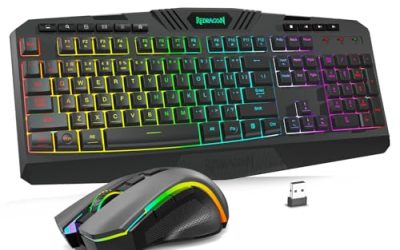
The Redragon S136 is the most complete ecosystem play in this group. It pairs the K628 PRO keyboard with the M693 Pro mouse, and the two share a single 2.4 GHz dongle, so one USB port runs the whole wireless setup. Both devices also offer Bluetooth and USB-C wired modes, which means the same set can stay paired to a gaming PC on the dongle, hop to a laptop over Bluetooth, and fall back to a cable without any re-pairing ritual. For a desk that serves more than one machine, that one-set arrangement is the core of the setup argument.
The keyboard half is built for players who adjust their gear over time. The 78-key 75 percent board uses hot-swappable linear red switches in sockets that accept common 3-pin and 5-pin replacements, sits on a plate-mounted PCB, and carries dedicated media controls alongside its RGB backlighting. The M693 Pro mouse matches it with tri-mode connection, an optical sensor reaching 7,200 DPI across five onboard levels, and seven programmable buttons. Redragon Pro software covers both devices, putting keyboard lighting and macros in the same window as mouse sensitivity and button assignments. Battery life on the mouse is listed at up to 35 hours with an eco mode for stretching it further, and the compact board leaves generous room for low-sensitivity mouse movement.
Specs
- Keyboard: K628 PRO, 78-key 75 percent layout, hot-swappable linear red switches
- Keyboard build: plate-mounted PCB, RGB backlighting, dedicated media controls
- Connection: tri-mode — shared 2.4 GHz dongle, Bluetooth, USB-C wired
- Mouse: M693 Pro wireless, optical sensor up to 7,200 DPI, 5 onboard DPI levels
- Mouse buttons: 7 programmable, Redragon Pro software covers both devices
- Mouse battery: up to 35 hours per charge, eco mode
2. MageGee GT838 Gaming Keyboard and Mouse Combo
- Keyboard: 104-key full-size layout, membrane switches, aluminum alloy top panel
- Keyboard extras: 12 multimedia keys, anti-ghosting on all keys
- Lighting: true RGB effects plus 6 single-color modes, four-side surround glow
- Mouse: 6 DPI steps from 600 to 3,200, color-coded LED indicator
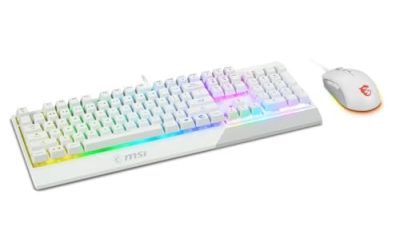
The MageGee GT838 is the fixed-desk anchor of the group: a full-size wired set that trades portability for a solid, always-ready presence. The keyboard keeps all 104 keys, including the number pad and twelve multimedia keys, under an aluminum alloy top panel that adds rigidity and a scratch-resistant, water-resistant surface to the deck. Membrane switches keep keypresses quiet, and anti-ghosting covers every key rather than a gaming cluster alone, so crowded movement and ability combinations register together during fast sequences.
Lighting is handled entirely on the hardware, which suits a setup that should work the moment the PC wakes. The keyboard runs true RGB effects plus six single-color modes, with glow wrapping all four sides of the frame; the K and M keys cycle the effects, and FN combined with the arrow keys sets brightness and animation speed. The mouse mirrors that approach with seven-color breathing backlight and six sensitivity steps from 600 to 3,200 DPI, each step color-coded by its LED indicator so the active level reads at a glance. There is no software layer at all: both devices are plug and play over USB 2.0, and the matched lighting controls give the pair a unified look without a background application holding the settings.
3. GEODMAER 65 Percent Gaming Keyboard and Mouse Combo
- Keyboard: 68-key 65 percent layout, membrane switches
- Lighting: RGB backlit keyboard and mouse
- Anti-ghosting: full anti-ghosting key rollover
- Mouse: optical sensor up to 7,200 DPI
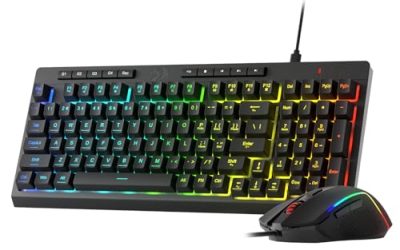
The GEODMAER combo takes the opposite approach to desk space: shrink the keyboard until the mouse owns the desk. The 68-key 65 percent board drops the number pad, the function row spacing and the navigation cluster, which shortens the reach to the mouse and leaves a wide sweep area for players who aim with low sensitivity settings. For small desks, dorm rooms and laptop stations, that footprint is the setup: two compact wired devices, one small rectangle of desk, nothing else competing for room.
Both halves connect by wire and work as plug and play, so the set is ready the moment it is plugged in and never asks for charging. The keyboard is a membrane design with RGB backlighting and anti-ghosting for the key combinations games lean on, and the mouse carries an optical sensor rated up to 7,200 DPI with its own RGB lighting, so the pair still reads as a matched set despite the small scale. Wired connection on both devices also keeps input behaviour identical on any machine the set is plugged into, which makes this combo a practical second setup for a laptop bag or a spare rig as well as a main desk where space is the limiting factor.
4. MageGee 98-Key RGB Gaming Keyboard and Mouse Combo
- Keyboard: 98-key layout, anti-ghosting on all 98 keys
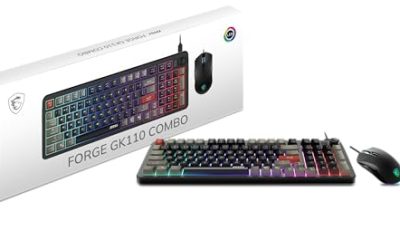
- Keycaps: double-injection, mixed blue, white and purple colorway
- Keyboard extras: round volume knob, FN plus F1–F12 multimedia shortcuts, foldable rear bracket
- Mouse: 6 DPI levels from 600 to 3,200, internal indicator light
This MageGee set is the middle path between the full-size GT838 and a compact board: a 98-key layout that keeps the number pad while trimming the frame, finished in a mixed blue, white and purple colorway that the mouse matches. Double-injection keycaps keep the legends clear and evenly backlit, and anti-ghosting covers all 98 keys, so nothing is given up in play for the narrower footprint. A foldable bracket underneath sets the typing angle, which makes the board easy to level on desks that double as work surfaces.
Two hardware controls define the setup experience. A round volume knob on the keyboard adjusts system volume directly, without reaching for on-screen controls mid-game, and FN combinations with F1 through F12 handle media playback and other shortcuts. The mouse offers six sensitivity levels from 600 to 3,200 DPI with an internal indicator light showing the active step, and its seven-color breathing backlight echoes the keyboard lighting so the pair presents as one designed set. Everything runs wired over USB with no software to install, and compatibility spans Windows, Mac, Linux and Android, which makes the combo a simple way to give a mixed-device desk a single, coherent input setup.
5. Cooler Master MS110 Combo Bundle
The Cooler Master MS110 is the big-brand entry in this group, and its setup appeal is coherence: one maker, one design language, and two wired devices that simply work when plugged in. The keyboard uses Cooler Master’s Mem-chanical switches, a plunger design built to imitate the tactile response of a mechanical board while keeping membrane-style quietness and durability. The full-size 104-key layout keeps the number pad and a standard bottom row, so the board slots into an existing desk without any layout adjustment period.
RGB backlighting runs across the keyboard with effects and speeds adjusted through FN key combinations, keeping lighting control on the hardware where it survives any PC the set is plugged into. The mouse is a compact ambidextrous design with an optical sensor and a dedicated DPI button for stepping sensitivity up or down between games, and its understated shell matches the keyboard’s clean styling. As a setup, the MS110 suits a desk that stays in one place and a player who values a matched, low-maintenance pair from an established peripheral maker over wireless flexibility or deep software tuning.
Specs
- Keyboard: 104-key layout, Mem-chanical plunger switches
- Lighting: RGB backlighting, effect controls on the keyboard
- Mouse: optical gaming sensor, dedicated DPI button, ambidextrous shape
- Design: matched Cooler Master styling across both devices
- Connection: wired USB for both devices, plug and play
- Compatibility: PC, Windows
https://www.amazon.com/dp/B07WDND9SC
Buying Guide: Planning a Keyboard and Mouse Setup
Start with the connection plan. A wireless set on a shared receiver uses one USB port and leaves the desk clear, which matters on laptops and small PCs with few ports. A wired set uses two ports but never needs charging and behaves identically on every machine. Tri-mode sets split the difference, running wireless day to day with a cable as backup. Decide which pattern fits the desk before comparing anything else, because it shapes every other choice.
Treat lighting and software as one decision. Sets with a shared software package let one application hold the lighting profiles, macros and sensitivity stages for both devices, so the pair stays in sync when the desk changes mood or game. Hardware-controlled sets keep those settings on the devices themselves, which is simpler and travels between computers without reinstalling anything. Neither approach is wrong, but mixing them across a desk is what creates the mismatched, half-configured feel a matched setup is meant to avoid.
Match the layout to the mouse, not the other way round. A full-size board keeps the number pad for work and data entry, while 75 percent and 65 percent boards hand that space to the mouse. Players who aim with low sensitivity and large sweeps gain more from the smaller boards than they lose from the missing keys, while players who type figures daily should stay full-size or 98-key.
Plan the power routine for wireless sets. Rechargeable combos need a charging habit, and sets that keep working over a cable while charging remove the dead-desk failure mode entirely. Check the listed battery figures for both devices, not just the keyboard, and note where the receiver stores when the setup travels.
FAQ
Is a keyboard and mouse combo better than buying each device separately?
For most desks, yes, when the goal is a coherent setup. A combo guarantees the lighting style, design language and connection plan match, and wireless combos add the shared receiver, which separate devices rarely offer. Separate purchases make sense only when one device has a very specific job, such as a particular switch type or mouse shape, that no combo provides.
What does a shared receiver change in a wireless setup?
One receiver drives both the keyboard and the mouse, so the setup occupies a single USB port and pairs as one unit. That frees ports on laptops and compact PCs, removes a second dongle from the desk, and means the whole input setup moves between machines by moving one small receiver.
Can one software package really control both devices?
On sets designed for it, yes. The Redragon S136 in this list runs both the keyboard and the mouse through Redragon Pro, so lighting, macros, sensitivity stages and button assignments for the pair live in a single application. Sets without software keep their controls on the hardware instead, which trades depth of tuning for simplicity.
Wired or wireless: which suits a fixed gaming desk?
A fixed desk can support either, and the deciding factors are charging and cables. Wired sets are always ready and add no power routine, at the exchange of two cables to manage. Wireless sets clear the desk surface and move easily between machines, at the exchange of batteries to monitor. Tri-mode sets cover both patterns in one purchase.
FAQ
Is a keyboard and mouse combo better than buying each device separately?
What does a shared receiver change in a wireless setup?
Can one software package really control both devices?
Wired or wireless: which suits a fixed gaming desk?
More from Amazon
Programs that pair well with the guide above. Offers and eligibility are set by Amazon and may change.
Free shipping on eligible items, Prime Video and more. Eligible new members can start with a free trial.
Start a Prime free trialAd-free music streaming. Eligible new subscribers can start with a free trial.
Try Music Unlimited freeA Prime membership for ages 18-24 with a trial period. Eligibility is set by Amazon.
See Prime for Young AdultsAudiobooks and podcasts to listen to on the go. Eligible new members can start with a free trial.
Try Audible freeAs an Amazon Associate we earn from qualifying purchases.