Our Short List of 3
All 4 Picks at a Glance
| Product | Specs | Action |
|---|---|---|
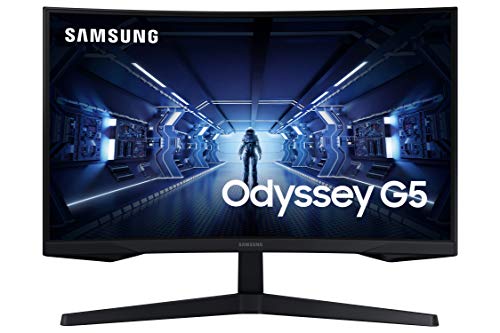 Samsung Odyssey G5 LC27G55TQWNXZA | Check price on Amazon | |
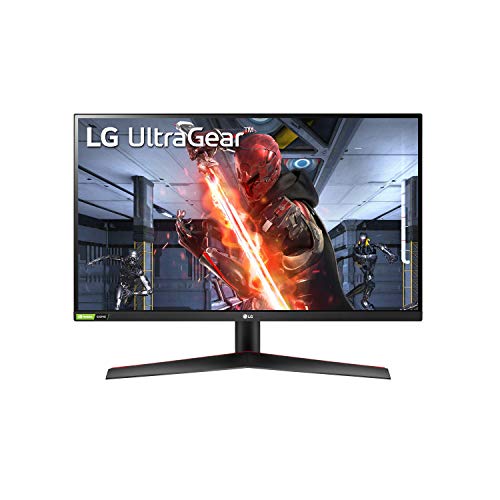 LG 27GN800-B | Check price on Amazon | |
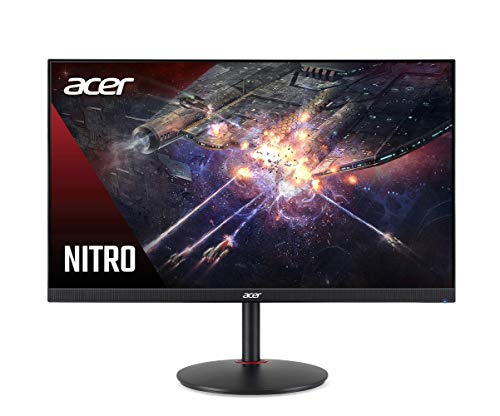 Acer Nitro XV272U Pbmiiprzx | Check price on Amazon | |
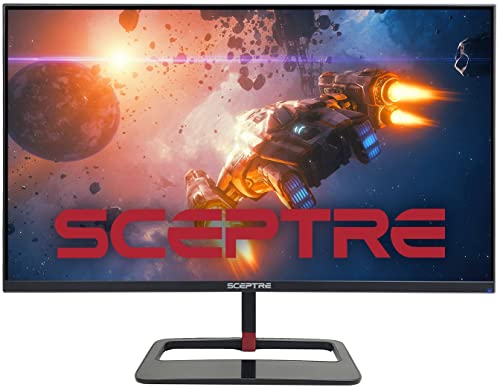 Sceptre E275B-QPN168 | Check price on Amazon |
Key takeaways
- best 2k 144hz monitors: five QHD screens with 144 Hz panels, 144 Hz motion, 144 Hz sync, 144 Hz clarity and 144 Hz speed compared for play here.
2K is the shorthand most monitor listings use for a 2560 x 1440 panel, also called QHD. True cinema 2K is a different width, 2048 pixels, but in the monitor aisle 2K means 2560 x 1440, and every screen in this guide uses that resolution at a 144Hz refresh rate. That combination is the sweet spot for a large group of PC gamers: sharper than Full HD, easier for a mid-range graphics card to drive than 4K, and quick enough that fast motion stays readable. All five picks here are 27-inch screens. Four are flat IPS panels and one is a curved VA panel, so the guide covers the two panel families that dominate this class.
Each pick was checked against its Amazon US listing, and each one names a 144Hz refresh rate in the listing itself, not as an overclock or a mode buried in a menu. A monitor that lists a higher ceiling and drops to 144Hz only on one input does not belong here, and none of the five below does that. What follows is a plain comparison of the five screens on the points that matter in daily use: panel behavior, sync support, ports, stand adjustment, and the small print that catches buyers out.
One note on the class itself: a 144Hz panel only shows its speed when the graphics card can deliver frames at that pace. A mid-range card will hold 144Hz in competitive titles and older games, while demanding new titles at high settings will run below it. The monitor does not create frames; it shows what the card sends.
What to look for
Resolution comes first. Confirm the listing says 2560 x 1440. Some sellers use the 2K label loosely, and a 1920 x 1080 screen can carry a 2K badge in a marketplace title. The pixel count in the specification table is the fact to trust, not the label in the title. Every pick below lists 2560 x 1440 in its specification table.
Refresh rate comes second, and the input matters as much as the panel. A screen can run at 144Hz over DisplayPort and cap at a lower figure over HDMI, and one pick in this guide does exactly that on two of its three HDMI ports. If your graphics card connects over HDMI, check the HDMI figure in the listing, not just the headline figure. DisplayPort is the safe route for the full 144Hz on every screen here.
Panel type shapes the image more than any other single choice. IPS panels give wide viewing angles and steady color when you move your head or share the screen with someone sitting beside you. VA panels give deeper blacks and stronger contrast, which suits dark rooms and moody games, but their viewing angles are narrower and their dark-to-light transitions can smear in fast motion. Neither family is better in every way; the guide names the panel for each pick so you can match it to your room and your games.
Sync support decides whether the picture tears when the frame rate moves around. AMD FreeSync Premium is the baseline on all five picks. NVIDIA G-Sync Compatible appears on three of them. If you run an NVIDIA card, a G-Sync Compatible badge on the listing is worth having, and if you run an AMD card, FreeSync Premium covers you. A badge on the box is not the same as a badge in the listing; confirm the sync claim on the Amazon listing itself.
Response time figures need care. One maker writes 1 ms GtG, another writes 1 ms MPRT, a third writes 1 ms VRB. Those are different measurements, so the numbers are not directly comparable across brands. Treat the 1 ms figure as a sign that the panel is built for speed, and judge motion by the panel family and the sync support rather than by splitting hairs between three different 1 ms labels.
HDR claims deserve a plain word. HDR10 and DisplayHDR 400 on screens in this class mean basic HDR: the screen accepts an HDR signal and shows a wider range than standard video, but it does not have the brightness or the local dimming to make HDR look dramatic. Do not pick one of these screens for HDR above all else.
Built-in speakers are the last point. Only one pick in this guide names built-in speakers. The other four expect separate speakers or a headset. If your desk has no room for speakers, that single pick carries real weight.
Samsung Odyssey G5 LC27G55TQWNXZA
The Samsung Odyssey G5 is the only curved screen in this guide, and the curve is the point. Its 1000R bend wraps the edges of the image toward the viewer, which suits a single-screen desk where you sit close and centered. The 27-inch VA panel runs at 2560 x 1440 and 144Hz, with a 1 ms MPRT response figure and AMD FreeSync Premium. The maker lists contrast at 2500:1 and brightness at 250 nits, both typical of a VA panel in this class: blacks look genuinely dark in a dim room, while bright daylight scenes will not dazzle.
Ports are spare: one DisplayPort 1.2 and one HDMI input, plus a headphone jack. That covers a PC and one more device, and nothing beyond that. The stand tilts from minus 2 to 18 degrees and does not adjust in height, so the screen sits where the stand puts it unless you mount it on a VESA 75 x 75 mm arm. The listing names no built-in speakers, so plan on separate audio.
Two cautions belong with this pick. First, Samsung reuses the Odyssey G5 name across curved and flat models and across several refresh rates, so confirm the listing shows the model code LC27G55TQWNXZA and a 1000R curve before buying. The flat G51F and the OLED G50SF are different screens under the same family name. Second, the evidence for this listing is the freshest in the guide: a tracker check dated November 28, 2026 records it in stock on Amazon US, and a mirror from eight days earlier records a new unit with only ten left. Open the listing live and confirm a new-unit buying option before you commit.
LG 27GN800-B
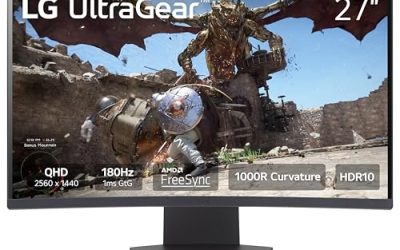
The LG 27GN800-B is the plain flat IPS pick of the group, and plain is a compliment here. Its 27-inch IPS panel runs at 2560 x 1440 and 144Hz with a 1 ms GtG response figure, NVIDIA G-Sync Compatible support, AMD FreeSync Premium, HDR10, and 99 percent sRGB color coverage. Color stays steady from wide angles, text stays sharp at 109 pixels per inch, and the G-Sync Compatible badge makes it a natural match for an NVIDIA card. The panel brightness is 350 nits, which is enough for a bright room without washing out.
The compromise is the stand. It tilts only, with no height adjustment, no pivot, and no swivel. On a desk at the right height that is no problem at all, and the screen itself is light enough to sit on a monitor arm. The VESA pattern is 100 x 100 mm, so an arm is a simple fix. Ports are two HDMI inputs and one DisplayPort, which covers a PC plus a console or a second machine. No USB hub and no built-in speakers are named in the listing.
This is the pick to choose when you want a flat IPS panel with G-Sync Compatible support and you do not need the stand to move. A tracker record dated November 27, 2026 lists this model on Amazon US, and the Amazon listing itself carries the full specification set, including the 144Hz figure and the G-Sync Compatible badge. Confirm the exact model code 27GN800-B on the listing, since LG sells several UltraGear models with similar names and different stands.
Acer Nitro XV272U Pbmiiprzx
The Acer Nitro XV272U Pbmiiprzx is the ergonomic pick of the guide. Its 27-inch flat IPS panel runs at 2560 x 1440 and 144Hz with a 1 ms VRB response figure, NVIDIA G-Sync Compatible support, AMD FreeSync, VESA DisplayHDR 400, and wide DCI-P3 color with a Delta E under 2. The stand adjusts in height, tilt, pivot, and swivel, which is the full set, and it is the most flexible stand in this guide. The VESA pattern is 100 x 100 mm. Ports are one DisplayPort and two HDMI inputs, plus an audio output.
VRB is Acer’s blur-reduction mode, and it works by dimming the backlight between frames. That can sharpen fast motion, but it also dims the image, so many owners leave it off and rely on the native panel speed and the sync support instead. The listing names the mode clearly, and the guide repeats that plainly so no one buys the screen for VRB alone. The DisplayHDR 400 badge means the screen meets the entry-level HDR standard: it accepts HDR signals and shows a wider range than standard video, but it will not deliver the HDR of a brighter screen with local dimming.
This is an older model, first sold in 2019, and that age shows in the evidence. The Amazon listing is confirmed, and tracker records show third-party new listings into 2026, but the direct listing crawl is months old. Open the listing live and confirm a new-unit buying option, not a Renewed one, before you buy. The model name matters here too: Acer reuses the XV272U family name across screens with different refresh rates and stands, so confirm the full suffix Pbmiiprzx on the listing rather than trusting the family name alone.
LG 27GL83A-B
The LG 27GL83A-B is the close sibling of the 27GN800-B, and the difference between them is the stand. Its 27-inch flat IPS panel runs at 2560 x 1440 with a native 144Hz refresh rate and a 1 ms GtG response figure, NVIDIA G-Sync Compatible support, AMD FreeSync Premium, HDR10, and 99 percent sRGB color coverage. Brightness is 350 nits. The stand adjusts in height, tilt, and pivot, including a full 90-degree turn into portrait mode, which the 27GN800-B cannot do. The VESA pattern is 100 x 100 mm. Ports are two HDMI inputs and one DisplayPort, and the listing names no USB hub and no built-in speakers.
Choose this LG when the adjustable stand matters. A height-adjustable stand lets you put the top of the screen at eye level without stacking books under the foot, and the pivot turn suits a second screen used for documents, chat, or code. If the stand does not matter to you, the 27GN800-B gives the same panel behavior for a screen that stays in one place. Both screens share the same 144Hz ceiling, the same sync support, and the same color coverage, so the choice between them is about the desk, not the image.
The HDR10 support here is basic, as it is on every screen in this guide. The panel accepts an HDR signal and shows a wider range than standard video, but with 350 nits and no local dimming the effect is modest. That is not a fault in a screen built for 144Hz gaming; it is a limit of the class. A roundup dated within the last two months records this model on Amazon US, and the model code 27GL83A-B is confirmed across the maker spec sheet and the listing.
Sceptre E275B-QPN168
The Sceptre E275B-QPN168 is the most feature-dense pick in the guide, and it is also the one that needs the closest reading of its port list. Its 27-inch flat IPS panel runs at 2560 x 1440 and 144Hz with a 1 ms GtG response figure with overdrive, AMD FreeSync Premium, HDR400, 135 percent sRGB and 92 percent DCI-P3 color coverage. It is the only pick here with built-in speakers, and its stand adjusts in height. The VESA pattern is 100 x 100 mm. It also carries picture-by-picture and picture-in-picture modes, which suit a desk where one screen serves two sources at once.
The port list is where care is needed. The screen has three HDMI inputs and one DisplayPort 1.2, but only DisplayPort and HDMI 1 carry the full 144Hz at QHD. HDMI 2 and HDMI 3 cap at 75Hz at the same resolution. If your graphics card connects over HDMI, use HDMI 1 or move to DisplayPort, or you will run the panel below its ceiling without knowing why. The maker spec sheet states this plainly, and the guide repeats it because it is the easiest mistake to make with this screen.
Two more cautions belong here. The contrast figure differs between sources: the maker spec sheet lists 3000:1 while one listing table lists 400:1, so the guide states no contrast figure for this pick and tells you to confirm it on the listing. Sceptre also sells a variant with a plus sign in the model code, the E275B-QPN168+, which is a different listing, so confirm the exact model code E275B-QPN168 on the page you buy from. This pick carries the thinnest evidence in the guide: the direct listing crawl is months old with no fresh stock line, so open it live and confirm a new-unit buying option before you buy.
Comparison table
| Monitor | Panel | Resolution | Refresh | Sync | Stand | Speakers |
|---|---|---|---|---|---|---|
| Samsung Odyssey G5 LC27G55TQWNXZA | 27-inch curved VA, 1000R | 2560 x 1440 | 144Hz | FreeSync Premium | Tilt only | None named |
| LG 27GN800-B | 27-inch flat IPS | 2560 x 1440 | 144Hz | G-Sync Compatible, FreeSync Premium | Tilt only | None named |
| Acer Nitro XV272U Pbmiiprzx | 27-inch flat IPS | 2560 x 1440 | 144Hz | G-Sync Compatible, FreeSync | Height, tilt, pivot, swivel | None named |
| LG 27GL83A-B | 27-inch flat IPS | 2560 x 1440 | 144Hz | G-Sync Compatible, FreeSync Premium | Height, tilt, pivot | None named |
| Sceptre E275B-QPN168 | 27-inch flat IPS | 2560 x 1440 | 144Hz | FreeSync Premium | Height adjustable | Built-in |
Frequently Asked Questions
Is 2K the same as QHD?
In monitor listings, yes. Sellers use 2K to mean a 2560 x 1440 panel, which is also called QHD. True cinema 2K is 2048 pixels wide, which is a different resolution that does not appear in this class. The safe check is the pixel count in the specification table: if it says 2560 x 1440, it is the screen this guide covers, whatever label the title uses. All five picks list 2560 x 1440 in their specification tables.
Do I need DisplayPort to get the full 144Hz?
For four of the five picks, either input will do, but DisplayPort is still the safe route. The exception is the Sceptre E275B-QPN168: only its DisplayPort input and its HDMI 1 input carry the full 144Hz at QHD, while HDMI 2 and HDMI 3 cap at 75Hz. If you connect over HDMI, check which HDMI port you are using. A cable cannot fix a port that caps below the panel ceiling.
Will a 144Hz monitor work with a game console?
Yes, and it will run at the console’s own ceiling rather than at the panel’s ceiling. Consoles in this generation output up to 120Hz on supported titles, so a 144Hz screen shows the console’s frames without strain and leaves room for a PC on the same desk. The monitor does not force the console to run faster; it simply does not hold it back. Confirm the console’s output settings on the console itself, since the monitor cannot change what the console sends.
How to choose
Begin with the panel family. Pick the Samsung Odyssey G5 when you sit centered at a single screen in a dim room and want the curve and the deep blacks of VA. Pick one of the four flat IPS screens when you share the screen, sit off-center, or want the steadiest color from wide angles. Between the two LG picks, the choice is the stand: the 27GL83A-B adjusts in height and pivots, while the 27GN800-B tilts only. Pick the Acer XV272U when you want the most flexible stand in the guide and the DisplayHDR 400 badge. Pick the Sceptre E275B-QPN168 when you want built-in speakers and a height-adjustable stand, and use its DisplayPort input or HDMI 1 to hold the full 144Hz.
Then confirm the details that decide whether the screen is the one you meant to buy. Read the model code on the listing, not just the family name: LC27G55TQWNXZA for the Samsung, 27GN800-B and 27GL83A-B for the two LG screens, XV272U Pbmiiprzx for the Acer, and E275B-QPN168 for the Sceptre. Confirm a new-unit buying option on the listing, since several of these models are old enough that Renewed and used listings circulate beside the new ones. Confirm the sync badge that matches your graphics card, and confirm the input you plan to use carries the full refresh rate. All five screens share the same 2560 x 1440 resolution and the same 144Hz ceiling, so the right choice is the one whose panel, stand, ports, and speakers fit your desk.
Disclosure: As an Amazon Associate, we may earn a commission from qualifying purchases made through links in this article, at no additional cost to you.
FAQ
Is 2K the same as QHD?
Do I need DisplayPort to get the full 144Hz?
Will a 144Hz monitor work with a game console?
More from Amazon
Programs that pair well with the guide above. Offers and eligibility are set by Amazon and may change.
Free shipping on eligible items, Prime Video and more. Eligible new members can start with a free trial.
Start a Prime free trialAd-free music streaming. Eligible new subscribers can start with a free trial.
Try Music Unlimited freeA Prime membership for ages 18-24 with a trial period. Eligibility is set by Amazon.
See Prime for Young AdultsAudiobooks and podcasts to listen to on the go. Eligible new members can start with a free trial.
Try Audible freeAs an Amazon Associate we earn from qualifying purchases.