Our Short List of 3

- Best for: hybrid and office workers who live in meetings and want one dependable stereo headset.
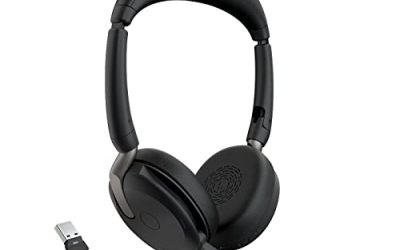
- Stereo on-ear design in black, model 26599-999-899
- 40 mm speakers
- 3-microphone call technology
- Up to 37 hours of battery life; a 15-minute charge adds up to 8 hours

- Best for: open-plan offices and busy households where both directions of the call need noise control.
- Five microphones with Yealink Acoustic Shield Technology
- Three levels of active noise cancellation
- Retractable hidden microphone arm
- Switchable on-ear and over-ear ear cushions

- Best for: home workers and call-heavy roles who want the longest battery and the simplest controls.
- On-ear design with Cloud Foam earcups
- Dual microphones with C3 Calling noise reduction
- 55+ hours of playtime per the listing title
- Bluetooth multipoint connects two devices at once
All 5 Picks at a Glance
| Product | Specs | Action |
|---|---|---|
| Jabra Evolve2 65 MS Wireless Headset with Link380c |
| Check price on Amazon |
| Yealink BH76 Plus UC Wireless Headset |
| Check price on Amazon |
| JLab Go Work Gen 2 Wireless Headset |
| Check price on Amazon |
 Shokz OpenComm2 UC 2025 Upgrade |
| Check price on Amazon |
 BlueParrott B450-XT Mono Bluetooth Headset |
| Check price on Amazon |
Key takeaways
- Five Bluetooth headsets for work compared on microphones, battery and comfort, from Jabra and Yealink ANC picks to Shokz open-ear and BlueParrott.
A Bluetooth headset for work is judged by two things a gaming headset barely considers: how clearly your voice reaches the other side of the call, and whether the battery and the fit survive a full day of meetings. The five headsets in this guide are all built for calls first. They use boom microphones or multi-microphone arrays tuned for speech, connect to a computer and a phone at the same time, and come from the office side of the catalogue rather than the gaming shelf.
The picks serve different working days. Desk-based staff get stereo headsets with USB adapters and all-day batteries, people in loud shared rooms get active noise cancelling or heavy-duty microphone filtering, and mobile or field workers get open-ear and single-ear designs that leave them aware of their surroundings. Every pick was chosen from its Amazon listing’s stated microphone, connection and battery specifications, so the comparison below rests on published figures rather than marketing claims.
Quick Picks
As an Amazon Associate we earn from qualifying purchases
| Product | Best for | Key spec from title |
|---|---|---|
| Jabra Evolve2 65 MS | All-day desk meetings on Teams and Zoom | Up to 37 hours of battery life |
| Yealink BH76 Plus UC | Noisy shared offices that need ANC | Active noise cancelling with retractable mic arm |
| JLab Go Work Gen 2 | Long call weeks on a budget | 55+ hours playtime with multipoint |
| Shokz OpenComm2 UC | Workers who must hear the room | Open-ear bone conduction, Zoom Certified |
| BlueParrott B450-XT | Driving, warehouse and field work | 300 ft wireless range, 24 hours talk time |
How to Choose
Put the microphone first
Your colleagues judge a work headset by your voice, not by how they sound to you, so the microphone system is the first thing to compare. A boom arm places the microphone near your mouth, which is the most reliable starting point, and multi-microphone designs go further by sampling the room and subtracting it from your voice. Look for headsets that describe noise cancelling on the microphone itself, and treat a flip-up or retractable boom as a bonus: it gives you a physical mute and a clear signal to people nearby that a call has ended.
Match the connection to your devices
Most work headsets reach a computer through a small USB Bluetooth adapter in the box, and that adapter is worth using: it gives a steadier connection and fuller call controls than a laptop’s built-in Bluetooth. Check which connector the adapter uses, because USB-A and USB-C versions are usually separate listings. Multipoint is the other feature to confirm if you work across two devices, since it keeps the headset connected to a laptop and a phone together and moves between them without re-pairing. A wired fallback over USB is useful insurance for a flat battery.
Choose a wearing style you can keep on
Stereo headsets cover both ears and help you concentrate, with on-ear designs running lighter and over-ear designs sealing out more of the room. A mono headset leaves one ear open for colleagues, customers and the sounds of the building, which suits shared and public-facing work. Open-ear bone conduction goes furthest, resting outside the ear entirely, at the cost of isolation. Active noise cancelling belongs in the same decision: it earns its place in loud, steady noise, but adds weight and cost that a quiet home office does not need.
Size the battery to your call load
Battery figures come in two kinds, and only one of them measures your working day. Talk time is the smaller, honest number; listening time always runs longer, so compare headsets on talk time against your longest stretch of back-to-back calls. A fast-charge figure matters more than a huge total if you forget to charge overnight, because a few minutes plugged in can rescue a morning. Finally, decide where the headset lives: a charging stand or wireless charging keeps a desk headset ready, while a case matters more for a headset that travels.
The 5 Best Options
Jabra Evolve2 65 MS Wireless Headset with Link380c
- Best for: hybrid and office workers who live in meetings and want one dependable stereo headset.
- Stereo on-ear design in black, model 26599-999-899
- 40 mm speakers
- 3-microphone call technology
- Up to 37 hours of battery life; a 15-minute charge adds up to 8 hours
hybrid and office workers who live in meetings and want one dependable stereo headset.
this listing is the USB-C adapter version, so a USB-A-only laptop needs the USB-A variant instead, and the noise cancelling is passive with no active cancellation.
The Evolve2 65 MS is the safe pair of hands in this guide: a stereo on-ear headset from Jabra’s business line, optimized for Microsoft Teams and happy on every other major platform. Its three-microphone system works on your voice rather than your room, the memory foam cushions and angled earcups passively shut out office noise, and the busylight tells colleagues you are on a call before they start talking. The included Link 380c adapter gives a computer connection that behaves better than a bare Bluetooth pairing, while your phone stays connected at the same time.
Yealink BH76 Plus UC Wireless Headset
- Best for: open-plan offices and busy households where both directions of the call need noise control.
- Five microphones with Yealink Acoustic Shield Technology
- Three levels of active noise cancellation
- Retractable hidden microphone arm
- Switchable on-ear and over-ear ear cushions
open-plan offices and busy households where both directions of the call need noise control.
this is the UC version, the Teams version is a separate listing, and the wireless charging stand is an extra purchase.
The BH76 Plus UC is the pick for people whose problem is the room rather than the meeting. Five microphones feed Yealink’s Acoustic Shield processing to keep your voice in front of the noise, and three levels of active noise cancelling quiet the space around your own ears. The microphone arm slides out of the earcup when a call starts and retracts flush when it ends, and the cushions switch between on-ear and over-ear fits, so one headset covers quiet days and loud ones. A BT51 dongle is in the box for computers.
JLab Go Work Gen 2 Wireless Headset
- Best for: home workers and call-heavy roles who want the longest battery and the simplest controls.
- On-ear design with Cloud Foam earcups
- Dual microphones with C3 Calling noise reduction
- 55+ hours of playtime per the listing title
- Bluetooth multipoint connects two devices at once
home workers and call-heavy roles who want the longest battery and the simplest controls.
the listing description still quotes the older 45-hour figure, so check the current page before ordering, and the light on-ear fit can tire ears over very long days.
The Go Work Gen 2 is the value pick, and its headline is endurance: JLab rates it beyond a full working week on one charge, so it suits people who would rather not think about charging at all. Two microphones split the work under JLab’s C3 Calling system, one for your voice and one for cancelling the room, and the boom rotates up out of the way between calls, with a red indicator light at its tip that shows when you are muted. It connects to a laptop and a phone together, and a USB-C cable covers wired use at a fixed desk.
Shokz OpenComm2 UC 2025 Upgrade
- Best for: mobile workers, drivers between stops and anyone who cannot afford to be cut off from the room.
- Open-ear bone conduction design, 35 g
- Noise-canceling boom microphone with DSP
- Up to 16 hours of talk time
- Bluetooth 5.1 with up to 98 ft range
mobile workers, drivers between stops and anyone who cannot afford to be cut off from the room.
open ears give no isolation, so in a loud room you may struggle to hear even though callers hear you, and this listing is the USB-A adapter version.
The OpenComm2 UC takes the opposite approach to every other pick here: nothing covers or enters your ears. Bone conduction leaves the ear canal open, so you hear the doorbell, the colleague and the traffic as clearly as the call, which is why this design suits people who move around or work where awareness matters. It still carries a proper noise-canceling boom microphone for the other side of the conversation, weighs very little, and connects to a computer through the included Loop 120 USB-A adapter while pairing with a phone over Bluetooth.
BlueParrott B450-XT Mono Bluetooth Headset
- Best for: drivers, warehouse and field teams who take calls in serious noise.
- Mono over-the-head design with padded headband
- Noise-canceling boom microphone
- Up to 24 hours of talk time, up to 500 hours standby
- Class 1 Bluetooth 5.0, range up to 300 ft with a Class 1 device
drivers, warehouse and field teams who take calls in serious noise.
the single-ear trucker styling suits work sites better than video meetings, and there is no computer USB adapter in the box.
The B450-XT is built for the loudest working environments on this list: warehouses, loading bays, shop floors and truck cabs. It is a single-ear headset with a large cushioned earcup and a heavy-duty boom whose microphone cancels the great majority of background noise before it reaches the call, so a forklift or an engine does not become part of the meeting. Class 1 Bluetooth gives it by far the longest range here, the programmable BlueParrott Button puts mute or push-to-talk under one thumb, and IP54 sealing shrugs off dust and splashes.
Which One Fits Your Situation
Back-to-back meetings at one desk
Choose the Jabra Evolve2 65 MS. Its adapter-based connection, Teams optimization and long battery are built for a day that is mostly meetings, and the busylight protects you from interruptions between them. If the room itself is loud rather than the schedule, step up to the Yealink BH76 Plus UC for active noise cancelling on top of the same desk routine.
A loud shared room or open-plan office
The Yealink BH76 Plus UC answers noise in both directions: its five microphones filter your voice for the callers, and its active noise cancelling quiets the room for you. When the noise is machinery, vehicles or a warehouse floor rather than voices, the BlueParrott B450-XT is the tougher tool, with a heavier-duty microphone and a far longer wireless range.
Moving around while you work
Pick the Shokz OpenComm2 UC if awareness matters, since its open-ear design leaves you hearing the room, the road and the people around you while its boom microphone keeps calls clear. Pick the BlueParrott B450-XT instead if you need one ear covered against noise and a headset that survives dust, splashes and being knocked about between calls.
Laptop and phone on a tight budget
The JLab Go Work Gen 2 covers the two-device routine for the least commitment: multipoint Bluetooth keeps a laptop and a phone connected together, the wired USB-C mode covers a fixed desk, and the battery is rated in weeks of calls rather than days. Its mute indicator light alone prevents the most common home-office embarrassment.
Common Mistakes
- Buying a gaming or music headset for calls, where the microphone is a secondary feature and often cannot be positioned near your mouth.
- Ordering the wrong adapter version: USB-A and USB-C variants of the same headset are separate listings, and the adapter in the box decides what your laptop accepts.
- Comparing listening-time battery figures instead of talk time, then running flat in the middle of a meeting day.
- Skipping the USB adapter and relying on a laptop’s built-in Bluetooth, which often loses call controls and connection stability.
- Choosing full stereo isolation for a job where you need to hear customers, colleagues or traffic around you.
Frequently Asked Questions
Do I need the USB adapter, or is plain Bluetooth enough?
Plain Bluetooth pairs the headset and carries sound, but the included USB adapter usually gives a more stable link and makes the call controls, mute sync and platform buttons behave as the software expects. If your laptop’s Bluetooth is unreliable or your employer locks it down, the adapter is the safer route. Keep it in a spare port and pair the phone directly.
Can one headset connect to a laptop and a phone at the same time?
Yes. That feature is called multipoint, and most picks in this guide support it. The headset stays connected to both devices and switches to whichever one rings, so a phone call can arrive between meetings without re-pairing. Check the listing’s multipoint wording before ordering, because some models connect to two devices but handle the switching less gracefully.
Will these headsets work with Zoom as well as Microsoft Teams?
Yes. Teams versions add certification and a dedicated button for that platform, but the UC versions of the same headsets are built for mixed use across Zoom, Teams, Google Meet and other services. The Shokz pick is Zoom Certified, and the rest list broad UC compatibility, so choose by platform button only if your whole day runs inside one app.
What is the difference between talk time and listening time?
Talk time measures continuous calling with the microphone live, and it is always the shorter figure. Listening time measures playback with the microphone idle, which draws less power. A headset rated for 35 hours of talk and 40 hours of music will not give you 40 hours of meetings, so plan your charging around the talk figure.
FAQ
Do I need the USB adapter, or is plain Bluetooth enough?
Can one headset connect to a laptop and a phone at the same time?
Will these headsets work with Zoom as well as Microsoft Teams?
What is the difference between talk time and listening time?
More from Amazon
Programs that pair well with the guide above. Offers and eligibility are set by Amazon and may change.
Free shipping on eligible items, Prime Video and more. Eligible new members can start with a free trial.
Start a Prime free trialAd-free music streaming. Eligible new subscribers can start with a free trial.
Try Music Unlimited freeA Prime membership for ages 18-24 with a trial period. Eligibility is set by Amazon.
See Prime for Young AdultsAudiobooks and podcasts to listen to on the go. Eligible new members can start with a free trial.
Try Audible freeAs an Amazon Associate we earn from qualifying purchases.