Our Short List of 3

- Best for: Series S owners who want one screen matched to the console now and ready for a PC later.
- 27-inch Nano IPS display
- 2560 x 1440 QHD resolution
- 165Hz refresh rate, 180Hz overclock
- 1ms GtG response time

- Best for: Competitive players who want blur reduction and speakers in one mid-priced screen.
- 27-inch IPS display
- 2560 x 1440 QHD resolution
- 165Hz refresh rate, supports 144Hz
- 1ms response time with Extreme Low Motion Blur

- Best for: Players whose Series S shares a desk and a screen with a PC or laptop.
- 27-inch SS IPS display
- 2560 x 1440 QHD resolution
- 170Hz refresh rate
- 0.5ms MPRT response time
All 5 Picks at a Glance
| Product | Specs | Action |
|---|---|---|
| LG UltraGear 27GP850-B |
| Check price on Amazon |
| ASUS TUF Gaming VG27AQ |
| Check price on Amazon |
| GIGABYTE M27Q |
| Check price on Amazon |
 Samsung Odyssey G5 27-inch |
| Check price on Amazon |
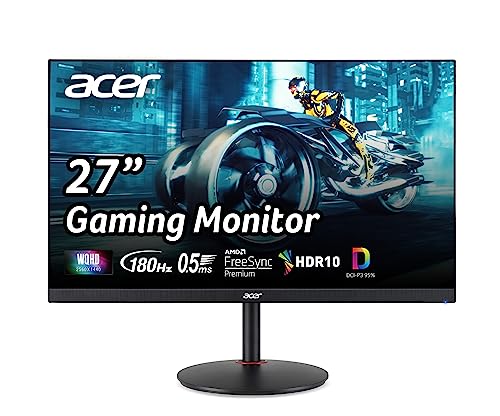 Acer Nitro XV271U M3bmiiprx |
| Check price on Amazon |
Key takeaways
- Five 1440p gaming monitors matched to the Xbox Series S ceiling: 27-inch IPS and curved VA picks with 120Hz over HDMI, FreeSync, HDR and fast panels.
The Xbox Series S has a hard ceiling that should drive the whole purchase: it renders games at up to 1440p and outputs at most 120Hz, so a monitor earns its place by accepting that exact signal over HDMI, not by posting the biggest numbers on the box. A 4K panel cannot add detail the console never draws, and a 240Hz headline figure means nothing if it only applies to DisplayPort. The right screen is a sharp 1440p panel with a verified 120Hz HDMI mode, variable refresh rate, and response fast enough for shooters.
This guide is for Series S owners moving the console to a desk, players sharing one screen between the console and a PC, and anyone replacing a living-room TV with something smaller and quicker. Every pick below is a 27-inch 1440p gaming monitor chosen from its Amazon listing specs, with the HDMI behaviour that matters to this console checked model by model.
Quick Picks
As an Amazon Associate we earn from qualifying purchases
| Product | Best for | Key spec from title |
|---|---|---|
| LG UltraGear 27GP850-B | The closest all-round match to the console | 27-inch Nano IPS, 2560 x 1440, 165Hz |
| ASUS TUF Gaming VG27AQ | Motion clarity with built-in speakers | 27-inch IPS, 2560 x 1440, 165Hz, ELMB |
| GIGABYTE M27Q | Sharing one screen with a PC or laptop | 27-inch SS IPS, 2560 x 1440, 170Hz, KVM |
| Samsung Odyssey G5 27-inch | A curved screen for dark-room play | 27-inch VA, 2560 x 1440, 165Hz, 1000R curve |
| Acer Nitro XV271U M3bmiiprx | High refresh over HDMI on a simpler setup | 27-inch IPS, 2560 x 1440, 180Hz, 144Hz via HDMI |
How to Choose
Match the resolution to the console ceiling
The Series S targets 1440p, so a 2560 x 1440 panel shows every pixel the console produces at native sharpness. A 1080p monitor throws away detail in games that render above it, while a 4K monitor mostly rescales the same 1440p image and spends your budget on pixels that stay unused in play. At 27 inches, 1440p also lands at a comfortable pixel density for desk distances of two to three feet, which is why every pick in this guide sits at that size and resolution.
Check the HDMI refresh rate, not the headline rate
Monitor titles advertise the fastest rate the panel can reach, and that figure usually belongs to DisplayPort. The Series S connects over HDMI only, so the number that counts is the HDMI rate printed in the listing or spec sheet. A 165Hz or 180Hz panel is fine as long as its HDMI input accepts 120Hz at 1440p, which HDMI 2.0 can carry. Before buying, confirm the listing states the HDMI refresh behaviour for your exact model, because sibling variants of the same monitor line often differ here.
Look for VRR and keep HDR expectations realistic
Variable refresh rate lets the monitor sync to the console when a game’s frame rate dips, which removes tearing without adding the lag of fixed sync. On these listings it appears as AMD FreeSync or FreeSync Premium, and the Xbox supports it over HDMI. HDR is the softer promise: DisplayHDR 400 and HDR10 badges on desk monitors describe acceptance of an HDR signal and modest peak brightness, not TV-style highlights. Treat HDR as a small bonus on top of a good panel, never as the reason to pick one model over another.
Weigh panel type, stand and speakers for your desk
IPS panels hold colour and brightness at wide angles, which suits a desk shared with a second viewer, while the curved VA panel in this guide trades some of that angle for deeper contrast in dark scenes. Stand adjustment decides daily comfort: height and pivot adjustment help on fixed-height desks, and a tilt-only stand may need a VESA arm later. Built-in speakers, listed on two picks here, matter if you do not own a headset; everyone else can ignore them and judge the panel alone.
The 5 Best Options
LG UltraGear 27GP850-B
- Best for: Series S owners who want one screen matched to the console now and ready for a PC later.
- 27-inch Nano IPS display
- 2560 x 1440 QHD resolution
- 165Hz refresh rate, 180Hz overclock
- 1ms GtG response time
Series S owners who want one screen matched to the console now and ready for a PC later.
The 165Hz and 180Hz figures belong to DisplayPort and overclock modes; over HDMI the console’s own 120Hz cap is the limit, so judge it on that.
This is the pick that lines up most cleanly with what the Series S can actually send. Its Nano IPS panel runs at the console’s native 1440p, its FreeSync Premium support covers variable refresh over HDMI, and the fully adjustable stand suits long sessions at a desk. It also leaves headroom for a future PC, with a DisplayPort input and a USB hub the console will never use but a laptop will. For a single-screen setup that has to do the console justice first, this is the balanced choice.
ASUS TUF Gaming VG27AQ
- Best for: Competitive players who want blur reduction and speakers in one mid-priced screen.
- 27-inch IPS display
- 2560 x 1440 QHD resolution
- 165Hz refresh rate, supports 144Hz
- 1ms response time with Extreme Low Motion Blur
Competitive players who want blur reduction and speakers in one mid-priced screen.
The 165Hz figure is an overclock above the native 144Hz, and sources differ on the exact overclock ceiling, so confirm the current spec sheet before relying on it.
The VG27AQ is the motion-focused option in this group. Its listing leads with a 165Hz rate that supports 144Hz natively, a 1ms response figure and Extreme Low Motion Blur, which strobes the backlight to sharpen fast pans in shooters and racing games. G-SYNC Compatible certification and HDR support round out a spec sheet aimed at competitive play, and the built-in speakers cover casual sessions without a headset. Buyers who split time between the Series S and fast-paced PC titles get the most from what it lists.
GIGABYTE M27Q
- Best for: Players whose Series S shares a desk and a screen with a PC or laptop.
- 27-inch SS IPS display
- 2560 x 1440 QHD resolution
- 170Hz refresh rate
- 0.5ms MPRT response time
Players whose Series S shares a desk and a screen with a PC or laptop.
This model has shipped in more than one panel revision with differing panel behaviour, so check which revision the listing describes if you read text on it all day.
The M27Q solves a desk problem the other picks ignore: two machines, one screen. Its built-in KVM switch lets a keyboard and mouse move between the Series S side of the desk and a work laptop or gaming PC without a cable swap, and the panel behind it is a fast SS IPS at the console’s native resolution. FreeSync Premium covers variable refresh for the Xbox, and the 170Hz ceiling gives a PC plenty of room. If your monitor budget has to serve work and play, this is the efficient answer.
Samsung Odyssey G5 27-inch
- Best for: Solo players who want a curved, high-contrast screen for atmospheric games.
- 27-inch VA display with 1000R curvature
- 2560 x 1440 QHD resolution
- 165Hz refresh rate
- 1ms MPRT response time
Solo players who want a curved, high-contrast screen for atmospheric games.
The listing’s port count is lean, with a single HDMI input on this model line, so a second console or PC means swapping cables or adding a switch.
The Odyssey G5 is the curved alternative for players who sit close and play in a dim room. Its VA panel bends at a tight 1000R radius that wraps the image toward your peripheral vision, and the VA technology brings the deeper blacks that dark game scenes need. The listing states a 165Hz rate with a 1ms MPRT response and HDR10 support, so it gives up nothing on speed to the flat IPS picks here. It is the one to choose when immersion matters more than sharing the screen at an angle.
Acer Nitro XV271U M3bmiiprx
- Best for: Buyers who want the HDMI refresh rate stated plainly, plus speakers and an adjustable stand.
- 27-inch IPS display
- 2560 x 1440 WQHD resolution
- Up to 180Hz refresh rate over DisplayPort, 144Hz over HDMI
- Up to 0.5ms response time
Buyers who want the HDMI refresh rate stated plainly, plus speakers and an adjustable stand.
The XV271U name covers several variants with different panels and rates, so match the full M3bmiiprx model name on the listing before ordering.
The Nitro XV271U is the straightforward high-refresh option whose listing is unusually honest about the figure a console owner needs: it states 180Hz over DisplayPort and 144Hz using the HDMI port, and 144Hz over HDMI clears the Series S ceiling with room to spare. FreeSync Premium, a wide DCI-P3 gamut and built-in speakers make it an easy single purchase for a bedroom or dorm desk, and the height-adjustable stand is rare at this end of the range. Check the model suffix carefully, because the Nitro line reuses names across variants.
Which One Fits Your Situation
You want the screen that matches the console best
Start with the LG UltraGear 27GP850-B. It pairs the console’s native resolution with FreeSync Premium, a proper ergonomic stand and enough colour performance for media between sessions. The ASUS VG27AQ runs it close if blur reduction matters more to you than the USB hub and stand range. Either way, you are buying a panel the console can drive to its full ceiling today.
Your Series S shares a desk with a PC or laptop
Take the GIGABYTE M27Q and let its KVM switch earn its keep every workday, or the Acer Nitro XV271U if the second machine is an occasional guest rather than a daily driver. Both give the PC a high-refresh DisplayPort path while the console uses HDMI at its own ceiling. One desk, one screen and no drawer full of swapped cables is the real prize here.
You play in a dark room and sit close
The Samsung Odyssey G5 is built for you: the 1000R curve fills your view at desk distance and the VA panel keeps blacks deep in night scenes and horror games. Its FreeSync support still covers the console’s variable frame rates, so the immersion costs you nothing in smoothness. Sit centred, though, because a curve this tight is a one-viewer design.
You need sound without a headset
The ASUS VG27AQ and the Acer Nitro XV271U both list built-in speakers, which covers menu navigation, casual play and streaming apps without extra hardware on the desk. The Acer adds the height-adjustable stand, so it is the easier long-session choice of the two for a fixed desk. Keep expectations modest, though, because monitor speakers serve convenience rather than the directional audio a headset gives you in shooters.
Common Mistakes
- Buying a 4K monitor for a console that renders at 1440p, then wondering why the image is no sharper than on a QHD screen.
- Trusting the headline refresh rate without checking whether it applies to the HDMI port the console actually uses.
- Ignoring variable refresh rate, then blaming the console for screen tearing that a FreeSync monitor would have absorbed.
- Picking a tilt-only stand for a fixed-height desk and ending up stacking the monitor on books to reach eye level.
- Ordering by line name alone, when variants such as the Nitro and Odyssey models change panel, ports and refresh behaviour under the same badge.
Frequently Asked Questions
Does the Series S need HDMI 2.1 for 120Hz at 1440p?
No. HDMI 2.0 carries a 1440p signal at 120Hz, which is why several monitors in this guide qualify without an HDMI 2.1 port. What matters is that the individual model’s HDMI input accepts that mode, so check the listing’s stated HDMI refresh rate for the exact variant you are buying.
Is a 4K monitor worth buying for a Series S?
Only if a PC or a future Series X will share the screen. The Series S renders games at up to 1440p, so on its own it cannot feed a 4K panel the detail that would justify one. A good 1440p monitor shows the same image the console produces, at native sharpness, for less money.
Will a 240Hz monitor make Series S games smoother?
No. The console outputs at most 120Hz, so frames beyond that rate never arrive from the Xbox. A high-refresh panel still works perfectly well and may serve a PC later, but for console-only use the extra speed is unused headroom rather than a visible improvement.
Can these monitors also run a gaming PC?
Yes, and most are better PC monitors than console ones on paper, since DisplayPort unlocks their full refresh rates. The GIGABYTE M27Q is the natural two-machine pick thanks to its KVM switch, while the LG 27GP850-B adds a USB hub that suits a laptop dock setup.
FAQ
Does the Series S need HDMI 2.1 for 120Hz at 1440p?
Is a 4K monitor worth buying for a Series S?
Will a 240Hz monitor make Series S games smoother?
Can these monitors also run a gaming PC?
More from Amazon
Programs that pair well with the guide above. Offers and eligibility are set by Amazon and may change.
Free shipping on eligible items, Prime Video and more. Eligible new members can start with a free trial.
Start a Prime free trialAd-free music streaming. Eligible new subscribers can start with a free trial.
Try Music Unlimited freeA Prime membership for ages 18-24 with a trial period. Eligibility is set by Amazon.
See Prime for Young AdultsAudiobooks and podcasts to listen to on the go. Eligible new members can start with a free trial.
Try Audible freeAs an Amazon Associate we earn from qualifying purchases.