Our Short List of 3

- Best for: Households with two consoles that need per-device bandwidth control and server filtering.
- Wi-Fi 6 (802.11ax), AX5400 class, up to 5.4 Gbps wireless speed
- DumaOS 3.0 gaming operating system
- 4 × 1G Ethernet ports and 1 USB port
- Model XR1000-100NAS

- Best for: Players who want manual NAT control and a prioritised wired port for the console.
- Wi-Fi 6 (802.11ax), AX5700 class, dual band
- 2.5G port and dedicated gaming port
- Port forwarding and Mobile Game Mode
- Subscription-free network security, VPN support, AiMesh compatible

- Best for: A wireless console that needs its own 5 GHz band away from streaming traffic.
- Wi-Fi 6, AX6600 tri-band: 4804 Mbps (5 GHz Game Band) + 1201 Mbps (5 GHz) + 574 Mbps (2.4 GHz)
- 1 × 2.5 Gbps WAN/LAN port, 1 × 1 Gbps WAN/LAN port, 3 × Gigabit LAN ports
- 1 × USB 3.0 port and 1 × USB 2.0 port
- 1.5 GHz quad-core CPU, OneMesh support
All 5 Picks at a Glance
| Product | Specs | Action |
|---|---|---|
| NETGEAR Nighthawk Pro Gaming XR1000 |
| Check price on Amazon |
| ASUS RT-AX86U Pro |
| Check price on Amazon |
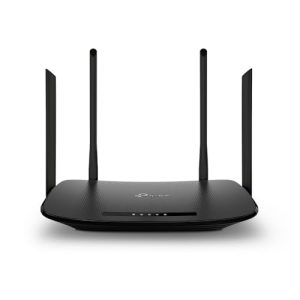
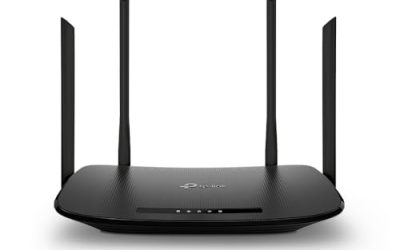
| TP-Link Archer GX90 |
| Check price on Amazon |
 ASUS ROG Rapture GT-AX6000 |
| Check price on Amazon |
 TP-Link Archer AX73 |
| Check price on Amazon |
Our Top Picks
- NETGEAR Nighthawk Pro Gaming 6-Stream WiFi 6 RouterExtra Large11.61 x 7.87 x 2.51 inches1.32 poundsCheck on Amazon
On a PC, a weak router shows up as a spiky ping graph. On an Xbox, it shows up as a sentence in the network settings: NAT Type: Strict. That one line decides whether you can hear party chat, join a friend’s lobby, or host a match at all, and no amount of download speed fixes it. The buying decision for Xbox Live is therefore not raw throughput. It is how a router handles NAT, UPnP and port forwarding for a console, and whether it can hold an Open NAT while the rest of the house streams and downloads around it.
This roundup is for Series X and Series S owners fighting a Strict or Moderate NAT reading, households running two consoles on one connection, and players whose Xbox sits too far from the router for a cable. Every pick below was chosen from its Amazon listing title and stated specifications, with the emphasis on NAT controls, per-device prioritisation and the 5 GHz band the console actually uses.
Quick Picks
As an Amazon Associate we earn from qualifying purchases.
| Product | Best for | Key spec from title |
|---|---|---|
| NETGEAR Nighthawk Pro Gaming XR1000 | Two consoles sharing one connection | DumaOS 3.0, AX5400 WiFi 6 |
| ASUS RT-AX86U Pro | Fixing NAT with manual port forwarding | Port Forwarding, 2.5G Gaming Port |
| TP-Link Archer GX90 | A wireless console in a busy streaming house | AX6600 Tri-Band, 4.8 Gbps Game Band |
| ASUS ROG Rapture GT-AX6000 | Fast fibre plans with a wired console | Dual 2.5G Ports, 2.0 GHz Quad-Core CPU |
| TP-Link Archer AX73 | A first dedicated router for one Xbox | AX5400 WiFi 6, HomeShield |
How to Choose
Start With NAT Handling, Not Speed Class
Xbox Live reports your NAT type because the console’s matchmaking and party chat depend on how the router translates its traffic. Open NAT lets you join and host freely; Moderate limits who you can connect to; Strict can block chat and lobbies outright. A router earns its place here through a reliable UPnP implementation, a clear port forwarding menu for manual rules, and enough processing headroom to hold many translations without dropping them. Two consoles behind one router is the hardest case, because both want the same ports, so UPnP quality matters more than any headline speed figure.
The 5 GHz Band Is the Console’s Ceiling
The Series X and Series S carry Wi-Fi 5 (802.11ac) radios, so the console cannot use a 6 GHz band or Wi-Fi 7 features no matter what the router offers. What reaches the Xbox is the quality of the router’s 5 GHz band: its width, its antenna design, and how cleanly it holds a signal through walls. A strong Wi-Fi 6 router serves the console at the top of its own radio limits while giving newer phones and laptops the newer standard. Spend on 5 GHz strength and coverage first; treat bands the console cannot see as a household bonus, not the reason to buy.
QoS Should Be Able to Name the Console
When a game update starts downloading in another room, an unprioritised network splits bandwidth fairly, which is exactly what a live match does not need. Useful QoS for Xbox Live works per device: you point it at the console and guarantee its share before anything else queues. The implementations differ in style. DumaOS allocates bandwidth by device with a visual panel, ASUS firmware offers adaptive modes plus a physical gaming port that jumps the queue, and TP-Link’s HomeShield prioritises by device in its app. Any of these beats a router whose only setting is a generic game mode toggle.
Ports, Placement and the Double NAT Trap
A wired Xbox removes Wi-Fi from the equation entirely, so count the LAN ports and check whether one is multi-gig if your plan runs faster than gigabit. Placement matters almost as much: a router in a cabinet under the TV stand weakens the very 5 GHz band the console depends on. The most common hidden fault is double NAT, where the Xbox sits behind both an ISP gateway and your new router, each translating addresses. Put the gateway in bridge mode or use one router only, or even the best hardware here will still report Moderate.
The 5 Best Options
NETGEAR Nighthawk Pro Gaming XR1000
- Best for: Households with two consoles that need per-device bandwidth control and server filtering.
- Wi-Fi 6 (802.11ax), AX5400 class, up to 5.4 Gbps wireless speed
- DumaOS 3.0 gaming operating system
- 4 × 1G Ethernet ports and 1 USB port
- Model XR1000-100NAS
Households with two consoles that need per-device bandwidth control and server filtering.
Every wired port is gigabit, so an internet plan faster than gigabit cannot reach the console at full speed over a cable.
The XR1000 runs DumaOS 3.0, an operating system built around the problems console players actually hit. Its Geo-Filter limits matchmaking to servers within a radius you draw, its bandwidth allocation panel lets you reserve a fixed share for the Xbox by name, and its connection benchmark shows NAT-relevant diagnostics in plain language. For a household with two consoles, that per-device control is the practical way to keep both machines addressable and prioritised without hand-writing rules. The AX5400 radio is Wi-Fi 6, comfortably above what the console’s own Wi-Fi 5 radio can use, and four gigabit LAN ports cover a wired setup.
Watch out for: Every wired port is gigabit, so an internet plan faster than gigabit cannot reach the console at full speed over a cable.
ASUS RT-AX86U Pro
- Best for: Players who want manual NAT control and a prioritised wired port for the console.
- Wi-Fi 6 (802.11ax), AX5700 class, dual band
- 2.5G port and dedicated gaming port
- Port forwarding and Mobile Game Mode
- Subscription-free network security, VPN support, AiMesh compatible
Players who want manual NAT control and a prioritised wired port for the console.
It is dual-band only, so there is no 6 GHz band for newer household devices; also check the listing says Pro, since the older RT-AX86U looks nearly identical.
If your fix for a Strict reading is doing it properly by hand, this is the router built for that approach. Port forwarding is named in the listing itself, and the ASUS firmware pairs it with a dedicated gaming port that prioritises whatever is plugged into it, a 2.5G port for a fast incoming line, and Mobile Game Mode in the app. The NAT and forwarding menus are the reason this model keeps appearing in console setup guides: rules are easy to write, easy to check, and the router holds them across reboots. AiMesh support also means a second ASUS unit can extend coverage later instead of replacing this one.
Watch out for: It is dual-band only, so there is no 6 GHz band for newer household devices; also check the listing says Pro, since the older RT-AX86U looks nearly identical.
TP-Link Archer GX90
- Best for: A wireless console that needs its own 5 GHz band away from streaming traffic.
- Wi-Fi 6, AX6600 tri-band: 4804 Mbps (5 GHz Game Band) + 1201 Mbps (5 GHz) + 574 Mbps (2.4 GHz)
- 1 × 2.5 Gbps WAN/LAN port, 1 × 1 Gbps WAN/LAN port, 3 × Gigabit LAN ports
- 1 × USB 3.0 port and 1 × USB 2.0 port
- 1.5 GHz quad-core CPU, OneMesh support
A wireless console that needs its own 5 GHz band away from streaming traffic.
Stock of this model runs thin at times, and the advanced HomeShield features sit in a paid tier, so check what the free tier covers before relying on them.
The GX90 answers a different problem: the Xbox cannot be wired, and the house will not stop streaming. Its tri-band layout reserves a dedicated 4.8 Gbps Game Band on 5 GHz, so the console gets a band of its own instead of competing with televisions on the same radio. A second 5 GHz band and the 2.4 GHz band absorb everything else. The Game Accelerator and per-device statistics in the interface help you see what the console is doing, and UPnP plus a 2.5 Gbps WAN/LAN port cover the NAT and incoming-line sides. For a wireless Series X in a busy home, this separation is the feature that matters.
Watch out for: Stock of this model runs thin at times, and the advanced HomeShield features sit in a paid tier, so check what the free tier covers before relying on them.
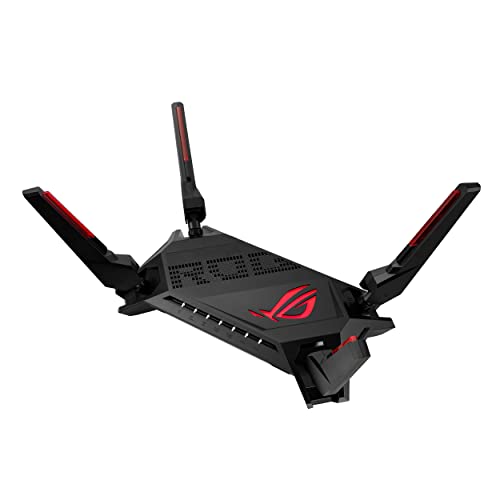
ASUS ROG Rapture GT-AX6000
- Best for: Fast fibre plans where the Xbox is wired and the router must keep up at peak hours.
- Wi-Fi 6, AX6000 class, dual band
- Dual 2.5G WAN/LAN ports with WAN aggregation
- Quad-core 2.0 GHz CPU
- AiMesh compatible, lifetime internet security, Instant Guard, Aura RGB
Fast fibre plans where the Xbox is wired and the router must keep up at peak hours.
Regional listings of this model print different codes and there is a separate EVA Edition, so confirm the listing is the standard GT-AX6000 before ordering.
The GT-AX6000 is the pick when the line coming into the house is fast and the console can sit on a cable. It carries two 2.5G ports that can split duties between a multi-gig WAN feed and a wired gaming device, plus WAN aggregation if your provider bonds lines. A 2.0 GHz quad-core processor gives it the headroom to hold large NAT tables and QoS rules during peak evening load, which is when Strict readings and lobby drops tend to appear on weaker hardware. Triple-level game acceleration prioritises the console’s traffic in the firmware, and AiMesh compatibility leaves the mesh door open later.
Watch out for: Regional listings of this model print different codes and there is a separate EVA Edition, so confirm the listing is the standard GT-AX6000 before ordering.
TP-Link Archer AX73
- Best for: A single-console household upgrading from an ISP-supplied router.
- Wi-Fi 6, AX5400 class, dual band
- Gigabit Ethernet ports
- HomeShield security and QoS, WPA3
- 6 high-performance antennas, OFDMA and MU-MIMO
A single-console household upgrading from an ISP-supplied router.
There is no multi-gig port, so gigabit is the wired ceiling, and its QoS controls are simpler than the DumaOS or ROG dashboards above.
Not every Xbox setup needs a gaming-branded flagship. The AX73 is a mainstream AX5400 router whose HomeShield QoS can prioritise the console by device, whose UPnP handles the standard Xbox Live port negotiation, and whose six high-gain antennas give the 5 GHz band a better reach than the router most ISPs hand out. It is the sensible first step for a single-console home that is replacing a provider box: the NAT reading usually improves simply because the translation and forwarding behaviour is predictable, and the rest of the house gets a modern Wi-Fi 6 network in the same purchase.
Watch out for: There is no multi-gig port, so gigabit is the wired ceiling, and its QoS controls are simpler than the DumaOS or ROG dashboards above.
Which One Fits Your Situation
Your Xbox Reports Strict NAT Behind an ISP Gateway
Fix the layout before the hardware: bridge the gateway, then let one router own the NAT. The RT-AX86U Pro suits this best because its forwarding menus make manual rules straightforward to add and verify, and its gaming port gives the wired console first claim on traffic while you confirm the console’s own test finally reads Open.
Two Xbox Consoles Share One Connection
This is the hardest NAT case, since both consoles request the same ports. The XR1000 is the natural pick: DumaOS allocates bandwidth per device by name, and its UPnP behaviour is designed for multi-console homes. Give each console a reserved address, let UPnP negotiate, and test both machines in the same party before assuming the setup is finished.
The Console Is Wireless and the House Streams Constantly
Choose separation over speed badges. The Archer GX90’s dedicated 5 GHz Game Band keeps the console off the radio the televisions are using, which removes most contention without any manual rules. Place it as centrally as the cabling allows, because a dedicated band cannot fix a weak signal through several walls.
You Have a Fast Plan and a Wired Desk Setup
The GT-AX6000 matches a multi-gig line with dual 2.5G ports and the processing power to hold QoS and NAT rules at peak load. Wire the Xbox into it, enable the game acceleration profile for that port, and the remaining decision is only whether to add an AiMesh node for the far rooms later.
Common Mistakes
- Running the new router behind the ISP gateway without bridge mode, creating double NAT that no setting on either box fully cures.
- Turning UPnP off for security and then wondering why the console falls back to Moderate NAT with no forwarding rules written to replace it.
- Forwarding the same Xbox Live port to two consoles at once, which guarantees one of them loses the mapping.
- Paying for a Wi-Fi 7 flagship expecting the Series X or S to use its 6 GHz band, when the console’s radio stops at Wi-Fi 5.
- Burying the router inside a TV cabinet, then blaming the router when the 5 GHz signal to the console weakens.
Frequently Asked Questions
What NAT Type Does Xbox Live Actually Need?
Open NAT is the goal. It allows joining any lobby, hosting games and hearing all party chat. Moderate NAT works for many games but restricts who you can connect to, and Strict NAT can block chat and matchmaking entirely. The router controls this through UPnP or forwarding rules, which is why NAT handling leads the buying criteria in this roundup.
Should UPnP Be On or Off for an Xbox?
For most homes, on. UPnP lets the console open the ports it needs automatically and is the only practical route when two consoles share one router. If you prefer it off, the alternative is manual port forwarding with a reserved address for the console, which works for a single Xbox but cannot serve two consoles requesting the same port simultaneously.
Will a Gaming Router Lower Ping to Xbox Servers?
Only the part of the delay created inside your home. A better router removes queueing delays when the network is busy and, with a feature like the XR1000’s Geo-Filter, can keep matchmaking on nearer servers. It cannot shorten the physical distance to a far server, and a wired connection still beats any wireless optimisation, so treat router features as stability tools rather than speed promises.
Can One Router Give Two Xbox Consoles Open NAT at the Same Time?
It depends on the router’s UPnP implementation, and it is the scenario cheaper routers handle worst. Models with mature UPnP and per-device controls, such as the XR1000 and the ASUS picks here, manage it far more reliably. Reserve an address for each console, avoid manual rules that claim the same port twice, and run the network test on both machines together to confirm.
FAQ
What NAT Type Does Xbox Live Actually Need?
Should UPnP Be On or Off for an Xbox?
Will a Gaming Router Lower Ping to Xbox Servers?
Can One Router Give Two Xbox Consoles Open NAT at the Same Time?
More from Amazon
Programs that pair well with the guide above. Offers and eligibility are set by Amazon and may change.
Free shipping on eligible items, Prime Video and more. Eligible new members can start with a free trial.
Start a Prime free trialAd-free music streaming. Eligible new subscribers can start with a free trial.
Try Music Unlimited freeA Prime membership for ages 18-24 with a trial period. Eligibility is set by Amazon.
See Prime for Young AdultsAudiobooks and podcasts to listen to on the go. Eligible new members can start with a free trial.
Try Audible freeAs an Amazon Associate we earn from qualifying purchases.