Our Short List of 3
- Best for: households that want app alerts and history without giving up an on-unit display.
- Model: H5075
- Temperature accuracy: ±0.54°F
- Humidity accuracy: ±3%RH
- Refresh rate: 2 seconds

- Best for: a nursery, bedroom or living room where anyone should be able to read the air at a glance.
- Model: TP49
- Temperature accuracy: ±1°F
- Humidity accuracy: ±2% to 3% RH
- Refresh rate: 10 seconds

- Best for: smart-home households that want humidity readings inside their existing automations.
- Model: W2301500 (Meter Plus)
- Display: 3-inch LCD with comfort indicator
- Temperature range: -4°F to 176°F
- Humidity range: 0 to 99% RH
All 4 Picks at a Glance
| Product | Specs | Action |
|---|---|---|
| Govee Hygrometer Thermometer H5075 |
| Check price on Amazon |
| ThermoPro TP49 Digital Hygrometer |
| Check price on Amazon |
| SwitchBot Meter Plus |
| Check price on Amazon |
 SensorPush HT1 Smart Sensor |
| Check price on Amazon |
Key takeaways
- Four indoor humidity monitors compared by accuracy, display, app alerts and data history: Govee H5075, ThermoPro TP49, SwitchBot Meter Plus and SensorPush HT1.
A humidity monitor earns its place by settling an argument: is this room actually damp, or does it just feel that way? The decision that matters is not the size of the screen but how you will use the number. A glanceable display suits a nursery you walk past; a logged history suits a basement you visit twice a month. Accuracy claims also need reading carefully, because every figure in this roundup applies to a stated temperature and humidity band, not the whole scale.
This guide is for three kinds of buyers: parents and allergy sufferers watching bedroom air, owners of basements, cellars, greenhouses or instrument collections where moisture does slow damage, and smart-home users who want humidity to trigger a fan or dehumidifier. Every pick below is a dedicated temperature and humidity meter chosen from its Amazon listing, and the four split cleanly into display-only, Bluetooth and logging roles.
Quick Picks
As an Amazon Associate we earn from qualifying purchases.
| Product | Best for | Key spec from title |
|---|---|---|
| Govee Hygrometer Thermometer H5075 | App alerts with a screen on the unit | Bluetooth remote app monitoring, 3-inch LCD |
| ThermoPro TP49 Digital Hygrometer | A simple reading anyone in the house can check | Face comfort indicator, refreshes every 10 seconds |
| SwitchBot Meter Plus | Feeding readings into a smart home | 3-inch LCD, app control with notification alerts |
| SensorPush HT1 Smart Sensor | Long-term logging in spots you rarely visit | App monitoring, samples every minute |
How to Choose
Decide Between a Screen and an App
A monitor with its own screen answers the moment you walk past, which suits nurseries, bedrooms and living rooms where several people check the air. An app-only sensor has no display to read, but it can sit inside a guitar case, a fridge or a crawl space where a screen would be pointless. Hybrid models do both, at the cost of a bigger body. Decide by asking who reads the number: if anyone in the house should be able to see it without a phone, the display is not optional; if the reader is always you and the spot is awkward, logging matters more.
Read the Accuracy Figures Carefully
Every listing in this category quotes accuracy for a limited band, usually room temperature and mid-range humidity, and the figure widens toward the extremes of the scale. For household use, a humidity tolerance of two to three percent RH is normal and honestly stated; treat any claim of laboratory precision across the full zero to one hundred range with suspicion. What matters more day to day is consistency: a monitor that reads two points high every day still shows you the trend and the moment a room crosses into damp. A few apps also allow a calibration offset if you own a reference meter.
Match the Wireless Link to the Distance
Bluetooth range figures are measured in open air, so a claim of two hundred feet can shrink to a room or two once walls, floors and a fridge door intervene. Alerts have the same limit: a Bluetooth monitor can only warn your phone while the phone is within reach, unless a hub or gateway bridges it to the internet. Check the history length too. Onboard storage ranges from a few weeks to over two months in this roundup, and it decides whether a holiday shows up as a complete graph or a gap when you return.
Plan Placement and Power
A hygrometer measures the air touching it, so placement decides whether the reading means anything. Keep it away from a humidifier’s output plume, a sunny window and exterior doors, and give a new unit a few hours to settle before trusting it. Mounting options in this roundup include stands, magnets and hanging holes, which cover shelves, fridge doors and greenhouse frames. Finally, look at the battery: common AAA cells are easy to replace and last a year or more in these devices, while the coin cell in the smallest logger is a less common size worth ordering alongside.
The 4 Best Options
Govee Hygrometer Thermometer H5075
- Best for: households that want app alerts and history without giving up an on-unit display.
- Model: H5075
- Temperature accuracy: ±0.54°F
- Humidity accuracy: ±3%RH
- Refresh rate: 2 seconds
households that want app alerts and history without giving up an on-unit display.
alerts only reach your phone while it is inside Bluetooth range; there is no Wi-Fi in this model.
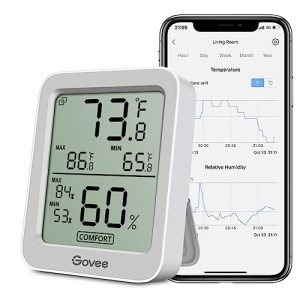
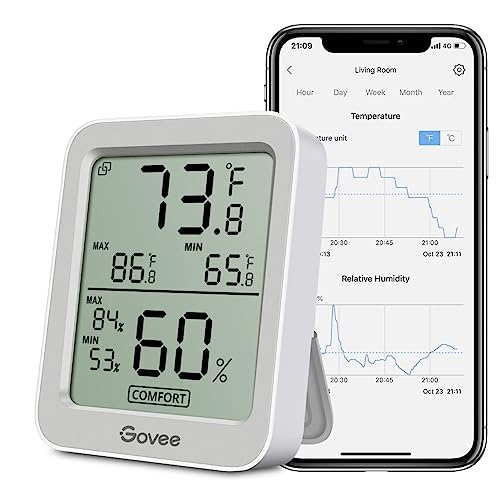
The H5075 is the pick for anyone who wants a readable screen on the unit and a phone record behind it. Its Swiss-made sensor is rated to ±0.54°F and ±3%RH, readings refresh every two seconds, and the 3-inch LCD shows current values plus max/min records with a dry/comfort/wet indicator. Through the Govee Home app it sends an alert when temperature or humidity leaves a preset range, keeps 20 days of records online and exports up to two years of data as CSV. Bluetooth range is listed at 196 feet, so it suits one floor of a home rather than a detached building.
ThermoPro TP49 Digital Hygrometer
- Best for: a nursery, bedroom or living room where anyone should be able to read the air at a glance.
- Model: TP49
- Temperature accuracy: ±1°F
- Humidity accuracy: ±2% to 3% RH
- Refresh rate: 10 seconds
a nursery, bedroom or living room where anyone should be able to read the air at a glance.
it keeps no history and has no max/min records, so slow damp problems building over weeks stay invisible.
The TP49 skips apps entirely and answers one question well: what does the air in this room feel like right now. A face icon marks the air as dry, comfortable or wet, the reading refreshes every ten seconds, and the listing rates the sensor to ±1°F and ±2 to 3 percent RH. It runs 18 to 24 months on a single AAA battery that is included in the box, and the back carries a tabletop stand, a magnet and a hanging hole, so it can live on a fridge door, a shelf or a wall in a nursery, cellar or guitar room.
SwitchBot Meter Plus
- Best for: smart-home households that want humidity readings inside their existing automations.
- Model: W2301500 (Meter Plus)
- Display: 3-inch LCD with comfort indicator
- Temperature range: -4°F to 176°F
- Humidity range: 0 to 99% RH
smart-home households that want humidity readings inside their existing automations.
remote alerts, voice assistants and Matter all require a SwitchBot hub, which is a separate purchase.
Choose the Meter Plus when the reading should feed the rest of a smart home rather than sit on a shelf. The 3-inch screen is the largest here, the sensor is rated to ±0.4°F and ±2% RH across the normal indoor band, and values update four times a second. On its own it works over Bluetooth and stores 68 days of history on the device; add a SwitchBot hub and it joins Alexa, Google Home, Apple Home, SmartThings and Matter, with phone alerts for humidity swings. A built-in magnet, stand and hanging hole cover fridges, shelves and walls.
SensorPush HT1 Smart Sensor
- Best for: cellars, freezers, humidors and instrument storage where the record matters more than the glance.
- Model: HT1
- Display: none, app only
- Temperature range: -40°F to 140°F
- Humidity range: 0 to 100% RH
cellars, freezers, humidors and instrument storage where the record matters more than the glance.
it is not waterproof, and internet access needs the G1 gateway, which is sold separately.
The HT1 is the monitor for people who trust a graph more than a glance. There is no screen at all; the sealed 1.6-inch square samples temperature and humidity every minute, stores 20 days of readings on board and syncs to the app whenever your phone is in Bluetooth range, with unlimited history kept in the app. Its published accuracy is the tightest here, ±0.5°F typical and ±3% RH typical, across a -40°F to 140°F range that covers freezers and attics. An optional G1 gateway adds internet access and alerts from anywhere.
Which One Fits Your Situation
A Bedroom or Nursery You Check in Passing
Take the ThermoPro TP49. The comfort face tells a parent or a partner the state of the room without anyone opening an app, the ten-second refresh catches the effect of a humidifier quickly, and the magnet or stand puts it on a fridge door or nightstand in seconds. It keeps no history, which is fine when the question is simply whether tonight’s air is dry.
A Basement, Cellar or Attic You Rarely Visit
Choose the SensorPush HT1. It samples every minute and holds twenty days of readings, so a damp spell that starts and ends between your visits still appears in the graph. Add the optional gateway and alerts reach your phone from anywhere, which turns it into an early warning for a leaking pipe or a failing dehumidifier rather than a record you discover weeks later.
Several Rooms on One Phone
The Govee H5075 fits a hallway-and-bedrooms setup best. Several units feed one app, each with its own alert thresholds, so a child’s room and a plant shelf can be watched side by side, and the two-year CSV export suits anyone tracking a damp problem across seasons. Its screen still shows the basics to anyone walking past, which app-only sensors cannot do.
A Smart Home That Should React on Its Own
Pick the SwitchBot Meter Plus, and budget for the hub. On Bluetooth alone it is a clear, fast-updating display with over two months of onboard history, but the hub is what lets its readings feed Alexa, Google Home, Apple Home and Matter routines, so a stuffy room can prompt action instead of just recording the problem. The large screen stays useful for everyone who never opens the app.
Common Mistakes
- Placing the monitor beside a humidifier, radiator or sunny window, then trusting a reading that only describes that one spot.
- Setting two units side by side for five minutes, seeing a small gap and declaring one of them broken; sensors need hours to settle, and the stated tolerances allow a few points of difference.
- Reading a Bluetooth range figure as a whole-house promise, when walls, floors and metal doors cut it down sharply.
- Expecting alerts while away from home from a Bluetooth-only setup that has no hub or gateway to reach the internet.
- Chasing one perfect number instead of watching the trend and counting the hours a room spends in the damp zone.
Frequently Asked Questions
What humidity level should a home stay at?
Most homes feel comfortable and resist mold somewhere between thirty and fifty percent relative humidity. Below that band, air dries skin, throats and wooden instruments; above it, condensation and mold become likelier, especially on cold windows and exterior walls. A monitor’s job is to show how long a room spends outside the band, not to hold one perfect number all day.
Where should I place a humidity monitor?
Put it at breathing height in the part of the room people actually use, away from windows, radiators, exterior doors and the direct output of a humidifier or dehumidifier. Give a new unit several hours in place before judging its readings, because the sensor needs time to match the room after being handled and shipped.
Do I need Wi-Fi, or is Bluetooth enough?
Bluetooth is enough if you read the monitor at home and only need alerts while you are nearby. Wi-Fi, through a hub or gateway, matters when the space sits empty — a holiday home, a storage unit, a cellar you check monthly — because alerts and live readings then reach your phone from anywhere with an internet connection.
Why do two monitors side by side disagree?
Small gaps are normal. Each listing in this roundup allows a tolerance of roughly two to three percent RH, so two honest units can sit a few points apart and both be within specification. Judge a monitor by whether it tracks changes consistently over days, and use a calibration offset in the app if you own a trusted reference.
FAQ
What humidity level should a home stay at?
Where should I place a humidity monitor?
Do I need Wi-Fi, or is Bluetooth enough?
Why do two monitors side by side disagree?
More from Amazon
Programs that pair well with the guide above. Offers and eligibility are set by Amazon and may change.
Free shipping on eligible items, Prime Video and more. Eligible new members can start with a free trial.
Start a Prime free trialAd-free music streaming. Eligible new subscribers can start with a free trial.
Try Music Unlimited freeA Prime membership for ages 18-24 with a trial period. Eligibility is set by Amazon.
See Prime for Young AdultsAudiobooks and podcasts to listen to on the go. Eligible new members can start with a free trial.
Try Audible freeAs an Amazon Associate we earn from qualifying purchases.