Our Short List of 3

- Best for: A family home on NBN FTTN or FTTB that wants dual-band Wi-Fi and USB sharing from one box.
- AC1200 dual-band Wi-Fi: 300 Mbps on 2.4 GHz and 867 Mbps on 5 GHz
- VDSL2 modem with up to 100 Mbps broadband and ADSL2+ support
- Four 5dBi fixed external antennas
- Three 10/100 Mbps LAN ports plus one 10/100 Mbps LAN/WAN port and one RJ11 port
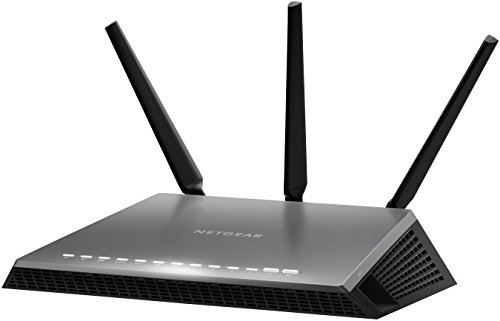
- Best for: A large home with many devices that wants strong dual-band Wi-Fi and five wired Gigabit ports.
- AC1900 dual-band Wi-Fi: 600 Mbps on 2.4 GHz and 1300 Mbps on 5 GHz
- VDSL2 and ADSL2+ modem with Ethernet WAN option
- 1 GHz dual-core processor with 256 MB memory
- Five Gigabit Ethernet ports
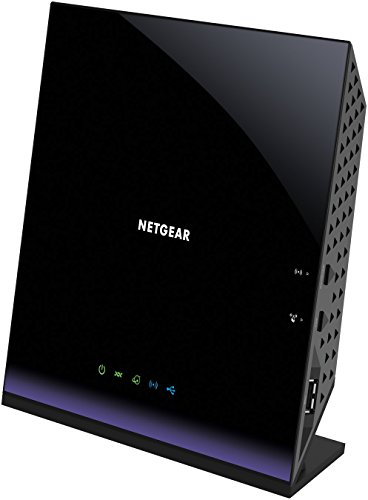
- Best for: A home that wants AC Wi-Fi and four wired Gigabit ports in a compact box.
- AC1600 dual-band Wi-Fi: 300 Mbps on 2.4 GHz and 1300 Mbps on 5 GHz
- VDSL2 and ADSL2+ modem with Ethernet WAN option
- Four Gigabit Ethernet ports
- One USB port for shared storage and printers
All 3 Picks at a Glance
| Product | Specs | Action |
|---|---|---|
| TP-Link AC1200 Wireless VDSL/ADSL Modem Router Archer VR300 |
| Check price on Amazon |
| NETGEAR Nighthawk AC1900 WiFi VDSL/ADSL Modem Router (D7000-100NAS) |
| Check price on Amazon |
| NETGEAR AC1600 WiFi VDSL/ADSL Modem Router (D6400-100NAS) |
| Check price on Amazon |
Our Top Picks
An NBN home on a node-based line needs a modem router that talks VDSL2 over the copper from the node to the house, and that single choice shapes Wi-Fi reach and wired connections through the home. Pick a unit without a VDSL2 modem and the line will not connect at all, while a unit with weak Wi-Fi will leave rooms with thin coverage even when the line itself runs well. The five models below all carry a built-in VDSL2 modem, so the real decision is Wi-Fi class, antenna count, and wired ports.
NBN is the National Broadband Network of Australia, and this roundup suits renters, families, and small offices on FTTN and FTTB lines who want one box for modem and Wi-Fi. The five picks come from TP-Link and NETGEAR modem routers listed on Amazon, ranging from a dual-band AC1200 unit with four antennas to single-band 300 Mbps units for smaller homes with lower Wi-Fi needs.
Quick Picks
As an Amazon Associate we earn from qualifying purchases
| Product | Best for | Key spec from title |
|---|---|---|
| TP-Link AC1200 Wireless VDSL/ADSL Modem Router Archer VR300 | Dual-band Wi-Fi for a busy family home | AC1200 Wireless VDSL/ADSL |
| NETGEAR Nighthawk AC1900 WiFi VDSL/ADSL Modem Router (D7000-100NAS) | Strong Wi-Fi for a large home with many devices | AC1900 WiFi VDSL/ADSL |
| NETGEAR AC1600 WiFi VDSL/ADSL Modem Router (D6400-100NAS) | Dual-band Wi-Fi for streaming and work | AC1600 WiFi VDSL/ADSL |
| TP-Link 300Mbps Wireless N VDSL/ADSL Modem Router TD-W9970 | Simple Wi-Fi for a small home with USB sharing | 300Mbps Wireless N TD-W9970 |
| TP-Link 300Mbps Wireless N VDSL/ADSL Modem Router TD-W9960 | Simple Wi-Fi for a renter with one wired desktop | 300Mbps Wireless N TD-W9960 |
How to Choose
Match the Modem to the NBN Line Type
A DSL modem router fits NBN fiber-to-the-node and fiber-to-the-building connections, which run over VDSL2 copper from the node or the building basement to the premises, so the modem inside the box must speak VDSL2 and accept the settings from the internet provider. NBN fiber-to-the-premises and HFC connections do not need a DSL modem at all, because the network box in the home already gives an Ethernet connection, and those homes need an Ethernet WAN router instead. Check the NBN connection type for the address first, then confirm with the provider that the chosen model, its VDSL settings, and its VLAN settings suit that line before ordering.
Pick the Wi-Fi Class for the Home
Dual-band AC1200, AC1600, and AC1900 units carry a 5 GHz band beside the 2.4 GHz band, which gives phones, laptops, and streaming boxes a roomier lane for video and large downloads, while the 2.4 GHz band reaches further through walls for smart plugs and gear in distant rooms. Single-band 300 Mbps units run on 2.4 GHz only, which suits a small home with a handful of devices and modest Wi-Fi needs, but can feel crowded when many devices share one band at once. Match the Wi-Fi class to the number of devices, the size of the home, and how much video the household watches each evening.
Count Wired Ports and USB Sharing
Wired ports matter for a desktop PC, a games console, a smart TV, and a network drive, because a cable link stays steady when Wi-Fi in a busy room dips. Gigabit ports suit homes that move large files between devices or run a wired PC beside the router, while Fast Ethernet ports suit smaller wired needs such as one desktop or one TV box. A USB port adds shared storage or a shared printer for the whole home, so a household that wants one drive for backups or one printer for every laptop should favor a model with USB. Count the wired devices first, then pick a model with enough ports plus one spare.
Weigh Setup, Antennas, and Coverage
Four antennas and dual-band Wi-Fi suit a larger home with rooms spread across two floors, because more antennas and a 5 GHz band help the signal reach bedrooms and living areas with fewer weak spots. Two antennas and single-band Wi-Fi suit a compact home where the router sits near the devices it serves, and a central shelf spot usually beats a corner cupboard for even coverage. Look for a phone app or a guided web setup that walks through VDSL settings, Wi-Fi names, and passwords in plain language, and keep the provider login details close at hand so setup runs without a hunt for paperwork.
The 5 Best Options
TP-Link AC1200 Wireless VDSL/ADSL Modem Router Archer VR300
- Best for: A family home on NBN FTTN or FTTB that wants dual-band Wi-Fi and USB sharing from one box.
- AC1200 dual-band Wi-Fi: 300 Mbps on 2.4 GHz and 867 Mbps on 5 GHz
- VDSL2 modem with up to 100 Mbps broadband and ADSL2+ support
- Four 5dBi fixed external antennas
- Three 10/100 Mbps LAN ports plus one 10/100 Mbps LAN/WAN port and one RJ11 port
A family home on NBN FTTN or FTTB that wants dual-band Wi-Fi and USB sharing from one box.
The LAN ports run at 10/100 Mbps, so wired devices will not reach Gigabit link rates.
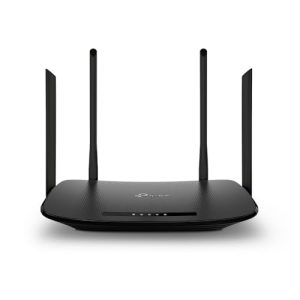
The Archer VR300 pairs a built-in VDSL2 modem with AC1200 dual-band Wi-Fi, so one box covers the NBN line and the wireless network for a family home. Its four fixed antennas spread the signal across living areas and bedrooms, while the 5 GHz band gives streaming boxes and laptops a roomier lane and the 2.4 GHz band reaches devices further from the router. A USB 2.0 port allows a shared drive or printer, and the Tether app gives phone-based control of Wi-Fi names, passwords, and parental controls for children in the home.
NETGEAR Nighthawk AC1900 WiFi VDSL/ADSL Modem Router (D7000-100NAS)
- Best for: A large home with many devices that wants strong dual-band Wi-Fi and five wired Gigabit ports.
- AC1900 dual-band Wi-Fi: 600 Mbps on 2.4 GHz and 1300 Mbps on 5 GHz
- VDSL2 and ADSL2+ modem with Ethernet WAN option
- 1 GHz dual-core processor with 256 MB memory
- Five Gigabit Ethernet ports
A large home with many devices that wants strong dual-band Wi-Fi and five wired Gigabit ports.
The unit is a wide desktop box, so it needs a broad shelf with room for three antennas and side USB ports.
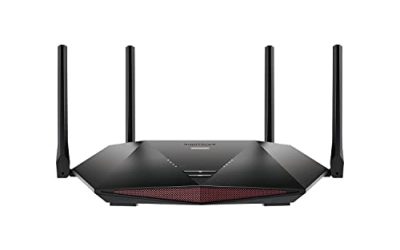
The Nighthawk D7000 brings AC1900 dual-band Wi-Fi to an NBN node-based line, with a 1 GHz dual-core processor that keeps the network responsive when phones, laptops, consoles, and smart TVs all share the connection. Five Gigabit Ethernet ports give wired PCs and consoles a steady cable link, while two USB 3.0 ports allow shared storage on both sides of the unit. Beamforming+ aims the wireless signal toward connected devices, and the Nighthawk app gives phone-based control of the network, guest access, and connected devices from anywhere in the home.
NETGEAR AC1600 WiFi VDSL/ADSL Modem Router (D6400-100NAS)
- Best for: A home that wants AC Wi-Fi and four wired Gigabit ports in a compact box.
- AC1600 dual-band Wi-Fi: 300 Mbps on 2.4 GHz and 1300 Mbps on 5 GHz
- VDSL2 and ADSL2+ modem with Ethernet WAN option
- Four Gigabit Ethernet ports
- One USB port for shared storage and printers
A home that wants AC Wi-Fi and four wired Gigabit ports in a compact box.
The 2.4 GHz band runs at 300 Mbps, so older single-band devices will not use the 5 GHz band.
The D6400 gives an NBN node-based line AC1600 dual-band Wi-Fi in a compact desktop box, with 1300 Mbps on the 5 GHz band for streaming and large downloads and 300 Mbps on the 2.4 GHz band for devices further from the router. Four Gigabit Ethernet ports cover a wired PC, a console, and a smart TV without an extra switch, while the built-in VDSL2 modem keeps the setup to one box beside the phone socket. NETGEAR genie guides the setup through VDSL settings and Wi-Fi names, and Beamforming+ aims the signal toward connected devices around the home.
TP-Link 300Mbps Wireless N VDSL/ADSL Modem Router TD-W9970
The TD-W9970 is a compact single-band modem router for a small NBN home, pairing a VDSL2 modem with 300 Mbps Wi-Fi on the 2.4 GHz band for browsing, video, and everyday connected devices. Two 5dBi antennas spread the signal across nearby rooms, while four Fast Ethernet ports cover a wired PC and a smart TV. A USB 2.0 port allows a shared drive or a 3G/4G backup link, and modem-only mode lets the unit serve as a plain modem in front of another router when the household wants a two-box setup.
Specs
- 300 Mbps Wi-Fi on the 2.4 GHz band
- VDSL2 modem with up to 100 Mbps broadband and ADSL2+ support
- Two 5dBi fixed external antennas
- One 10/100 Mbps LAN/WAN port, three 10/100 Mbps LAN ports, and one RJ11 port
- USB 2.0 port for shared storage and 3G/4G backup
- Modem-only mode and Tether app setup
Best for: A small home that wants a compact VDSL2 modem router with USB sharing.
Watch out for: Single-band Wi-Fi can feel crowded when many devices share the 2.4 GHz band at once.
ASIN: B013OXVA6M
TP-Link 300Mbps Wireless N VDSL/ADSL Modem Router TD-W9960
The TD-W9960 is a compact single-band modem router for a small NBN home that needs a plain, steady link for browsing, video, and work calls. Its VDSL2 modem connects the node-based line, while 300 Mbps Wi-Fi on the 2.4 GHz band serves phones, laptops, and smart TVs in nearby rooms. Four Fast Ethernet ports cover a wired desktop and a TV box, two omni-directional antennas spread the signal, and 6kV lightning protection guards the unit against surges on the line. The Tether app guides setup from a phone, with Wi-Fi names and passwords in plain language.
Specs
- 300 Mbps Wi-Fi on the 2.4 GHz band
- VDSL2 modem with up to 100 Mbps broadband and ADSL2+ support
- Two omni-directional antennas
- Four 10/100 Mbps LAN ports and one RJ11 port
- 6kV lightning protection
- Modem-only mode and Tether app setup
Best for: A renter in a small home who wants a compact modem router with wired ports for a desktop.
Watch out for: There is no USB port, so shared storage and a shared printer need another device on the network.
ASIN: B07H5Q3QNH
Which One Fits Your Situation
A Family Home with Many Devices
Pick the Nighthawk D7000 when the home has phones, laptops, consoles, and smart TVs all online at once. Its AC1900 dual-band Wi-Fi and five Gigabit ports keep wired and wireless devices moving together, while two USB 3.0 ports allow shared storage for the whole household. Place the wide box on a broad shelf with room for its antennas, and let the 5 GHz band carry video while the 2.4 GHz band serves devices in distant rooms.
A Small Home or Rental
Pick the TD-W9960 or the TD-W9970 when the home is compact and the device list is short. Both give a VDSL2 modem and 300 Mbps Wi-Fi on the 2.4 GHz band, with four Fast Ethernet ports for wired devices. Choose the TD-W9970 when a USB port for shared storage matters, and choose the TD-W9960 when a plain compact box with lightning protection is the priority. Either unit keeps the setup to one box beside the phone socket.
A Home Office with Wired Gear
Pick the D6400 or the Archer VR300 when work calls and file transfers share the network with evening video. The D6400 gives four Gigabit ports and AC1600 dual-band Wi-Fi, which suits a wired PC beside the router and wireless laptops around the home. The Archer VR300 gives dual-band AC1200 Wi-Fi, four antennas, and a USB port for a shared drive, which suits a home office that also serves family devices after work hours.
A Household That Wants Dual-Band Wi-Fi on a Modest Line
Pick the Archer VR300 when the NBN line runs at modest VDSL2 rates and the household still wants dual-band Wi-Fi for video and browsing. Its AC1200 wireless and four antennas spread coverage across living areas and bedrooms, while the USB 2.0 port allows a shared drive for backups. The D6400 is the pick when four Gigabit ports matter more than antennas, because its wired ports suit a desktop, a console, and a smart TV beside the router.
Common Mistakes
- Buying a DSL modem router for an NBN fiber-to-the-premises or HFC home, where an Ethernet WAN router is the right box.
- Ordering before checking the NBN connection type and the provider settings for the line.
- Placing the router in a corner cupboard, where walls and doors weaken the Wi-Fi in distant rooms.
- Choosing single-band Wi-Fi for a home with many devices, then crowding every device onto the 2.4 GHz band.
- Forgetting to check wired port counts, then finding the desktop, console, and TV need more ports than the box has.
Frequently Asked Questions
Do these modem routers suit NBN FTTN and FTTB lines?
Yes. Each model in this roundup carries a built-in VDSL2 modem, which is the modem type that NBN fiber-to-the-node and fiber-to-the-building lines use over copper from the node or building to the home. Confirm the connection type for the address and the VDSL settings from the provider before ordering, because the wrong modem type will not connect to the line at all.
Can I use a DSL modem router on NBN fiber-to-the-premises or HFC?
No. NBN fiber-to-the-premises and HFC homes already have a network box that gives an Ethernet connection, so a DSL modem has nothing to connect to on those lines. Those homes need an Ethernet WAN router, which plugs into the network box with a cable and shares the connection over Wi-Fi and wired ports. A DSL modem router bought for those lines will sit unused beside the network box.
What Wi-Fi class suits a family home on NBN?
Dual-band AC1200 or higher suits a family home, because the 5 GHz band carries video and downloads while the 2.4 GHz band reaches devices in distant rooms. Single-band 300 Mbps Wi-Fi suits a small home with a handful of devices, but it can feel crowded when many devices share one band. Count the phones, laptops, consoles, and smart TVs first, then match the Wi-Fi class to that device list.
Do I need the provider settings before setup?
Yes. Keep the provider login details, the VDSL settings, and any VLAN details close at hand before the box arrives, because guided setup will ask for them. The provider support pages or the welcome letter from the provider usually carry these details, and the setup app walks through each field in order. Without the right settings, the modem may link to the line yet fail to reach the internet.
FAQ
Do these modem routers suit NBN FTTN and FTTB lines?
Can I use a DSL modem router on NBN fiber-to-the-premises or HFC?
What Wi-Fi class suits a family home on NBN?
Do I need the provider settings before setup?
More from Amazon
Programs that pair well with the guide above. Offers and eligibility are set by Amazon and may change.
Free shipping on eligible items, Prime Video and more. Eligible new members can start with a free trial.
Start a Prime free trialAd-free music streaming. Eligible new subscribers can start with a free trial.
Try Music Unlimited freeA Prime membership for ages 18-24 with a trial period. Eligibility is set by Amazon.
See Prime for Young AdultsAudiobooks and podcasts to listen to on the go. Eligible new members can start with a free trial.
Try Audible freeAs an Amazon Associate we earn from qualifying purchases.