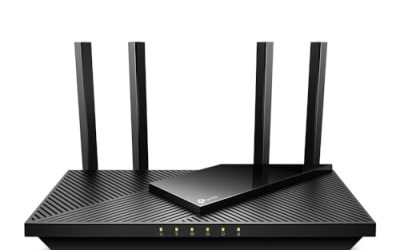
Key takeaways
- Find the best routers that work with Xfinity, from DOCSIS 3.1 modem-router combos to standalone routers, and check compatibility before you buy one today.
As an Amazon Associate we earn from qualifying purchases.
Shopping for a router on Xfinity means answering one question before anything else: will this box actually get your home online on a Comcast connection? A router that works beautifully on fibre or DSL can be useless on cable, and a modem-router combo that suits a small flat can choke in a busy family home. The decision is really about matching the hardware to the way your line reaches the house, the plan you pay for, and the rooms you need to cover.
This guide is written for Xfinity customers who are done renting a gateway, households setting up a new connection from scratch, and gamers or remote workers who want steadier Wi-Fi without guessing at compatibility. Every recommendation below is drawn from the model names and specifications listed on the product page, so you can check any pick against the approved-device list before spending anything.
How to Choose a Router for Xfinity
Match the Modem Standard to Your Plan
Xfinity is a cable service, so the modem side of the setup speaks DOCSIS, and the generation matters more than the brand on the box. DOCSIS 3.1 is the current standard behind most of the plans Xfinity sells today, while DOCSIS 3.0 hardware belongs to an earlier generation and can hold back a faster tier. If you buy a modem-router combo, confirm the DOCSIS version in the specifications and line it up with the plan on your bill. A standalone router has no modem inside, so this check does not apply, but the modem you pair it with still needs the right standard. Getting this wrong is the most common reason a new setup underperforms from day one.
Combo or Separate Router: Pick the Setup That Fits Your Home
A modem-router combo puts the cable modem and the Wi-Fi router in one enclosure, which means one power socket, one device to restart, and no cable between two boxes. That simplicity suits flats and smaller homes, and it is the quickest way to stop paying a monthly rental fee for a gateway. A separate router paired with a standalone modem costs more up front and takes up more room, yet it lets you upgrade the Wi-Fi side later without touching the modem, and it opens the door to gaming routers and mesh systems that never come as combos. Choose the combo for simplicity and the separate route when you expect to upgrade.
Cover the Space You Actually Live In
Router makers describe coverage in ideal conditions, so treat those descriptions as a starting point rather than a promise. Thick walls, a router tucked in a basement corner, and a home spread over several floors all shrink the usable range. A single router usually serves a flat or a small house when it sits near the centre of the home and out in the open, while larger or multi-storey homes tend to need a mesh system with extra nodes in the far rooms. Before you buy, sketch out where the coaxial outlet sits and where people actually use Wi-Fi, because a well-placed mid-range router often beats a powerful one stranded behind a television cabinet.
Mind the Ports, Bands, and Features You Will Use
Beyond the headline Wi-Fi generation, the details decide how the router behaves day to day. Count the Ethernet ports if you wire a gaming PC, a console, or a work laptop, since many compact models offer only a couple. Dual-band Wi-Fi splits traffic between the 2.4 GHz band, which reaches further through walls, and the 5 GHz band, which is faster at close range, while tri-band models add a second 5 GHz band for busy households. Look too for the extras you will genuinely use, such as a USB port for a shared drive, straightforward parental controls, and a guest network, and skip features that sound impressive but solve a problem you do not have.
Modem-Router Combos vs. a Separate Router
The combo versus separate debate comes down to how much control you want over each half of the connection. With a combo, the modem and router share firmware, a single setup screen, and one support line, which makes troubleshooting simpler when something goes wrong. The trade-off is that the two halves age together: when Wi-Fi standards move on, replacing the router means replacing a working modem as well. Combos also tend to offer fewer Ethernet ports and less advanced traffic controls than dedicated routers, which matters in a home where a gaming PC, a console, and a work computer all compete for a wired connection.
A separate modem and router split the job, and that split brings flexibility. You can pair a solid DOCSIS 3.1 modem with a gaming router that prioritises low latency, or with a mesh system that blankets a large house, and swap either half later without disturbing the other. The setup takes a little more work, because the modem must be activated with Xfinity first and the router then configured behind it, and the pair costs more than a single box. For most households the combo is the sensible default, while the separate route earns its keep in bigger homes, in gaming setups, and for anyone who likes upgrading the network piece by piece.
One detail catches out first-time buyers either way: Xfinity voice service needs a modem with telephony support, often called an eMTA, and most ordinary modem-router combos do not include it. If your household uses Xfinity Voice, check that requirement before you buy anything, because a standard combo will leave the phone line dead. Households without a landline service can ignore this entirely and choose freely.
How to Check Compatibility Before You Buy
Xfinity keeps an approved-device list, and it is the single source that settles whether a modem or combo will work on your connection. Search the list for the exact model number, not just the brand or series name, because one letter at the end of a model number can mark a different hardware revision. Retail listings sometimes shorten model names, so cross-check the full number on the manufacturer’s own page when the listing looks abbreviated. If a model is missing from the approved list, do not assume it will work, and do not rely on a retailer’s compatibility badge alone.
Activation is the next step, and it is usually done through the Xfinity app or the activation page after the hardware is connected to the coaxial outlet. The app walks through the process and provisions the modem on your account, which replaces the need for a technician visit in most cases. Keep the modem’s MAC address handy, since it is printed on the label underneath the device and the activation flow can ask for it. A brand-new modem that has never been provisioned can take a few minutes to come online, so give it time before assuming something is broken.
Standalone routers skip the approved list, because the modem handles the Xfinity side of the connection, but they still need to suit your plan. A router built for a basic tier can bottleneck a gigabit plan, while a high-end gaming router adds little on a modest plan in a small flat. Match the router’s capabilities to the plan you actually pay for, and remember that the modem you pair it with must itself be on the approved list.
Which One Fits Your Situation
Renting the Xfinity Gateway and Wanting Better Wi-Fi
If the gateway you rent already works but the Wi-Fi feels weak in the far rooms, a standalone router in bridge mode behind the gateway is the least disruptive fix. Putting the gateway into bridge mode turns off its routing so your own router takes over the network, and you keep the modem side that Xfinity already provisioned. This suits households that want stronger Wi-Fi without touching the cable connection itself, and it avoids the activation step entirely.
A Smaller Home on a Modest Plan
A compact DOCSIS 3.1 modem-router combo is the natural fit for a flat or a small house on a mid-tier plan. One box covers the whole space, there is a single setup screen to learn, and the rental fee disappears from the bill. Pick a combo whose specifications line up with your plan rather than the most powerful model in the range, and place it centrally so the signal does not have to fight through every wall in the home.
A Larger Household with Many Devices
A big household with phones, laptops, consoles, and smart home gear all online at once needs capacity more than raw range. A separate modem paired with a mesh system spreads the load across several nodes and keeps each room close to a signal source, while the modem itself stays out of the way. This arrangement costs more and takes longer to set up, but it holds up when a dozen devices stream, game, and video call at the same time.
A Gaming Setup That Needs a Wired Connection
Gamers should start from the Ethernet ports and work backwards. A modem-router combo with four Gigabit ports can wire a PC and a console directly, which keeps latency steadier than Wi-Fi for competitive play. A dedicated gaming router goes further, with traffic controls that prioritise game packets and more ports for the whole setup, paired with a standalone modem that sits on the approved list. Either way, put the gaming hardware on a cable before spending anything on faster Wi-Fi.
Common Mistakes
- Buying a router built for fibre or DSL and discovering it has no way to connect to a cable line at all.
- Picking a DOCSIS 3.0 combo for a fast plan, then wondering why the connection never reaches the speed on the bill.
- Skipping the approved-device list and trusting a retailer’s compatibility badge instead of the exact model number.
- Hiding the router inside a cabinet or behind the television, where the signal has to fight through furniture before it reaches the next room.
- Forgetting that Xfinity Voice needs a telephony modem, and ending up with a working internet connection and a dead phone line.
Frequently Asked Questions
Do I need a modem as well as a router for Xfinity?
Yes, unless you buy a modem-router combo that contains both. Xfinity delivers internet over a coaxial cable line, so a standalone router on its own cannot connect to it. The modem translates the cable signal, and the router then shares that connection as Wi-Fi and wired Ethernet. A combo merges the two jobs into one box, which is why it is the simplest option for most homes.
How do I check whether a modem works with Xfinity?
Look the exact model number up on the approved-device list on Xfinity’s own site, and match every character rather than the series name alone. Model numbers with a single different letter can mark different hardware revisions, and only the listed revision is certain to activate. If the model is absent from the list, treat it as incompatible and choose a listed alternative.
Can I use my own router instead of renting the Xfinity gateway?
Yes, you can replace the rented gateway with your own modem or modem-router combo, or keep the gateway as a modem in bridge mode and add your own router behind it. Either route removes the need to rent routing hardware, although the modem side still has to be a model Xfinity supports. Activation usually runs through the Xfinity app once the new hardware is connected.
Is a modem-router combo or a separate router better for gaming?
A separate router usually wins for gaming, because gaming routers offer more Ethernet ports and traffic controls that prioritise game packets, and they can be upgraded without replacing the modem. A combo still works well when it has enough wired ports for the PC and console, and it is simpler to set up. The bigger factor is a wired connection itself, which keeps latency steadier than Wi-Fi in competitive play.
FAQ
Do I need a modem as well as a router for Xfinity?
How do I check whether a modem works with Xfinity?
Can I use my own router instead of renting the Xfinity gateway?
Is a modem-router combo or a separate router better for gaming?
More from Amazon
Programs that pair well with the guide above. Offers and eligibility are set by Amazon and may change.
Free shipping on eligible items, Prime Video and more. Eligible new members can start with a free trial.
Start a Prime free trialAd-free music streaming. Eligible new subscribers can start with a free trial.
Try Music Unlimited freeA Prime membership for ages 18-24 with a trial period. Eligibility is set by Amazon.
See Prime for Young AdultsAudiobooks and podcasts to listen to on the go. Eligible new members can start with a free trial.
Try Audible freeAs an Amazon Associate we earn from qualifying purchases.