Our Short List of 3
All 5 Picks at a Glance
| Product | Specs | Action |
|---|---|---|
 TP-Link Archer AX73 | Check price on Amazon | |
 NETGEAR Nighthawk RAX70 | Check price on Amazon | |
 TP-Link Archer AXE75 | Check price on Amazon | |
 ASUS ROG Rapture GT-AX11000 | Check price on Amazon | |
 ASUS RT-AX86U | Check price on Amazon |
Our Top Picks
- TP-Link AXE5400 Tri-Band WiFi 6E RouterWiFi 6E, Tri-Band AXE540012.91 x 10.43 x 4.72 inches1.5 poundsCheck on Amazon
A home network rarely serves one device at a time. Phones, laptops, consoles, smart TVs, and a growing pile of connected gadgets all ask for airtime at once, and a router that talks to one device at a time makes the rest wait in line. MU-MIMO changes that pattern: a router with MU-MIMO sends separate streams to several devices at the same moment instead of cycling through them one by one. The result is less waiting when the house is busy, smoother video calls while someone else streams, and a network that holds up when a dozen devices are awake at once.
This guide compares five standalone routers that state MU-MIMO support in their listing or maker specifications. Every pick is a single router, not a mesh kit and not an extender, so each one is judged on its own as the single box that runs a home network.
A note on honesty before the picks: MU-MIMO only pays off when the devices on the network can use it. A phone or laptop with a single antenna still gets a single stream, and older devices connect the same way they always did. The benefit shows up when several MU-MIMO-capable devices are active at once, which is exactly the busy-home case this guide is built around. Every specification in this guide comes from the product listing or the maker specification page, and every stock note reflects the most recent evidence found for that exact ASIN. Several of these routers rest on Amazon crawls that are months old, so each one deserves a live check of its own link before buying.
What to look for
MU-MIMO itself comes first, and the rule is simple: the listing or the maker page must state it. Wi-Fi 6 routers almost always support MU-MIMO, but “almost always” is not a specification, so this guide only includes routers where MU-MIMO is named outright. Look for the number of streams alongside it. A 4×4 MU-MIMO radio can serve up to four single-antenna devices at once on that band, while a 2×2 radio serves two. More streams mean more devices served in the same moment, and the stream count is usually stated next to the MU-MIMO line in the specification table.
Bands come next. A tri-band router carries two 5 GHz bands plus a 2.4 GHz band, which gives busy devices a second fast lane to spread across. A dual-band router carries one 5 GHz band and one 2.4 GHz band, which is enough for most homes but puts every fast device on the same band. Wi-Fi 6E adds a 6 GHz band on top of the other two, and that band is the least crowded of the three because fewer devices use it yet. Only devices with Wi-Fi 6E radios can join the 6 GHz band, so its value depends on what is already in the house.
The wired side matters as much as the wireless side. Every router in this guide has gigabit Ethernet ports, and the count runs from four LAN ports to five. A 2.5 gigabit port is worth having when the internet connection or a wired device can use it, because it removes the gigabit ceiling on a single wired link. USB ports matter too: a USB 3.0 port lets the router share a drive or a printer across the network, and two of the picks carry two USB ports instead of one.
Processor and memory decide how the router behaves under load. A quad-core processor with enough memory keeps the queue moving when dozens of devices are connected, while a weaker chip can stumble when the house fills up. The picks here run from a 1.5 GHz triple-core chip to a 1.8 GHz quad-core chip, and the memory runs from 256 MB of flash with 512 MB of RAM up to 1 GB of RAM. None of these figures is a measured speed; they are maker figures, and they are useful mainly for comparing one router against another in the same guide.
Security and management round out the list. WPA3 encryption is now the baseline on Wi-Fi 6 hardware, and every pick here names it. Built-in security suites and parental controls vary by maker, and mesh compatibility varies too: the TP-Link picks work with OneMesh nodes, the ASUS picks work with AiMesh nodes, and the NETGEAR pick is a standalone router with no mesh system of its own.
The five routers
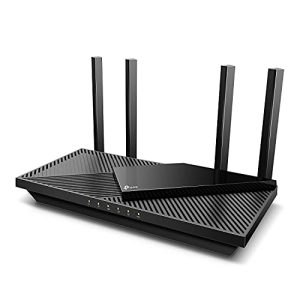
TP-Link Archer AX73
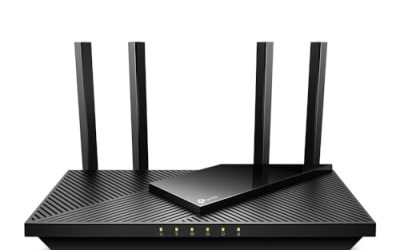
The Archer AX73 is a dual-band Wi-Fi 6 router rated AX5400, and it leads this guide because its Amazon listing states MU-MIMO outright alongside OFDMA, and because it carries the freshest direct Amazon crawl of the five. The 5 GHz band reaches up to 4804 Mbps and the 2.4 GHz band reaches up to 574 Mbps, with a 4T4R antenna structure and 160 MHz channels on the 5 GHz band. Six high-performance antennas and beamforming shape the signal toward connected devices, and a 1.5 GHz triple-core processor handles the queue. The listing names WPA3 encryption, HomeShield security tools, and OneMesh support for building whole-home coverage with matching nodes.
The wired side is straightforward: one gigabit WAN port, four gigabit LAN ports, and one USB 3.0 port for sharing a drive or printer. The AX73 is a dual-band design, so every fast device shares a single 5 GHz band, and the second 5 GHz lane that tri-band routers carry is absent here. That is the honest trade for a router that keeps the rest of the specification sheet strong. The listing states MU-MIMO and OFDMA together as the capacity features, and the 4×4 MU-MIMO layout is named in the maker specification data.
One flag to carry into the live check: a third-party roundup page noted the AX73 as out of stock on Amazon in August 2026, while the direct Amazon crawl from roughly 200 days ago shows the listing live. Those two signals point in different directions, so confirm a new-unit buying option on the live link before deciding. The AX73 suits a home that wants a proven dual-band Wi-Fi 6 router with MU-MIMO stated on the listing, a full set of gigabit ports, and no mesh kit in the box.
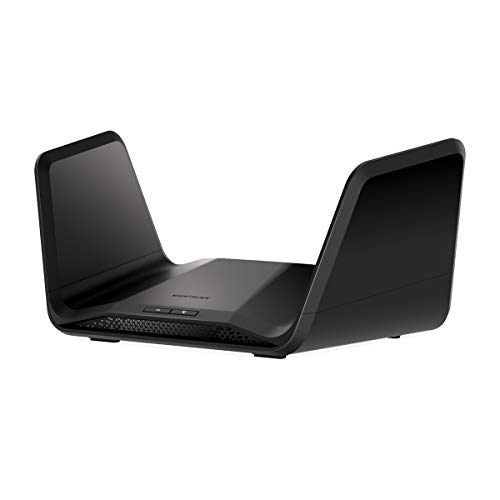
NETGEAR Nighthawk RAX70
The Nighthawk RAX70 is a tri-band Wi-Fi 6 router rated AX6600, and it is the only tri-band pick in this guide from NETGEAR. Its three bands split as 600 Mbps on 2.4 GHz, 1.2 Gbps on one 5 GHz band, and 4.8 Gbps on the second 5 GHz band, carried over eight streams. NETGEAR states 4×4 MU-MIMO on its own product page, with four single-antenna devices able to stream at the same time on the 5 GHz band. A 1.5 GHz quad-core processor drives the whole unit, and the maker states coverage for up to 2,500 square feet and up to 40 connected devices.
The wired side gives one gigabit WAN port and four gigabit LAN ports, with link aggregation available on two LAN ports and two WAN ports for faster wired transfers. A USB 3.0 port sits on the back for shared storage. Security features include NETGEAR Armor tools, guest network access, and support for voice control through Alexa and Google Assistant.
Two honest notes belong here. First, the two 5 GHz bands are not equal: the second band tops out at 1.2 Gbps while the main band reaches 4.8 Gbps, so devices on the slower band get less headroom. Second, the RAX70 is a standalone router with no mesh system of its own, so a home that later needs wider coverage cannot add a matching NETGEAR node the way the TP-Link and ASUS picks can. The Amazon crawl for this ASIN is about 320 days old, which is the oldest direct crawl in this guide, although a tracker recorded an Amazon figure for it in January 2026. Confirm the live listing before buying.
TP-Link Archer AXE75
The Archer AXE75 is the Wi-Fi 6E pick in this guide, a tri-band router rated AXE5400 with a 6 GHz band added to the usual 2.4 GHz and 5 GHz bands. The 6 GHz band reaches up to 2402 Mbps, the 5 GHz band reaches up to 2402 Mbps, and the 2.4 GHz band reaches up to 574 Mbps. A 1.7 GHz quad-core processor and 512 MB of memory run the unit, and six external antennas carry the signal. The router names WPA3 encryption, HomeShield security tools, and OneMesh support, and it carries one gigabit WAN port, four gigabit LAN ports, and one USB 3.0 port.
The 6 GHz band is the reason to look at this router. It is the least crowded band in the house because only Wi-Fi 6E devices can use it, so a Wi-Fi 6E laptop or phone gets a lane with almost no neighbors. That makes the AXE75 a forward-looking pick: its value grows as more Wi-Fi 6E devices arrive in the home, and it behaves like a strong tri-band Wi-Fi 6 router until then.
One flag deserves a plain statement. TP-Link’s own product description and the B&H specification listing both state MU-MIMO support for the AXE75, and that is the basis for including it here. A couple of spec aggregator tables list MU-MIMO differently for this model, so confirm the MU-MIMO line on the live listing if it matters to the decision. The direct Amazon crawl for this ASIN is about 211 days old, and a direct open of the listing was blocked, so the live check matters here too.
ASUS ROG Rapture GT-AX11000
The ROG Rapture GT-AX11000 is the gaming flagship of this guide, a tri-band Wi-Fi 6 router classed AX11000 with a 1.8 GHz quad-core processor, 1 GB of RAM, and 256 MB of flash memory. Its three bands combine to the AX11000 class, and ASUS states MU-MIMO support in the maker specifications. The router carries a 2.5 gigabit port that can serve as a WAN or LAN link, four gigabit LAN ports, one gigabit WAN port, and two USB 3.0 ports, which is the widest wired layout in this guide. AiMesh support lets it join a wider ASUS mesh network, AiProtection provides lifetime network security tools, and Aura RGB lighting marks it as a ROG design.
Gaming features are the reason this router exists. A dedicated gaming port prioritizes traffic from whatever is plugged into it, WTFast support is built in for routing game traffic, and adaptive QoS lets the router favor gaming packets when the network is busy.
Two honest notes belong here. First, the GT-AX11000 is the oldest design in this guide, first available in December 2018, and its Wi-Fi 6 hardware comes from the first wave of Wi-Fi 6 routers. Second, the most recent Amazon evidence found for this ASIN names a third-party seller rather than Amazon itself, so confirm the seller and the returns terms on the live listing. The direct Amazon crawls for this ASIN are about 218 and 285 days old. This router suits a home that wants the widest wired layout and gaming-focused traffic tools in a tri-band MU-MIMO router.
ASUS RT-AX86U
The RT-AX86U is a dual-band Wi-Fi 6 router rated AX5700, and it closes this guide as the second ASUS pick. The 5 GHz band reaches up to 4804 Mbps and the 2.4 GHz band reaches up to 861 Mbps, carried over three removable antennas. ASUS states MU-MIMO support in the maker specifications. A 2.5 gigabit port sits alongside one gigabit WAN port and four gigabit LAN ports, and two USB 3.0 ports cover shared storage and printers. Mobile Game Mode, adaptive QoS, port forwarding, and Instant Guard VPN tools are named on the listing, and AiMesh support lets it join a wider ASUS mesh network.
The RT-AX86U is a vertical-only design, which suits a desk or shelf with open space above it and suits a crowded shelf less well. Its 2.5 gigabit port is the standout on the wired side: a single wired device can move past the gigabit ceiling when the connection on the other end supports it. The router also carries subscription-free network security tools from Trend Micro, which the listing names as a lifetime feature rather than a trial.
The weakest evidence in this guide belongs to this router. The direct Amazon crawl is about 272 days old, and the tracker record shows no current Amazon figure for it, with the last tracked entry about 29 days old. That is not proof that the listing is gone, but it is the thinnest signal of the five, so this is the link to check first if time is short. The RT-AX86U suits a home that wants a dual-band Wi-Fi 6 router with a 2.5 gigabit port, gaming traffic tools, and MU-MIMO stated by the maker.
Comparison table
| Router | Wi-Fi | Bands | MU-MIMO | Wired ports | USB |
|---|---|---|---|---|---|
| TP-Link Archer AX73 | Wi-Fi 6, AX5400 | Dual-band | 4×4, stated on listing | 1 WAN + 4 LAN gigabit | 1 x USB 3.0 |
| NETGEAR Nighthawk RAX70 | Wi-Fi 6, AX6600 | Tri-band | 4×4, stated by NETGEAR | 1 WAN + 4 LAN gigabit | 1 x USB 3.0 |
| TP-Link Archer AXE75 | Wi-Fi 6E, AXE5400 | Tri-band | Stated by TP-Link | 1 WAN + 4 LAN gigabit | 1 x USB 3.0 |
| ASUS ROG Rapture GT-AX11000 | Wi-Fi 6, AX11000 | Tri-band | Stated by ASUS | 2.5G + 4 LAN + 1 WAN gigabit | 2 x USB 3.0 |
| ASUS RT-AX86U | Wi-Fi 6, AX5700 | Dual-band | Stated by ASUS | 2.5G + 4 LAN + 1 WAN gigabit | 2 x USB 3.0 |
Frequently asked questions
Does MU-MIMO help when my devices are old?
MU-MIMO helps most when the devices on the network can use it. A device with a MU-MIMO radio and more than one antenna can share a transmission with other devices instead of waiting its turn. Older devices without MU-MIMO still connect and still work, but they fall back to one-at-a-time service on their streams. The benefit grows as more MU-MIMO-capable devices join the network, and it shrinks to almost nothing on a network with a single active device.
Is a tri-band router better than a dual-band router for MU-MIMO?
MU-MIMO works on both, and the band count answers a different question: how much airtime is available. A tri-band router gives fast devices a second 5 GHz lane, or a 6 GHz lane on Wi-Fi 6E models, so two busy devices can sit on different bands instead of sharing one. A dual-band router puts every fast device on the same 5 GHz band, and MU-MIMO then shares that single band among them. Tri-band helps most in a home with many active devices at once, while dual-band is enough when only a few devices are busy at the same time.
Can I add mesh coverage to one of these routers later?
It depends on the maker. The two TP-Link picks work with OneMesh nodes, and the two ASUS picks work with AiMesh nodes, so a matching node can extend coverage later without replacing the router. The NETGEAR RAX70 is a standalone router with no mesh system of its own, so wider coverage from NETGEAR would mean a separate mesh system rather than an add-on node. Mesh nodes are separate purchases in every case, and a single router in this guide is meant to cover a home on its own first.
How to choose
Match the router to the house, not to the specification sheet alone. A home with Wi-Fi 6E devices already in it gets the most from the Archer AXE75, because the 6 GHz band is a lane almost nobody else is using. A home with many devices active at once gets the most from a tri-band design, and the Nighthawk RAX70 is the tri-band pick with the clearest MU-MIMO statement from its maker. A home that plays games over a wired connection gets the most from the GT-AX11000 or the RT-AX86U, because both carry a 2.5 gigabit port and gaming traffic tools that the other three do not name.
For a home that wants a proven dual-band router with MU-MIMO stated on the listing itself, the Archer AX73 is the straightforward pick, with the freshest direct Amazon crawl of the five behind it. Whichever router fits, open its own link before buying: several of these listings rest on crawls that are months old, and the live page is the only place that shows whether a new unit is still available and who is selling it. MU-MIMO is a stated feature on all five, so the choice comes down to bands, wired ports, and the traffic tools that match how the house actually uses its network.
Disclosure: As an Amazon Associate, we may earn a commission from qualifying purchases made through links in this article, at no additional cost to you.
FAQ
Does MU-MIMO help when my devices are old?
Is a tri-band router better than a dual-band router for MU-MIMO?
Can I add mesh coverage to one of these routers later?
More from Amazon
Programs that pair well with the guide above. Offers and eligibility are set by Amazon and may change.
Free shipping on eligible items, Prime Video and more. Eligible new members can start with a free trial.
Start a Prime free trialAd-free music streaming. Eligible new subscribers can start with a free trial.
Try Music Unlimited freeA Prime membership for ages 18-24 with a trial period. Eligibility is set by Amazon.
See Prime for Young AdultsAudiobooks and podcasts to listen to on the go. Eligible new members can start with a free trial.
Try Audible freeAs an Amazon Associate we earn from qualifying purchases.