Key takeaways
- GPU is king: Prioritize the graphics card above all else — aim for an RTX 4050 at the entry mid-range floor and an RTX 5060 at the upper end for 1080p/1440p gaming that holds up over time.
- Display refresh and response: Look for 144Hz or higher with a 3ms-to-7ms response time; panel quality matters, but for competitive and fast-paced games, refresh rate and response time should be dealbreakers.
- Cooling and sustained performance: A laptop that throttles under load is wasted hardware — check for dual-fan arrays, ample exhaust venting, and chassis designs that prioritize airflow over thinness.
- Memory and storage floor: Treat 16GB of DDR5 as the minimum for gaming in 2026, with 32GB being the smarter long-term play; a 1TB NVMe Gen 4 SSD gives you room for a healthy game library without immediate upgrades.
- CPU pairing matters less than you think: Mid-range Intel Core i7 and AMD Ryzen 7 chips both deliver plenty of gaming performance — don’t overspend on a top-tier processor at the expense of GPU headroom.
What's inside
Finding a mid-range gaming laptop in 2026 means navigating a crowded field of machines that promise strong frame rates without emptying your wallet. The problem most buyers face is that the $900 to $1,600 bracket is where marketing fluff runs thick — you’ll see laptops with fast processors paired with underpowered GPUs, beautiful screens hamstrung by weak cooling, or last-generation silicon dressed up in a fresh chassis. Getting real value here requires cutting through the noise to understand which components actually move the needle in modern titles and which are just spec-sheet padding.
As an Amazon Associate we earn from qualifying purchases.




This guide cuts straight to what matters for PC gamers who care about graphics performance and frame-rate longevity. We focus on discrete GPUs that can handle 1080p and 1440p gaming with headroom, panels with high refresh rates and low response times, and thermals that won’t throttle after twenty minutes of gameplay. Below you’ll find our top picks across the mid-range spectrum, from established gaming brands like ASUS ROG and TUF to surprising value plays from NIMO that lean on AMD’s capable integrated and external graphics solutions.
🛒 Best Price Today on Amazon
Prime members get fast, free shipping on everything above, plus member-only deals. New members get a 30-day free trial — cancel anytime.
Watch: Best Gaming Laptop Mid Range — Video Review
How to Choose a Gaming Laptop Mid Range (2026)
- GPU is king: Prioritize the graphics card above all else — aim for an RTX 4050 at the entry mid-range floor and an RTX 5060 at the upper end for 1080p/1440p gaming that holds up over time.
- Display refresh and response: Look for 144Hz or higher with a 3ms-to-7ms response time; panel quality matters, but for competitive and fast-paced games, refresh rate and response time should be dealbreakers.
- Cooling and sustained performance: A laptop that throttles under load is wasted hardware — check for dual-fan arrays, ample exhaust venting, and chassis designs that prioritize airflow over thinness.
- Memory and storage floor: Treat 16GB of DDR5 as the minimum for gaming in 2026, with 32GB being the smarter long-term play; a 1TB NVMe Gen 4 SSD gives you room for a healthy game library without immediate upgrades.
- CPU pairing matters less than you think: Mid-range Intel Core i7 and AMD Ryzen 7 chips both deliver plenty of gaming performance — don’t overspend on a top-tier processor at the expense of GPU headroom.
The Best Gaming Laptop Mid Range (2026)s Reviewed
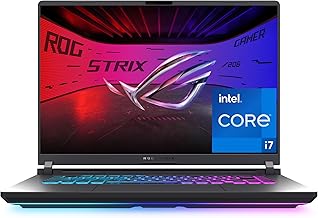
ASUS ROG Strix G16 (2025)
The standout pick in this lineup pairs an RTX 5060 with Intel’s i7-14650HX on a 165Hz/3ms panel, delivering the strongest combination of GPU grunt, CPU overhead, and display speed in this group — all wrapped in ASUS’s well-engineered ROG thermal design that keeps performance sustained during long sessions.
ASUS TUF Gaming A16
A solid budget-mid option with an RTX 4050 and Ryzen 7 7445HS on a 145Hz screen, offering dependable 1080p gaming performance and the durability the TUF line is known for — the trade-off is the 512GB SSD, which fills up fast if you play modern AAA titles.
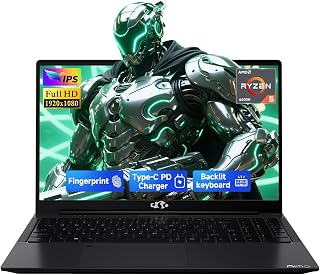
NIMO 15.6 Gaming-Creator (16GB, Radeon 780M)
This machine leverages AMD’s Radeon 780M integrated graphics to deliver surprisingly capable 1080p performance for lighter and esports titles, with an 8-core Ryzen 7 8745HS and a 1TB SSD that make it a versatile laptop for content creation and remote streaming as well as casual gaming.
NIMO 15.6 Gaming-Creator with RX 7600M XT eGPU
The creative pick of the bunch — pairing a 32GB Ryzen 7 system with an external RX 7600M XT dock transforms this from an integrated-graphics ultraportable into a genuine gaming workstation, giving you desktop-class GPU power when you need it and portability when you don’t.
NIMO 17.3 Multitasking (Ryzen 7 7735HS, 64GB)
A workstation-minded choice with 64GB of DDR5 and the Radeon 680M iGPU, suited to gamers who also run heavy productivity workloads — the large chassis and full-size keyboard are pluses, though integrated graphics won’t match a discrete GPU for demanding titles.
Frequently Asked Questions
Is an RTX 4050 enough for mid-range gaming in 2026?
For 1080p gaming on medium-to-high settings, the RTX 4050 remains a viable entry point into the mid-range bracket. It handles most current titles comfortably, though you may need to dial back settings on the most demanding AAA releases and it lacks the longevity headroom of the RTX 5060.
Are integrated graphics like the Radeon 780M viable for gaming?
The Radeon 780M and 680M are among the strongest integrated GPUs available, handling esports and older titles at 1080p with ease. They’re a smart choice for budget-conscious gamers who also value portability and battery life, but they won’t substitute for a discrete GPU in demanding modern titles.
How much RAM do I need in a mid-range gaming laptop?
16GB of DDR5 is the practical minimum for gaming in 2026 and will serve most players well. If you also stream, edit video, or run multiple background applications, stepping up to 32GB or 64GB provides meaningful headroom and extends the laptop’s useful lifespan.
Is a 17.3-inch screen better for gaming than a 15.6-inch one?
Larger screens offer more immersion and better thermal headroom due to the bigger chassis, but they sacrifice portability. A 15.6-inch or 16-inch panel strikes the best balance for most gamers, especially when paired with a high refresh rate and low response time.
Final Thoughts
For most buyers, the ASUS ROG Strix G16 (2025) is the clear winner here — its RTX 5060, 165Hz display, and i7-14650HX deliver the best all-round gaming experience in this group. The ASUS TUF Gaming A16 is the pick if you want a lower buy-in with discrete graphics, and the NIMO 15.6 with the RX 7600M XT eGPU dock is the wildcard choice for creators who want desktop GPU power on demand without abandoning portability.