Key takeaways
- G-SYNC Compatible monitors undergo NVIDIA validation testing for VRR stability, whereas base FreeSync has no mandatory low-framerate compensation requirement.
- FreeSync Premium mandates LFC and at least 120Hz at 1080p, aligning closely with G-SYNC Compatible specs but without proprietary module costs.
- Hardware G-Sync includes a dedicated scaler chip enabling VRR down to 1Hz and integrated HDR metadata handling, unlike adaptive-sync-only panels.
- DisplayPort 2.1 cables like the Ubluker 54Gbps model unlock full VRR bandwidth for next-gen GPUs, while DP 1.4 cables suffice for QHD 180Hz setups.
- AMD GPUs support all FreeSync tiers natively; NVIDIA GPUs require G-SYNC Compatible or hardware G-Sync certification for guaranteed VRR functionality.
- Cable length affects signal integrity at high refresh rates—active or certified DP 1.4 cables like the Capshi 35ft are necessary for long runs to prevent VRR dropout.
Choosing between FreeSync and G-Sync in 2026 no longer requires picking a side based solely on your graphics card brand. NVIDIA’s G-Sync Compatible program and AMD’s expanded FreeSync Premium tiers have converged to make variable refresh rate (VRR) support nearly universal across modern displays, yet meaningful differences in certification rigor, low-framerate compensation, and HDR tone-mapping integration still separate budget options from premium experiences.
The right choice depends on your target resolution, refresh rate ceiling, and whether you demand validated tear-free performance at every framerate. Monitors like the ASUS TUF Gaming VG27AQ3A now carry both FreeSync Premium and G-SYNC Compatible badges, while cables such as the Ubluker DisplayPort 2.1 ensure full bandwidth for 4K 240Hz VRR without compression artifacts that can undermine sync technologies.
Our top picks
 Samsung 27” Odyssey G5
- Samsung’s 27” Odyssey G5 QHD Gaming Monitor delivers…
- QHD resolution (2560 x 1440) boasts incredibly detailed,…
- With a wide 178° viewing angle, the IPS…
 Capshi 8K 4K DisplayPort Cable 1.4
- 8K DisplayPort Cable 1.4: This VESA Certified DP…
- Multi-functional Support: The 8K DisplayPort cable supports video…
- Advanced Technology: The cable delivers enhanced bandwidth via…
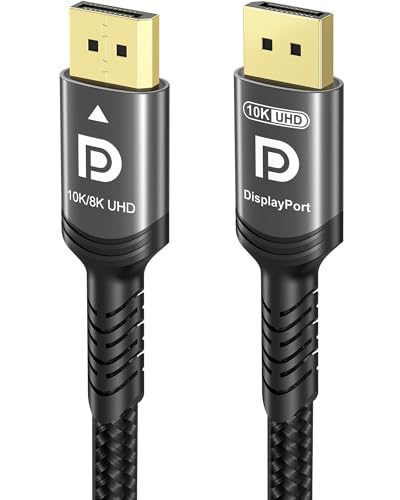 Ubluker 10K 8K DisplayPort 2.1 Cable 54Gbps
- Certify Displayport Cable: Ubluker DisplayPort cable has multiple…
- Meeting High Quality Needs: DisplayPort is a digital…
- Widespread Applications: DisplayPort is a high-speed serial interface…
| Product | Key specs | |
|---|---|---|
| Samsung 27” Odyssey G5 | Samsung’s 27” Odyssey G5 QHD Gaming Monitor delivers… QHD resolution (2560 x 1440) boasts incredibly detailed,… With a wide 178° viewing angle, the IPS… | Check price |
| Capshi 8K 4K DisplayPort Cable 1.4 | 8K DisplayPort Cable 1.4: This VESA Certified DP… Multi-functional Support: The 8K DisplayPort cable supports video… Advanced Technology: The cable delivers enhanced bandwidth via… | Check price |
| Ubluker 10K 8K DisplayPort 2.1 Cable 54Gbps | Certify Displayport Cable: Ubluker DisplayPort cable has multiple… Meeting High Quality Needs: DisplayPort is a digital… Widespread Applications: DisplayPort is a high-speed serial interface… | Check price |
 ASUS TUF Gaming 27” 1440P HDR Monitor ASUS TUF Gaming 27” 1440P HDR Monitor | High-Resolution QHD Gaming Display: 27-inch QHD (2560 x… ASUS Extreme Low Motion Blur Sync Technology: ELMB… Advanced Synchronization Technologies: FreeSync Premium, G-Sync compatible and… | Check price |
 IVANKY VESA Certified 8K DisplayPort Cable 1.4 IVANKY VESA Certified 8K DisplayPort Cable 1.4 | [VESA Certified DP to DP Cable 1.4] This… [Enhanced Gaming Experience] The DisplayPort 1.4 Cable provides… [Anti-Interference & Ultra Durability] Our Display Port cable… | Check price |
 Capshi 8K 4K DisplayPort Cable 1.4 Capshi 8K 4K DisplayPort Cable 1.4 | 8K DisplayPort Cable 1.4: This VESA Certified DP… Multi-functional Support: The 8K DisplayPort cable supports video… Advanced Technology: The cable delivers enhanced bandwidth via… | Check price |
 Maxonar 8K VESA Certified DisplayPort Cable 1.4 Maxonar 8K VESA Certified DisplayPort Cable 1.4 | 【UHD 8K DISPLAYPORT 1.4 CABLE】: HIGH END RESOLUTIONS… 【MAXIMUM PERFORMANCE- Gamer Friendly】: Maxonar Displayport cable supports… 【Reliable Anti-interference Capability】:Our DisplayPort 1.4 Cable Made of… | Check price |
 LG 27GS75Q-B 27-inch Ultragear QHD LG 27GS75Q-B 27-inch Ultragear QHD | Ascend your game with the speed of UltraGear… 200Hz Refresh Rate & 1ms MBR - Gear… SYNC Compatible and AMD FreeSync - Officially validated… | Check price |
As an Amazon Associate we earn from qualifying purchases at no extra cost to you.
⚡ Save on Your Next PC — Amazon Prime
Prime members get fast free shipping on the systems above, plus early access to Prime Day & Black Friday PC deals. New members get a 30-day free trial.
Watch: FreeSync vs G-Sync: Which Is Better? — Video Review
Quick Verdict
For most gamers in 2026, FreeSync Premium offers the best value with guaranteed low-framerate compensation and strict VRR range enforcement, while G-SYNC Compatible remains the safer bet for NVIDIA users who want plug-and-play assurance without manual tweaking. True hardware G-Sync modules are now niche, reserved for professional esports or simulation rigs where absolute latency consistency below 30 FPS justifies the price premium.
Key Differences
- G-SYNC Compatible monitors undergo NVIDIA validation testing for VRR stability, whereas base FreeSync has no mandatory low-framerate compensation requirement.
- FreeSync Premium mandates LFC and at least 120Hz at 1080p, aligning closely with G-SYNC Compatible specs but without proprietary module costs.
- Hardware G-Sync includes a dedicated scaler chip enabling VRR down to 1Hz and integrated HDR metadata handling, unlike adaptive-sync-only panels.
- DisplayPort 2.1 cables like the Ubluker 54Gbps model unlock full VRR bandwidth for next-gen GPUs, while DP 1.4 cables suffice for QHD 180Hz setups.
- AMD GPUs support all FreeSync tiers natively; NVIDIA GPUs require G-SYNC Compatible or hardware G-Sync certification for guaranteed VRR functionality.
- Cable length affects signal integrity at high refresh rates—active or certified DP 1.4 cables like the Capshi 35ft are necessary for long runs to prevent VRR dropout.
FreeSync Premium: The Value Standard
FreeSync Premium has matured into a reliable baseline for competitive and immersive gaming without vendor lock-in. Monitors like the Samsung Odyssey G5 (G50F) deliver QHD 165Hz VRR with LFC that smoothly doubles frames when framerates dip below the minimum refresh threshold, eliminating stutter in demanding titles. This tier’s open standard keeps panel costs lower, making high-refresh VRR accessible under $300.
The trade-off is less stringent factory calibration compared to NVIDIA’s program. Some FreeSync Premium panels exhibit minor flicker during rapid framerate transitions or narrower effective VRR ranges than advertised. Pairing with a certified DisplayPort 1.4 cable like the IVANKY 8K ensures the monitor receives uncompressed timing data, reducing edge-case sync failures that stem from signal degradation rather than panel firmware.
G-SYNC Compatible: NVIDIA-Assured Performance
G-SYNC Compatible certification provides NVIDIA GPU owners confidence that VRR will activate automatically and remain stable across the advertised refresh range. The ASUS TUF Gaming VG27AQ3A exemplifies this dual-certified approach, supporting both FreeSync Premium and G-SYNC Compatible at 180Hz with ELMB Sync for simultaneous motion blur reduction. NVIDIA’s testing specifically validates grayscale accuracy during VRR transitions, minimizing the brightness fluctuations that plague uncertified adaptive-sync panels.
This assurance comes without the cost of a hardware module, keeping prices competitive with FreeSync Premium equivalents. However, G-SYNC Compatible does not guarantee sub-30Hz VRR operation or integrated HDR tone-mapping. For users pushing RTX 5090-class hardware at 4K 240Hz, pairing with a Ubluker DisplayPort 2.1 cable is essential to avoid DSC compression that can interfere with VRR metadata signaling at extreme bandwidths.
Which Should You Buy?
- Choose FreeSync Premium if you use an AMD GPU or prioritize value and accept minor per-unit variance in VRR smoothness.
- Choose G-SYNC Compatible if you own an NVIDIA GPU and want validated out-of-box VRR without manual driver configuration.
- Invest in hardware G-Sync only for professional simulation or esports where consistent sub-30Hz performance and integrated HDR processing are non-negotiable.
- Always match cable specification to your target resolution and refresh rate—DP 1.4 for QHD 180Hz, DP 2.1 for 4K 240Hz—to prevent VRR instability from bandwidth bottlenecks.
- Verify monitor certification tier on the manufacturer’s spec sheet, as marketing terms like “FreeSync” without “Premium” lack LFC guarantees.
Frequently Asked Questions
Can I use FreeSync with an NVIDIA GPU?
Yes, but only if the monitor is listed as G-SYNC Compatible or supports Adaptive-Sync over DisplayPort. Base FreeSync monitors without NVIDIA validation may require manual enablement and can exhibit flickering or limited VRR ranges.
Does cable quality affect FreeSync or G-Sync performance?
Absolutely. Uncertified or damaged cables can cause VRR dropout, especially at high refresh rates. Use VESA-certified DP 1.4 cables like the Capshi 6.6ft for QHD or DP 2.1 for 4K 240Hz to maintain signal integrity across the full VRR range.
Is hardware G-Sync worth it in 2026?
Only for niche use cases. Modern G-SYNC Compatible and FreeSync Premium panels cover 95% of gaming scenarios adequately. Hardware G-Sync’s advantages below 30Hz and in HDR workflows rarely justify the premium for mainstream gamers.
Do FreeSync Premium and G-SYNC Compatible work identically?
Functionally similar, but not identical. G-SYNC Compatible includes NVIDIA-specific validation for grayscale stability and VRR activation reliability, while FreeSync Premium enforces LFC and minimum refresh specs through AMD’s open standard. Real-world differences are subtle but measurable in controlled testing.
Final Verdict
In 2026, the FreeSync versus G-Sync decision hinges on GPU ecosystem and tolerance for validation variance rather than fundamental capability gaps. FreeSync Premium delivers excellent value with enforced LFC, while G-SYNC Compatible provides NVIDIA users with tested reliability at comparable prices. Prioritize certified cables matching your bandwidth needs, verify the exact certification tier before purchase, and reserve hardware G-Sync for specialized applications where its unique advantages directly impact your workflow.