Our Top Picks
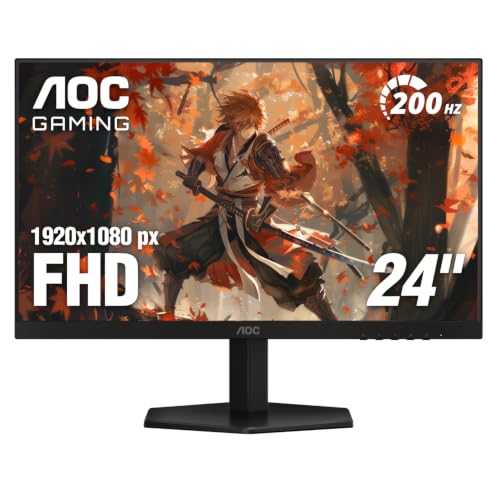 AOC 24" Gaming Monitor FHD 200Hz IPS NVIDIA24" 200Hz7.03 x 21.25 x 16.68 inches6.4 poundsCheck on Amazon
 Acer Nitro 24.5in FHD 1920x1080 200Hz Gaming Monitor24.5-inch8.28 x 21.93 x 16.28 inches7.39 poundsCheck on Amazon
 New! Sceptre 27-inch Prime Gaming Monitor DisplayPort x227 inches6.7 x 24.2 x 17.4 inches7 poundsCheck on Amazon

You can get a very good gaming monitor for a modest budget, and Black Friday is the best time to try, since many popular budget panels dip to their lowest typical sale levels. Black Friday 2026 is Friday, November 27, with Cyber Monday on November 30, and Amazon often begins monitor deals earlier. At this level, the goal is a smooth refresh rate and a decent panel, not every premium feature.
The six monitors below often sit near the 200-dollar mark, though prices change, so check the current price on Amazon. We have not tested them; the notes reflect published specs and owner feedback.
Budget monitors compared
| Pick | Best for | Key feature |
|---|---|---|
| AOC 24G2 | Best all-round 1080p | IPS panel with high refresh rate |
| Acer Nitro VG240Y | Tight budgets | IPS 1080p at a high refresh rate |
| MSI G244F E2 | Fast response on a budget | Rapid IPS with high refresh |
| Gigabyte G24F 2 | Smooth esports play | Fast refresh with adaptive sync |
| LG UltraGear 24GN600 | Reliable brand build | IPS with motion clarity tools |
| Sceptre E275B-QWN168 | Larger screens for less | Bigger 1440p-style panel for the money |
1. AOC 24G2 (24G2 24-inch IPS)
The AOC 24G2 has been a budget favorite for years, with an IPS panel, a high refresh rate and good response. It is a strong choice for first-time gaming monitor buyers. The weaknesses are the 1080p resolution, which looks less crisp on a 27-inch screen, and an older design. Compare it with the Acer and MSI, and check whether the listing is for the exact 24G2 model rather than a cousin.
2. Acer Nitro VG240Y (Nitro VG240Y IPS)
The Acer Nitro VG240Y is a very affordable IPS option with a high refresh rate, ideal when every dollar counts. It is thin-bezeled and simple. Drawbacks include a plain stand with limited adjustment and modest brightness. Compare it with the AOC, and make sure the exact variant has the refresh rate you expect, since Acer lists several similar Nitro models.
3. MSI G244F E2 (G244F E2 gaming monitor)
The MSI G244F E2 pairs a fast IPS panel with a high refresh rate and adaptive sync, which suits esports-minded gamers on a budget. The build is basic, with a plain tilt-only stand in many cases. Compare it with the Gigabyte G24F 2 and consider a monitor arm if you want height adjustment.
4. Gigabyte G24F 2 (G24F 2 gaming monitor)
The Gigabyte G24F 2 offers a fast refresh rate and responsive IPS performance, with extras such as a crosshair overlay on some versions. It is a good fit for shooters. Weaknesses include average out-of-the-box color and a modest stand. Compare it with the MSI and AOC, and check reviews for backlight uniformity, which can vary between units.
5. LG UltraGear 24GN600 (24GN600-B)
The LG UltraGear 24GN600 offers an IPS panel with a high refresh rate in a neat, well-built package. It is a good choice for people who prefer a recognizable brand. The downsides are limited ergonomics and a 1080p resolution. Compare it with the Acer Nitro for price, and check whether the version on sale is the current one.
6. Sceptre E275B-QWN168 (Sceptre 27-inch)
The Sceptre 27-inch monitor gives you a larger screen and a high refresh rate for less than many name brands. It suits people who want size above all. The compromises are less refined color, a basic stand and variable quality control. Compare it with a 24-inch IPS if you value image quality, and look at return terms in case of defects.
What to prioritize on a budget
At low prices, refresh rate and panel type matter most. A 144Hz-class monitor feels noticeably smoother than 60Hz for fast games. IPS gives better color and viewing angles; VA offers more contrast. Resolution should match your GPU: 1080p is easiest to drive, while 1440p needs more power. Ignore headline HDR claims on cheap monitors, which rarely deliver. Check that the monitor includes the right cable, because some ship with only HDMI, which can limit the refresh rate on certain setups.
How to spot a real Black Friday monitor deal
- Check price history with Keepa; budget monitors cycle through sale prices often.
- Confirm the model number and refresh rate in the listing.
- Look at the seller and the warranty for dead pixels.
- Test it promptly and use the return window if you see defects.
What to buy now vs wait
If your current display is 60Hz and you play fast games, buying a popular budget model on any decent sale is a clear upgrade. If you are stretching toward 1440p, waiting until Black Friday week may reveal better deals. Do not overspend on a “gaming” label when a standard monitor with the same specs costs less.
Getting the most from a budget monitor
Once it arrives, set the refresh rate manually in your operating system, since many monitors default to 60Hz until you change it. Turn on adaptive sync in both the monitor menu and your graphics driver, and use the overdrive setting at the middle level rather than the maximum, which can cause visible trails. Calibrate brightness for your room; many budget panels ship too bright. These small steps turn an inexpensive panel into a much better one.
Console players on a budget
If you game on a console, check HDMI version and supported refresh rates before buying. Many cheap monitors support 120Hz only at lower resolutions or only on PC. A 1080p, 144Hz panel is well matched to older consoles, while newer consoles can benefit from 1440p with HDMI 2.1. Read the manual for supported modes.
Warranty and returns on cheap monitors
Budget monitors are more likely to have a stuck pixel or uneven backlight, and policies vary by brand and seller. Test with solid black, white and colored screens as soon as it arrives, and check corners for glow. If you see problems, use the return window rather than hoping they fade, because manufacturers often have strict dead-pixel thresholds.
When to spend a little more
If you can stretch the budget, a better stand, a higher resolution or a faster panel might justify the extra. But if you mainly play esports titles at modest settings, the cheaper models above will already feel like a big leap over an old 60Hz screen. Decide what matters to you before the sale begins so you do not buy on impulse.
Frequently asked questions
Is 144Hz worth it on a budget?
Yes, for most gamers it is the biggest upgrade over 60Hz.
1080p or 1440p?
1080p is easier on your GPU; 1440p looks sharper if your hardware can drive it.
Do I need adaptive sync?
It helps smooth frame delivery, and most modern budget monitors include it.
When is Black Friday 2026?
Friday, November 27, 2026, with Cyber Monday on November 30.
Conclusion
The AOC 24G2 is the safe pick, the Acer and MSI options stretch the budget, and the Sceptre gives size. As an Amazon Associate we earn from qualifying purchases.
FAQ
Is 144Hz worth it on a budget?
1080p or 1440p?
Do I need adaptive sync?
When is Black Friday 2026?
More from Amazon
Programs that pair well with the guide above. Offers and eligibility are set by Amazon and may change.
Send a Prime gift membership to someone who would use free shipping and Prime Video.
Gift Amazon PrimeGive audiobooks to someone who loves to listen. Plans and prices are set by Amazon.
Gift AudibleFree shipping on eligible items, Prime Video and more. Eligible new members can start with a free trial.
Start a Prime free trialAd-free music streaming. Eligible new subscribers can start with a free trial.
Try Music Unlimited freeAs an Amazon Associate we earn from qualifying purchases.