Key takeaways
- Socket: AM4. The 2300X works on A320, B350, X370, B450, X470, A520, B550 and X570 boards, as long as the BIOS supports Zen+. Check the maker’s CPU support list for your exact board.
- Memory: DDR4 up to 2933 MT/s officially. Use two sticks for dual channel.
- Cooler: OEM listings often say the chip comes without a thermal solution. You will need a cooler. A 65W-class single tower is enough.
- Graphics: no integrated graphics, so a discrete graphics card is required. Without one, you will not get any display output.
- Upgrade path: AM4 is the best part of this chip. A BIOS update on a compatible board lets you move to a Ryzen 5000 processor later.
The Ryzen 3 2300X is a 4-core, 4-thread Zen+ processor for the AM4 socket with a 3.5 GHz base clock and 4.0 GHz boost, sold only as an OEM part. In 2026 it is a legacy chip: it can still run lighter games at 1080p, but a Ryzen 5 5500 or 5600 is a much better buy.
Verdict: skip the 2300X unless you inherit one in a working PC. Four threads are the main problem, since many current games want six cores or more to avoid stutter.
Ryzen 3 2300X specs
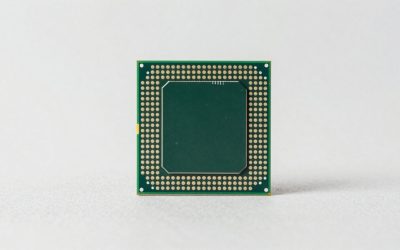
The AMD Ryzen 3 2300X (also written Ryzen 2300X or 2300X) is the Pinnacle Ridge, Zen+ generation quad-core made on a 12nm process. It has an unlocked multiplier, no integrated graphics, and was never sold in a retail box. Listings call it an OEM or tray part, often without a cooler, so it mainly turned up in prebuilt systems and later in the used market.
| Spec | Ryzen 3 2300X |
|---|---|
| Architecture | Zen+ (Pinnacle Ridge), 12nm |
| Cores / threads | 4 / 4 |
| Base / boost clock | 3.5 GHz / 4.0 GHz |
| L2 cache | 4 x 512KB |
| L3 cache | 8MB (one source lists 4MB) |
| TDP | 65W |
| Socket | AM4 |
| Memory | DDR4 up to 2933 MT/s |
| Integrated graphics | None |
| Multiplier | Unlocked |
| Availability | OEM / tray only, no cooler in box |
Release dates in the public sources I read do not agree: one gives 2018 and another gives April 2020. Treat the 2300X as an OEM-only product of the Zen+ era, and not as a chip you can buy new in a retail box. One spec site also lists 4MB of L3 where most list 8MB, so I use 8MB with that caveat.
Is the Ryzen 3 2300X good for gaming?
It is a basic gaming CPU. It can run older and lighter titles, esports games and many indie games at 1080p with an entry graphics card. It struggles in modern open-world and CPU-heavy games, because four threads leave no room for the game plus background tasks, and Zen+ has lower per-core speed than the Zen 3 chips on the same socket.
I did not benchmark this chip, so the table below gives approximate planning guidance rather than frame-rate numbers. Real results depend on the game, the graphics card, memory speed and patch version.
| Game type | What to expect from a 2300X with an entry GPU |
|---|---|
| Esports and older titles at 1080p | Playable, often limited by the GPU |
| Current AAA titles at 1080p | Frame rate dips and stutter are likely; low to medium settings |
| Open-world and simulation games | Four threads are the limit; expect hitching |
| Gaming with Discord, browser and streaming | Poor; there are no spare threads |
| 1440p with a strong GPU | The CPU is the bottleneck |
The four-thread problem
The 2300X has four cores and no simultaneous multithreading, so it runs four threads. A Ryzen 3 3300X has four cores and eight threads, and the Ryzen 5 5500 has six cores and twelve threads. In modern games the extra threads reduce the stutter you notice in 1% lows even when average frame rates look similar. If a game and your background apps together want more than four busy threads, the 2300X slows down.
What graphics card suits the 2300X?
Pair it with an entry-level card and expect to play at 1080p. A graphics card faster than a mid-range model will spend a lot of time waiting for the processor. If you must keep the 2300X for now, buy the best graphics card that fits your budget but plan a CPU upgrade next.
Productivity performance
For office work, web browsing, video playback and light photo editing the 2300X is fine. For video editing, 3D rendering and compiling code, four threads is a hard ceiling, and a six-core Ryzen 5 will finish the same jobs far faster. Treat it as a light-duty chip.
Platform: AM4 board, RAM and BIOS
- Socket: AM4. The 2300X works on A320, B350, X370, B450, X470, A520, B550 and X570 boards, as long as the BIOS supports Zen+. Check the maker’s CPU support list for your exact board.
- Memory: DDR4 up to 2933 MT/s officially. Use two sticks for dual channel.
- Cooler: OEM listings often say the chip comes without a thermal solution. You will need a cooler. A 65W-class single tower is enough.
- Graphics: no integrated graphics, so a discrete graphics card is required. Without one, you will not get any display output.
- Upgrade path: AM4 is the best part of this chip. A BIOS update on a compatible board lets you move to a Ryzen 5000 processor later.
Check the BIOS before upgrading
A first-generation or A320 board may need a BIOS update before it can run a Ryzen 5000 chip. Update the BIOS while the 2300X is still installed, then swap the processor. Skipping this step can leave the PC unable to boot.
Power and cooling
The 65W TDP makes the 2300X easy to cool. A budget single tower is plenty, and even a stock-style cooler from a spare AM4 chip works for light loads. Because the multiplier is unlocked you can overclock, but with four threads and a Zen+ core the gains are small and not worth the extra heat for gaming.
| Cooler type | Fit |
|---|---|
| Spare stock AM4 cooler | Fine for light loads |
| Budget single tower with 4 heat pipes | Comfortable and quiet |
| Premium cooler | Overkill for this chip |
Alternatives to the Ryzen 3 2300X
| Chip | Cores / threads | Socket | Why consider it |
|---|---|---|---|
| Ryzen 5 5500 | 6 / 12 | AM4 | Lowest-cost modern AM4 upgrade; includes a Wraith Stealth cooler on the listed version |
| Ryzen 5 5600 | 6 / 12 | AM4 | Better gaming speed per core; includes a Wraith Stealth cooler on the listed version |
| Ryzen 3 3300X | 4 / 8 | AM4 | A faster quad-core with eight threads |
| Ryzen 5 5600G | 6 / 12 | AM4 | Has integrated graphics, for builds without a graphics card |
| Ryzen 5 7600X | 6 / 12 | AM5 | New platform with a new board and DDR5 |
Ryzen 5 5500 – the cheapest sensible upgrade
The Ryzen 5 5500 has six cores and twelve threads on AM4 and ships with a Wraith Stealth cooler on the listed retail version. It adds two cores and eight more threads than the 2300X and uses a faster Zen 3 based design, so it is a straightforward step up for a small budget.
Ryzen 5 5600 – the better gaming choice
The Ryzen 5 5600 has the same six-core, twelve-thread layout with higher clocks. It is the chip to pick if your graphics card is mid-range or better, and it also includes a Wraith Stealth cooler on the listed version.
Is the Ryzen 3 2300X worth buying in 2026?
No. It is OEM-only, discontinued and mostly found in old prebuilt PCs or the used market. The same money buys a far faster six-core chip on the same socket. Buying a used 2300X only makes sense if it is free, bundled in a working PC you already want, or priced so low that the seller is essentially clearing stock.
| Situation | Recommendation |
|---|---|
| You own a PC with a 2300X | Keep it, then upgrade the CPU on the same board after a BIOS update |
| You are building a new PC | Buy a Ryzen 5 5500 or 5600, or an AM5 chip |
| You want a cheap used office PC | Fine if the whole system works |
| You want a gaming PC under a tight budget | Pick a Ryzen 5 5500 and a used graphics card instead |
Buying options: OEM and used caution
The 2300X was not sold in a retail box. That means any unit you find is OEM, pulled from a system or leftover stock, and may be used. The store listing I found for it was marked as used, so I do not recommend it as a purchase.
- Ask for the condition: check the seller’s description and photos of the processor’s contacts.
- Check the return policy: processors that arrive dead should be returnable.
- Compare against a Ryzen 5 5500: the difference in cost is often small.
Parts to pair with an AM4 build around a Ryzen 3 2300X or its replacement
A budget AM4 motherboard
The MSI A520M-A PRO is a micro-ATX AM4 board that lists Ryzen 5000 support, DDR4 and PCIe 3.0. It is a reasonable low-cost base for a 2300X, and it keeps an upgrade to the Ryzen 5 5500 or 5600 open.
A step-up B550 board
The GIGABYTE B550M K is a micro-ATX AM4 board with Ryzen 5000, 4000 and 3000 support and DDR4. B550 adds PCIe 4.0, which matters if you later use a graphics card or SSD that supports it.
A DDR4 kit
The G.SKILL Ripjaws V 16GB (2x8GB) kit is rated up to 3200 MT/s at CL16 and works with AMD. Two sticks give you dual channel, which is the biggest memory setting for Ryzen.
A budget cooler
Because the 2300X is often sold without a cooler, you will probably need one. The Thermalright Assassin X120 Refined SE is a single tower with 4 heat pipes and a PWM fan, and it is more than enough for a 65W chip.
Upgrade plan: from a 2300X to a modern AM4 chip
- Identify your board. Find the model name printed on the motherboard.
- Look up its CPU support list on the maker’s site and note the BIOS version that adds Ryzen 5000.
- Update the BIOS with the 2300X still installed.
- Power down, remove the cooler, and swap the CPU.
- Reuse the cooler or fit the chip’s included Wraith Stealth.
- Enable the memory profile in the BIOS so the RAM runs at its rated speed.
If your board is an A320 or similar with limited BIOS memory, check the maker’s notes first. Some entry boards drop older chip support to make room for Ryzen 5000 support, which can make a downgrade difficult.
2300X versus 5500: what changes in practice
| Factor | Ryzen 3 2300X | Ryzen 5 5500 |
|---|---|---|
| Cores / threads | 4 / 4 | 6 / 12 |
| Architecture | Zen+ (12nm) | Zen 3 based |
| Cooler | None (OEM) | Wraith Stealth on the listed version |
| Availability | OEM / used only | New, retail |
| Best for | Existing PCs | New budget gaming builds |
Where the 2300X fits in the Ryzen lineup
The Ryzen 3 2300X belongs to the Zen+ generation, the refresh of the original Ryzen design that arrived on AM4. Most Zen+ desktop chips were sold at retail, like the Ryzen 5 2600. The 2300X, along with a few siblings, was kept for system builders, so buyers rarely saw it on a store shelf.
That history explains why the chip is hard to review in the usual way: there is no retail box, no standard cooler and little first-party marketing. What you can say for sure is that it is a four-core, four-thread design that sits below the six-core Ryzen 5 parts of its generation.
| Generation | Example entry quad or hexa-core | Threads | Notes |
|---|---|---|---|
| Zen (2017) | Ryzen 3 1200 class | 4 | First-generation Ryzen, low per-core speed |
| Zen+ (2018 to 2019) | Ryzen 3 2300X | 4 | OEM-only quad-core |
| Zen 2 (2019) | Ryzen 3 3300X | 8 | Quad-core with SMT |
| Zen 3 (2020 to 2022) | Ryzen 5 5500 / 5600 | 12 | Six-core parts, widely recommended |
The table is a simplified summary to show the direction of travel: later generations added threads and raised per-core speed on the same socket.
How to tell if the 2300X is your bottleneck
A quick check costs nothing and tells you whether to upgrade the processor or the graphics card.
- Open Task Manager (or a monitoring overlay) while you play.
- Note GPU use. If the graphics card sits near full use, the card is the limit and a new CPU will not add frames.
- Look at the CPU. If all four threads are pegged near 100 percent while the GPU is below about 80 percent, the 2300X is the bottleneck.
- Check for stutter. If the average frame rate looks fine but the game hitches, four threads are likely the cause.
- Lower the graphics settings. If frame rate does not improve when you drop resolution or detail, the CPU is the limit.
This is a worked decision, not a measurement: your results depend on the game and the graphics card. But it takes five minutes and prevents spending money on the wrong part.
Power supply and case notes
A 65W processor does not need a large power supply. A quality 450W to 550W unit is enough for a 2300X and an entry or mid-range graphics card, though the graphics card maker’s recommendation is the number to follow. Any standard ATX or micro-ATX case works, and the chip’s low heat means case airflow is not a concern. If you plan to upgrade to a Ryzen 5 5600 or 5500 later, the same power supply and case still work.
Common problems with an older AM4 build
- No display output: the 2300X has no integrated graphics, so plug the monitor into the graphics card, not the motherboard.
- PC does not boot after a CPU swap: the BIOS probably does not support the new chip. Put the old processor back, update the BIOS and try again.
- RAM runs slowly: the memory is probably at a default speed. Turn on the memory profile in the BIOS.
- High idle temperature: check that the cooler is seated and that the plastic film on the base was removed.
- Stutter in newer games: this is the four-thread limit, not a fault. An upgrade to a six-core chip fixes it.
Final thoughts on the 2300X
The best thing about the Ryzen 3 2300X is the socket it sits in, not the chip itself. Because AM4 supported several processor generations, a 2300X owner can move to a six-core Ryzen 5 with a BIOS update and a modest purchase, and keep the board, memory, cooler and case. That makes the 2300X a fine starting point you can outgrow, and a poor place to stop. If you are choosing today, spend a little more on a boxed Ryzen 5 and enjoy smoother games for years.
Who should still buy or keep a Ryzen 3 2300X
- Keep it if it sits in a working family or office PC that does web, video and documents.
- Keep it as a stopgap while you save for a six-core upgrade on the same board.
- Do not buy it for a new gaming build when a Ryzen 5 5500 is available as a boxed processor with a cooler.
- Do not buy it for streaming, editing or modern open-world games.
Frequently asked questions
Is the Ryzen 3 2300X good for gaming?
It is only good enough for light games at 1080p. Four threads limit it in modern titles, and a six-core Ryzen is a much better choice.
Does the Ryzen 3 2300X have integrated graphics?
No. It needs a discrete graphics card to display anything.
What socket does the AMD Ryzen 3 2300X use?
It uses the AM4 socket, the same one as Ryzen 3000 and 5000 desktop processors.
Does the 2300X come with a cooler?
No. It was an OEM part and listings describe it as sold without a thermal solution, so plan to buy or reuse a cooler.
Can I upgrade a 2300X to a Ryzen 5 5600?
Often yes, if your board’s maker supports Ryzen 5000 through a BIOS update. Update the BIOS first, then swap the processor.
Is the Ryzen 3 2300X better than the 3300X?
No. The 3300X has four cores and eight threads, which makes it smoother in games than the 2300X’s four threads.
Is the 2300X worth buying used?
Only if it is very cheap or part of a working PC you want. A Ryzen 5 5500 is a better purchase for most builds.
Sources
- CPU-World, AMD Ryzen 3 2300X page
- Wikipedia, List of AMD Ryzen processors
- PCBuilder, AMD Ryzen 3 2300X component details
- Eatyourbytes, AMD Ryzen 3 2300X details
Last updated: October 2026