Key takeaways
- Pro: Cardioid pattern listed
- Pro: Tripod and pop filter included
- Pro: 180 cm cable
- Con: No gain control named
- Con: Tripod uses desk space
The best usb microphones under $30 are the TONOR TC777 for a tripod and pop filter kit, the FIFINE K054 for a simple mute button with an LED, and the JOUNIVO gooseneck for flexible placement. All plug into a PC or Mac with no interface or driver install.
A USB microphone is a one-cable upgrade over a laptop mic or a headset boom. It handles video calls, online classes and light streaming, and at this ceiling you get condenser capsules, plug-and-play setup and a basic stand, but not studio features such as multiple pickup patterns.
Every model below is compared from listing specifications. Home office, small-desk and gaming use are covered in the buying section and the FAQ, so you can match the mic to how you actually talk.
Quick Comparison
| Model | Key specs per listing | Best for |
|---|---|---|
| TONOR TC777 USB Podcast Microphone | Cardioid condenser, tripod stand, pop filter, 180 cm cable | Calls and light podcasting |
| FIFINE K054 USB Computer Microphone | Plug and play condenser, mute button with LED, Windows and Mac | Zoom calls and YouTube |
| JOUNIVO USB Microphone with Gooseneck | 360 degree gooseneck, mute button with LED, noise-canceling, Windows and macOS | Flexible positioning on a small desk |
| CMTECK G009 USB Computer Microphone | Noise-cancelling desktop mic, mute function, Windows and Mac | Online chatting on a tight spend |
| FIFINE K668 USB Condenser Microphone | Plug and play home studio condenser, Windows and Mac | Voice recording and games |
| TONOR TC310 Gaming Microphone Set | PC condenser, RGB, desktop stand, quick mute, volume control, 200 cm cable | Gaming chat with a stand and volume control |
The table uses only the facts each listing states: capsule type, stand hardware, mute control, cable length and operating system support. Sample rates and frequency response are not given in these listings, so they are marked as not listed. Words like noise-canceling are seller claims and describe intent, not a measured result.
TONOR TC777 USB Podcast Microphone
As an Amazon Associate we earn from qualifying purchases at no extra cost to you.

Spec line: USB cardioid condenser microphone with tripod stand and pop filter, 180 cm (70 inch) cable, for podcasting, streaming and vocal recording on PC and laptop.
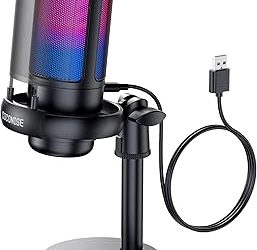
The TONOR TC777 is the best-equipped entry in this group because the listing names a cardioid condenser capsule, a tripod stand, a pop filter and a 180 cm cable. A cardioid pattern favours sound in front of the mic, which suits one person at a desk, and the pop filter softens plosive sounds when you speak. It is a plug-and-play USB mic aimed at podcasting, streaming and vocal recording, so it covers calls and light content work. The tripod takes some desk space, and the listing gives no sample rate or gain control, so you set the level in software.
- Pro: Cardioid pattern listed
- Pro: Tripod and pop filter included
- Pro: 180 cm cable
- Con: No gain control named
- Con: Tripod uses desk space
FIFINE K054 USB Computer Microphone
Spec line: Plug-and-play desktop condenser USB microphone with mute button and LED indicator, for Windows and Mac, YouTube, Zoom, recording and Twitch.
FIFINE’s K054 puts the mute button front and centre, and the LED indicator tells you at a glance whether the mic is live, which matters on a call. The listing describes a plug-and-play desktop condenser for Windows and Mac, and names Zoom, YouTube, recording and Twitch as uses. It is the most practical pick for a home office because it is simple and quick to operate. The listing does not name a pickup pattern, pop filter or cable length, so check those details if you plan to record vocals. It is a plain, low-fuss option rather than a feature-rich kit.
- Pro: Mute button with LED indicator
- Pro: Windows and Mac support
- Pro: Simple plug and play
- Con: Pickup pattern not listed
- Con: Cable length not listed
JOUNIVO USB Microphone with Gooseneck
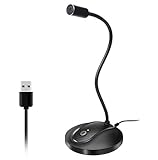
Spec line: USB microphone with 360 degree adjustable gooseneck, mute button and LED indicator, noise-canceling technology, plug and play for Windows and macOS.
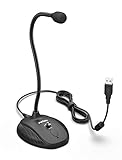
The JOUNIVO gooseneck design is its selling point. A 360 degree adjustable neck lets you point the capsule at your mouth without a tripod, which keeps the desk clear and suits a small workspace or a laptop stand. The listing also names a mute button with an LED indicator, noise-canceling technology and plug-and-play support for Windows and macOS. Gooseneck mics can pick up desk vibration through the base, so avoid placing it on the same surface as a heavy keyboard. The noise-canceling claim is seller wording, and no sample rate or capsule type is given in the listing.
- Pro: 360 degree gooseneck
- Pro: Mute button with LED
- Pro: Windows and macOS support
- Con: Base may pass desk vibration
- Con: Capsule type not listed
CMTECK G009 USB Computer Microphone

Spec line: USB desktop computer microphone G009, noise-cancelling, with mute function, for PC and laptop, Windows and Mac, chatting, home studio, podcasting and gaming.
CMTECK’s G009 is the lowest-priced model here, and the listing describes a noise-cancelling desktop mic with a mute function for chatting, home studio, podcasting and gaming on Windows and Mac. That spread of uses is generous for a basic mic, so treat the home-studio wording as a marketing statement. It makes sense as a spare mic, a classroom mic or a second desk. The compromise is detail: no stand type, pop filter, cable length or capsule pattern is named in the listing text we saw. If you need those facts, step up to the TONOR TC777.
- Pro: Lowest price in the group
- Pro: Mute function
- Pro: Windows and Mac support
- Con: Stand and filter not listed
- Con: Few technical details
FIFINE K668 USB Condenser Microphone
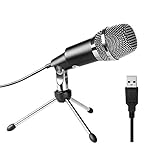
Spec line: Plug-and-play USB condenser microphone for home studio use, Skype, YouTube recordings, Google Voice Search and games, for Windows and Mac.
The FIFINE K668 is a long-running budget condenser, and the listing describes plug-and-play use on Windows and Mac for Skype, YouTube recordings, Google Voice Search and games. That lines up with the typical home use: calls, voice search and casual recording. It is the second FIFINE entry here, so choose it over the K054 only if you do not need the mute button and LED. The listing does not mention a stand, filter, mute button or cable length, so the benefits listed are limited. Expect a basic, no-frills mic that gets you on a call quickly.
- Pro: Plug and play
- Pro: Condenser capsule named
- Pro: Windows and Mac support
- Con: No mute button named
- Con: Stand and filter not listed
TONOR TC310 Gaming Microphone Set

Spec line: PC condenser gaming microphone set with RGB, desktop stand, quick mute and volume control, 200 cm (78 inch) cable, for Twitch streaming and Discord chatting, black.
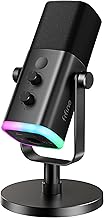
The TC310 is the gaming pick and the highest-priced model here, though still under the ceiling. The listing names RGB lighting, a desktop stand, a quick mute control, a volume control and a 200 cm cable, which is the longest cable in this group and helps when the PC sits far from the desk. It is aimed at Twitch streaming and Discord chatting, so it suits a gamer who wants a visible, controllable mic. The RGB is optional, but you pay for it in the price. No pickup pattern or sample rate is listed, so treat it as a gaming chat mic rather than a recording mic.
- Pro: 200 cm cable
- Pro: Volume control and quick mute
- Pro: Desktop stand included
- Con: Highest price in the group
- Con: Pickup pattern not listed
What a USB Mic Under $30 Does Well
At this price a USB microphone is a clear improvement over a laptop mic because it sits closer to your mouth and picks up less keyboard and fan noise. It will not match a studio setup, but it handles calls, classes and casual streaming with minimal setup.
Most of these mics are condensers, which are sensitive, so a quiet room, a pop filter and a distance of around 10 to 15 cm from your mouth will do more for clarity than any feature on the box. If you share a room, point the back of the mic toward noise sources rather than toward your own voice.
If your setup needs more control later, a model with XLR and USB lets you grow, but that sits above this price. For this guide, the focus is on the simplest, lowest-risk way to get clear speech from a PC or a Mac.
One last habit: before an important call, record ten seconds of yourself and play it back. This reveals hum, echo and level problems faster than any spec sheet, and it takes less time than adjusting settings during the meeting.
How to Choose USB Microphones Under $30
Stand or gooseneck
A tripod stand is stable and portable, while a gooseneck such as the JOUNIVO lets you aim the mic precisely and frees desk space. If you move the mic between desks, a tripod is easier. If you work on a small desk, a gooseneck is the better fit.
Mute and level controls
A mute button with an LED, as on the FIFINE K054 and JOUNIVO, is the single most useful feature for calls. A volume control, as on the TONOR TC310, lets you adjust the level without opening settings, which helps during a game or a class.
Home office and small-space use
For a home office, a usb microphone for home office use needs a clear mute and a compact footprint. For small spaces, pick a gooseneck or a mic with a folding tripod, and place it off to the side of your monitor so it does not block the view.
Gaming use and what $30 buys
For gaming, a usb microphone for gaming benefits from a long cable and a volume control, so the TONOR TC310 is the closest fit. Under $30 you get a clear, simple mic, so keep expectations to calls and casual streams rather than studio recording.
FAQ
Do USB microphones need drivers?
Most plug-and-play USB mics need none on Windows or Mac. Plug in, select the mic as input in sound settings and you are ready.
Is a USB mic better than a headset mic?
Often yes for clarity, because the capsule is larger and sits at a better distance. A headset is more portable and keeps the mic close to your mouth.
What does cardioid mean?
A cardioid pattern picks up sound mostly from the front and rejects the back. It suits a single speaker at a desk.
Are USB microphones for small spaces worth it?
Yes, especially goosenecks and compact stands, because they free desk space and keep the mic near your mouth.
Can I use an inexpensive USB mic for gaming?
Yes. For voice chat, a plug-and-play mic with a mute button is enough, and the TONOR TC310 adds a volume control.
Last updated: November 2026
FAQ
Do USB microphones need drivers?
Is a USB mic better than a headset mic?
What does cardioid mean?
Are USB microphones for small spaces worth it?
Can I use an inexpensive USB mic for gaming?
More from Amazon
Programs that pair well with the guide above. Offers and eligibility are set by Amazon and may change.
Free shipping on eligible items, Prime Video and more. Eligible new members can start with a free trial.
Start a Prime free trialAd-free music streaming. Eligible new subscribers can start with a free trial.
Try Music Unlimited freeA Prime membership for ages 18-24 with a trial period. Eligibility is set by Amazon.
See Prime for Young AdultsAudiobooks and podcasts to listen to on the go. Eligible new members can start with a free trial.
Try Audible freeAs an Amazon Associate we earn from qualifying purchases.