Our Top Picks


Grand Theft Auto VI launches on 19 November 2026 on PlayStation 5 and Xbox Series X|S, published by Rockstar Games. No PC version has been announced, so players who want to record a playthrough will be capturing console gameplay through an external device or an internal card in a recording computer. The capture card, rather than the console, decides how clean that recorded footage looks after several hours of play.
Long sessions demand more than a short clip does. Passthrough has to stay stable while you play, capture has to keep going without dropping frames, and the card has to suit your display, the resolution you want to record at, and the computer receiving the signal.
As an Amazon Associate, we earn from qualifying purchases.
Quick Answer
The Elgato 4K X is the strongest all-round choice for long GTA VI sessions, with HDMI 2.1, 4K144 passthrough, and capture up to 4K144. The AVerMedia Live Gamer Ultra 2.1 GC553G2 is the closest alternative for high-refresh play. For 1080p recording, the Elgato HD60 X or HD60 S+ will do, while a dedicated desktop suits the internal Elgato 4K Pro.
Elgato 4K X
The Elgato 4K X is the most capable USB capture card in this guide. Its HDMI 2.1 input and output let a high-refresh television or monitor receive the full signal from a PS5 or an Xbox Series X|S while the card records at the same time. Capture up to 4K144 lets you record in 4K for a detailed archive, or drop to 1080p at a high frame rate for smaller files. It works with OBS and other common recording tools on a PC, a Mac, or an iPad.
Specs
- Passthrough: up to 4K144 with HDR10 and VRR
- Capture resolution: up to 4K144, or 1080p240
- Interface: USB 3.2 Gen 2
- HDMI version: HDMI 2.1
- Latency: ultra-low latency passthrough
- Console compatibility: PS5, PS5 Pro, Xbox Series X|S
- Recording software: OBS and more
- ASIN: B0CPFWXMBL
AVerMedia Live Gamer Ultra 2.1 GC553G2
The AVerMedia Live Gamer Ultra 2.1 GC553G2 is the closest rival to the Elgato 4K X, and it suits players whose television or monitor runs at a high refresh rate. Its HDMI 2.1 passthrough reaches 4K144, so the picture you play on stays at the refresh rate your display supports while the card captures the session. Capture reaches 4K60, a sensible target for a long playthrough archive, keeping detail high without demanding the storage that higher frame rates at 4K would need. It connects over USB and includes an HDMI 2.1 cable in the box.
Specs
- Passthrough: up to 4K144, or 4K120, with HDR and VRR
- Capture resolution: up to 4K60
- Interface: USB 3.2 Gen 2
- HDMI version: HDMI 2.1
- Latency: low latency passthrough
- Console compatibility: PS5, Xbox Series X|S
- Included in the box: HDMI 2.1 cable, USB cable, audio cable
- ASIN: B0CGD86HNB
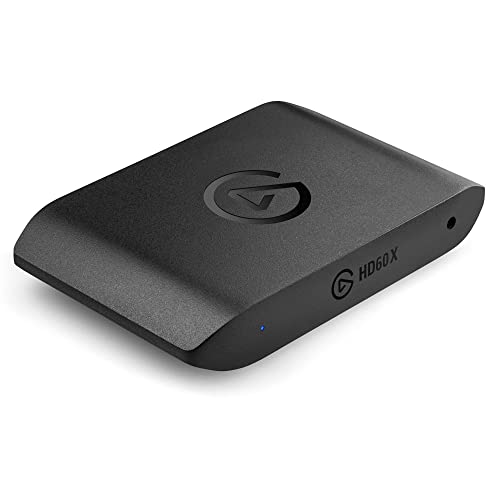
Elgato HD60 X
The Elgato HD60 X is the practical choice for recording long GTA VI sessions in 1080p. Its passthrough reaches 4K60 with HDR10, so you can play on a 4K television at 60 frames per second while the card records a clean 1080p60 file. That split suits long sessions, because 1080p files are smaller, easier to store, and quicker to edit than 4K files. Capture at 1080p60 with HDR10 keeps footage bright and detailed, and the card also supports 4K30 capture. It connects over USB-C, works with a PC or a Mac, and needs no internal installation.
Specs
- Passthrough: up to 4K60 HDR10, 1440p120, or 1080p120, with VRR
- Capture resolution: 1080p60 HDR10, 1440p60, or 4K30
- Interface: USB-C, USB 3.0
- HDMI version: HDMI 2.0
- Latency: ultra-low latency passthrough
- Console compatibility: PS5, PS4 Pro, Xbox Series X|S, Xbox One X|S
- Recording software: OBS and more
- ASIN: B09V1KJ3J4
Elgato 4K Pro
The Elgato 4K Pro is an internal capture card for a dedicated desktop recording computer, and the best option here for a permanent, long-session setup. Because it sits inside the computer on a PCIe slot, it avoids the USB bus entirely, giving it a stable data path for hours of continuous capture. Passthrough reaches 8K60 and 4K at up to 240 frames per second, and capture reaches 4K60 with HDR10 for a detailed archive. It needs a free PCIe slot, a desktop case, and a Windows computer.
Specs
- Passthrough: up to 8K60, or 4K240, with HDR10 and VRR
- Capture resolution: up to 4K60 HDR10, or 1080p240
- Interface: PCIe internal card
- HDMI version: HDMI 2.1
- Latency: ultra-low latency passthrough
- Console compatibility: PS5, PS5 Pro, Xbox Series X|S
- Recording software: OBS and more
- ASIN: B0CSJPDYDN
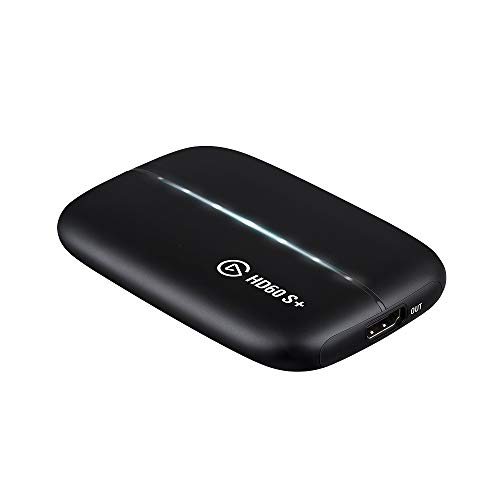
Elgato HD60 S+
The Elgato HD60 S+ is the simplest card in this guide, and it suits long GTA VI sessions where 1080p is enough. Its passthrough reaches 4K60 with HDR10, so you can play on a 4K screen while the card records in 1080p60 with HDR10. The card connects over USB 3.0 and works with a PC or a Mac, with no internal installation. Instant Gameview keeps the delay between your controller and the screen low, and flashback recording lets you save gameplay that has already happened. The main limit is capture resolution: it records at 1080p60, not in 4K.
Specs
- Passthrough: up to 4K60 HDR10
- Capture resolution: 1080p60 HDR10
- Interface: USB 3.0
- HDMI version: HDMI
- Latency: ultra-low latency with Instant Gameview
- Console compatibility: PS5, PS4 Pro, Xbox Series X|S, Xbox One X|S
- Recording software: OBS and more
- ASIN: B07XB6VNLJ
How to Choose a Capture Card for Long GTA VI Recording Sessions
Passthrough Resolution and Refresh Rate
Passthrough is the signal that goes from the console, through the capture card, to your television or monitor, and it decides what you see while you play. A 4K60 display needs a card with 4K60 passthrough at minimum, while a high-refresh display benefits from 4K120 or 4K144 passthrough. If passthrough is lower than your display, you will play at a lower resolution or refresh rate for the whole session. Check passthrough first, not capture.
Capture Resolution
Capture resolution is the resolution of the recorded file, and it is often lower than passthrough. Recording in 4K gives the most detailed archive, but it also creates the largest files and places the highest demand on the recording computer and storage. Recording in 1080p is lighter, easier to edit, and easier to store over many hours. If you plan to edit highlights and share them online, 1080p60 is often enough. If you want a detailed archive to keep, choose a card that captures in 4K60.
Latency
Latency is the delay between pressing a button and seeing the result on screen. A capture card adds latency if you watch the game through the recording software preview, so most players watch the passthrough signal on their television instead. Low-latency passthrough keeps the game feeling responsive, which matters more the longer you play. Look for cards that describe passthrough as ultra-low latency or zero-lag.
USB or PCIe Interface
USB capture cards connect to a laptop or a desktop with a single cable, and they can be moved between computers and rooms. That flexibility suits a living-room setup. PCIe cards sit inside a desktop computer and use a direct slot connection, giving them a stable data path and avoiding shared bandwidth with other USB devices. Choose USB if you need portability, and PCIe if you have a dedicated desktop and want the most stable connection available.
PS5 and Xbox Series X|S Compatibility
Every card in this guide works with the PS5 and the Xbox Series X|S, but compatibility still deserves a check before you buy. Confirm that the card lists both consoles, that it supports the resolution and refresh rate you play at, and that it works with your recording computer and software. Also confirm you have a spare HDMI input, a free USB port or PCIe slot, and enough storage for a long session.
Who Should Skip a Capture Card
A capture card is not the right purchase for every GTA VI player. If you only want to save a short clip now and then, the recording tools built into the PS5 and the Xbox Series X|S may already cover what you need, without extra hardware, cables, or software. If you have no recording computer, a capture card will not work on its own. You should also skip one if you play on a shared television and do not want extra cables and a computer running in the room. If you only watch your own playthroughs back for fun and do not edit or share them, the built-in console recording may be the simpler choice.
Frequently Asked Questions
Can I record GTA VI on PS5 and Xbox Series X|S with a capture card?
Yes. Connect the console to the capture card with an HDMI cable, connect the card to your television for passthrough, and connect the card to a recording computer. GTA VI launches on 19 November 2026 on PS5 and Xbox Series X|S, published by Rockstar Games, and both consoles are supported by the cards in this guide.
What capture resolution should I choose for a long GTA VI session?
Choose 1080p60 for smaller files, easier editing, and simpler storage over many hours. Choose 4K60 for a detailed archive, if your recording computer and storage can handle large files. Passthrough should match your display either way.
Do I need a PC to use a capture card with a console?
Yes, in practice. A capture card sends the console signal to a recording computer, which runs the recording software and stores the file. That computer can be a laptop or a desktop. Internal PCIe cards need a desktop with a free slot. No PC version of GTA VI has been announced.
Will a capture card affect how GTA VI plays on my television?
It should not, as long as the card passthrough matches your display. A card with 4K60 passthrough lets you play in 4K at 60 frames per second on a matching television, and a card with 4K120 or 4K144 passthrough supports a high-refresh display. If passthrough is lower, the picture you play on will be limited to the card passthrough.
Final Verdict
For long GTA VI recording sessions from a console, the Elgato 4K X is the best overall choice, pairing HDMI 2.1 with 4K144 passthrough and capture up to 4K144 in a simple USB package. The AVerMedia Live Gamer Ultra 2.1 GC553G2 is the best alternative for high-refresh displays. Players who record in 1080p will be well served by the Elgato HD60 X, or by the simpler Elgato HD60 S+. The Elgato 4K Pro is the pick for a permanent desktop setup. Match passthrough to your display, choose a capture resolution your storage can sustain, and test the full setup before launch day.
FAQ
Can I record GTA VI on PS5 and Xbox Series X|S with a capture card?
What capture resolution should I choose for a long GTA VI session?
Do I need a PC to use a capture card with a console?
Will a capture card affect how GTA VI plays on my television?
More from Amazon
Programs that pair well with the guide above. Offers and eligibility are set by Amazon and may change.
Free shipping on eligible items, Prime Video and more. Eligible new members can start with a free trial.
Start a Prime free trialAd-free music streaming. Eligible new subscribers can start with a free trial.
Try Music Unlimited freeA Prime membership for ages 18-24 with a trial period. Eligibility is set by Amazon.
See Prime for Young AdultsAudiobooks and podcasts to listen to on the go. Eligible new members can start with a free trial.
Try Audible freeAs an Amazon Associate we earn from qualifying purchases.