Our Top Picks
 Samsung 34' Odyssey G5 Ultra-Wide Gaming Monitor with34-inch10.73 x 31.75 x 18.71 inches12.3 poundsCheck on Amazon
 ASUS TUF Gaming VG34VQL1B 34 Inch 1440p 165Hz31.85 x 16.38 x 10.79 inches19.86 poundsCheck on Amazon
A 34 inch curved monitor changes how a desk feels in a way a flat 27 inch screen simply cannot. The 21:9 ultrawide format wraps more of the game world into your peripheral vision, stretches a timeline or spreadsheet across a single panel without a bezel in the middle, and gives racing, flight and open-world games a sense of width that matches how you naturally look around. For many players and hybrid workers, it is the single-screen alternative to a dual-monitor setup, with none of the alignment, colour-matching or cable clutter that two separate displays bring.
Panel type, curvature, refresh rate and adaptive sync separate a gaming-first ultrawide from an office-first one. This guide compares five real 34 inch curved ultrawides, all at 3440 x 1440, and explains which fits which use.
Disclosure: As an Amazon Associate, we earn from qualifying purchases made through links in this article, at no additional cost to you.
Quick Picks
- Best overall for gaming and colour work: LG UltraGear 34GP83A-B — Nano IPS, 144Hz native with a 160Hz overclock, 1ms GtG and wide DCI-P3 coverage.
- Best for immersion: Samsung Odyssey G5 34 inch — a steep 1000R VA curve, 165Hz and 3440 x 1440 resolution.
- Best value VA ultrawide: Gigabyte G34WQC A — 1500R VA panel, 144Hz, 1ms MPRT and DisplayHDR 400.
- Best balanced Dell option: Dell S3422DWG — 1800R VA panel, 144Hz over DisplayPort and a clean, work-friendly design.
- Best for fast VA gaming: ASUS TUF Gaming VG34VQL1B — 165Hz, 1ms, Extreme Low Motion Blur and FreeSync Premium.
1. LG UltraGear 34GP83A-B — Best Overall
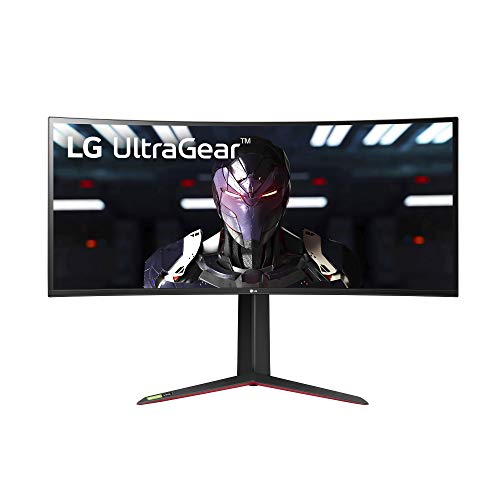
The LG UltraGear 34GP83A-B is the most complete package in this group because it pairs the ultrawide format with a Nano IPS panel. Most 34 inch curved monitors at this level use VA panels, which are strong on contrast but can smear dark motion. Nano IPS answers that trade-off with fast response and wide, accurate colour, making this LG a credible choice for players who also edit photos or video on the same screen.
Its native refresh rate is 144Hz, with an overclock to 160Hz listed, and response time is 1ms GtG. The listing describes 3440 x 1440, a 1900R curvature, VESA DisplayHDR 400 and 98 percent DCI-P3 coverage. Adaptive sync covers NVIDIA G-SYNC Compatibility and AMD FreeSync Premium, and connectivity includes HDMI, DisplayPort and USB.
The 1900R curve is the gentlest here, which suits mixed use: text stays easy to read, editing lines look less distorted at the edges, and the screen still feels more enveloping than a flat ultrawide. It is also more forgiving for shared viewing than a 1000R design.
Specifications
- Size and format: 34 inch, 21:9 curved ultrawide, 1900R
- Resolution: 3440 x 1440
- Panel: Nano IPS
- Refresh rate: 144Hz native, 160Hz overclocked
- Response time: 1ms GtG
- HDR: VESA DisplayHDR 400
- Colour: 98 percent DCI-P3
- Adaptive sync: NVIDIA G-SYNC Compatible, AMD FreeSync Premium
- Ports: HDMI, DisplayPort, USB
Pros
- Nano IPS colour and viewing angles that suit editing as well as gaming
- Fast 1ms GtG response with high refresh for competitive play
- Adaptive sync support for both NVIDIA and AMD graphics cards
- Gentler curve that works well for productivity and shared viewing
Cons
- IPS contrast is lower than the VA models in this guide, so blacks look greyer in a dark room
- No USB-C input is listed, so single-cable laptop docking is not part of the package
- Stand adjustment is height and tilt in the listing records, with no swivel
Check the LG UltraGear 34GP83A-B on Amazon
2. Samsung Odyssey G5 34 Inch — Best for Immersion
If the whole point of going curved is to feel surrounded, the Samsung Odyssey G5 makes the strongest case here. Its 1000R curvature is the steepest in this guide, matching the natural curve of the eye more closely than 1500R or 1800R designs. In a racing cockpit, a flight simulator or a first-person game, that tighter wrap brings the edges of the 34 inch panel into play instead of leaving them at the edge of your attention.
The panel is VA, at 3440 x 1440, with a 165Hz refresh rate and 1ms MPRT listed in the product records. Samsung lists HDR10 support and AMD FreeSync Premium for tear-free variable refresh gaming. VA contrast is the other half of the appeal: dark scenes, night races and shadowed interiors carry more depth on this type of panel than on IPS, which matters if you mostly play in a dim room.
That steep curve is designed for one viewer sitting centred and fairly close. It is less natural for two people watching together, and some users need a few days to adjust to it. The stand is also simpler than height-adjustable rivals, so plan for a VESA arm if ergonomics matter.
Specifications
- Size and format: 34 inch, 21:9 curved ultrawide, 1000R
- Resolution: 3440 x 1440
- Panel: VA
- Refresh rate: 165Hz
- Response time: 1ms MPRT
- HDR: HDR10
- Adaptive sync: AMD FreeSync Premium
- Features listed: Eye Saver Mode, Flicker Free, Black Equalizer, Low Input Lag Mode
Pros
- Steepest 1000R curve here for the strongest wrap-around effect
- High 165Hz refresh rate for fast-paced gaming
- VA contrast suits dark games and evening play
- FreeSync Premium support for variable refresh rate gaming
Cons
- Very tight curve is best for a single, centred viewer and takes adjustment
- VA motion can show dark smearing compared with the Nano IPS model above
- Stand adjustment is more limited than on height-adjustable rivals
Check the Samsung Odyssey G5 34 inch on Amazon
3. Gigabyte G34WQC A — Best Value VA Ultrawide

The Gigabyte G34WQC A covers the core ultrawide gaming specification without chasing extras you may never use. You get a 34 inch VA panel at 3440 x 1440, a 1500R curve, a 144Hz refresh rate and a 1ms MPRT response time, plus VESA DisplayHDR 400 and AMD FreeSync Premium, all of which are named in the Amazon listing for this model. Colour coverage in the listing is 90 percent DCI-P3, which is wide enough for casual content creation alongside gaming.
The 1500R curve sits in the middle: more enveloping than the Dell and LG, but less demanding about seating than the Samsung. Gigabyte also includes a height-adjustable stand in the listing, which helps set this large panel at a comfortable eye level.
Connectivity includes HDMI and DisplayPort. As with other VA panels, the trade-off is clear: you gain contrast over Nano IPS, and accept slower dark transitions in return.
Specifications
- Size and format: 34 inch, 21:9 curved ultrawide, 1500R
- Resolution: 3440 x 1440
- Panel: VA
- Refresh rate: 144Hz
- Response time: 1ms MPRT
- HDR: VESA DisplayHDR 400
- Colour: 90 percent DCI-P3
- Adaptive sync: AMD FreeSync Premium
- Ports: HDMI, DisplayPort
- Stand: height adjustable
Pros
- Complete core spec: 144Hz, 1500R curve and DisplayHDR 400 in one model
- Height-adjustable stand included
- Middle-ground curve suits both gaming and everyday desktop work
- Wide colour coverage for a VA panel at this tier
Cons
- VA dark-motion smearing is possible in fast, dark scenes
- No USB-C docking is listed for single-cable laptop use
- Built-in audio, where fitted, is a convenience rather than a replacement for headphones
Check the Gigabyte G34WQC A on Amazon
4. Dell S3422DWG — Best Balanced Option

The Dell S3422DWG takes a more restrained approach, and that is exactly why it works for a desk that has to do everything. The listing describes a 34 inch curved gaming monitor with an 1800R screen, WQHD 3440 x 1440 resolution and a 144Hz refresh rate, with AMD FreeSync and a DisplayPort 1.4 cable included in the box description. The design is plain, dark and free of aggressive gaming styling, so it looks at home in a home office as easily as in a gaming setup.
The VA panel and 1800R curve give you the ultrawide benefit without the strong bend of a 1000R or 1500R model. If you split your day between spreadsheets, calls and evening gaming, that calmer curve is easy to live with. Dell listing records also reference VESA DisplayHDR 400 for this model.
The 144Hz rate is reached over DisplayPort in the listing, so use the included DP cable. Height adjustment is part of the design. No USB-C video and charging is listed, so laptop users will connect power separately.
Specifications
- Size and format: 34 inch, 21:9 curved screen, 1800R
- Resolution: 3440 x 1440 (WQHD)
- Panel: VA
- Refresh rate: 144Hz, over DisplayPort
- HDR: VESA DisplayHDR 400
- Adaptive sync: AMD FreeSync, with FreeSync Premium Pro named in Dell materials for this model
- Ports: HDMI, DisplayPort 1.4
- In the box per listing: monitor, stand, DP to DP 1.4 cable
Pros
- Understated design that fits a work desk as well as a gaming desk
- Gentle 1800R curve is easy to adjust to for long workdays
- 144Hz gaming performance over DisplayPort
- DisplayPort cable included in the listing description
Cons
- Top refresh rate depends on using DisplayPort rather than HDMI
- No USB-C single-cable connection is listed
- VA panel shares the usual dark-smearing limitation of the technology
Check the Dell S3422DWG on Amazon
5. ASUS TUF Gaming VG34VQL1B — Best for Fast VA Gaming
The ASUS TUF Gaming VG34VQL1B is aimed squarely at players who want VA contrast and high speed together. The Amazon listing title gives the headline specification directly: a 34 inch curved gaming monitor at WQHD 3440 x 1440, with a 165Hz refresh rate, 1ms response, Extreme Low Motion Blur, FreeSync Premium, Eye Care features, a height-adjustable stand, DisplayHDR 400, and DisplayPort, HDMI and USB connections.
Extreme Low Motion Blur (ELMB) uses backlight strobing to sharpen moving images, making fast pans and tracking targets look clearer. It is a mode you turn on for games that benefit, rather than an always-on desktop setting, and it works within specific conditions — check the listing and manual before counting on it for a particular title.
The height-adjustable stand and USB ports in the listing make it easy to build a tidy setup. FreeSync Premium is the listed adaptive sync support; NVIDIA owners should check the listing for compatible-mode notes.
Specifications
- Size and format: 34 inch curved ultrawide
- Resolution: 3440 x 1440 (WQHD)
- Panel: VA
- Refresh rate: 165Hz
- Response time: 1ms
- Motion feature: Extreme Low Motion Blur (ELMB)
- HDR: DisplayHDR 400
- Adaptive sync: AMD FreeSync Premium
- Ports: DisplayPort, HDMI, USB
- Stand: height adjustable
- Eye care: Eye Care features named in the listing
Pros
- 165Hz refresh with a motion-clarity mode for fast games
- Height-adjustable stand and USB connectivity in the listing
- DisplayHDR 400 and FreeSync Premium included
- VA contrast for darker game scenes
Cons
- Motion-blur strobing is a situational mode, not an always-on benefit
- VA response in dark transitions still trails fast IPS
- No USB-C video input is named in the listing title specification
Check the ASUS TUF Gaming VG34VQL1B on Amazon
How to Choose a 34 Inch Curved Monitor
Begin with panel type. Choose Nano IPS, like the LG here, if colour accuracy, wide viewing angles and clean fast motion matter most, and you can accept lower native contrast. Choose VA, like the other four models, if deeper blacks and stronger contrast in a dim room matter more, and you accept some dark smearing in fast motion.
Match the curve to your seating. A 1900R or 1800R curve is gentle, work-friendly and better for shared viewing. A 1500R curve is a balanced gaming choice for one person at a desk. A 1000R curve is the most immersive and the most personal: sit centred and close, or the effect works against you.
Check refresh rate by connection. A headline rate such as 144Hz or 165Hz may apply over DisplayPort first. Before you buy, confirm the rate your graphics card and cable will actually deliver over the port you plan to use, especially if you intend to connect through HDMI or through a dock.
Be realistic about HDR. Every model here lists an HDR tier such as DisplayHDR 400 or HDR10. That means the monitor can accept and display an HDR signal with some benefit, not that it delivers the local-dimming impact of a high-end HDR television. Treat HDR at this tier as a bonus, not the reason to buy.
Think about your GPU. Driving 3440 x 1440 at high refresh rates is a real step up from 1080p. A monitor cannot create frames your graphics card does not produce, so pair a 144Hz or 165Hz ultrawide with a GPU that can feed it in the games you play, and use adaptive sync to smooth the range below the maximum.
Plan the desk. Measure it, check height adjustment, and decide on a VESA arm in advance. Only some models here list USB ports, and none headlines a USB-C docking input, so laptop users should plan a hub separately.
FAQs
Is a 34 inch curved monitor good for work as well as gaming?
Yes, for most desk work. The 3440 x 1440 resolution gives you room for two full windows side by side on one screen, which suits documents, code, timelines and spreadsheets. Gentler curves such as 1800R and 1900R are usually the easiest for long text-heavy days, while tighter curves are aimed at a single gaming viewer.
What resolution should a 34 inch curved monitor have?
For this size, 3440 x 1440 is the standard to look for, and all five monitors in this guide use it. It keeps text sharp at normal desk distance while remaining far easier for a graphics card to drive at high refresh rates than a 4K-class ultrawide would be.
Does curvature actually matter, or is it marketing?
It matters in how the screen feels, not in the resolution or refresh rate. A tighter curve such as 1000R brings the edges closer and can increase immersion for a centred viewer. A gentler curve changes the image less and is easier for work and shared viewing. Neither is automatically better; the right choice depends on seating and use.
Can one 34 inch ultrawide replace two monitors?
For many users, yes. You gain a seamless centre view with no bezel gap, one stand and simpler colour matching. What you lose is the ability to angle two screens independently or to dedicate a separate physical display to a call or chat while a game runs fullscreen, so window management habits matter.
Do I need FreeSync or G-SYNC on an ultrawide?
Adaptive sync is worth having if you game, because ultrawide resolutions often produce frame rates that rise and fall rather than sitting at the maximum refresh rate. It reduces tearing and stutter in that variable range. Match the listed support to your graphics card, and check the listing for the exact sync support of the model you choose.
Conclusion
The best 34 inch curved monitors all share the same winning format — 34 inches, 21:9 and 3440 x 1440 — but they split clearly by panel and curve. Pick the LG UltraGear 34GP83A-B if you want the most versatile screen, with Nano IPS colour, fast response and a curve that works for both play and productivity. Pick the Samsung Odyssey G5 if immersion is the priority and you sit centred in front of its steep 1000R wrap. The Gigabyte G34WQC A and ASUS TUF VG34VQL1B serve VA gamers who want 144Hz to 165Hz performance with a height-adjustable stand, while the Dell S3422DWG is the calm, balanced option for a desk that has to look professional by day and play by night. Measure your desk, match the curve to your seat, confirm the refresh rate over your chosen connection, and any of these five will make a flat, smaller monitor feel cramped by comparison.
FAQ
Is a 34 inch curved monitor good for work as well as gaming?
What resolution should a 34 inch curved monitor have?
Does curvature actually matter, or is it marketing?
Can one 34 inch ultrawide replace two monitors?
Do I need FreeSync or G-SYNC on an ultrawide?
More from Amazon
Programs that pair well with the guide above. Offers and eligibility are set by Amazon and may change.
Free shipping on eligible items, Prime Video and more. Eligible new members can start with a free trial.
Start a Prime free trialAd-free music streaming. Eligible new subscribers can start with a free trial.
Try Music Unlimited freeA Prime membership for ages 18-24 with a trial period. Eligibility is set by Amazon.
See Prime for Young AdultsAudiobooks and podcasts to listen to on the go. Eligible new members can start with a free trial.
Try Audible freeAs an Amazon Associate we earn from qualifying purchases.