
Our Short List of 3
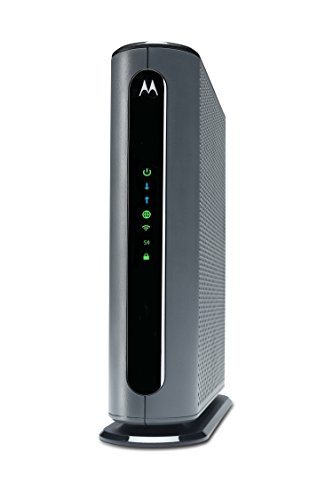
- Best for: Xfinity households on mid-tier plans who want one approved box for modem and Wi-Fi duties.
- DOCSIS 3.0 cable modem with 24×8 channel bonding
- Built-in AC1900 dual-band Wi-Fi router
- Power Boost, as listed
- 4 Gigabit Ethernet ports
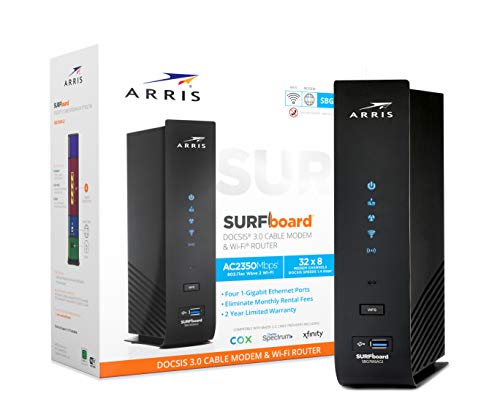
- Best for: Busy, device-heavy homes that want the most DOCSIS 3.0 headroom in this group.
- DOCSIS 3.0 cable modem with 32×8 channel bonding
- AC2350 802.11ac Wave 2 Wi-Fi
- Four 1 Gbps Ethernet ports
- Approved for Xfinity, Cox and Charter Spectrum, per the listing

- Best for: Larger homes where stated coverage matters more than the widest channel bonding.
- DOCSIS 3.0 cable modem, per the listing title
- AC1900 Wi-Fi, up to 1.9 Gbps as listed
- For cable plans up to 800 Mbps on Xfinity, as listed
- Coverage up to 1,800 sq ft and 30 devices, as listed
All 5 Picks at a Glance
| Product | Specs | Action |
|---|---|---|
| Motorola MG7700 |
| Check price on Amazon |
| ARRIS SURFboard SBG7600AC2 |
| Check price on Amazon |
| NETGEAR Nighthawk C7000 |
| Check price on Amazon |
 Motorola MG7550 |
| Check price on Amazon |
 NETGEAR C6230 |
| Check price on Amazon |
Key takeaways
- Five Xfinity-approved AC cable gateways compared: DOCSIS 3.0 channel bonding, Wi-Fi class and plan ceilings from the Motorola, ARRIS and NETGEAR listings.
Buying a router for Xfinity starts with a decision most router roundups skip: Xfinity arrives over a coaxial cable line, so the box you buy has to be a modem and a router in one, and it has to be a model Xfinity accepts on its network. A standalone router, however good, still leaves you needing a separate cable modem. The real decision is therefore which approved gateway matches your plan’s speed tier, your home’s size and the number of devices you run at once, because a gateway that is under-specced for your plan quietly caps the connection you pay for every month.
This guide is for Xfinity households replacing a rented gateway or setting up a new connection, from small apartments on entry plans to busy family homes on faster tiers. Every pick below is a modem-router combo whose Amazon listing states Comcast Xfinity approval or compatibility, and each was chosen from the specs in its listing title and product details rather than from brand reputation.
Quick Picks
As an Amazon Associate we earn from qualifying purchases
| Product | Best for | Key spec from title |
|---|---|---|
| Motorola MG7700 | Most Xfinity homes on mid-tier plans | DOCSIS 3.0 combo for cable plans up to 800 Mbps |
| ARRIS SURFboard SBG7600AC2 | Busy homes that want the widest Wi-Fi class | AC2350 Wi-Fi with 32×8 DOCSIS 3.0 bonding |
| NETGEAR Nighthawk C7000 | Larger homes where coverage comes first | AC1900 Wi-Fi, coverage up to 1,800 sq ft as listed |
| Motorola MG7550 | Smaller homes on lower-speed plans | 16×4 DOCSIS 3.0, for plans up to 300 Mbps |
| NETGEAR C6230 | Compact setups on entry cable plans | AC1200 Wi-Fi, for cable plans up to 400 Mbps |
How to Choose
Match the modem side to your plan tier
Every gateway here is a DOCSIS 3.0 unit, but the channel bonding behind that label differs: 16×4 on the MG7550, 24×8 on the MG7700 and 32×8 on the SBG7600AC2. Bonding is the modem’s capacity, and each listing converts it into a plan ceiling — up to 300 Mbps, up to 400 Mbps or up to 800 Mbps. Start with the speed tier on your Xfinity bill and buy the gateway whose stated ceiling meets or passes it. A gateway below your tier caps your connection no matter how strong its Wi-Fi is, while one far above it adds nothing today.
Check that Xfinity approval is stated in the listing
Cable gateways are not universal. A modem-router combo activates only on networks whose operator has approved that model, which is why the listings in this guide carry their provider wording in the title itself: approved by Comcast Xfinity, or compatible with Xfinity, Spectrum and Cox. Treat that wording as a requirement, not a bonus. A gateway approved for a different provider, or an older model whose approval has lapsed, can fail at activation even though the connectors fit. If a listing does not name Xfinity, leave it off your shortlist, however attractive its Wi-Fi class looks.
Weigh the Wi-Fi class against your home
The AC number is the combined speed class of both bands added together: AC1200 on the C6230, AC1900 on the MG7700, MG7550 and C7000, and AC2350 on the SBG7600AC2. No single device ever connects at the combined figure, so use the class as a rough capacity guide for how many devices can stay busy at once. Only one listing here states coverage outright — the C7000, at up to 1,800 square feet and 30 devices. In a large or multi-storey home, that stated coverage matters more than a small step in AC class.
Count the ports, and note what these boxes cannot do
Four Gigabit Ethernet ports are standard across most of this group, which covers a desktop, a console and a streaming box with one spare. The C7000 is the only model here whose listing adds a USB port, for sharing storage or a printer across the network. Just as important is what none of them lists: a telephone jack for Xfinity Voice. Households with a voice line need a telephony gateway instead of any pick here. Check your wired devices and your phone service before choosing, not after the box arrives.
The 5 Best Options
Motorola MG7700
- Best for: Xfinity households on mid-tier plans who want one approved box for modem and Wi-Fi duties.
- DOCSIS 3.0 cable modem with 24×8 channel bonding
- Built-in AC1900 dual-band Wi-Fi router
- Power Boost, as listed
- 4 Gigabit Ethernet ports
Xfinity households on mid-tier plans who want one approved box for modem and Wi-Fi duties.
It is a DOCSIS 3.0 unit listed for plans up to 800 Mbps, so anyone expecting to move to a gigabit-class tier later will outgrow the modem side.
The MG7700 is the natural starting point for most Xfinity households because its listing pairs the two numbers that matter most: DOCSIS 3.0 approval for cable plans up to 800 Mbps and an AC1900 dual-band router in the same box. Its 24×8 channel bonding sits a step above entry gateways, which suits homes that stream, game and hold video calls at the same time. Motorola’s Power Boost is listed as an amplifier feature for the Wi-Fi side. If your plan sits in the middle tiers and you want one box that simply covers it, this is the pick to beat.
ARRIS SURFboard SBG7600AC2
- Best for: Busy, device-heavy homes that want the most DOCSIS 3.0 headroom in this group.
- DOCSIS 3.0 cable modem with 32×8 channel bonding
- AC2350 802.11ac Wave 2 Wi-Fi
- Four 1 Gbps Ethernet ports
- Approved for Xfinity, Cox and Charter Spectrum, per the listing
Busy, device-heavy homes that want the most DOCSIS 3.0 headroom in this group.
The AC2350 figure is a combined total across both bands, so no single device connects at that speed; judge it against your plan tier instead.
Choose the SBG7600AC2 when the modem side and the Wi-Fi side both need headroom. Its listing states 32×8 channel bonding, the widest DOCSIS 3.0 bonding in this group, alongside AC2350 802.11ac Wave 2 Wi-Fi, again the broadest wireless class here. That combination suits larger households where several televisions, consoles and laptops pull on the connection through the evening. ARRIS also lists approval for Xfinity, Cox and Charter Spectrum and a 2-year warranty, which makes it the easiest pick to justify if the gateway will serve a busy home for years.
NETGEAR Nighthawk C7000
- Best for: Larger homes where stated coverage matters more than the widest channel bonding.
- DOCSIS 3.0 cable modem, per the listing title
- AC1900 Wi-Fi, up to 1.9 Gbps as listed
- For cable plans up to 800 Mbps on Xfinity, as listed
- Coverage up to 1,800 sq ft and 30 devices, as listed
Larger homes where stated coverage matters more than the widest channel bonding.
The listed plan ceilings differ by provider — 800 Mbps on Xfinity but lower figures for Cox and Spectrum — so check the ceiling for your own provider in the listing copy.
The C7000 is the coverage-led option. NETGEAR’s listing states AC1900 Wi-Fi with coverage up to 1,800 square feet and up to 30 devices, figures none of the other listings here put in writing, and it is the only pick in this group with a USB port for sharing storage or a printer on the network. Its title rates it for cable plans up to 800 Mbps on Xfinity. Pick it when the rooms at the far end of the house are the problem, rather than the speed of the plan itself.
Motorola MG7550
- Best for: Apartments and smaller homes on Xfinity plans at the lower tiers.
- 16×4 DOCSIS 3.0 cable modem
- AC1900 dual-band Wi-Fi router with Power Boost and DFS
- Approved by Comcast Xfinity, Cox and Charter Spectrum, per the listing title
- For cable plans up to 300 Mbps
Apartments and smaller homes on Xfinity plans at the lower tiers.
The title also carries a 686 Mbps maximum DOCSIS figure; the figure to match against your plan is the up-to-300 Mbps rating, and 16×4 bonding leaves the least room if your plan speeds up.
The MG7550 is the smaller-plan Motorola. Its 16×4 DOCSIS 3.0 modem is the narrowest bonding in this group, and Motorola positions it for cable plans up to 300 Mbps, which is exactly where it belongs: apartments and smaller homes whose plan will never trouble it. You still get an AC1900 dual-band router, Power Boost and DFS channels, so the Wi-Fi side does not feel cut down. It also carries approval wording for Comcast Xfinity, Cox and Charter Spectrum in its title. Choose it when your plan is modest and extra modem headroom would go unused.
NETGEAR C6230
- Best for: Smaller homes on entry Xfinity plans that want a single approved gateway.
- DOCSIS 3.0 cable modem with built-in Wi-Fi router
- AC1200 Wi-Fi speed
- Modem throughput up to 680 Mbps, as listed
- For cable plans up to 400 Mbps
Smaller homes on entry Xfinity plans that want a single approved gateway.
AC1200 is the narrowest Wi-Fi class in this group, so a home that keeps adding streaming devices will feel its limits before the modem side reaches its own.
The C6230 is the entry point of the group and the only AC1200 model here. NETGEAR’s title states compatibility with Xfinity, Spectrum and Cox and rates the unit for cable plans up to 400 Mbps, with modem throughput listed up to 680 Mbps. That makes it a sensible fit for smaller homes and lighter device counts, where an AC1200 router still covers the space comfortably. It gives up the wider bonding and faster Wi-Fi classes of the models above, so it suits buyers whose plan and home are both compact and likely to stay that way.
Which One Fits Your Situation
Your plan is mid-tier and you want one box to handle everything
Pick the MG7700. Its listing covers cable plans up to 800 Mbps, which spans the middle Xfinity tiers most households actually sit on, and its 24×8 bonding plus AC1900 Wi-Fi handle a family mix of streaming, gaming and video calls without the modem becoming the bottleneck. It is the balanced default in this group: approved in its title, sensibly specced on both sides, and unlikely to need replacing unless your plan jumps to a gigabit tier.
Every screen in the house streams at the same time
Go with the SBG7600AC2. The 32×8 bonding gives the modem side the most headroom here, and the AC2350 Wave 2 Wi-Fi is the widest wireless class in the group, so simultaneous 4K streams, downloads and calls have the most room to coexist. The stated approval for Xfinity in its listing and the 2-year warranty suit a gateway you expect to leave running for years.
The back rooms keep losing the Wi-Fi signal
Choose the C7000. It is the only pick whose listing states coverage figures — up to 1,800 square feet and up to 30 devices — so it is the one to reach for when dead zones, not plan speed, are the complaint. Its AC1900 Wi-Fi and up-to-800 Mbps Xfinity ceiling still cover most plans, and the USB port adds network storage or printer sharing that the others here do not list.
A small flat on an entry plan, with no plans to upgrade
Take the C6230 if your plan runs up to 400 Mbps, or the MG7550 if it tops out at 300 Mbps. Both keep the setup to one approved box, and their narrower Wi-Fi and bonding figures only become limits when plans or device counts grow. In a compact home with a handful of devices, either covers daily browsing, calls and streaming without the unused headroom of the bigger gateways.
Common Mistakes
- Buying a standalone router for Xfinity and discovering there is still no modem in the chain.
- Matching the gateway to your Wi-Fi wishes but not to your plan: a 16×4 unit on a faster plan caps speeds no matter how good the wireless side is.
- Reading the AC number as the speed a single device will get — it is the combined total of both bands.
- Forgetting Xfinity Voice: none of these gateways is a telephone modem, so voice households need a telephony-capable unit instead.
- Assuming approval carries between providers: each listing names its own providers, and a gateway approved elsewhere may not activate on Xfinity.
Frequently Asked Questions
Do these gateways replace both my modem and my router?
Yes. Each pick is a modem-router combo: the DOCSIS 3.0 modem talks to the Xfinity cable line and the built-in dual-band AC Wi-Fi router handles your home network, with Gigabit Ethernet ports for wired devices. That is the difference between this class and a standalone router, which still needs a separate modem in front of it to work on a cable connection at all.
Will any of these run a gigabit-class Xfinity plan?
No. All five are DOCSIS 3.0 gateways whose listings state plan ceilings between 300 and 800 Mbps, so a gigabit-class tier would run into the modem’s ceiling before it reached your devices. Households on those tiers need a DOCSIS 3.1 gateway instead, which is a different class from every pick in this guide. Match the gateway to the tier on your bill, not the tier you might want later.
Can I use one of these gateways with Xfinity Voice?
None of the five listings states a telephone or voice function, and these are data gateways. If your Xfinity package includes a voice line that runs through the gateway, you need a telephony-capable model with the voice ports stated in its listing. Check your package first; households without the voice service can use any pick here without giving the question another thought.
How do I confirm a gateway is approved before ordering?
Read the listing title and product details for the provider wording: the gateways here state Comcast Xfinity approval or compatibility with Xfinity by name. Then check the plan ceiling in that listing against the speed tier on your bill — up to 300, 400 or 800 Mbps depending on the model. If the provider name or a sufficient ceiling is missing, that gateway is not the right match.
FAQ
Do these gateways replace both my modem and my router?
Will any of these run a gigabit-class Xfinity plan?
Can I use one of these gateways with Xfinity Voice?
How do I confirm a gateway is approved before ordering?
More from Amazon
Programs that pair well with the guide above. Offers and eligibility are set by Amazon and may change.
Free shipping on eligible items, Prime Video and more. Eligible new members can start with a free trial.
Start a Prime free trialAd-free music streaming. Eligible new subscribers can start with a free trial.
Try Music Unlimited freeA Prime membership for ages 18-24 with a trial period. Eligibility is set by Amazon.
See Prime for Young AdultsAudiobooks and podcasts to listen to on the go. Eligible new members can start with a free trial.
Try Audible freeAs an Amazon Associate we earn from qualifying purchases.









