Key takeaways
- Pros: 48V phantom power listed
- Pros: XLR/TRS inputs and USB-C connection
- Pros: Direct monitoring with echo control
- Cons: Unfamiliar brand
- Cons: Bit depth and noise figures not listed
The best audio interfaces under $30 are a small group: two true XLR/TRS recording interfaces and several simple USB sound cards. The AMZ-UTHHF USB audio interface is the top pick because its listing names 48V phantom power, XLR/TRS inputs, a USB-C connection and direct monitoring. This guide compares six options from listing specifications and separates real interfaces from plain adapters.
Quick Comparison
| Model | Key specs (per listing) | Best for |
|---|---|---|
| AMZ-UTHHF USB Audio Interface | 48V phantom power, XLR/TRS inputs, USB-C, direct monitor and echo control, 48kHz | First mic or guitar recording |
| XTUGA Q-12 USB Audio Interface | XLR input, microphone jack, USB sound card, plug and play | Simple XLR mic hookup |
| VANTEC USB 7.1 Adapter | USB external 7.1 channel audio adapter | Extra audio outputs |
| MEIRIYFA USB Sound Card | USB 2.0, virtual 7.1, volume control, USB to 3.5mm jack | Replacing a dead audio jack |
| VENTION USB Sound Card | Stereo, volume control, USB to 3.5mm jack, Windows and Mac | Headset on a desktop |
| biaze USB Audio Adapter | 3.5mm headphone and mic jack, no drivers, PC and PS5/PS4 | Plug-and-play headset use |
What an Audio Interface Under $30 Can and Cannot Do
A true audio interface connects professional microphones and instruments to a computer, usually through XLR or quarter-inch inputs with a preamp and sometimes phantom power. At this budget only two listings fit that description. The rest are USB sound cards or adapters that add a headphone and microphone jack to a computer. They are useful, but they do not power condenser microphones or accept XLR cables. Reading the listing carefully avoids buying the wrong category.
1. AMZ-UTHHF USB Audio Interface
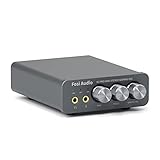
Spec line: USB-C audio interface, 48V phantom power, XLR/TRS inputs, direct monitor and echo control, 48kHz, for PC, Mac and iOS.
As an Amazon Associate we earn from qualifying purchases at no extra cost to you.

This is the only listing in the group that names phantom power, which a condenser microphone needs to work. It also lists XLR/TRS inputs, a USB-C connection, and direct monitoring with an echo control, and it describes use with a guitar, a microphone or a podcast setup on PC, Mac and iOS.
The trade-offs are the brand and the specification depth. The brand is little known, the listing mentions 48kHz sampling but does not state bit depth or preamp noise figures, and there are no details on drivers or latency. For a first microphone or a spare setup it is a sensible pick, but check the maker page for support information before you rely on it for important recordings.
- Pros: 48V phantom power listed
- Pros: XLR/TRS inputs and USB-C connection
- Pros: Direct monitoring with echo control
- Cons: Unfamiliar brand
- Cons: Bit depth and noise figures not listed
2. XTUGA Q-12 USB Audio Interface
Spec line: USB audio interface with XLR input, microphone jack, USB sound card, ultra-low latency, plug and play.

The XTUGA is an interface for microphones and recording that the listing describes with an XLR input, a microphone jack and plug-and-play operation. It positions itself for recording music or a computer-based studio and mentions ultra-low latency.
The listing does not state phantom power, so it is safest to assume it suits dynamic microphones and confirm on the maker page before you plug in a condenser. Specifications such as sample rate are also absent from the text. It is a simple device, and the plug-and-play promise means no drivers on most systems, but you should check the maker page for compatibility.
- Pros: XLR input listed
- Pros: Plug-and-play USB design
- Pros: Microphone jack for direct headset use
- Cons: Phantom power not listed
- Cons: Sample rate not listed
3. VANTEC USB 7.1 Channel Audio Adapter
Spec line: USB external 7.1 channel audio adapter.
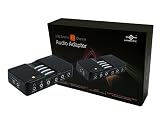
The Vantec is a USB sound card with a seven-point-one channel layout. The listing is short, so details like connector types or sampling rates are not stated in the text. It is a convenient way to add outputs to a computer whose built-in audio is damaged or missing.
It is not a recording interface and it has no XLR input. Treat it as an audio output upgrade for speakers or a surround setup. If you want to record a microphone with XLR, the first two picks are the right category. Check the maker page for the connector layout before you buy.
- Pros: 7.1 channel layout named
- Pros: USB plug-in convenience
- Pros: Useful for adding outputs
- Cons: No XLR input
- Cons: Few details in the listing
4. MEIRIYFA USB Sound Card
Spec line: External USB 2.0 sound card, virtual 7.1 surround, volume control, USB to 3.5mm jack adapter cable, plug and play.

The MEIRIYFA adapter is a simple USB sound card with volume control on the cable and virtual 7.1 surround processing. The listing describes it as plug and play and as a USB to 3.5mm jack adapter for PC.
Virtual surround is a software effect that simulates multiple channels through stereo headphones, so it is not the same as true multi-channel output. It is practical when a laptop port stops working or when you need an extra headphone jack. Like the other adapters, it will not power condenser microphones or accept XLR cables.
- Pros: Volume control on the cable
- Pros: Plug and play
- Pros: Virtual 7.1 effect named
- Cons: Not a recording interface
- Cons: Virtual surround is a software effect
5. VENTION USB Sound Card
Spec line: External stereo USB sound card, volume control, USB to 3.5mm jack, for Windows, Mac, PC, laptop, desktop, headset and Switch.

The Vention sound card is a simple stereo adapter with volume control. The listing names Windows and Mac plus desktop, laptop and headset use, and it also mentions the Nintendo Switch. It is easy to understand and aimed at people who want a headset to work on a computer without a free audio jack.
A stereo adapter like this suits a headset with a built-in microphone, if the jack layout matches. It will not suit professional microphones. Specifications beyond the stated stereo and volume control are not in the listing, so check the maker page for jack type and compatibility details with your headset.
- Pros: Volume control
- Pros: Windows and Mac named
- Pros: Headset-friendly design
- Cons: Stereo only
- Cons: No XLR or phantom power
6. biaze USB Audio Adapter
Spec line: USB sound card with 3.5mm headphone and microphone TRS jack, no drivers needed, for Windows and Mac, PC, laptop, PS5 and PS4.

The biaze adapter lists no drivers needed and compatibility with PC, laptops, PS5 and PS4. It provides a 3.5mm headphone and microphone jack, which suits a headset on a console controller or a laptop.
It has the simplest feature set of the six, which is also its strength: nothing to install or configure. The limitation is the same as other adapters, since it does not offer XLR input or phantom power. Pick it when you simply need a headset to work.
- Pros: No drivers needed
- Pros: PC, laptop, PS5 and PS4 named
- Pros: Headphone and microphone jack
- Cons: No XLR input
- Cons: Few controls
How to Choose Audio Interfaces Under $30
Decide whether you need an interface or an adapter
If you own an XLR microphone or plan to record a guitar, you need an interface with XLR or TRS input, which means the first two picks. If you only need a headset or speakers to work on a computer, a USB sound card is simpler. A listing that does not name XLR, TRS or phantom power is an adapter.
Check phantom power for condenser microphones
Condenser microphones need 48V phantom power. Dynamic microphones do not. Only the AMZ-UTHHF lists it, so assume the others will not power a condenser.
Audio interfaces for home office
For calls and voice work from a home office, a simple USB sound card with a headset is often enough. If you use an XLR microphone for better voice quality, an interface with direct monitoring helps you hear yourself without delay.
Audio interfaces for small spaces and gaming
Small adapters take almost no desk space, which suits small desks and laptops. For gaming, a USB sound card with a mic jack can rescue a headset on a PC without a spare jack, while an XLR interface suits streamers who own a dedicated microphone. Every product here is listed at or under $30.
Which Pick Fits Which User
Start with the AMZ-UTHHF if you want phantom power and a recording-style setup, and the XTUGA if you only need an XLR dynamic microphone connection. Choose the Vantec for extra audio outputs, the MEIRIYFA or Vention for a straightforward headset adapter, and the biaze for a no-driver console or laptop headset. Expect to upgrade later if recording becomes serious, because entry-level interfaces from established brands add quality preamps and drivers.
Latency, Drivers and Direct Monitoring
Three practical terms come up in interface listings. Latency is the delay between speaking and hearing yourself through the computer; lower is better for recording. Direct monitoring solves it by sending the microphone signal straight to your headphones before it reaches the computer, which is why the AMZ-UTHHF listing mentions it. Drivers are the software that lets the computer talk to the device. Plug-and-play devices, such as the biaze and the XTUGA listing, rely on the operating system and often need nothing else, while some interfaces need a driver from the maker for the best performance.
At this budget, do not expect low-noise preamps or high headroom. Entry-level preamps can add hiss if you turn the gain up to compensate for a quiet microphone, so choose a microphone with decent output, speak close to it and keep the gain moderate. Those habits help any interface, whatever it costs.
Upgrade Path When You Outgrow Them
A sub-30 interface is a starting point. If you find yourself recording regularly, the next step is an interface from an established maker with better preamps, stable drivers and published specifications. Your XLR cables, dynamic microphones and stands carry over, so the early purchase is rarely wasted. If you only ever need a headset to work, the adapters here may last for years without a replacement.
FAQ
What is the difference between an audio interface and a USB sound card?
An interface adds microphone preamps and XLR or instrument inputs for recording. A USB sound card adds headphone and microphone jacks for everyday audio.
Do I need phantom power?
Only for condenser microphones. Dynamic microphones work without it, so check your microphone before you choose.
Will these work with a Mac?
Several listings name Mac support, but not all. Check the listing and maker page for your operating system.
Can I use these for streaming?
Yes, an XLR interface or a USB sound card can feed a streaming setup. The interface suits an XLR microphone, while the adapters suit headsets.
How were these products chosen?
They were compared from listing specifications, looking at inputs, connections and compatibility. Details not stated are marked as not listed.
Last updated: November 2026
FAQ
What is the difference between an audio interface and a USB sound card?
Do I need phantom power?
Will these work with a Mac?
Can I use these for streaming?
How were these products chosen?
More from Amazon
Programs that pair well with the guide above. Offers and eligibility are set by Amazon and may change.
Free shipping on eligible items, Prime Video and more. Eligible new members can start with a free trial.
Start a Prime free trialAd-free music streaming. Eligible new subscribers can start with a free trial.
Try Music Unlimited freeA Prime membership for ages 18-24 with a trial period. Eligibility is set by Amazon.
See Prime for Young AdultsAudiobooks and podcasts to listen to on the go. Eligible new members can start with a free trial.
Try Audible freeAs an Amazon Associate we earn from qualifying purchases.