Key takeaways
- Pros: USB-C, optical, coaxial and RCA inputs plus Bluetooth
- Pros: Remote included per listing
- Pros: Studio-style bookshelf design
- Cons: No subwoofer
- Cons: Larger on the desk than satellite speakers
The best computer speakers under $200 are either 2.1 systems with a subwoofer or powered bookshelf pairs, and the PreSonus Eris Accent BT is the top pick because its listing names USB-C, optical, coaxial and RCA inputs, Bluetooth, a remote and 60W of power in one wooden pair. This guide compares six desk speaker sets from listing specifications so you can match connections and size to your setup.
Quick Comparison
| Model | Key specs (per listing) | Best for |
|---|---|---|
| PreSonus Eris Accent BT | 60W pair, 4 in woofer, silk tweeter, USB-C, optical, coaxial, RCA, remote | Flexible inputs, music and gaming |
| Logitech Z623 | 400 watt 2.1 system, powerful bass | Loud, bass-heavy desks |
| Klipsch ProMedia 2.1 THX | 2.1 system, THX certified | Clear PC audio with a subwoofer |
| Logitech Z533 | 2.1 with subwoofer, 3.5mm and RCA inputs | PC, console and TV connection |
| Edifier R1280Ts | 2.0 active near field monitors, 42W RMS, sub line out | Music and small rooms |
| Edifier G1500 MAX | 2.1 RGB, 4 in wood subwoofer, 60W peak, Bluetooth 5.3 | Gaming desks |
1. PreSonus Eris Accent BT
Spec line: 60W powered Bluetooth bookshelf speakers (pair), 4 inch woofer, silk tweeter, USB-C, optical, coaxial, RCA, remote, wood grain.
As an Amazon Associate we earn from qualifying purchases at no extra cost to you.
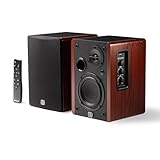
The Eris Accent BT leads because of its connection list. The listing names USB-C, optical, coaxial and RCA inputs plus Bluetooth and a remote, which means one pair of speakers can serve a PC, a TV, a turntable and a phone. It also describes a 4 inch woofer and a silk tweeter in a wood-grain enclosure and calls them wireless studio monitors.
The trade-off is the lack of a subwoofer. Two 4 inch woofers produce clean mid-range but limited deep bass, so action games and bass-heavy music will sound lighter than with a 2.1 system. Each speaker needs desk space and, preferably, stands or foam pads to angle them toward your ears.
- Pros: USB-C, optical, coaxial and RCA inputs plus Bluetooth
- Pros: Remote included per listing
- Pros: Studio-style bookshelf design
- Cons: No subwoofer
- Cons: Larger on the desk than satellite speakers
2. Logitech Z623
Spec line: 400 watt 2.1-channel home speaker system, powerful bass, with subwoofer.
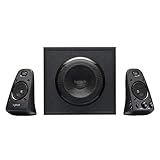
The Z623 is the power option. The listing names 400 watts and a 2.1-channel layout with a subwoofer, which suggests loud output and strong bass. That suits a larger room, a living-room desk or a user who watches films and plays games with the volume up.
The subwoofer is a separate box, so you need floor space. The listing does not mention Bluetooth or USB audio, so confirm the input types on the maker page before you rely on a specific connection. Wattage figures describe peak power, so they are a rough guide, not a direct measure of sound quality.
- Pros: 400 watt 2.1 system per listing
- Pros: Subwoofer for strong bass
- Pros: Suits larger rooms
- Cons: Separate subwoofer needs floor space
- Cons: Inputs not listed in the text
3. Klipsch ProMedia 2.1 THX
Spec line: 2.1 THX certified computer speaker system with subwoofer, black.
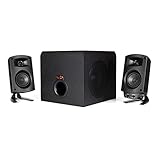
The Klipsch ProMedia is the clarity pick among the subwoofer sets. The listing describes a THX certified 2.1 computer speaker system, which points to a design aimed at PC audio, games and movies. The system includes a subwoofer for low-frequency content, so films and games get a fuller low end than a bookshelf pair alone.
Specifications such as power output and connections are not in the listing text, so check the maker page. It looks like a wired desk system, so plan your cable routing. Compared with the Logitech Z623 it focuses on balanced sound rather than raw power.
- Pros: THX certified per listing
- Pros: 2.1 layout with subwoofer
- Pros: Aimed at PC audio
- Cons: Power and input details not listed
- Cons: Wired only per listing text
4. Logitech Z533
Spec line: 2.1 multimedia speaker system with subwoofer, 3.5mm and RCA inputs, compatible with PC, PS, Xbox, TV, smartphone, tablet and music player.
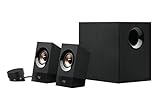
The Z533 is the multi-device 2.1 system. The listing names both 3.5mm and RCA inputs and compatibility with PCs, consoles, TVs, smartphones, tablets and music players, so it works as a living-room and desk system. A subwoofer provides the low end.
RCA and 3.5mm are analog inputs, so there is no digital optical connection in the listing. That is fine for most desks but less flexible than the PreSonus. It sits between the smaller Edifier sets and the louder Z623 in size and presence.
- Pros: 3.5mm and RCA inputs
- Pros: Works with PC, consoles and TV per listing
- Pros: Subwoofer included
- Cons: Analog inputs only in the listing
- Cons: Separate subwoofer needs space
5. Edifier R1280Ts
Spec line: 2.0 stereo active near field monitors, 42 watts RMS, subwoofer line out, wooden enclosure.
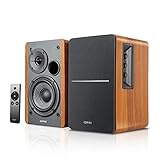
The R1280Ts is a classic powered bookshelf pair for music and desk listening. The listing gives 42 watts RMS, a wooden enclosure and a subwoofer line out, which means you can add a powered sub later. RMS is a more realistic power rating than peak wattage.
It has no Bluetooth in the listing, so it is a wired choice, and the stereo design offers clean mid-range for the size. The pair needs room on a desk, and without a sub it gives limited deep bass. It is a strong pick for a small room where clarity matters more than volume.
- Pros: 42W RMS and wooden enclosure
- Pros: Subwoofer line out for upgrades
- Pros: Near field monitor design
- Cons: No Bluetooth listed
- Cons: No subwoofer included
6. Edifier G1500 MAX
Spec line: 2.1 RGB gaming speakers, 4 inch wood subwoofer, 2.5 inch satellites, 60W peak, Bluetooth 5.3, multi-wired connections, 3 sound modes.
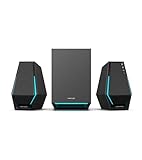
The G1500 MAX is the gaming-oriented set. The listing names a 4 inch wood subwoofer, 2.5 inch satellite speakers, Bluetooth 5.3, several wired connections, RGB lighting and three sound modes. Compact satellites keep the desk footprint small.
The 60W peak figure is modest compared with the Z623, so do not expect room-filling volume. It is a good fit for a gaming desk or a smaller room, and the sound modes let you tune for games or music. The RGB lighting is optional but part of the style.
- Pros: 4 inch wood subwoofer and Bluetooth 5.3
- Pros: Compact satellites
- Pros: Three sound modes
- Cons: 60W peak is modest
- Cons: RGB styling may not suit offices
How to Choose Computer Speakers Under $200
Pick 2.0 or 2.1 for your room
A 2.0 pair is cleaner and takes less space, while a 2.1 system adds a subwoofer for deeper bass but needs floor space. If your desk is small or your room is echoey, a 2.0 pair is easier to place. If you watch films and play action games, a subwoofer adds weight.
Computer speakers for home office
For work and calls, choose a compact pair with a volume knob within reach and Bluetooth for a phone. The PreSonus and Edifier bookshelf pairs suit quiet rooms and clean voice. Keep them at ear height on stands or pads for best clarity.
Computer speakers for small spaces
Choose satellites with a small subwoofer, such as the G1500 MAX, or a bookshelf pair without one. Place the subwoofer away from walls to reduce boom, and keep the volume sensible in shared rooms. Every set here is listed at or under $200.
Computer speakers for gaming
Gaming benefits from a subwoofer and direct connection. Look for USB-C, optical or 3.5mm inputs that match your PC, and Bluetooth only for phones. Sound modes and lighting are extras, not requirements.
Which Pick Fits Which Desk
Pick the PreSonus for flexible connections, the Z623 for volume, the Klipsch for THX-certified clarity, the Z533 for multi-device analog hookups, the Edifier R1280Ts for music-first listening and the G1500 MAX for a compact gaming desk. Whichever you choose, give the speakers breathing room, angle them toward your ears and keep cables tidy. If you are torn between two sets, pick the one whose connections match your current devices, since a perfect speaker that cannot plug in cleanly is a daily annoyance. Check the maker page for warranty length and what ships in the box, including cables and remotes, because the listings vary on those details.
Sound Character: What to Expect From Each Layout
A 2.0 bookshelf pair, like the PreSonus and Edifier R1280Ts, tends toward even mid-range and clear vocals, which suits voice, podcasts and music. A 2.1 system pushes more low end, which suits films, explosions and bass-heavy music, but it can sound boomy if the subwoofer is placed badly or set too high. Compact satellites, as on the G1500 MAX, trade a little mid-range body for a small footprint. The listings do not state frequency ranges, so treat these as general layout traits rather than measured results.
Placement and Setup That Improve Any Speaker
Speaker placement changes sound more than most spec differences. Place the two main speakers about as far apart as they are from your ears, forming a rough triangle, and angle them inward slightly. Keep tweeters near ear height; a stack of books or small stands works if the speakers sit low. Keep them a little away from the back wall, because walls add bass boom, especially on ported designs.
For a subwoofer, start on the floor near the desk, away from corners, and set the level so it supports the satellites rather than overpowering them. If bass sounds muddy, move the subwoofer a foot or two and listen again. Also consider desk vibration: a thin foam pad under a bookshelf speaker keeps bass from rattling the desk.
Connections and Compatibility
Match the inputs to your devices before you buy. Digital optical and USB-C inputs avoid some analog noise from a PC, while 3.5mm and RCA are common on consoles, TVs and phones. Bluetooth adds convenience for phones but can add delay for games and video, so keep a wired connection for those. The listings here are unequal in how much connection detail they give, so for the Klipsch and Logitech Z623 especially, confirm the input list on the maker page. Finally, check where the volume control sits: a wired pod or a top-mounted knob is easier to reach than a control on the back of a speaker.
FAQ
Do I need a subwoofer?
Not always. A subwoofer helps for films and action games, but a good bookshelf pair is enough for music and calls in a small room.
What does RMS mean?
RMS is continuous power output. It is a more realistic measure than peak watts, which describes short bursts.
Can I connect speakers to my console?
Often yes. Analog RCA or 3.5mm inputs, or optical, connect to many consoles and TVs. Check the listing for your connection type.
Are Bluetooth speakers good for gaming?
Bluetooth can add delay, so use a wired connection for gaming and keep Bluetooth for phones and music.
How were these speakers chosen?
They were compared from listing specifications, looking at layout, power, inputs and size. Anything not stated is marked as not listed.
Last updated: November 2026
FAQ
Do I need a subwoofer?
What does RMS mean?
Can I connect speakers to my console?
Are Bluetooth speakers good for gaming?
How were these speakers chosen?
More from Amazon
Programs that pair well with the guide above. Offers and eligibility are set by Amazon and may change.
Free shipping on eligible items, Prime Video and more. Eligible new members can start with a free trial.
Start a Prime free trialAd-free music streaming. Eligible new subscribers can start with a free trial.
Try Music Unlimited freeA Prime membership for ages 18-24 with a trial period. Eligibility is set by Amazon.
See Prime for Young AdultsAudiobooks and podcasts to listen to on the go. Eligible new members can start with a free trial.
Try Audible freeAs an Amazon Associate we earn from qualifying purchases.