Our Short List of 3
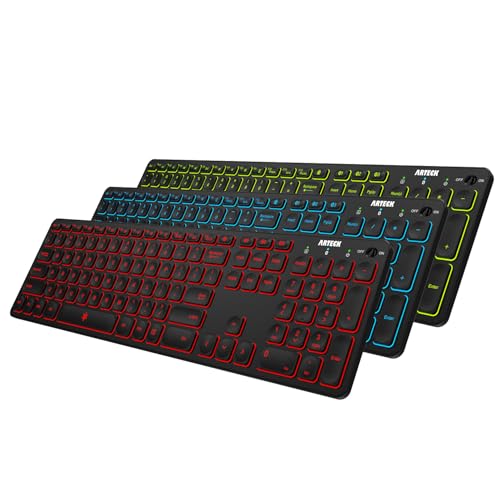
- Best for: Android tablet owners who want a backlit, full-size keyboard with a laptop-style touchpad.
- Bluetooth connection, no dongle required
- Built-in touchpad with dedicated mouse buttons
- 78 keys, low-profile scissor-style keys
- 7-colour backlight, 2 brightness levels, auto-sleep

- Best for: Travellers who want full-size typing and a trackpad in a board that folds flat.
- Bluetooth 5.1, connects to 3 devices
- Large multi-touch trackpad built in
- Full-size foldable layout, quiet scissor-switch keys
- Built-in phone holder

- Best for: Commuters and students who want the smallest folded footprint with a proper clickable touchpad.
- Tri-folding design with PU leather cover
- Integrated touchpad with two clickable mouse buttons
- Multi-touch gesture support
- Dual Bluetooth channels, pairs with 2 devices
All 5 Picks at a Glance
| Product | Specs | Action |
|---|---|---|
| Arteck HB305-4B |
| Check price on Amazon |
| Samsers Foldable Bluetooth Keyboard with Touchpad |
| Check price on Amazon |
| Seenda Foldable Bluetooth Keyboard with Touchpad |
| Check price on Amazon |
 Rii i4 Mini Bluetooth Keyboard with Touchpad |
| Check price on Amazon |
 Fosmon Mini Bluetooth Keyboard 23022KB |
| Check price on Amazon |
Key takeaways
- Five Bluetooth keyboards for Android with a built-in touchpad, compared for tablets and phones. Type, point, and scroll with no separate mouse to carry.
A tablet or phone turns into a real workstation only when you can point as easily as you type. That is the decision behind this roundup: a Bluetooth keyboard for Android is not enough on its own if every tap, drag, and text selection still forces a finger onto the screen. In this article, “touch pad” means a touchpad built into the keyboard itself, so the cursor, the scrolling, and the clicking all live on the same slab you type on.
This guide is for Android tablet owners who write documents on the couch, phone users who answer long messages from a hotel desk, and anyone who wants a travel kit with one accessory instead of two. Every keyboard below connects over Bluetooth, lists Android among its supported systems, and carries an integrated touchpad, with the specs taken from its Amazon listing.
Quick Picks
As an Amazon Associate we earn from qualifying purchases
| Product | Best for | Key spec from title |
|---|---|---|
| Arteck HB305-4B | Backlit typing in dim rooms | 7-color backlight, built-in touchpad, Bluetooth |
| Samsers Foldable | Full-size typing that folds away | Bluetooth 5.1 x 3 devices, multi-touch trackpad |
| Seenda Foldable KTU-402 | Tri-fold travel with a phone holder | Tri-folding, dual Bluetooth, touchpad |
| Rii i4 Mini | Thumb typing on a TV box or phone | Bluetooth 4.0 + 2.4GHz, 92 keys, touchpad |
| Fosmon Mini 23022KB | A pocket remote for media and search | Bluetooth 3.0, mini QWERTY, touchpad |
How to Choose
Touchpad size and placement decide how much you will actually use it
A touchpad that sits to the right of the keys, like a laptop’s, feels familiar and takes taps and two-finger scrolling without a learning curve. Narrow strips above the keys, or tiny pads squeezed beside a thumb board, work for clicking and short scrolls but frustrate anyone who drags text or moves a cursor across a wide tablet screen. Before buying, picture your most common gesture: if it is selecting a paragraph or dragging a file, a full-size board with a proper pad wins; if it is pressing play and typing a search term, a mini board is enough.
Bluetooth version and multi-device switching matter more than range claims
Bluetooth 5.1 boards pair faster and hold a steadier link at a distance than older Bluetooth 3.0 and 4.0 designs, and the difference shows up when a tablet sits on a stand a metre away. Multi-device support is the other half of the story: a keyboard that remembers three devices lets a phone, a tablet, and a laptop share one board with a keypress, while a single-device board forces a fresh pairing every time you switch screens. Check the listing for the number of Bluetooth channels rather than assuming every board switches.
Android gesture support is not the same on every board
Android handles an external touchpad through its own pointer system, so scrolling and clicking generally work, but multi-finger gestures depend on the Android version and the keyboard’s firmware. Some listings spell out a minimum Android version or a key combination that switches the pad between full and partial function, and that detail is worth reading before checkout. If your tablet runs an older Android build, favour a board whose listing names that version explicitly instead of one that only says “Android” in passing.
Layout and power decide whether the board survives a working day
A compact 78-key layout keeps the board bag-friendly while keeping arrow keys and media hotkeys within reach, whereas a mini QWERTY layout trades real typing for pocketability. Foldable boards solve the size problem by opening to full size, yet their hinges and split key rows take a day or two to get used to. On power, rechargeable boards charged over USB-C are the easiest to top up from a phone charger, while older mini boards still use micro-USB, so confirm the cable type and pack the right lead.
The 5 Best Options
Arteck HB305-4B
- Best for: Android tablet owners who want a backlit, full-size keyboard with a laptop-style touchpad.
- Bluetooth connection, no dongle required
- Built-in touchpad with dedicated mouse buttons
- 78 keys, low-profile scissor-style keys
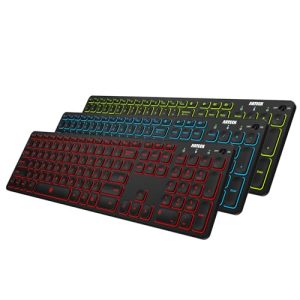
- 7-colour backlight, 2 brightness levels, auto-sleep
Android tablet owners who want a backlit, full-size keyboard with a laptop-style touchpad.
Bluetooth only, so the tablet must have Bluetooth built in; after a long sleep the first keypress may only wake the board.
The Arteck HB305-4B is the most complete board here for someone who wants a laptop-like setup around an Android tablet. Its full-size layout keeps the keys spaced like a normal keyboard, and the touchpad sits where a laptop user expects it, with dedicated mouse buttons underneath. The seven-colour backlight with two brightness levels makes evening typing practical in a dark room, and the auto-sleep function stretches the rechargeable battery between charges.
Watch out for: Bluetooth only, so the tablet must have Bluetooth built in; after a long sleep the first keypress may only wake the board.
Samsers Foldable Bluetooth Keyboard with Touchpad
- Best for: Travellers who want full-size typing and a trackpad in a board that folds flat.
- Bluetooth 5.1, connects to 3 devices
- Large multi-touch trackpad built in
- Full-size foldable layout, quiet scissor-switch keys
- Built-in phone holder
Travellers who want full-size typing and a trackpad in a board that folds flat.
The fold line runs through the key rows, so touch typists should expect a short adjustment period.
The Samsers foldable board suits travellers who refuse to choose between a full-size layout and a small bag. It unfolds to a complete keyboard with a large multi-touch trackpad, then folds down to a slab that slips into a jacket pocket or a tablet sleeve. Three Bluetooth 5.1 channels let it stay paired with a phone, a tablet, and a laptop at once, and the built-in phone holder props a handset up beside the keys.
Watch out for: The fold line runs through the key rows, so touch typists should expect a short adjustment period.
Seenda Foldable Bluetooth Keyboard with Touchpad
- Best for: Commuters and students who want the smallest folded footprint with a proper clickable touchpad.
- Tri-folding design with PU leather cover
- Integrated touchpad with two clickable mouse buttons
- Multi-touch gesture support
- Dual Bluetooth channels, pairs with 2 devices
Commuters and students who want the smallest folded footprint with a proper clickable touchpad.
Touchpad gestures need a recent operating system version; confirm your Android build supports multi-touch pointers before buying.
Seenda’s tri-fold board is the lightest-feeling travel option here, folding twice into a compact block with a leather-style cover and a phone holder. The integrated touchpad carries two clickable mouse buttons along its bottom edge, which makes right-clicking and dragging more reliable than on pads that only accept taps. Dual Bluetooth channels switch between two paired devices, covering the common phone-plus-tablet combination without re-pairing, and the folding design means the whole kit disappears into a small bag pocket.
Watch out for: Touchpad gestures need a recent operating system version; confirm your Android build supports multi-touch pointers before buying.
Rii i4 Mini Bluetooth Keyboard with Touchpad
- Best for: Android TV box and phone users who need a handheld remote-style keyboard for search and media control.
- Bluetooth 4.0 plus 2.4GHz USB dongle, dual mode
- Built-in multi-touch touchpad, backlit
- 92 keys, compact membrane-style keys
- Directional pad and scroll wheel
Android TV box and phone users who need a handheld remote-style keyboard for search and media control.
Thumb typing only; writing long documents on this layout is slow, and the touchpad suits clicking and scrolling rather than precise dragging.
The Rii i4 Mini is a thumb board, not a desk keyboard, and it earns its place for Android TV boxes, phones, and tablets used mainly for media. Held in both hands, it puts a full QWERTY row, a directional pad, a scroll wheel, and a multi-touch touchpad within thumb reach. Bluetooth 4.0 handles the phone or tablet, while the included 2.4GHz dongle covers a TV box or PC that lacks Bluetooth.
Watch out for: Thumb typing only; writing long documents on this layout is slow, and the touchpad suits clicking and scrolling rather than precise dragging.
Fosmon Mini Bluetooth Keyboard 23022KB
- Best for: Android phone users who want the smallest possible keyboard-and-cursor combo for travel and media.
- Bluetooth 3.0 connection
- Built-in touchpad, thumb operated
- Mini QWERTY layout
- 500mAh rechargeable battery
Android phone users who want the smallest possible keyboard-and-cursor combo for travel and media.
Bluetooth 3.0 is an older standard with a shorter stable range than newer boards, and the keys are sized for thumbs rather than ten-finger typing.
The Fosmon Mini is the oldest design in this roundup and still the most pocketable way to add a cursor to an Android phone. Its mini QWERTY layout and thumb-operated touchpad turn a phone into a tiny media centre controller, handy for typing a search term on a TV stick or answering messages without touching the screen. Bluetooth 3.0 keeps the pairing simple, and the rechargeable cell means no disposable batteries to carry.
Watch out for: Bluetooth 3.0 is an older standard with a shorter stable range than newer boards, and the keys are sized for thumbs rather than ten-finger typing.
Which One Fits Your Situation
You write documents on an Android tablet at a desk or on the couch
Pick the Arteck HB305-4B. The full-size layout and laptop-style touchpad with real mouse buttons handle long typing sessions and text selection, and the backlight covers evening work. Its 33-foot range also means the tablet can sit on a stand across the room while the keyboard stays on your lap, which suits couch writing.
You travel light and switch between a phone and a tablet
Pick the Samsers foldable board or the Seenda tri-fold. Both open to a full-size layout, both carry a multi-touch trackpad, and both remember more than one device, so the phone and tablet share a single keyboard. Choose Samsers for three-device switching and a larger trackpad, or Seenda for the smallest folded size and physical touchpad buttons.
You mainly control a TV box or stream from your phone
Pick the Rii i4 Mini. Its handheld shape, scroll wheel, and directional pad are built for launching apps and typing search terms from the couch, and the dual-mode connection covers both a Bluetooth phone and a dongle-based TV box. The Fosmon Mini is the even smaller alternative if the Rii still feels too large for a pocket.
You need a backup board for a bag or a car glovebox
Pick the Fosmon Mini 23022KB. It costs little space, charges over a standard cable, and covers the two jobs a backup board must do: typing a short message and moving a cursor without a separate mouse. Keep expectations modest, since its keys and touchpad are sized for thumbs rather than full typing.
Common Mistakes
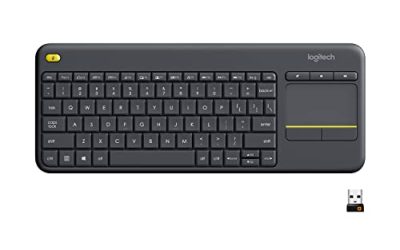
- Buying the well-known Logitech K400 Plus for a Bluetooth-only setup: it has a large touchpad and lists Android support, but it connects through a USB Unifying dongle, not Bluetooth, so most phones and many tablets cannot use it at all.
- Assuming every “Android keyboard” includes a touchpad: most Bluetooth keyboards for Android tablets have no pointer at all, so confirm the listing itself says touchpad or trackpad rather than trusting the category.
- Ignoring the Android version on the listing: older Android builds may not support multi-touch gestures, leaving a trackpad that only clicks and moves.
- Choosing a mini thumb board for serious writing: handheld QWERTY layouts are built for search terms and short replies, and long documents on them are slow and tiring.
- Forgetting the charging cable type: USB-C boards top up from a modern phone charger, while older mini boards still need micro-USB, so pack the right lead for the board you buy.
Frequently Asked Questions
Does a Bluetooth keyboard touchpad work on Android?
Yes, Android supports an external pointer, so a Bluetooth keyboard with a built-in touchpad generally moves a cursor, clicks, and scrolls on a tablet or phone. Multi-finger gestures such as two-finger scrolling depend on the Android version and the keyboard firmware, so check the listing for a minimum version before buying.
Do I still need a separate mouse with one of these keyboards?
No, that is the point of the touchpad: it replaces the mouse for pointing, clicking, and scrolling. A separate mouse still wins for precise work such as photo editing, but for writing, browsing, and media control the built-in pad covers the job.
Will these keyboards work with a Samsung Galaxy Tab or a Fire tablet?
The boards in this guide list Android among their supported systems, which covers Galaxy Tab models with Bluetooth, and Fire tablets run a version of Android that accepts Bluetooth keyboards. Touchpad behaviour can vary by device, so pair the board within the return window and test scrolling and clicking on your own tablet first.
Why do some Bluetooth keyboards with touchpads cost so little?
Mini thumb boards use fewer keys, smaller touchpads, and older Bluetooth versions, which keeps their cost down, while full-size foldable boards add hinges, larger trackpads, and newer Bluetooth chips. The cheaper boards suit media control and short messages, whereas the full-size models are the ones built for daily typing.
FAQ
Does a Bluetooth keyboard touchpad work on Android?
Do I still need a separate mouse with one of these keyboards?
Will these keyboards work with a Samsung Galaxy Tab or a Fire tablet?
Why do some Bluetooth keyboards with touchpads cost so little?
More from Amazon
Programs that pair well with the guide above. Offers and eligibility are set by Amazon and may change.
Free shipping on eligible items, Prime Video and more. Eligible new members can start with a free trial.
Start a Prime free trialAd-free music streaming. Eligible new subscribers can start with a free trial.
Try Music Unlimited freeA Prime membership for ages 18-24 with a trial period. Eligibility is set by Amazon.
See Prime for Young AdultsAudiobooks and podcasts to listen to on the go. Eligible new members can start with a free trial.
Try Audible freeAs an Amazon Associate we earn from qualifying purchases.