Our Short List of 3

- Best for: Quiet all-day drafting in a shared studio or home office.
- Full-size low-profile keyboard with 104 keys
- Spherically dished keys shaped for fingertip typing
- Smart illumination with hand proximity and ambient light sensors
- Bluetooth Low Energy and included Logi Bolt USB receiver
- Best for: Drafters who want mechanical feedback in a slim, office-friendly board.
- Full-size low-profile mechanical keyboard
- Tactile Quiet switches
- Backlit keys with smart illumination
- Bluetooth and Logi Bolt USB receiver connectivity

- Best for: Long drafting sessions where wrist angle and palm support matter most.
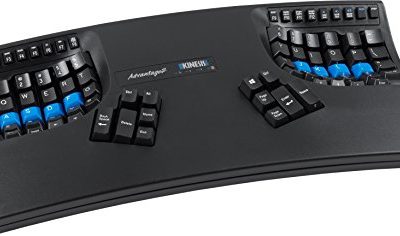
- Split ergonomic keyboard with curved keyframe
- Attached cushioned wrist rest with stain-resistant fabric
- Full-size layout with number pad
- Bluetooth and Logi Unifying USB receiver connectivity
All 4 Picks at a Glance
| Product | Specs | Action |
|---|---|---|
| Logitech MX Keys S |
| Check price on Amazon |
| Logitech MX Mechanical |
| Check price on Amazon |
| Logitech Ergo K860 |
| Check price on Amazon |
 Keychron K10 |
| Check price on Amazon |
Our Top Picks
- Logitech MX Mechanical Wireless Illuminated Keyboard TactileFull Size17.9 x 5.9 x 2.1 inches2.55 poundsCheck on Amazon
AutoCAD work asks a keyboard to do two jobs at once. It must type long blocks of notes and layer names accurately, and it must also fire off short commands, coordinates, and function-key shortcuts without forcing the drafter to look down every few seconds. A board that feels fine for email can slow a drawing session when its number pad sits in an awkward spot, its function row needs an extra modifier, or its keys wobble under fast two-handed input.
This guide is for architects, engineers, students, and hobbyists who draft in AutoCAD for hours at a time, whether on a desktop workstation, a laptop docked at a desk, or a shared machine in a studio. Each keyboard below was chosen from the name and listed features on its Amazon page, with full-size layouts, a usable number pad, and controls that suit command-driven CAD work in mind.
Quick Picks
As an Amazon Associate we earn from qualifying purchases.
| Product | Best for | Key spec from title |
|---|---|---|
| Logitech MX Keys S | Quiet full-size typing with smart backlighting | Low-profile full-size keyboard with 104 keys |
| Logitech MX Mechanical | Tactile mechanical feedback in a low-profile frame | Full-size mechanical keyboard with Tactile Quiet switches |
| Logitech Ergo K860 | Long sessions with a split layout and wrist rest | Split ergonomic keyboard with cushioned wrist rest |
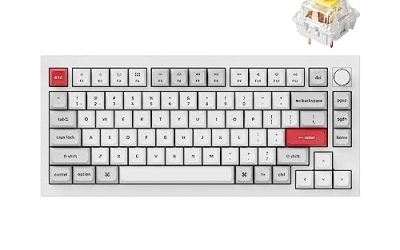
| Keychron K10 | Programmable full-size mechanical layout | Full-size 104-key mechanical keyboard with Gateron G Pro Brown switches |
How to Choose
Start with a full-size layout and a real number pad
AutoCAD rewards a full-size board because coordinates, distances, and layer numbers flow through the number pad far faster than through the top number row. A dedicated pad also keeps the main letter keys free while the right hand enters values, which matters during long dimensioning passes. Check that the pad includes its own Enter key and that the arrow keys sit in a familiar cluster, since CAD users lean on arrows to nudge selections and move through dialog boxes. A compact board without a pad can work for a laptop bag, yet it forces constant hand travel at a desk. For a fixed workstation, treat a full-size layout with a standard pad as the baseline.
Match the switch feel to long command sessions
Switch feel decides how tired the hands get across a full drawing day. Low-profile scissor-style keys travel a short distance and stay quiet, which suits shared studios and late sessions. Mechanical switches give a clearer actuation point, so a drafter can feel each keystroke land without bottoming out hard. Tactile switches add a small bump at the actuation point, while linear switches move smoothly from top to bottom. Try to picture the mix of typing and short commands in a typical session: heavy text entry favors a soft, quiet action, while repeated shortcuts favor a distinct tactile step. Pick the feel that stays comfortable after several hours, not the one that feels most exciting in the first minute.
Check the function row and shortcut support
AutoCAD leans on function keys, Ctrl combinations, and custom aliases, so the top row deserves close attention. Look for full-size function keys that can be pressed directly, rather than a row that shares space with media controls and needs a toggle first. Software that lets a user reassign keys or build multi-step shortcuts adds real value, because common commands such as trim, offset, copy, and layer control can sit one keystroke away. A board that pairs with several devices also helps drafters who switch between a workstation and a laptop. Before settling on a model, confirm how its function row behaves out of the box and whether its companion software runs on the operating system the CAD machine uses.
Weigh comfort, connection, and desk fit
Comfort and connection matter as much as key feel at a real desk. A split or curved layout spreads the hands into a more natural angle, while a wrist rest supports the palms during long sessions. Backlighting helps when drafting in a dim room, and a sensor that brightens the keys as hands approach keeps the light from staying on all day. Wireless boards should connect over Bluetooth or a small USB receiver and hold a stable link, while a wired option removes charging from the routine. Measure the desk space too: a wide full-size board plus a mouse needs more room than a compact layout.
The 4 Best Options
Logitech MX Keys S
- Best for: Quiet all-day drafting in a shared studio or home office.
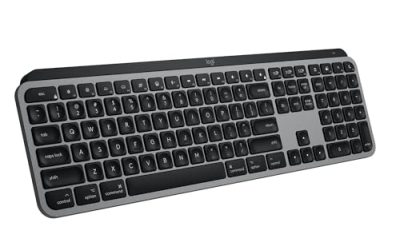
- Full-size low-profile keyboard with 104 keys
- Spherically dished keys shaped for fingertip typing
- Smart illumination with hand proximity and ambient light sensors
- Bluetooth Low Energy and included Logi Bolt USB receiver
Quiet all-day drafting in a shared studio or home office.
Smart Actions and lighting tweaks need the Logi Options+ app, which runs on Windows and macOS.
The MX Keys S suits drafters who want a quiet, low-profile board that disappears into a long session. Its spherically dished keys guide the fingertips into place, which helps when typing layer names, notes, and command aliases without looking down. Smart illumination lights the keys as hands approach and adjusts to the room, so evening drafting stays readable without a desk lamp pointed at the board. It pairs with up to three devices over Bluetooth Low Energy or the included Logi Bolt USB receiver, and the Logi Options+ app supports Smart Actions for multi-step shortcuts. The full-size layout keeps the number pad where CAD users expect it.
Watch out for: Smart Actions and lighting tweaks need the Logi Options+ app, which runs on Windows and macOS.
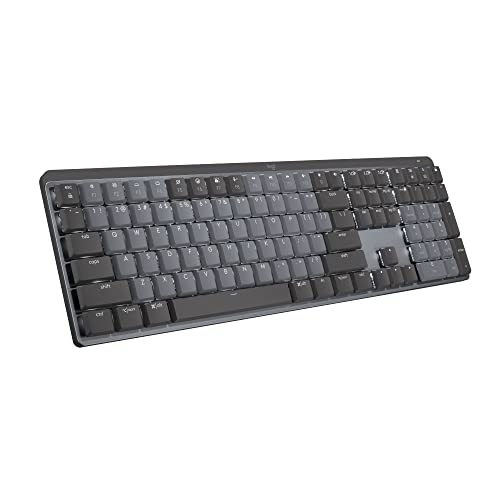
Logitech MX Mechanical
- Best for: Drafters who want mechanical feedback in a slim, office-friendly board.
- Full-size low-profile mechanical keyboard
- Tactile Quiet switches
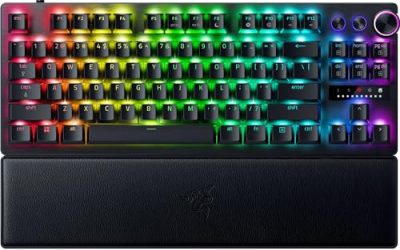
- Backlit keys with smart illumination
- Bluetooth and Logi Bolt USB receiver connectivity
Drafters who want mechanical feedback in a slim, office-friendly board.
The low-profile switches feel different from full-height mechanical boards, so check the travel before committing to it for very heavy typing.
The MX Mechanical brings a mechanical feel to a low-profile frame, which makes it a strong fit for drafters who like a clear actuation point without a tall, noisy board. Its Tactile Quiet switches give a small bump as each key registers, so commands land with a definite feel while the sound stays restrained for an office. The full-size layout includes a number pad and a standard function row, and the backlit keys stay readable during evening work. It connects over Bluetooth or the Logi Bolt receiver and charges over USB-C, so the desk stays free of a permanent cable.
Watch out for: The low-profile switches feel different from full-height mechanical boards, so check the travel before committing to it for very heavy typing.
Logitech Ergo K860
- Best for: Long drafting sessions where wrist angle and palm support matter most.
- Split ergonomic keyboard with curved keyframe
- Attached cushioned wrist rest with stain-resistant fabric
- Full-size layout with number pad
- Bluetooth and Logi Unifying USB receiver connectivity
Long drafting sessions where wrist angle and palm support matter most.
The split layout takes a few days to feel natural, and the wide frame needs more desk space than a straight board.
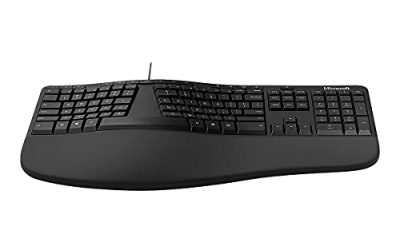
The Ergo K860 is built for drafters whose wrists and shoulders feel the strain of long sessions at a fixed desk. Its split, curved keyframe angles each half of the board toward the hands, while the attached cushioned wrist rest supports the palms through hours of dimensioning and annotation. The full-size layout keeps the number pad and function row in familiar places, so CAD shortcuts do not need relearning. It connects over Bluetooth or the included Unifying USB receiver and runs on two AAA batteries, which removes charging from the weekly routine. The fabric wrist rest resists stains, which helps a board that stays on the desk every day.
Watch out for: The split layout takes a few days to feel natural, and the wide frame needs more desk space than a straight board.
Keychron K10
- Best for: CAD users who want a programmable-feeling mechanical board with a full number pad.
- Full-size 104-key mechanical keyboard with number pad
- Gateron G Pro Brown switches
- Bluetooth 5.1 for up to three devices, plus USB-C wired mode
- White LED backlight
CAD users who want a programmable-feeling mechanical board with a full number pad.
Hot-swapping applies to the hot-swap version of this board, so confirm the version on the listing before assuming the switches can be changed without soldering.
The Keychron K10 gives CAD users a full-size mechanical board with room to shape the layout around their own workflow. Its 104-key layout includes a number pad, and the Gateron G Pro Brown switches offer a tactile bump without a loud click, which suits command entry and long notes alike. Bluetooth 5.1 connects to up to three devices, while a USB-C cable covers wired use, and the white LED backlight keeps the legends readable in a dim room. A 4000 mAh battery lasts up to 240 hours with the backlight off, so wireless use stretches across many sessions.
Watch out for: Hot-swapping applies to the hot-swap version of this board, so confirm the version on the listing before assuming the switches can be changed without soldering.
Which One Fits Your Situation
You draft all day in a shared office
Pick the Logitech MX Keys S when quiet keys and a low profile matter more than mechanical feel. Its dished keys keep typing accurate through long notes, the smart backlight adapts to the room, and the three-device pairing covers a workstation and a laptop. The full-size pad handles coordinates without hand travel, and the rechargeable battery keeps the desk free of disposable cells.
You want mechanical feedback without office noise
Pick the Logitech MX Mechanical when a tactile bump helps each command register, yet a tall clicky board would disturb nearby colleagues. The low-profile Tactile Quiet switches give a definite actuation point, the backlit full-size layout stays readable after dark, and the metal frame holds steady under fast input. It suits drafters who type shortcuts all day and want the board to answer back.
Your wrists ache after long sessions
Pick the Logitech Ergo K860 when comfort outranks every other feature. The split curved layout opens the hands into a more natural angle, the cushioned wrist rest supports the palms, and the familiar full-size layout keeps CAD shortcuts where muscle memory expects them. Give the layout a few days to settle in before judging it, since the first session always feels different.
You want to shape the board around your workflow
Pick the Keychron K10 when a full-size mechanical layout with switch choice and multi-device Bluetooth fits the way the desk is set up. The tactile brown switches suit both notes and commands, the number pad stays in place for coordinate entry, and the long battery life keeps wireless use simple. It fits a drafter who enjoys tuning the board rather than accepting a fixed layout.
Common Mistakes
- Choosing a compact board without a number pad, then entering coordinates through the top row all day.
- Picking loud clicky switches for a shared studio without checking how the sound carries across the room.
- Ignoring the function row, then finding that common AutoCAD shortcuts need an extra toggle key every time.
- Buying a split ergonomic board and judging it after one session, before the hands adjust to the new angle.
- Forgetting to check whether the companion software and shortcut features run on the operating system the CAD machine uses.
Frequently Asked Questions
Does AutoCAD need a special keyboard?
No special keyboard is required, since AutoCAD runs with any standard computer keyboard. A full-size board helps because its number pad speeds up coordinate and distance entry, and a clear function row keeps shortcuts within reach. The best choice is the board that stays comfortable through long sessions and keeps the keys a drafter uses most in familiar places.
Is a mechanical keyboard better than a low-profile keyboard for CAD work?
Neither type wins for every drafter. Mechanical switches give a clear actuation point that many users find precise for repeated commands, while low-profile keys travel less and stay quieter in shared rooms. Comfort over several hours matters more than the switch category, so the right pick is the feel that stays easy on the hands through a full drawing day.
Why does a number pad matter so much for AutoCAD?
The number pad matters because CAD work involves constant numeric entry for coordinates, distances, angles, and layer numbers. A dedicated pad lets the right hand enter values without moving to the top row, which keeps the left hand free for modifiers and shortcuts. That split of work across both hands adds up to real time saved across a long project.
Can one keyboard work for both AutoCAD and general office typing?
Yes, a good full-size keyboard handles both jobs well when its layout stays standard and its keys feel comfortable for long text. Look for a number pad, a usable function row, and a switch feel that suits both notes and commands. A board that pairs with more than one device also helps when the same desk serves a workstation and a laptop.
FAQ
Does AutoCAD need a special keyboard?
Is a mechanical keyboard better than a low-profile keyboard for CAD work?
Why does a number pad matter so much for AutoCAD?
Can one keyboard work for both AutoCAD and general office typing?
More from Amazon
Programs that pair well with the guide above. Offers and eligibility are set by Amazon and may change.
Free shipping on eligible items, Prime Video and more. Eligible new members can start with a free trial.
Start a Prime free trialAd-free music streaming. Eligible new subscribers can start with a free trial.
Try Music Unlimited freeA Prime membership for ages 18-24 with a trial period. Eligibility is set by Amazon.
See Prime for Young AdultsAudiobooks and podcasts to listen to on the go. Eligible new members can start with a free trial.
Try Audible freeAs an Amazon Associate we earn from qualifying purchases.