Our Short List of 3

- Best for: Creators who want one quiet, backlit wireless board for writing, editing and recording.
- Brand: Logitech
- Model: MX Keys S, model number 920-011558
- Colour: Graphite
- Typing profile: Low profile, fluid precise quiet typing per the listing title

- Best for: A fixed studio desk that wants the quietest wired typing with zero setup.
- Brand: CHERRY
- Model: STREAM Keyboard, model number JK-8500EU-2
- Switch technology: CHERRY SX scissor switches
- Noise: Whisper-quiet keystroke, per the listing

- Best for: Streamers who game and record at the same desk and want one board for both.
- Brand: SteelSeries
- Model: Apex 3, item model number 64812
- Switches: Whisper Quiet gaming switches, over 20 million keypresses
- Lighting: 10-zone RGB illumination
All 4 Picks at a Glance
| Product | Specs | Action |
|---|---|---|
| Logitech MX Keys S Graphite |
| Check price on Amazon |
| CHERRY STREAM Keyboard |
| Check price on Amazon |
| SteelSeries Apex 3 |
| Check price on Amazon |
 Razer Pro Type Ultra |
| Check price on Amazon |
Our Top Picks
A microphone does not care that your keyboard is excellent. It hears keystrokes as clicks and thocks layered under your voice, and in a quiet take — a voiceover line, an acoustic part, a streamed conversation — the keyboard can end up louder in the recording than the thing you meant to capture. Switching to a quiet board is the cheapest fix in the whole signal chain.
This guide covers computer keyboards only, chosen because their listings state quiet, silent or whisper-quiet typing: low-profile scissor boards and silent-switch models for home studios, streamers, podcasters and anyone whose desk doubles as a recording space. If you are shopping for a MIDI controller or a piano-style instrument, that is a different product category and a different article.
Quick Picks
As an Amazon Associate we earn from qualifying purchases
| Product | Best for | Key spec from title |
|---|---|---|
| Logitech MX Keys S Graphite | All-round quiet typing with backlighting | Low profile, fluid precise quiet typing |
| CHERRY STREAM Keyboard | The quietest wired option for a fixed desk | Whisper-quiet keystroke, SX scissor technology |
| SteelSeries Apex 3 | Streamers who also game at the same desk | Whisper Quiet Gaming Switch, IP32 water resistant |
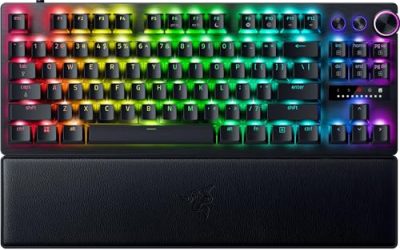
| Razer Pro Type Ultra | A mechanical feel without mechanical noise | Silent linear switches, sound dampening foam |
How to Choose
Understand Where Keyboard Noise Comes From
A keystroke makes two sounds: the switch itself, and the key bottoming out and springing back against the case. Microphones pick up both, and sensitive condenser mics pick them up from across a desk. Scissor-switch boards are quiet because travel is short and the mechanism is damped by design. Mechanical boards run louder unless the switches are silent types and the case absorbs impact — which is why the one mechanical keyboard below uses silent linear switches plus sound-dampening foam. Judge a board by the noise mechanism it names on the listing, not by a “quiet” badge alone.
Low Profile Usually Means Low Noise
Short key travel gives a keystroke less distance to accelerate and less force when it lands, so low-profile boards are naturally easier to record around. They also sit flatter on the desk, which suits long editing sessions at a workstation. The Logitech MX Keys S and the CHERRY STREAM below are both built this way, with scissor mechanisms under short caps. If your current board is a tall mechanical one, a low-profile board is the single biggest noise reduction available to you — bigger than any microphone setting change you can make afterwards.
Wired or Wireless in a Studio
Wireless boards remove a cable from a desk that already carries audio leads, and Bluetooth models like the MX Keys S can serve the recording PC and a laptop without replugging. Wired boards answer with zero pairing fuss, no battery to die mid-session and no wireless dropouts when a take matters. Studios also run plenty of other wireless gear competing for clean air. Neither choice is wrong; decide by how fixed your desk is. A permanent workstation suits the wired CHERRY or the SteelSeries; a desk that changes roles suits the wireless Logitech or Razer.
Layout, Backlighting and the Rest of the Desk
Recording desks are working desks. A numeric keypad speeds up editing shortcuts and timecode entry for some users and wastes space for others, pushing the mouse further right. Backlighting matters in dim control rooms and late sessions, and both the Logitech and the SteelSeries here include it. Also check the listing for the connection type your machine needs — USB receiver, Bluetooth or a plain USB-A cable — because studio PCs are often short of free ports once interfaces, controllers and drives are connected.
The 4 Best Options
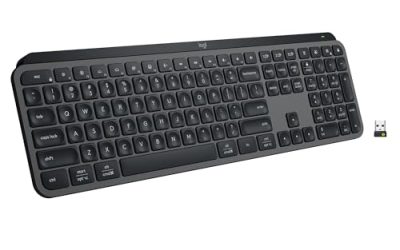
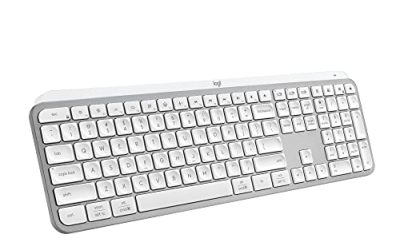
Logitech MX Keys S Graphite
- Best for: Creators who want one quiet, backlit wireless board for writing, editing and recording.
- Brand: Logitech
- Model: MX Keys S, model number 920-011558
- Colour: Graphite
- Typing profile: Low profile, fluid precise quiet typing per the listing title
Creators who want one quiet, backlit wireless board for writing, editing and recording.
It is a membrane-style scissor board, so players wanting a mechanical key feel should look at the Razer below instead.
The MX Keys S is the easiest recommendation on this page: a low-profile board whose listing leads with quiet typing, built around spherically dished keys that land softly and stay stable. It pairs over Bluetooth, recharges over USB-C, and its backlighting wakes as your hands approach — genuinely useful in a darkened studio. For a creator who writes scripts, edits timelines and records at the same desk, it is the board that disappears under the work. The Graphite finish suits darker setups, and the layout covers Windows, macOS, Chrome and Linux per the listing.
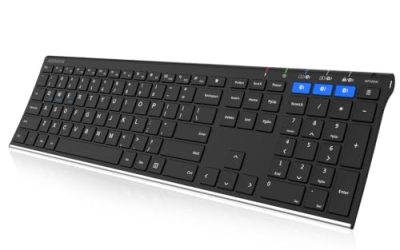
CHERRY STREAM Keyboard
- Best for: A fixed studio desk that wants the quietest wired typing with zero setup.
- Brand: CHERRY
- Model: STREAM Keyboard, model number JK-8500EU-2
- Switch technology: CHERRY SX scissor switches
- Noise: Whisper-quiet keystroke, per the listing
A fixed studio desk that wants the quietest wired typing with zero setup.
No backlighting and no wireless; check the listing’s layout description matches the layout you type on before ordering.
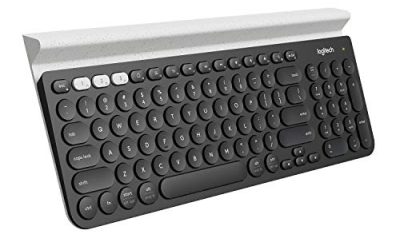
CHERRY built its name on switches, and the STREAM applies that knowledge to silence: its SX scissor mechanism is engineered for a whisper-quiet keystroke, in a slim wired board that asks nothing of your PC beyond a USB-A port. There is no battery, no pairing and no software — it is the keyboard you plug into a studio machine once and forget, which is exactly what a fixed recording desk wants. The full layout keeps a numeric keypad for editing work. If your priority is the lowest noise floor for the least money and complexity, this is the board in the roundup built purely for that.
SteelSeries Apex 3
- Best for: Streamers who game and record at the same desk and want one board for both.
- Brand: SteelSeries
- Model: Apex 3, item model number 64812
- Switches: Whisper Quiet gaming switches, over 20 million keypresses
- Lighting: 10-zone RGB illumination
Streamers who game and record at the same desk and want one board for both.
As a membrane gaming board it is quiet rather than silent; for voiceover-first work the CHERRY or Logitech will sit lower in a recording.
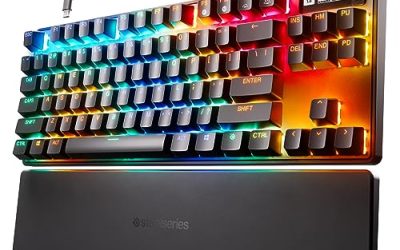
The Apex 3 answers a specific problem: the same desk is used for gaming at night and recording by day. Its Whisper Quiet gaming switches are rated for over 20 million low-friction keypresses, so the board stays near-silent without giving up a gaming layout, and the IP32 water resistance is real protection in a room where drinks live next to audio gear. Ten-zone RGB lighting, a premium magnetic wrist rest and gaming-grade anti-ghosting round it out. It will not match the scissor boards for absolute silence, but it is far quieter than a standard mechanical gaming keyboard.
Razer Pro Type Ultra
- Best for: Mechanical-keyboard loyalists who need studio-acceptable noise levels.
- Brand: Razer
- Model: Pro Type Ultra, model number RZ03-04110200-R3U1
- Switches: Silent, linear mechanical switches
- Case: Sound-dampening foam layer
Mechanical-keyboard loyalists who need studio-acceptable noise levels.
Silent for a mechanical board is still not scissor-board silent; position your microphone and test a take before a long session.
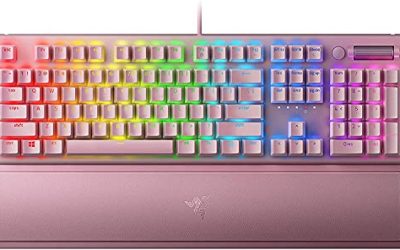
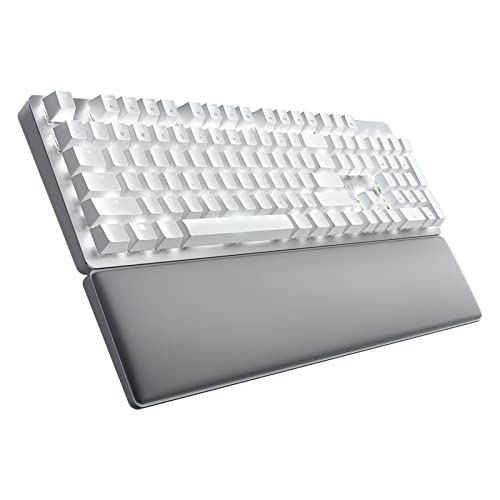
Most mechanical keyboards are banned from recording rooms; the Pro Type Ultra was designed to be allowed in. Its silent linear switches are paired with a sound-dampening foam layer inside the case, attacking both halves of keystroke noise, and Razer rates the switches for up to 80 million clicks. It connects to up to four devices over HyperSpeed wireless and Bluetooth, carries fully programmable keys for editing shortcuts, and includes a wrist rest for long sessions. It is the choice for typists who refuse to give up a mechanical feel but record in the same chair they type in.
Which One Fits Your Situation
You Record Voiceovers or Podcasts
Take the CHERRY STREAM for a fixed desk or the Logitech MX Keys S if you move between machines. Both keep keystrokes low enough that normal mic placement handles the rest, and both are full working keyboards for the scripting and editing around the recording. The CHERRY is the purist’s low-noise choice; the Logitech adds backlighting and wireless freedom for a desk that changes shape during the day.
You Stream Games From One Desk
The SteelSeries Apex 3 was made for your exact conflict. It keeps a gaming layout, lighting and wrist rest while its whisper-quiet switches stay out of your stream audio, and the water resistance forgives the inevitable drink near the desk. If your stream is talk-heavy rather than gameplay-heavy, step up to the Logitech or CHERRY instead — your microphone will hear the difference even if your viewers never comment on it.
You Type All Day and Record in Between
The Razer Pro Type Ultra protects your typing feel. Silent linear switches and case foam bring a mechanical board down to a level a desk microphone can live with, and the four-device switching suits a work machine and a recording machine side by side. It is the most expensive route here, but for someone whose hands are on the keys eight hours a day, feel is not a luxury.
Your Studio PC Is short on Ports and Patience
Choose the CHERRY STREAM. One USB-A cable, no charging, no Bluetooth menu, no receiver to lose, and the quietest keystroke in the roundup. In a room full of audio interfaces and controllers competing for ports and attention, the keyboard that never needs managing is the one still working quietly in year three.
Common Mistakes
- Buying a standard mechanical keyboard for a recording desk because it felt good in the shop, then hearing it on every take.
- Treating a MIDI controller as a typing keyboard or the reverse — they are different product types that solve different problems.
- Blaming the microphone and buying a new one, when the keyboard two feet away was the noise source all along.
- Forgetting to test-record typing before a real session, instead of discovering keystroke noise during editing.
- Choosing a compact layout, then missing the numeric keypad that your editing shortcuts relied on.
Frequently Asked Questions
Are scissor keyboards quieter than mechanical ones for recording?
Almost always, yes. Scissor mechanisms have short travel and soft landings, so they produce less switch noise and less bottom-out impact. A mechanical board needs silent switches and case damping — like the Razer Pro Type Ultra here — to get close, and even then the scissor boards in this guide sit lower under a microphone.
Will a quiet keyboard completely remove typing from my recordings?
No keyboard removes typing noise entirely, and your microphone placement still matters: keep the mic close to your mouth and the keyboard out of its most sensitive axis. What a quiet board does is drop keystrokes far enough below your voice that normal gain settings stop featuring them. Test with a short recording before relying on it for a full session.
Is a wired or wireless keyboard better in a studio?
For a fixed workstation, wired is simpler and never runs flat mid-take, which is why the CHERRY STREAM and Apex 3 here are wired. Wireless suits desks that change roles or machines. Modern Bluetooth and 2.4 GHz boards are reliable enough for recording work; the choice is about your desk habits, not audio quality.
Can I just use my gaming keyboard and fix the noise in editing?
You can reduce steady background noise in editing, but keystrokes are sharp, irregular transients that sit in the same frequency range as speech consonants, so removing them usually damages the voice too. Prevention is cheaper: a quiet board costs less than the hours spent cleaning takes, and it fixes every future recording at the source.
FAQ
Are scissor keyboards quieter than mechanical ones for recording?
Will a quiet keyboard completely remove typing from my recordings?
Is a wired or wireless keyboard better in a studio?
Can I just use my gaming keyboard and fix the noise in editing?
More from Amazon
Programs that pair well with the guide above. Offers and eligibility are set by Amazon and may change.
Free shipping on eligible items, Prime Video and more. Eligible new members can start with a free trial.
Start a Prime free trialAd-free music streaming. Eligible new subscribers can start with a free trial.
Try Music Unlimited freeA Prime membership for ages 18-24 with a trial period. Eligibility is set by Amazon.
See Prime for Young AdultsAudiobooks and podcasts to listen to on the go. Eligible new members can start with a free trial.
Try Audible freeAs an Amazon Associate we earn from qualifying purchases.