Key takeaways
- Five keyboards for long coding days, from quiet low-profile boards to split ergonomic and programmable mechanical models, compared on listing specs.
A developer spends more hours touching a keyboard than any other tool on the desk, so the choice shapes every working day. The right board keeps fingers moving through long sessions without strain, puts the keys you reach for most within easy range, and stays quiet enough for calls and shared rooms. Gaming boards chase speed and lighting, while a coding keyboard earns its place through feel, layout, and the way it handles the shortcuts you repeat hundreds of times a day.
This guide covers five keyboards for different kinds of coders: backend developers who live in a terminal, data workers who need a number pad, remote workers on calls all day, and tinkerers who remap every key. Each pick below was chosen from the names and specifications shown on its Amazon product page, with a focus on switch feel, layout, programmability, and comfort across long sessions.
Quick Picks
As an Amazon Associate we earn from qualifying purchases
| Product | Best for | Key spec from title |
|---|---|---|
| Logitech MX Keys S | Quiet typing in shared spaces and on calls | Spherically-dished keys with Smart Actions |
| Keychron K2 Version 2 | Compact mechanical typing on Mac and Windows | 75 percent layout, 84 keys, Gateron Brown switches |
| Logitech Ergo K860 | Long sessions with wrist comfort | Split curved keyframe with pillowed wrist rest |
| Keychron Q2 Knob Version | Deep customization and remapping | QMK/VIA programmable, full aluminum body |
| Kinesis Advantage2 | Contoured ergonomics and onboard macros | Contoured key wells, Cherry MX Brown switches |
How to Choose
Switch Feel and Noise
Switch feel decides whether a keyboard fades into the background or demands attention on every keystroke. Tactile switches, such as the Brown switches on three boards in this guide, give a small bump at actuation without an audible click, which suits shared offices and voice calls. Linear switches travel smoothly and stay quiet, while clicky switches sound sharp and carry across a room, so they fit a private office better. Low-profile membrane keys, like those on the MX Keys S, trade travel distance for silence and a laptop-like touch. Try to match the switch to where you actually type, not to what looks popular in a product photo.
Layout and Size
Layout decides how much desk a keyboard takes and which keys sit under your fingers. A full-size board keeps the number pad, which data work and spreadsheet navigation use heavily, but it pushes the mouse further right and takes the most space. A 75 percent board, like the Keychron K2, keeps the arrow keys and function row in a smaller frame, which suits most coders. A 65 percent board, like the Keychron Q2, drops the function row and number pad entirely, so it fits small desks but asks you to reach for layered shortcuts. Check that the layout you pick keeps the keys your editor relies on, such as arrows, Escape, and the function row.
Programmability and Layers
Programmability turns a keyboard from a fixed tool into one shaped around your workflow. Boards with QMK or VIA support, such as the Keychron Q2, let you remap any key, build layers for symbols and navigation, and record macros that run a build, format code, or switch branches with one press. The Kinesis Advantage2 stores layouts and macros on the board itself, so your setup follows the keyboard between machines. Even a simpler board can help: the MX Keys S uses Smart Actions to chain several steps to a single key. Before buying, list the five shortcuts you use most and check whether the board can put them where your fingers already rest.
Ergonomics and Long Sessions
Ergonomics matter most when coding stretches past a few hours a day. A split keyframe, like the one on the Logitech Ergo K860, lets your hands rest at a more natural angle instead of forcing your wrists flat, and a pillowed wrist rest supports the heel of the hand between bursts of typing. Tenting, which tilts the two halves of a board upward, helps some typists further, and the Advantage2 builds it into the shell. Low-profile boards reduce how far fingers travel on each press, while taller mechanical boards often feel better with a separate wrist rest. Whichever shape you pick, keep the board at elbow height and take short breaks away from the keys.
The 5 Best Options
1. Logitech MX Keys S

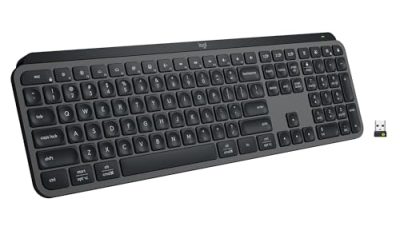
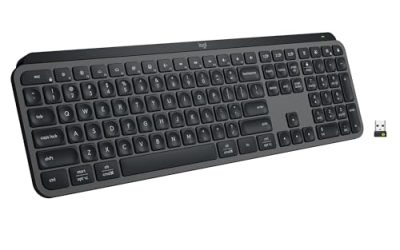
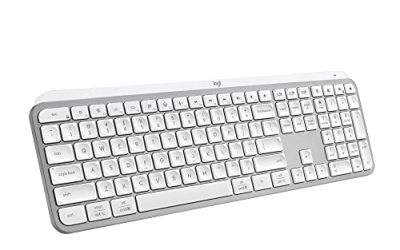
The MX Keys S is the quiet workhorse of this group, built for developers who type in shared rooms and spend much of the day on calls. Its spherically-dished keys sit low and stable, so fingers land cleanly without the clatter of a mechanical board, and the backlight brightens as your hands approach, then fades when you step away. Smart Actions in the Logi Options+ app turn repetitive sequences into a single keystroke, and the board pairs with up to three devices over Bluetooth or the included Logi Bolt receiver, which suits a laptop-and-desktop setup.
Specs
- Spherically-dished keys for fluid, precise typing
- Smart Actions automate repetitive tasks with a single keystroke through the Logi Options+ app
- Bluetooth Low Energy and included Logi Bolt USB receiver
- Connects with up to 3 devices
- Backlit keys light up as hands approach and adjust to the environment
- USB-C rechargeable, 1500 mAh Li-Po battery, up to 10 days per charge
- Low-profile design, 810 g, 17.74 x 5.81 x 1.56 inches
- Compatible with Windows, macOS, Linux, and Chrome OS
Best for: Developers who type in shared spaces, take calls all day, and switch between a laptop and a desktop.
Watch out for: It is a membrane-style board, so it lacks the tactile snap of a mechanical switch, and Smart Actions need the Logi Options+ app on Windows or macOS.
ASIN: B0BKVZK4TH
2. Keychron K2 Version 2

The Keychron K2 Version 2 packs a full typing experience into a compact 75 percent frame, which makes it a natural fit for developers who want mechanical feel without giving up the arrow keys. Gateron Brown switches give a gentle tactile bump at actuation without the click of louder switches, and the hot-swappable sockets let you change switches later without soldering. Bluetooth connects to up to three devices, while USB-C wired mode handles long sessions at the desk, and the Mac layout with included Windows keycaps means the board adapts to either system out of the box.
Specs
- 75 percent layout with 84 keys, including arrow keys and a dedicated screen capture key
- Gateron G Pro Brown tactile switches, 55gf actuation force, 2mm pre-travel
- Hot-swappable sockets for 3-pin and 5-pin MX switches
- Bluetooth 5.1 connects to up to 3 devices, plus USB-C wired mode
- 4000 mAh battery, up to 72 hours of typing
- N-key rollover in wired mode, 6KRO in wireless mode
- RGB backlight with 15+ lighting modes
- CNC aluminum front panel, Mac layout with Windows keycaps included
Best for: Developers who want a compact mechanical board that works on Mac and Windows and leaves room for a mouse.
Watch out for: There is no number pad, and wireless mode drops to 6-key rollover, with full N-key rollover only when wired.
ASIN: B07YB32H52
3. Logitech Ergo K860

The Ergo K860 is built for developers whose wrists feel the end of a long day first. Its curved, split keyframe angles each half of the board so hands rest in a more natural position, and the pillowed wrist rest carries the heel of the hand with a memory-foam layer. Perfect Stroke keys keep the typing feel smooth and quiet, while the full-size layout keeps the number pad for data work. Tilt legs set the palm lift at 0, minus 4, or minus 7 degrees, and two AAA batteries power the board for up to 24 months, so charging never interrupts a sprint.
Specs
- Curved, split keyframe reduces wrist bending
- Pillowed wrist rest with 3-layer memory foam
- Perfect Stroke keys for precise, fluid typing
- Bluetooth 5.0 LE and Logitech Unifying USB receiver
- Connects with up to 3 devices with Easy-Switch keys
- 2 AAA batteries, up to 24 months of battery life
- Full-size layout with 105 keys and integrated number pad
- Tilt legs at 0, -4, and -7 degrees
Best for: Developers with wrist strain who want a full-size board with a number pad and a split, supported typing posture.
Watch out for: The wrist rest is built in and cannot be removed, and the board is wide, so it needs a desk with room to spare.
ASIN: B07ZWK2TQT
4. Keychron Q2 Knob Version

The Keychron Q2 Knob Version is the board for developers who treat a keyboard as a tool to configure, not just to type on. Its full CNC aluminum body and double-gasket mount give every keystroke a solid, muted feel, and QMK and VIA support let you remap any key, build layers, and record macros without extra software. The rotary knob can control volume or scroll through code, and hot-swappable sockets accept most 3-pin and 5-pin switches, so the feel can change as your taste does. Double-shot PBT keycaps resist shine through years of daily use.
Specs
- 65 percent layout with 66 keys and a rotary knob
- QMK/VIA programmable for remapping, macros, and layers
- Full CNC-machined aluminum body with double-gasket mount
- Hot-swappable sockets for 3-pin and 5-pin MX switches
- Gateron G Pro Brown tactile switches, 55gf operating force
- Double-shot PBT keycaps in OSA profile
- South-facing RGB LED backlight
- Wired USB-C connection, 1000 Hz polling rate
- Steel plate, screw-in PCB stabilizers, 327.5 x 121 x 33.8 mm, 1645 g
Best for: Developers who remap keys, write macros, and want a heavy, premium board that stays put on the desk.
Watch out for: It is wired only and has no function row or number pad, so layered shortcuts replace dedicated keys, and at 1645 g it is not a board to carry daily.
ASIN: B09V58WPZ9
5. Kinesis Advantage2
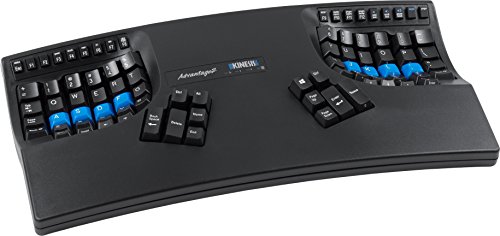
The Kinesis Advantage2 takes ergonomics further than any other board here, with two contoured key wells that cup each hand and put every key in a column matched to finger length. Thumb keys move Space, Backspace, and Enter onto the strongest digits, which cuts pinky strain across long sessions, and the fixed 20-degree tenting keeps wrists neutral without extra parts. The driverless SmartSet engine stores custom layouts and macros on the board itself, so your setup travels with the keyboard. Cherry MX Brown switches keep the feel tactile and quiet enough for shared rooms.
Specs
- Contoured split key wells with sculpted home row
- Cherry MX Brown tactile switches
- Thumb keys for Space, Backspace, and Enter
- Orthogonal columnar layout with 20-degree tenting
- Integrated palm supports with cushioned palm pads
- SmartSet Engine onboard programmability, macros, and remapping, saved to 4MB flash memory
- Wired USB, plug-and-play with all USB operating systems
- 68 keys, 16.5 x 8 x 3 inches, 2.2 pounds
- 3-year manufacturer warranty
Best for: Developers with wrist pain who want the deepest ergonomic change and onboard macros that follow the board between machines.
Watch out for: The columnar layout takes weeks to learn, typing speed drops at first, and Kinesis has ended production of this line, so stock is limited to what remains.
ASIN: B01KR1C5PY
Which One Fits Your Situation
You Code in a Shared Office or on Calls
You spend the day typing beside teammates or talking on calls, so noise and call quality come first. Pick the Logitech MX Keys S: its low-profile keys stay quiet, the backlight fades when you step away, and Smart Actions handle repetitive sequences with one press. If you want mechanical feel instead, the Keychron K2 with Brown switches is the quieter mechanical option, since its tactile bump comes without a click.
Your Wrists Ache After Long Days
Comfort decides the pick when your wrists complain by late afternoon. The Logitech Ergo K860 gives the gentlest change: a split keyframe, a pillowed wrist rest, and tilt legs that set a negative angle. If the ache runs deeper, the Kinesis Advantage2 changes the shape entirely, with contoured wells, thumb keys, and built-in tenting. Give either board a few weeks, since a new shape feels strange before it feels better.
You Remap Keys and Automate Your Workflow
You live in your editor and want the keyboard to match it. The Keychron Q2 Knob Version is the pick: QMK and VIA let you remap any key, build layers for symbols and navigation, and record macros that run builds or format code. The Kinesis Advantage2 is the other strong choice, since its SmartSet engine stores layouts and macros on the board itself, so nothing is lost when you switch machines.
You Want a Compact Board for a Small Desk
Desk space is tight, so the board has to earn its footprint. The Keychron K2 Version 2 keeps arrow keys and the function row in a 75 percent frame, which suits most coders and leaves room for a mouse. The Keychron Q2 goes smaller still at 65 percent, which frees more space but drops the function row, so layered shortcuts take over.
Common Mistakes
- Picking clicky switches for a shared office, then finding the noise carries across every call.
- Buying a 65 percent board without checking which keys are missing, then discovering the function row lives on a layer.
- Choosing a board by looks alone and ignoring whether the layout matches your operating system.
- Skipping a wrist rest or split shape when your wrists already ache, and hoping a new switch type will fix the strain.
- Ordering a heavy aluminum board for a bag you carry daily, then leaving it at home because of the weight.
Frequently Asked Questions
Do developers need a mechanical keyboard?
No. A mechanical board suits many coders, but a quiet low-profile board like the MX Keys S types just as fast and stays silent on calls. What matters is switch feel, layout, and comfort across long sessions, not the mechanism under the keycaps. Pick the board whose keys feel right after an hour of typing, and let the switch type follow that feeling, not the other way around.
Are quiet switches better for coding?
They are better when you share a room or spend the day on calls, since tactile Brown switches and low-profile membrane keys keep typing noise low. Clicky switches sound satisfying alone, but the sharp click carries through microphones and open offices. If you code mostly at home with the door closed, switch sound is a matter of taste, and a clicky board can feel more rewarding to type on.
What keyboard layout is best for programming?
There is no single best layout, since the answer depends on your work. Full-size boards suit data work and spreadsheet navigation because the number pad stays within reach. A 75 percent board balances size and completeness for most coders, keeping arrows and the function row. A 65 percent board fits small desks but asks you to learn layers, so it suits developers who already remap keys and automate their editor.
Can I use a Mac-layout keyboard on Windows?
Yes, most boards in this guide work on both systems. The Keychron K2 ships with a Mac layout and includes Windows keycaps in the box, so you can swap them when you change machines. The MX Keys S and the Ergo K860 carry dual legends and connect to Windows, macOS, Linux, and Chrome OS. Check the listing first, since a few boards ship with one layout only.
FAQ
Do developers need a mechanical keyboard?
Are quiet switches better for coding?
What keyboard layout is best for programming?
Can I use a Mac-layout keyboard on Windows?
More from Amazon
Programs that pair well with the guide above. Offers and eligibility are set by Amazon and may change.
Free shipping on eligible items, Prime Video and more. Eligible new members can start with a free trial.
Start a Prime free trialAd-free music streaming. Eligible new subscribers can start with a free trial.
Try Music Unlimited freeA Prime membership for ages 18-24 with a trial period. Eligibility is set by Amazon.
See Prime for Young AdultsAudiobooks and podcasts to listen to on the go. Eligible new members can start with a free trial.
Try Audible freeAs an Amazon Associate we earn from qualifying purchases.