Key takeaways
- Find the best office keyboards for all-day typing, from quiet low-profile boards to ergonomic wave designs, with multi-device pairing compared.
An office keyboard is a tool you use for eight hours a day, so comfort matters more than flash. The best office keyboards have quiet keys that do not disturb a shared room, a layout that keeps your wrists in a neutral position, and a connection that stays reliable from the first email to the last spreadsheet. This guide compares four office keyboards built for long workdays, from a slim low-profile board to a contoured ergonomic design.
How to Choose an Office Keyboard
Quiet keys
An office keyboard should be heard as little as possible. Low-profile keys with a short travel and a soft landing suit a shared room, and membrane keys are usually quieter than mechanical switches. If your office is a private room, a tactile board is fine, but in an open office the quietest board wins. Check the listing for words like quiet or silent in the key description before you buy.
Ergonomics
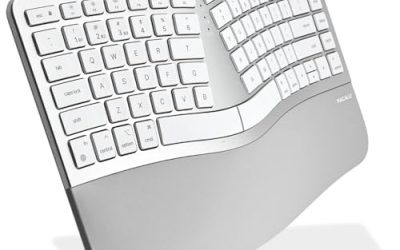
Typing comfort comes from the shape of the board as much as the keys. A wave or curved layout guides your hands into a natural position, and a cushioned palm rest supports your wrists through a long day. A split or contoured design goes further by angling each half of the keyboard toward its hand, which suits people who feel wrist strain on a flat board. A keyboard with adjustable tilt lets you set the angle that fits your desk and chair.
Multi-device pairing
Many office workers switch between a desktop, a laptop, and a phone during the day. A keyboard that pairs with three devices and switches between them with a dedicated key saves the time and hassle of re-pairing. Bluetooth covers phones and tablets, while a USB receiver covers a desktop with no Bluetooth. A board with both covers every device on the desk.
Battery life and connection
A wireless office keyboard should run for months on one set of batteries or one charge, not days. Look for a battery life measured in months or years rather than hours, and a wired mode or a USB receiver as a backup. A rechargeable battery with a USB-C cable is convenient, while replaceable AA or AAA batteries mean the board never needs to sit on a charger.
Layout and extras
A full-size layout with a number pad suits spreadsheet work and data entry, while a compact layout suits a small desk. Dedicated media keys, programmable function keys, and a device cradle for a phone or tablet are useful extras that save desk space. A backlight helps in a dim room, though it shortens battery life, so a board with an ambient light sensor that turns the backlight on only when needed is the best of both.
The Best Office Keyboards
Logitech MX Keys S

The Logitech MX Keys S is the pick for most office workers, and the reason is the typing feel. The low-profile keys are dished to fit the shape of your fingertips, and the keystroke is fluid and quiet, with a stable landing that suits long documents and long email threads. The board is full-size with 104 keys, so the number pad and navigation cluster are all in their usual places.
Smart backlighting is the feature that sets this board apart: the keys light up as your hands approach and adjust to the light in the room, so the backlight is there when you need it and off when you do not. The board pairs with up to three devices over Bluetooth Low Energy or the included Logi Bolt receiver, and the Logi Options+ app adds Smart Actions that automate repetitive tasks with a single keystroke. The rechargeable battery charges over USB-C, and the board weighs 810 grams, which keeps it planted on the desk.
This board suits an office worker who types all day and wants a quiet, full-size board with a backlight and multi-device pairing. Its limits are the connection: the Logi Bolt receiver is included, but the board does not work with older Logitech receivers, and FileVault on macOS can block Bluetooth login at the lock screen, in which case the receiver is the fix. The board is also heavier than a compact keyboard, so it is a desk board rather than a travel board.
Logitech K780
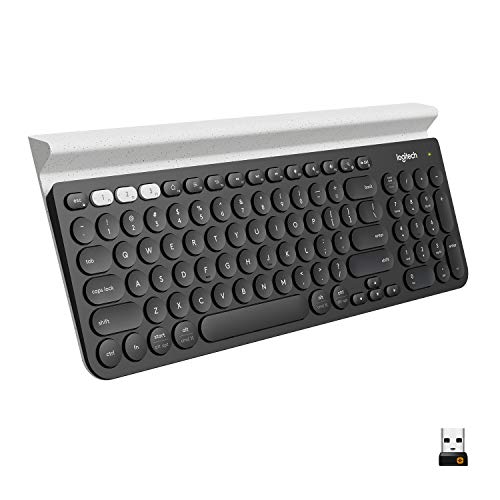
The Logitech K780 is the pick for a desk shared across several devices. The board pairs with up to three devices over Bluetooth or the included Unifying receiver, and dedicated Easy-Switch keys move between them with one press. A built-in cradle holds a phone or tablet upright beside the keyboard, so a second screen sits at eye level without a separate stand.
The keys are large and quiet, with a membrane feel that suits a shared room, and the board has 96 keys including a number pad. The K780 works with PC, Mac, Android, Chrome OS, and iOS, and it pairs with a Logitech Flow mouse for cross-computer control, moving the cursor and copied text between screens. Two AAA batteries power the board, and the listing notes a long battery life measured in months rather than days.
This board suits an office worker who types on a computer, a tablet, and a phone from the same desk, and who wants a cradle built into the keyboard. Its limits are the missing keys: there is no Home, End, Insert, or Page Up and Down cluster, so those functions need software remapping. The board is also wide, and the white speckled finish shows dirt more than a dark board, so it needs a wipe now and then.
Logitech K350
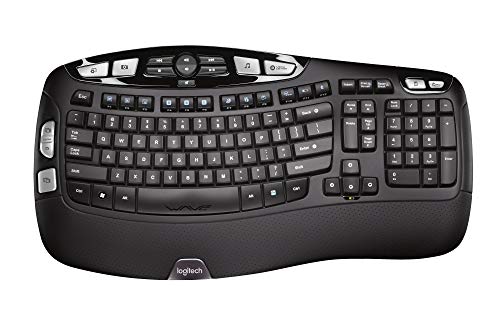
Logitech K350 Wave Ergonomic Keyboard with Unifying Wireless Technology – Black
The Logitech K350 is the ergonomic pick for office workers who feel wrist strain on a flat board. The wave design uses a curved layout that guides your hands into a natural position, and a cushioned palm rest supports your wrists through a long day. The board has 120 keys with programmable function keys, and the Unifying receiver stays in the laptop, so there is nothing to unplug when you move.
Battery life is the K350’s quiet strength: the listing rates it for up to three years on two pre-installed AA batteries, which is longer than any other board in this guide. The wireless connection uses the 2.4 GHz Unifying receiver, and the same receiver can pair with a compatible Logitech mouse. The board is full-size with a number pad, and the wave shape is a gentle change from a flat board, so most typists adjust to it in a day or two.
This board suits an office worker who wants ergonomic comfort without a split keyboard, and who wants a board that never needs charging. Its limits are the size: the wave shape and palm rest make it wider than a flat board, so it needs a roomy desk. It has no backlight, no Bluetooth, and no USB-C charging, and the membrane keys are quiet but lack the crisp feel of a mechanical board.
Microsoft Ergonomic Keyboard

The Microsoft Ergonomic Keyboard is the pick for office workers who want the most wrist support in this guide. The split design angles each half of the keyboard toward its hand, and the improved cushion palm rest is covered in premium fabric that promotes a neutral wrist posture through a long day. The board is wired over USB, so there is no battery to charge and no wireless dropouts to worry about.
The board has a dedicated number pad and dedicated shortcut keys for Microsoft 365, emoji, search, and media controls, which suit a Windows office workflow. The listing notes a three-year limited warranty and a slim, refined design that sits low on the desk. The keys are tactile with a soft landing, and the board is built for all-day comfort rather than speed.
This board suits a Windows office worker who feels wrist strain and wants a split ergonomic board with a palm rest and a wired connection. Its limits are the connection: it is wired only, with no wireless mode, so the cable needs a free USB port. It is also designed around Windows, with Office shortcut keys that do not carry over to macOS, and the listing’s layout field needs checking before ordering, so confirm the QWERTY layout on the listing before you buy.
Comparison Table
| Keyboard | Layout | Keys | Connectivity | Best For |
|---|---|---|---|---|
| Logitech MX Keys S | Full-size, 104 keys | Low-profile, quiet, backlit | Bluetooth, Logi Bolt, USB-C rechargeable | Most office workers, quiet typing |
| Logitech K780 | Full-size, 96 keys | Membrane, quiet, device cradle | Bluetooth, Unifying, 2 AAA batteries | Multi-device desks |
| Logitech K350 | Full-size, 120 keys | Wave ergonomic, membrane, palm rest | Unifying receiver, 2 AA batteries | Wrist comfort, long battery life |
| Microsoft Ergonomic Keyboard | Full-size, split | Tactile, cushioned palm rest | Wired USB | Maximum wrist support, Windows |
Frequently Asked Questions
What makes a keyboard good for office work?
A good office keyboard has quiet keys, a comfortable layout, and a reliable connection. Quiet keys keep a shared room calm, a wave or split layout keeps wrists in a neutral position, and multi-device pairing saves time when you switch between a computer, a laptop, and a phone. Battery life measured in months, a number pad for spreadsheets, and a palm rest for long sessions are all worth having.
Is a mechanical keyboard good for an office?
A mechanical keyboard can work in an office if the switches are quiet. Linear or tactile switches with a soft landing suit a private room, but clicky switches are loud enough to disturb nearby desks. For a shared office, a low-profile membrane or scissor board like the MX Keys S is usually the safer pick, while a mechanical board suits a home office or a private room.
How long should an office keyboard battery last?
A wireless office keyboard should last months on one charge or one set of batteries. The K350 in this guide is rated for up to three years on two AA batteries, and the MX Keys S runs for months between USB-C charges with the backlight off. If a wireless board needs charging every week, the battery is too small for office use.
Do I need a number pad on an office keyboard?
A number pad helps with spreadsheets, data entry, and accounting work, and all four boards in this guide include one. If you rarely type numbers, a compact board without a number pad frees desk space for a mouse. The K780 and K350 are full-size boards with a number pad, so they suit number-heavy work.
Is an ergonomic keyboard worth it?
An ergonomic keyboard is worth it if you feel wrist strain, numbness, or fatigue after a long day of typing. A wave layout like the K350 is a gentle change that helps most people, while a split design like the Microsoft Ergonomic Keyboard is a bigger change that helps more. Try a wave board first, and move to a split board if the strain continues.
Conclusion
The best office keyboard depends on how you work and how your wrists feel at the end of the day. The Logitech MX Keys S is the pick for most office workers: quiet, low-profile, backlit, and paired with three devices. The Logitech K780 suits a desk shared across a computer, a tablet, and a phone, with a cradle built in. The Logitech K350 suits anyone who wants ergonomic comfort and a battery that lasts for years. The Microsoft Ergonomic Keyboard suits Windows workers who want the most wrist support in this guide. Pick the layout that fits your desk, check the connection against your devices, and confirm the key layout on the listing before ordering.
Disclosure: As an Amazon Associate, we may earn from qualifying purchases.
FAQ
What makes a keyboard good for office work?
Is a mechanical keyboard good for an office?
How long should an office keyboard battery last?
Do I need a number pad on an office keyboard?
Is an ergonomic keyboard worth it?
More from Amazon
Programs that pair well with the guide above. Offers and eligibility are set by Amazon and may change.
Free shipping on eligible items, Prime Video and more. Eligible new members can start with a free trial.
Start a Prime free trialAd-free music streaming. Eligible new subscribers can start with a free trial.
Try Music Unlimited freeA Prime membership for ages 18-24 with a trial period. Eligibility is set by Amazon.
See Prime for Young AdultsAudiobooks and podcasts to listen to on the go. Eligible new members can start with a free trial.
Try Audible freeAs an Amazon Associate we earn from qualifying purchases.