Key takeaways
- Red switches have a loyal following for a simple reason: they are smooth from top to bottom.
Red switches have a loyal following for a simple reason: they are smooth from top to bottom. A linear switch has no tactile bump and no click, so a key press feels like an uninterrupted slide, and the light actuation force lets fast players tap repeatedly without much effort. That is why buyers who search for red switch mechanical keyboards are usually gamers who want quick, quiet-ish repeat presses, or typists who dislike the noise and resistance of clicky blues and the bump of browns.
This guide is for readers who have already settled on red switches and now need to choose among layouts, connections, and build quality. The list narrows to six listings whose titles clearly state red switches, covering a compact tenkeyless board, a 96% layout, full-size options, a 75% wireless model, and a retro non-backlit board. Everything below is judged on the specs printed in the titles, so use it as a shortlist and confirm details such as key travel before buying.
Quick Picks
Our top picks
 Redragon Mechanical Gaming Keyboard Wired
- Brilliant Color Illumination- With 11 unique backlights, choose…
- Support Macro Editing: The K671 Mechanical Gaming Keyboard…
- Hot-swappable Linear Red Switch- Our K671 gaming keyboard…


 Redragon K556 PRO Wireless RGB Mechanical Gaming
- Aluminum Build That Won't Wobble - A tank-solid…
- Switch Devices Without Re-Pairing, Zero Lag - Tri-mode…
- Swap Switches Without Soldering, Smooth and Quiet -…
As an Amazon Associate we earn from qualifying purchases at no extra cost to you.
| Product | Best for | Key spec from the title |
|---|---|---|
| Redragon Hot-Swappable Red Switch Keyboard | Customizing switches and keycaps later | Hot-swappable red switch, double-shot PBT keycaps, 11 backlit modes |
| Redragon K552 | Compact desks and beginners | 87-key TKL, red switches, metal frame |
| AK96 96% Keyboard | Saving space without losing the number pad | 96 keys, hot-swappable, wired USB-C |
| Redragon Aluminum RGB Keyboard | A sturdy full-size board with full programmability | Red switches, RGB, aluminum frame |
| Keychron C2 | Simple, full-size typing | Red switch, full size, non-backlit, USB-C |
| Keychron K2 75% | Wireless desk and laptop use | Bluetooth, silent red switch, 84 keys, white LED |
How to Choose
Know what a red switch gives you and what it does not
Red switches are linear, with a light actuation force commonly around 45 grams and an actuation point near 2 millimeters. That suits rapid double-taps and low fatigue, but the lack of a bump means you may bottom out harder than you notice and mistype more on a lightly tuned board. A title that adds a silent or quiet label points to dampened internals, which cut noise at the cost of a slightly softer landing. Treat any label that mixes clicky with red with caution, since a red switch is normally not clicky; read the full listing to verify. If you are coming from a membrane or laptop keyboard, expect red switches to feel lighter and faster than you are used to, and give yourself a week or two to stop accidentally pressing keys while your fingers rest on them. Some buyers add small rubber rings, called O-rings, to soften the bottom-out, though that is a modification rather than a spec to shop for.
Pick the layout that matches your desk
Full-size boards of 104 keys keep the number pad. Tenkeyless layouts of 87 keys remove it and give you more mouse room, which matters for low-sensitivity shooters. A 96% layout keeps the number pad in a tighter body, and a 75% board of around 84 keys trims even more. If you do not use a number pad, going tenkeyless or 75% frees about four to six inches of desk space. That extra room lets your mouse hand swing wider, which matters if you play first-person games at low sensitivity. Writers and office users should be cautious: losing the number pad, arrow cluster, or function row on tighter layouts is a common source of regret after the box is opened.
Decide between wired, wireless, and hot-swap support
Wired USB-C boards avoid latency and battery questions. A Bluetooth model like the Keychron K2 gives desk flexibility but requires charging. Hot-swappable sockets let you change switches without soldering, so you can start on red and experiment later; this is useful if you are unsure about red switches. Check the number of backlight modes only after the other items, as lighting rarely changes how the board performs. On wireless models, check how the board charges and whether it can fall back to a cable, because a dead battery in the middle of a session is the main weakness of any wireless keyboard.
Check the frame, keycaps, and anti-ghosting claims
A metal or aluminum frame reduces flex and gives a more solid feel than all-plastic builds. Double-shot PBT keycaps resist shine and legend wear better than thin ABS, which can polish smooth over time. Anti-ghosting and N-key rollover claims ensure multiple keys register at once, useful in games. Budget keyboards commonly cut corners on keycap thickness, stabilizers on long keys, and cable quality, so inspect those details if the listing shows them. Spacebars and shift keys are where weak stabilizers rattle first, which is a good reason to read buyer discussions for those specific complaints before committing. A detachable USB-C cable is also worth having, since a fixed cable is a failure point you cannot replace.
The 6 Best Options
Redragon Hot-Swappable Red Switch Keyboard
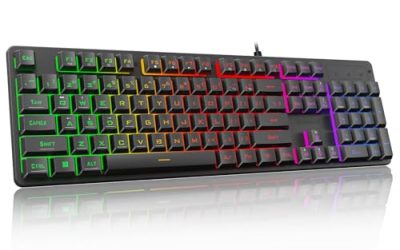
This wired mechanical gaming keyboard lists 11 programmable backlit modes, hot-swappable red switches, anti-ghosting, and double-shot PBT keycaps. It suits players who want a board they can customize over time rather than replace, and the PBT caps add a sturdier feel than basic plastic.
- Strength: hot-swap sockets allow easy switch changes without soldering.
- Strength: double-shot PBT keycaps are a durability upgrade at this tier.
- Trade-off: the title does not state layout size, so check the full listing for key count.
Skip it if you want a wireless connection or a minimalist, non-lit look.
Redragon K552
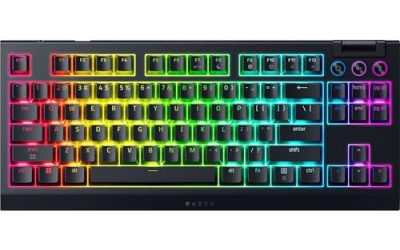
The K552 is a long-running compact option with LED backlighting, red switches, an 87-key tenkeyless layout, anti-ghosting, and a metal frame. The title says it suits PC gaming and typing, and it is a natural entry for beginners who want to try a mechanical board.
- Strength: the tenkeyless layout leaves more room for mouse movement.
- Strength: a metal frame adds rigidity that plastic boards lack.
- Trade-off: no number pad, which hurts spreadsheet-heavy work.
Skip it if you need numeric entry, wireless, or hot-swap customization.
AK96 96% Keyboard
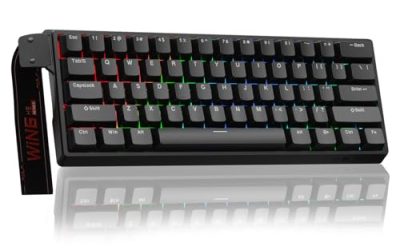
The AK96 lists a compact 96% layout with 96 keys, a top mount design, hot-swappable sockets, wired USB-C, and a colorful LED backlight. It targets typists who want the number pad but not the full-size footprint.
- Strength: a 96% layout keeps the number pad while saving desk width.
- Strength: hot-swap sockets and USB-C connection add flexibility.
- Trade-off: the title describes a clicky sound, which conflicts with typical linear red switches, so confirm the switch feel.
Skip it if you want a dependable, well-documented linear feel without verifying it first.
Redragon Aluminum RGB Keyboard
This wired board lists red switches, RGB backlighting, full programmability, a durable aluminum frame, and anti-ghosting. It fits gamers who want a robust, fully remappable keyboard with a metal body.
- Strength: the aluminum frame and anti-ghosting claims suit heavy daily use.
- Strength: full programmability supports macros and custom layouts.
- Trade-off: its title lacks layout details, so confirm the size before buying.
Skip it if you want wireless freedom or a compact tenkeyless body.
Keychron C2
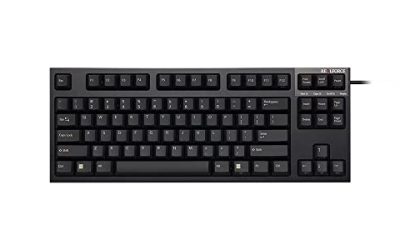
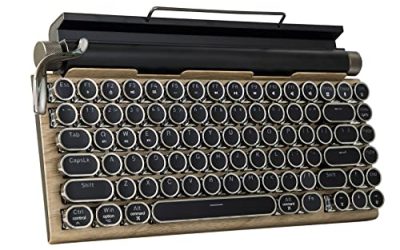
A full-size wired mechanical keyboard with red switches, retro styling, ABS keycaps, USB-C, ergonomic support, and a non-backlit design. It suits typists and gamers who want the number pad and a clean, retro look. It reads as a no-frills board for people who value the layout and switch feel over lighting effects.
- Strength: a full-size layout with a number pad suits office and gaming use alike.
- Strength: the non-backlit design keeps the board simple and avoids battery questions.
- Trade-off: no backlight means it is hard to use in a dark room.
Skip it if you type in low light or want shine-resistant PBT keycaps.
Keychron K2 75%
A 75% Bluetooth wireless mechanical keyboard with 84 keys, silent K Pro red switches, white LED backlighting, USB-C, anti-ghosting, and N-key rollover. It is built for people who split time between a laptop and a desk.
- Strength: silent red switches make it friendlier for shared rooms.
- Strength: Bluetooth plus USB-C offers flexible connection choices.
- Trade-off: a compact 75% layout drops the number pad and some navigation keys.
Skip it if you want RGB colors or a full-size layout.
Which One Fits Your Situation
You want to try different switches later
The Redragon hot-swappable board and the AK96 both list hot-swappable sockets, so you can start on red and change your mind without buying a new keyboard. This is the safer path if you have never typed on a linear switch, because a different switch type can be dropped into the same board later. Check which switch style the sockets accept before ordering replacements.
You are on a tight desk and play shooters
The Redragon K552 with its 87-key layout leaves room for wide mouse swipes, and the metal frame keeps it steady. If you want a little more length without a full number block, the AK96 keeps the pad in a compact 96-key footprint, though you should confirm its switch feel first.
You type all day and need a number pad
The Keychron C2 delivers a full-size layout with red switches and a simple, non-lit design, while the Redragon aluminum model adds RGB and a metal body. Pick the C2 for a well-lit office where you already know the keys by heart, or the aluminum Redragon if you work late and want the legends visible. Either way, the layout keeps every navigation key within reach, which is handy when you scroll through long documents or spreadsheets.
You move between a laptop and a desk
The Keychron K2 offers Bluetooth wireless with silent red switches and an 84-key layout. The silent switches also make it the more considerate choice for a shared apartment or a library desk, while the Bluetooth link keeps cables off a crowded workspace.
Common Mistakes
- Assuming red switches are tactile or clicky, when they are normally linear.
- Buying a layout without a number pad and then needing one for work.
- Skipping hot-swap support and feeling stuck if red switches do not suit you.
- Ignoring keycap material, then watching ABS caps turn shiny.
- Choosing a non-backlit board for a dim room.
Related guides
- Gaming Headsets For Competitive Fps Directional Audio
- Compact Mini Itx Gaming Pcs For Small Desks
- Threadripper Vs Xeon Vs Core I9 For Workstations
Frequently Asked Questions
Are red switches good for gaming?
Yes. Their light, linear press suits fast taps and repeated inputs, which is why many gamers choose them. Some players prefer a tactile bump for accuracy, so if you notice accidental presses, a tactile switch may suit you better, and a hot-swappable board makes that change easy.
Are red switches quiet?
They are quieter than clicky blue switches, but a standard red can still make a bottoming-out thud. Silent variants, such as the one listed on the Keychron K2, reduce that noise further.
Should I buy a hot-swappable keyboard in 2026?
If you may want to experiment, yes. Hot-swap sockets let you change switches without soldering, which keeps a keyboard useful for longer.
What layout is best for red switches?
It depends on your desk and number pad needs. Tenkeyless suits shooters, 96% and full-size suit office work, and 75% suits portability and a clean setup.