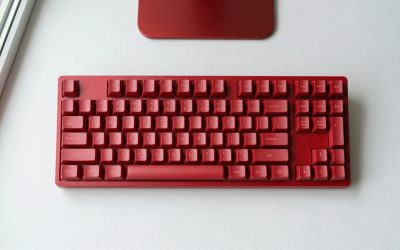
Our Top Picks
 Razer BlackWidow V4 X Mechanical Gaming Keyboard20.5 x 8 x 2 Inch18.36 x 6.01 x 1.71 inches2.51 poundsCheck on Amazon

Choosing a Razer keyboard is less about the logo on the spacebar and more about how the board behaves during the games you actually play. A clicky full-size board with macro keys suits a player who runs complex rotations in an MMO, while a compact analog board with adjustable actuation suits a competitive shooter player who needs one key to walk and sprint. The wrong pick means fighting the keyboard every session, so the decision deserves a close look at switches, layout, and software.
This guide covers four Razer keyboards chosen from their Amazon product pages, spanning full-size mechanical boards, a tenkeyless analog board, and a low-profile membrane option. They fit competitive shooter players, MMO and strategy players, typists who game after work, and anyone building a first Razer setup. Each section below compares real listing details so you can match a board to your hands, your desk, and your games.
Quick Picks
As an Amazon Associate we earn from qualifying purchases
| Product | Best for | Key spec from title |
|---|---|---|
| Razer BlackWidow V4 Pro | MMO and macro-heavy play | Green tactile switches, command dial, 8 macro keys |
| Razer Huntsman V3 Pro TKL | Competitive shooters | Analog Optical Switches, Rapid Trigger, adjustable actuation |
| Razer BlackWidow V4 X | Full-size gaming on a tighter setup | Yellow linear and silent switches, 6 macro keys |
| Razer Ornata V3 | Quiet low-profile typing and play | Mecha-membrane switches, 10-zone RGB lighting |
How to Choose
Match the switch to your games
Razer sells several switch types, and each one changes how a key feels and sounds. Green switches give a tactile bump and an audible click, which many players like for feedback during long sessions. Yellow switches move in a straight line with no click, so they stay quieter and suit shared rooms or late-night play. Analog optical switches read how far a key is pressed, which opens up features like Rapid Trigger and adjustable actuation points. Think about the games you play most: fast shooters reward linear or analog switches, while slower strategy games work well with tactile ones.
Pick a layout that fits your desk and your aim
Full-size boards keep the number pad and a full row of function keys, which helps MMO players who bind abilities across the whole board. Tenkeyless boards drop the number pad and free up space for wide mouse sweeps, which matters in low-sensitivity shooter play. A 75 percent board goes further, but Razer keeps most of its range at full-size or tenkeyless, so the choice is usually between those two. Measure your desk before you buy, and leave room for the wrist rest, since Razer includes a magnetic rest with several of its boards.
Look at the extra controls, not just the keys
Macro keys, a command dial, and a media roller change how a board works outside the game itself. The BlackWidow V4 Pro carries eight dedicated macro keys plus a command dial, so MMO players can bind rotations, push-to-talk, and utility commands without reaching for the mouse. The Huntsman V3 Pro TKL uses a media dial and dedicated media keys instead, which keeps the layout compact while still giving quick volume control. If you stream or record, a dial and media keys save constant trips to the operating system volume controls.
Check the software and the build before you commit
Every Razer keyboard in this guide works through Razer Synapse, which handles lighting, macros, and actuation settings. That software is where analog features like Snap Tap and Rapid Trigger live, so a board with analog switches needs Synapse running to use its headline features. Build matters too: doubleshot ABS keycaps resist shine from long use, a metal top plate keeps the board rigid, and a detachable cable makes the board easier to move. Read the listing for the exact switch and layout, because Razer sells the same model in several switch colors.
The 4 Best Options
Razer BlackWidow V4 Pro

The BlackWidow V4 Pro is the full-featured board in this group, and it suits players who want every control within reach. Its green tactile switches give a clear bump and click with each press, and the command dial plus eight dedicated macro keys put bindings, volume, and utility commands under your left hand. A magnetic plush leatherette wrist rest comes in the box, and Chroma RGB lighting runs across the board and its underglow. The doubleshot ABS keycaps keep their legends sharp through long sessions, and Snap Tap helps with fast directional changes in shooters.
Specs
- Green tactile mechanical switches
- Command dial and 8 dedicated macro keys
- Magnetic plush leatherette wrist rest
- Chroma RGB lighting with underglow
- Doubleshot ABS keycaps
- Snap Tap
Best for: MMO and strategy players who bind lots of abilities and want macro keys plus a dial.
Watch out for: Check the switch color on the listing before ordering, since the same model ships with green, yellow, and orange switches.
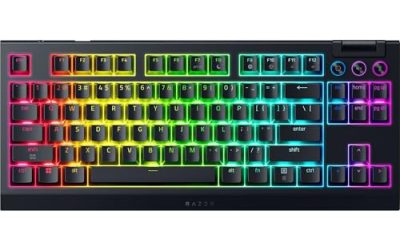
Razer Huntsman V3 Pro TKL

The Huntsman V3 Pro TKL is the competitive pick here, built around analog optical switches that read key depth instead of a simple on-off press. Rapid Trigger resets a key the moment you lift your finger, and adjustable actuation lets you set how far a key travels before it fires, so one key can handle both walking and sprinting. Snap Tap favors the most recent directional input, which helps with counter-strafing in shooters. The tenkeyless layout leaves more room for the mouse, and the included wrist rest and doubleshot PBT keycaps round out a board made for long ranked sessions.
Specs
- Analog Optical Switches
- Rapid Trigger
- Adjustable actuation
- Snap Tap
- Media keys and dial
- Doubleshot PBT keycaps
- Wrist rest included
Best for: Competitive shooter players who want adjustable actuation and fast key resets.
Watch out for: The analog features need Razer Synapse running, so confirm the software works with your setup before buying.
Razer BlackWidow V4 X
The BlackWidow V4 X keeps the full-size layout and the macro row of its bigger sibling while trimming the extras that push the cost up. Its yellow linear switches move smoothly with no click, so the board stays quiet in shared spaces, and six dedicated macro keys still give MMO and strategy players room for bindings. A multi-function roller and secondary media keys handle volume and playback, Chroma RGB lighting covers each key, and doubleshot ABS keycaps stand up to daily use. Sound dampening foam inside the case softens the typing sound further, and Snap Tap adds the same fast directional switching found on the higher boards.
Specs
- Yellow switches, linear and silent
- 6 dedicated macro keys
- Chroma RGB lighting
- Doubleshot ABS keycaps
- Multi-function roller and media keys
- Sound dampening foam
- Snap Tap
Best for: Players who want a full-size Razer board with macro keys and quiet switches.
Watch out for: The wrist rest is not listed with this model, so plan for a separate rest if you use one.
Razer Ornata V3
The Ornata V3 takes a different path from the mechanical boards in this guide, pairing low-profile keys with mecha-membrane switches that blend a membrane feel with a mechanical-style click. The result is a quieter, softer keystroke that suits players who type all day and game at night, and the low-profile keys keep finger travel short. Ten-zone RGB lighting runs across the board, backlit media keys handle volume and playback, and the magnetic wrist rest snaps on for longer sessions. A spill-resistant design adds some protection against desk accidents, and Snap Tap brings the same directional input feature as the mechanical boards.
Specs
- Low-profile keys
- Mecha-membrane switches
- UV-coated keycaps
- Backlit media keys
- 10-zone RGB lighting
- Spill-resistant design
- Magnetic wrist rest
- Snap Tap
Best for: Players who want a quiet low-profile board for mixed typing and gaming.
Watch out for: Mecha-membrane switches feel different from true mechanical switches, so expect a softer keystroke.
Which One Fits Your Situation
You play MMOs and need bindings everywhere
Pick the Razer BlackWidow V4 Pro. Its eight macro keys and command dial give you room for rotations, consumables, and push-to-talk without crowding the main keys, and the full-size layout keeps the number pad available for extra binds. The green switches give clear feedback for each press, which helps when you are chaining abilities in a busy fight.
You play competitive shooters and want every millisecond
Pick the Razer Huntsman V3 Pro TKL. Rapid Trigger and adjustable actuation let you tune keys to your movement style, and the tenkeyless layout frees desk space for wide mouse sweeps. Snap Tap helps with counter-strafing, and the analog switches give you analog movement on a single key, so walking and sprinting share one smooth press.
You want a full-size board without the flagship extras
Pick the Razer BlackWidow V4 X. It keeps the number pad, six macro keys, and a media roller, but drops the command dial and the included wrist rest. The yellow linear switches stay quiet, which suits shared rooms, and the sound dampening foam keeps typing noise down further during late-night sessions in a shared home.
You type all day and game at night
Pick the Razer Ornata V3. Its low-profile keys and mecha-membrane switches give a softer, quieter keystroke than the mechanical boards, and the magnetic wrist rest helps during long typing sessions. The ten-zone RGB lighting still gives the desk a gaming look without the click of mechanical switches, and the spill-resistant design guards against coffee accidents at your desk.
Common Mistakes
- Buying a switch color without checking the listing, then finding the board clicks louder or feels different than expected
- Picking a full-size board for a small desk and losing mouse space for low-sensitivity aiming
- Skipping the software setup and missing Rapid Trigger, Snap Tap, and macro features that need Synapse
- Ignoring the wrist rest situation and discovering a board ships without one
- Choosing a loud clicky board for a shared room and disturbing everyone nearby
Frequently Asked Questions
Are Razer keyboards good for competitive shooters?
Yes, especially the analog models. The Huntsman V3 Pro TKL uses analog optical switches with Rapid Trigger and adjustable actuation, so keys reset the moment you lift your finger and one key can handle both walking and sprinting. Snap Tap favors the latest directional input, which helps with counter-strafing. The tenkeyless layout also leaves more desk space for wide mouse movements at low sensitivity.
What is the difference between the BlackWidow V4 Pro and the V4 X?
The V4 Pro adds a command dial, eight macro keys instead of six, and a magnetic plush leatherette wrist rest, plus underglow lighting. The V4 X keeps the full-size layout, six macro keys, a media roller, and Chroma RGB lighting, but skips the dial and the wrist rest. Both use Razer mechanical switches and Snap Tap, so the choice comes down to how many extra controls you want.
Do Razer keyboards need software to work?
The boards type and light up without software, but the headline features need Razer Synapse. Rapid Trigger, Snap Tap, adjustable actuation, macros, and custom lighting profiles all live in Synapse, so install it to use the board fully. The software also handles firmware updates, which keep the board current as Razer adds features.
Which Razer keyboard is quietest for shared rooms?
The BlackWidow V4 X with yellow linear switches is the quietest mechanical pick in this guide, since yellow switches move in a straight line with no click and the case includes sound dampening foam. The Ornata V3 is quieter still, because its mecha-membrane switches give a soft keystroke with no mechanical click. Either one works well when other people are nearby.
FAQ
Are Razer keyboards good for competitive shooters?
What is the difference between the BlackWidow V4 Pro and the V4 X?
Do Razer keyboards need software to work?
Which Razer keyboard is quietest for shared rooms?
More from Amazon
Programs that pair well with the guide above. Offers and eligibility are set by Amazon and may change.
Free shipping on eligible items, Prime Video and more. Eligible new members can start with a free trial.
Start a Prime free trialAd-free music streaming. Eligible new subscribers can start with a free trial.
Try Music Unlimited freeA Prime membership for ages 18-24 with a trial period. Eligibility is set by Amazon.
See Prime for Young AdultsAudiobooks and podcasts to listen to on the go. Eligible new members can start with a free trial.
Try Audible freeAs an Amazon Associate we earn from qualifying purchases.