Key takeaways
- Compare the best keyboards for MacBooks by Mac layout, Bluetooth pairing, key feel and backlighting, and pick the board for your desk or late-night typing.
A MacBook keyboard is good for travel, but long writing days call for a full-size board with a steadier angle, a numeric keypad or a calmer key feel. The right external keyboard turns a laptop into a comfortable desk setup without forcing you to relearn where every key sits. The decision comes down to layout, connection and feel: Mac-labelled modifier keys save daily friction, Bluetooth keeps the desk tidy, and the switch or scissor mechanism decides whether your fingers tire after a few hours.
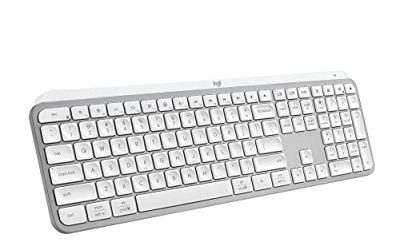
This guide covers three kinds of MacBook owners: desk writers who want a quiet full-size board, Mac-only users who want Touch ID and a native layout, and typists who prefer a compact mechanical board. The Logitech MX Keys S brings a low-profile backlit design with three-device switching, the Apple Magic Keyboard adds Touch ID with a numeric keypad, and the Keychron K2 Version 3 pairs a 75 percent layout with a hot-swappable Super Brown switch.
Quick Picks
As an Amazon Associate we earn from qualifying purchases
| Product | Best for | Key spec from title |
|---|---|---|
| Logitech MX Keys S Wireless Keyboard, Graphite | All-day desk typing | Low profile, backlit, Bluetooth, USB-C rechargeable |
| Apple Magic Keyboard with Touch ID and Numeric Keypad, Black Keys | A native Mac desk setup | Touch ID, numeric keypad, Bluetooth, rechargeable |
| Keychron K2 QMK Wireless Mechanical Keyboard, Version 3 | Compact mechanical typing | 75 percent layout, Super Brown switch, white LED backlight |
How to Choose
Mac-Ready Layout and Keys
MacBooks use Command and Option where other systems use different labels, so a keyboard with Mac legends keeps shortcuts readable and muscle memory intact. Look for a board that prints Command and Option on the modifier keys, places them in the Mac order, and keeps the function row useful for brightness, volume and media controls. Some boards add a physical switch that flips the layout between Mac and Windows, which helps if the same keyboard also serves a second machine. Apple’s own board goes further with Touch ID built into a key, but that feature only works on a Mac with Apple silicon. Check the listing for Mac compatibility rather than assuming any wireless board feels native.
Connection: Bluetooth, Multi-Device, and a Wired Backup
Bluetooth is the tidy choice for a MacBook desk because it needs no dongle and no cable, but the details matter when the keyboard is shared. A board that pairs with up to three devices lets you move between a MacBook, a tablet and a phone with one key press, which suits people who juggle screens. A wired USB-C connection is a useful backup for charging while you type and for the moments when wireless pairing misbehaves. If your Mac uses FileVault, keep in mind that Bluetooth may not accept a login password, so a board with a receiver or a cable gives you a way in. Check how the board connects before you commit.
Key Feel and Noise
Key feel decides whether a keyboard is pleasant after four hours or tiring after one, so match the mechanism to your typing load. Low-profile scissor keys feel close to a MacBook keyboard and stay quiet, which suits shared rooms and long documents. A tactile mechanical switch gives a clear bump at the actuation point and suits typists who want feedback with every press, while a linear switch moves smoothly with no bump at all. Noise matters as much as feel: clicky switches carry across a room, so a quiet or tactile switch is the safer pick for an office or a home shared with others. If possible, know which switch a board uses before ordering.
Size, Backlighting, and Power
Size is a desk decision as much as a typing decision, so measure before you buy. A full-size board with a numeric keypad suits spreadsheet work but needs roughly 43 cm of desk width, while a 75 percent board keeps the function row and arrow keys and frees space for a mouse. Backlighting matters if you type in dim rooms: keys that light up as your hands approach, or a steady white backlight, keep legends readable without a desk lamp. Power is the last check: rechargeable boards need a USB-C cable nearby, while long-life designs run for months on a single charge. Pick the size and lighting that fit your desk, not the other way round.
The 3 Best Options
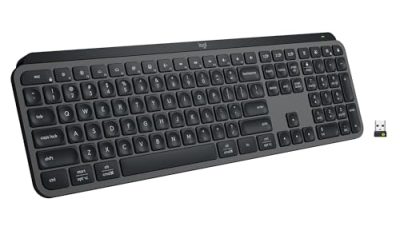
Logitech MX Keys S Wireless Keyboard, Graphite

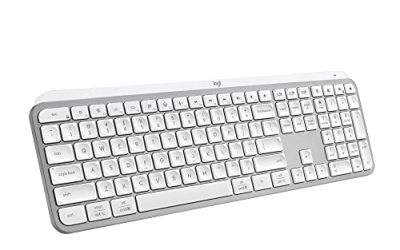
The MX Keys S is the full-size desk option in this set, with a low-profile scissor design, spherically dished keys and backlighting that brightens as your hands approach. It pairs over Bluetooth Low Energy or the included Logi Bolt receiver, switches between up to three devices, and recharges over USB-C, so it suits a MacBook that shares a desk with a tablet or a second computer. The Logi Options+ app unlocks Smart Actions and backlight control on Windows and macOS. At 810 g with a 1500 mAh battery, it stays planted on a desk rather than travelling in a bag.
Specs
- Connectivity: Bluetooth Low Energy, Logi Bolt receiver, USB-C charging
- Layout: low-profile, QWERTY, 104 keys, backlit keys
- Multi-device: switches between up to 3 devices
- Battery: rechargeable 1500 mAh
- Weight: 810 g; model number 920-011558
Best for: all-day typing at a desk where a MacBook shares space with a second device.
Watch out for: if FileVault is enabled on your Mac, Bluetooth may not accept your password at login, so keep the Logi Bolt receiver plugged in.
Apple Magic Keyboard with Touch ID and Numeric Keypad, Black Keys
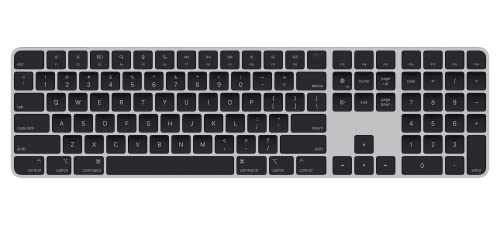
Apple’s own keyboard is the most native match for a MacBook, with a slim aluminium build, a familiar scissor mechanism and a numeric keypad for spreadsheets and finance work. It connects over Bluetooth, runs on a rechargeable internal battery, and pairs automatically with a Mac with Apple silicon. Touch ID sits in a key on the keyboard itself, so unlocking the Mac and approving sign-ins works without reaching for the laptop. The Black Keys version keeps the same layout with dark keycaps that suit a space grey desk. It is a Mac-first board, so households that also run Windows machines will find its layout less flexible.
Specs
- Connectivity: Bluetooth, rechargeable internal battery
- Layout: full-size with numeric keypad, US English, Black Keys
- Touch ID: built into the keyboard, works with Mac computers with Apple silicon
- System: requires a Mac with Apple silicon using macOS 11.4 or later
- Model: MMMR3LL/A
Best for: Mac-only desks where Touch ID and a native layout matter most.
Watch out for: Touch ID only works on Mac models with Apple silicon, so Intel MacBook owners lose that feature.
Keychron K2 QMK Wireless Mechanical Keyboard, Version 3

The Keychron K2 Version 3 is the compact mechanical pick, with a 75 percent layout that keeps the function row and arrow keys while dropping the numeric keypad. Its Super Brown switch gives a tactile bump without a loud click, the white LED backlight keeps legends readable in dim rooms, and the hot-swappable sockets let you change switches without soldering. It connects over Bluetooth 5.2 to up to three devices or over a wired USB-C cable, runs on a 4000 mAh battery, and supports key remapping through the Keychron Launcher web app. Mac and Windows keycaps are included, with a switch that flips the layout.
Specs
- Layout: 75 percent, 84 keys, aluminium frame, white LED backlight
- Switch: Keychron Super Brown, hot-swappable
- Connectivity: Bluetooth 5.2 for up to 3 devices, wired USB-C
- Battery: 4000 mAh rechargeable
- System: macOS, Windows and Linux; QMK support
Best for: typists who want a mechanical feel on a smaller desk.
Watch out for: the 75 percent layout has no numeric keypad, so heavy spreadsheet work needs a separate keypad or a full-size board.
Which One Fits Your Situation
You Type All Day at a Desk
Pick the Logitech MX Keys S. Its full-size layout, quiet low-profile keys and smart backlighting suit long documents, email and code without tiring your fingers. Three-device switching means the same board can serve a MacBook and a tablet, and USB-C charging keeps it running without swapping batteries. It is the most comfortable choice when the keyboard rarely leaves the desk.
You Want the Most Mac-Native Board
Pick the Apple Magic Keyboard with Touch ID and Numeric Keypad. Its layout, key feel and Touch ID match the MacBook experience exactly, and it pairs automatically with a Mac with Apple silicon. The numeric keypad helps with spreadsheets and finance work, while the slim aluminium body looks at home next to a MacBook. It is the right pick when every device on the desk is a Mac.
You Prefer Mechanical Keys and a Compact Desk
Pick the Keychron K2 Version 3. Its 75 percent layout keeps the keys you use most while freeing desk space for a mouse, and the tactile Super Brown switch gives clear feedback without a loud click. Hot-swappable sockets let you change switches later without soldering, and Bluetooth 5.2 plus a wired USB-C connection covers both desk and travel use. It suits typists who like a mechanical feel in a smaller footprint.
You Often Type in Dim Rooms
Pick the Logitech MX Keys S for its smart backlighting, which lights up as your hands approach and adjusts to the room. The Keychron K2 Version 3 is the backup choice here, with a steady white LED backlight that keeps legends readable late at night. Either way, check that the backlight can be adjusted, since a board that is too bright in a dark room is as distracting as one that is too dim.
Common Mistakes
- Buying a Windows-first layout with no Mac legends, then relearning every shortcut from scratch.
- Assuming Touch ID works on every MacBook, when it needs a Mac with Apple silicon.
- Ordering a full-size board for a small desk without measuring the space it needs.
- Choosing clicky switches for a shared room without thinking about the noise they make.
- Skipping the wired or receiver option, then finding Bluetooth cannot enter a FileVault password at login.
Frequently Asked Questions
Do these keyboards work with MacBook Air and MacBook Pro?
Yes, all three connect to MacBook Air and MacBook Pro over Bluetooth, and the Logitech and Keychron boards also work over a wired USB-C connection. The difference is Touch ID: only the Apple Magic Keyboard has it, and it works solely on Mac models with Apple silicon. Check your MacBook chip before choosing a board for its fingerprint feature.
Does Touch ID work on any MacBook?
No, Touch ID on an external keyboard works only on Mac models with Apple silicon running macOS 11.4 or later. Intel MacBook owners can still type on the Apple Magic Keyboard and use its numeric keypad, but the fingerprint key will not unlock the Mac. If you own an Intel MacBook, the Logitech or Keychron board is the better match.
Can I use one keyboard with my MacBook and another device?
Yes, both the Logitech MX Keys S and the Keychron K2 Version 3 pair with up to three devices and switch between them with a key press. That covers a MacBook plus a tablet or a second computer on the same desk. The Apple Magic Keyboard pairs with one Mac at a time, so it suits a single-machine desk rather than a shared setup.
Do I need to install software to use these keyboards?
No, basic typing works on all three without extra software, since macOS recognises them as Bluetooth or USB keyboards. The Logi Options+ app adds Smart Actions and backlight control for the MX Keys S, while the Keychron Launcher web app handles remapping for the K2 Version 3. Install the companion app only if you want those extras.
FAQ
Do these keyboards work with MacBook Air and MacBook Pro?
Does Touch ID work on any MacBook?
Can I use one keyboard with my MacBook and another device?
Do I need to install software to use these keyboards?
More from Amazon
Programs that pair well with the guide above. Offers and eligibility are set by Amazon and may change.
Free shipping on eligible items, Prime Video and more. Eligible new members can start with a free trial.
Start a Prime free trialAd-free music streaming. Eligible new subscribers can start with a free trial.
Try Music Unlimited freeA Prime membership for ages 18-24 with a trial period. Eligibility is set by Amazon.
See Prime for Young AdultsAudiobooks and podcasts to listen to on the go. Eligible new members can start with a free trial.
Try Audible freeAs an Amazon Associate we earn from qualifying purchases.