Our Top Picks


As an Amazon Associate, we earn from qualifying purchases.
The Short Answer
The best keyboard for Valorant is the Razer Huntsman V3 Pro TKL. It pairs analog optical switches with Rapid Trigger and Snap Tap, so counter-strafes register the moment you lift a finger, and its tenkeyless layout leaves plenty of room for low-sensitivity mouse movement. If you want the deepest per-key tuning, the SteelSeries Apex Pro TKL Gen 3 is the strongest alternative, with adjustable OmniPoint 3.0 switches, Rapid Trigger, Rapid Tap, and an OLED display. Players already invested in Logitech gear should look at the Logitech G PRO X TKL Rapid, a wired tenkeyless board with magnetic analog switches and a volume roller. For a wireless option, the ASUS ROG Azoth is a 75 percent layout with tri-mode connectivity and hot-swappable switches, though it uses standard mechanical switches rather than Hall effect ones, so it cannot match the rapid-trigger boards on input speed.
Valorant rewards clean movement above almost everything else: counter-strafing, jiggle peeking, and holding tight angles all depend on how quickly a key registers and resets when you release it. A keyboard with rapid trigger shortens that reset to almost nothing, so stopping on a dime feels noticeably sharper. Adjustable actuation lets you set movement keys to fire with a very light touch while keeping ability keys deeper, so you stop fat-fingering utility mid-round. None of that replaces aim or game sense, but the right board removes a layer of friction between your hands and the game, and in a tactical shooter that friction is exactly what costs rounds.
Our Top Picks
- Best overall: Razer Huntsman V3 Pro TKL — analog optical switches, Rapid Trigger, Snap Tap, and a tournament-ready tenkeyless layout.
- Best for deep tuning: SteelSeries Apex Pro TKL Gen 3 — OmniPoint 3.0 switches with adjustable actuation, Rapid Trigger, Rapid Tap, and an OLED display.
- Best for Logitech setups: Logitech G PRO X TKL Rapid — magnetic analog switches with Rapid Trigger, Lightsync RGB, and a detachable USB-C cable.
- Best wireless option: ASUS ROG Azoth — a 75 percent board with tri-mode connectivity, hot-swappable switches, and an OLED display. Note that it uses standard mechanical switches without rapid trigger, so it is the pick for flexibility rather than raw input speed.
Quick Comparison
| Keyboard | Switches | Layout | Rapid Trigger | Connection |
|---|---|---|---|---|
| Razer Huntsman V3 Pro TKL | Analog optical, adjustable actuation | Tenkeyless | Yes | Wired USB-C |
| SteelSeries Apex Pro TKL Gen 3 | OmniPoint 3.0, adjustable actuation | Tenkeyless | Yes | Wired USB-C |
| Logitech G PRO X TKL Rapid | Magnetic analog, adjustable actuation | Tenkeyless | Yes | Wired USB-C |
| ASUS ROG Azoth | ROG NX Brown mechanical, hot-swappable | 75 percent | No | 2.4 GHz wireless, Bluetooth, wired |
How to Choose
Rapid trigger matters more than anything else
Rapid trigger is the single most useful feature a Valorant keyboard can have. On a normal mechanical switch, a key resets at a fixed point, so you have to lift your finger past that point before the key can fire again. Rapid trigger resets the key the instant it starts moving upward, so counter-strafes and repeated taps register sooner. In Valorant, where stopping instantly is what makes your shots accurate, that difference is real. Three of the four boards here have rapid trigger; the Azoth does not, and that is the honest trade-off for choosing it.
Adjustable actuation lets you tune movement separately
Hall effect and analog optical switches let you set how far a key has to travel before it registers. Set movement keys shallow, near the shallowest end of the range, and strafes feel instant. Set ability keys deeper, and you stop throwing utility by accident when your hand brushes a key mid-fight. This is a software setting on the Razer, SteelSeries, and Logitech boards, worth an evening of tuning. Start with movement keys shallow and everything else in the middle, then adjust one key at a time over a few matches. Confirm the exact actuation range for each board on its listing, since it can vary by model and color variant.
Layout: tenkeyless is the standard for a reason
Most competitive Valorant setups use a tenkeyless or smaller board: dropping the number pad pulls the keyboard closer and gives your mouse hand more room, which matters on low sensitivity. The 75 percent Azoth is even more compact, while the three tenkeyless boards keep dedicated function keys. Full-size boards are not a good fit here: the extra width pushes your mouse hand outward for no benefit in a game that barely uses the number pad.
Polling rate and connection
A wired connection is the safest choice for competitive play, and all three rapid-trigger boards here are wired. Wireless has improved a lot, and the Azoth connects over 2.4 GHz wireless with a wired fallback, so it is a legitimate option if you hate cables. Confirm the polling rate on the listing before you buy, since polling figures vary between models and revisions of the same board.
Anti-ghosting and N-key rollover
Valorant often asks you to hold several keys at once: a strafe key, a crouch key, and an ability key in the same moment. Full N-key rollover means every key you press registers, no matter how many you hold down, and anti-ghosting stops the board from reporting keys you never pressed. All four boards here list full key rollover or anti-ghosting; if a board you are considering elsewhere lists neither, skip it.
Keycaps and build
Doubleshot PBT keycaps resist shine and wear far better than ABS caps; the Razer and SteelSeries boards both use them. Check the listing for an aluminum top plate or rigid chassis, since a board that flexes under hard presses can shift on the desk mid-round.
Software is part of the purchase
Rapid trigger, adjustable actuation, and Snap Tap-style features all live in the maker’s software: Razer Synapse, SteelSeries GG, Logitech G Hub, and ASUS Armoury Crate each handle these settings differently. If you already use one maker’s software for a mouse or headset, picking a keyboard from the same maker keeps everything in one place. Before buying, check that the software supports your operating system, since some features are limited on Mac.
The Picks in Detail
1. Razer Huntsman V3 Pro TKL — Best Overall
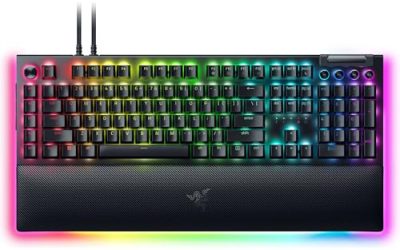
The Huntsman V3 Pro TKL is the board most competitive Valorant players should buy first. Its analog optical switches support adjustable actuation, Rapid Trigger, and Snap Tap, which lets two opposing strafe keys resolve cleanly so counter-strafes feel crisp instead of muddy. The listing also notes doubleshot PBT keycaps, a magnetic wrist rest, and dedicated media keys with a dial. The tenkeyless layout is the tournament standard, and the board is wired over USB-C.
In practice, this is the board that asks the least of you: set movement keys shallow, turn on Rapid Trigger, and it gets out of the way. The wrist rest helps across long sessions, and the media dial adjusts volume without tabbing out of the game.
Pros:
– Analog optical switches with adjustable actuation and Rapid Trigger
– Snap Tap for cleaner counter-strafing
– Doubleshot PBT keycaps and a magnetic wrist rest included
– Dedicated media keys and dial
– Tenkeyless layout leaves room for low-sensitivity mouse play
Cons:
– Wired only, so cable management is on you
– The software setup takes time to learn if you have never used Razer Synapse
– Confirm the polling rate on the listing, since it varies between the standard and 8KHz variants
2. SteelSeries Apex Pro TKL Gen 3 — Best for Deep Tuning
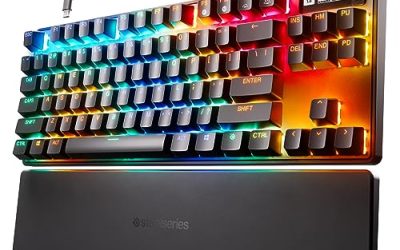
SteelSeries Apex Pro TKL Gen 3
The Apex Pro TKL Gen 3 is the tinkerer’s board. Its OmniPoint 3.0 switches adjust actuation per key, and the listing pairs that with Rapid Trigger, Rapid Tap for counter-strafe style inputs, and a Protection Mode that guards against accidental presses. An OLED display and a media dial sit at the top of the board for quick changes without opening software mid-match. The listing also notes doubleshot PBT keycaps and a USB-C connection.
What sets this board apart is how far the tuning goes: individual keys can sit at different actuation points, per-game profiles are supported, and the OLED screen confirms which profile is active before a match. That depth is a strength if you enjoy dialing in settings, and a mild burden if you want a board that is perfect out of the box.
Pros:
– OmniPoint 3.0 switches with per-key adjustable actuation
– Rapid Trigger plus Rapid Tap for fast counter-strafing
– OLED display and media dial for quick adjustments
– Doubleshot PBT keycaps and a rigid aluminum top plate
– Protection Mode helps prevent accidental key presses
Cons:
– The depth of the software settings can feel overwhelming at first
– Wired only in this model
– The OLED display is useful but not essential, so players who never touch it carry a feature they do not use
3. Logitech G PRO X TKL Rapid — Best for Logitech Setups

The G PRO X TKL Rapid brings Hall effect speed to Logitech’s tournament-proven tenkeyless shape. The listing describes magnetic analog switches with Rapid Trigger, Lightsync RGB, a detachable USB-C cable, and a volume roller with media buttons. Actuation is adjustable down to a very light touch, which suits players who want their movement keys to fire with almost no travel. The board is wired.
This is the natural pick if you already run a Logitech mouse, since one piece of software manages both. The volume roller is well placed for quick adjustments between rounds, and the detachable cable makes the board easy to pack for a LAN or a friend’s setup.
Pros:
– Magnetic analog switches with Rapid Trigger and adjustable actuation
– Familiar tournament tenkeyless layout with a detachable USB-C cable
– Volume roller and media buttons within easy reach
– Lightsync RGB for per-key lighting
– Shares software with Logitech mice and headsets
Cons:
– No wrist rest included in the box
– Wired only
– Confirm the actuation figures on the product page, since they can vary by color variant
4. ASUS ROG Azoth — Best Wireless Option

The ROG Azoth is the odd one out in this guide, and it earns its place honestly: it is the best wireless keyboard here. The listing describes a 75 percent layout with tri-mode connectivity, covering 2.4 GHz wireless, Bluetooth, and wired play, plus hot-swappable pre-lubed ROG NX Brown switches, PBT keycaps, RGB lighting, and an OLED display. The gasket-mounted design with three-layer dampening gives it a softer, quieter typing feel than the other boards here.
The open trade-off is that the Azoth uses standard mechanical switches, not Hall effect ones, so it has no rapid trigger and no adjustable actuation. In Valorant, counter-strafes therefore depend on the fixed reset point of the switches rather than an instant reset. If you play ranked at a casual-to-serious level and value wireless freedom, a compact layout, and a board that doubles as a comfortable daily typing keyboard, the Azoth is a strong choice. If you are chasing every millisecond of input speed, one of the three rapid-trigger boards above is the better buy.
Pros:
– Tri-mode connectivity with 2.4 GHz wireless, Bluetooth, and wired play
– Compact 75 percent layout saves desk space
– Hot-swappable switches for easy customization later
– Gasket mount and dampening layers for a softer typing feel
– OLED display and PBT keycaps
Cons:
– No rapid trigger and no adjustable actuation, since it uses standard mechanical switches
– The 75 percent layout takes a short adjustment if you are used to tenkeyless
– Wireless play means keeping an eye on battery and connection, even with a wired fallback
Who Should Choose What
- You play ranked seriously and want the safest all-round pick: the Razer Huntsman V3 Pro TKL, with Rapid Trigger, Snap Tap, and a tournament layout.
- You love tuning settings and want the most control per key: the SteelSeries Apex Pro TKL Gen 3. Its per-key actuation and OLED display reward players who enjoy dialing in a setup.
- You already use Logitech gear or want the most sensitive actuation feel: the Logitech G PRO X TKL Rapid. It slots into an existing Logitech setup and keeps everything in one piece of software.
- You want wireless freedom and a board that is also great for typing: the ASUS ROG Azoth. Accept that it gives up rapid trigger in exchange for tri-mode connectivity and a softer feel.
- You play on a small desk or travel to LANs: any tenkeyless board here works, with the Azoth saving the most space and the Logitech’s detachable cable making it the easiest to pack.
Common Mistakes
Buying a full-size board for competitive play. The number pad pushes your mouse hand outward and eats desk space, and Valorant barely uses it, so a tenkeyless or 75 percent board is the better fit for almost every player.
Chasing RGB over switch performance. Lighting looks good on a stream, but it does not make counter-strafes faster. Focus on rapid trigger, actuation, and rollover first, and treat lighting as a bonus.
Setting actuation too shallow on every key. A hair-trigger movement key feels fast, but equally light ability keys will throw utility by accident. Keep movement keys shallow and give ability keys a deeper setting.
Ignoring the software. Rapid trigger and adjustable actuation only work through the maker’s software. If it does not support your operating system, or you never install it, you are paying for features you cannot use.
Using wireless without a wired fallback plan. Wireless boards are good now, but a dead battery mid-match is a real risk. Keep the cable handy and check the battery before a long session if you play wireless.
Assuming every model with the same name is the same board. Keyboard lines often have several variants with different polling rates, switch types, and layouts. Check the exact model name and switch type on the listing before you buy.
FAQ
Do I need a Hall effect keyboard for Valorant?
No, but it helps. Valorant is playable on any decent mechanical keyboard, and aim and game sense matter far more than hardware. A Hall effect board with rapid trigger makes counter-strafing and repeated taps register sooner, a real but modest edge. If you are choosing between a better mouse and a Hall effect keyboard, upgrade the weaker part first.
What is rapid trigger, and why does it matter in Valorant?
Rapid trigger resets a key the moment it starts moving upward, instead of waiting for it to pass a fixed reset point. In Valorant, where accurate shooting depends on stopping instantly, that faster reset makes counter-strafes feel sharper and lets you peek and re-peek more quickly.
Is a 60 percent keyboard better than tenkeyless for Valorant?
Not necessarily. A 60 percent board saves the most desk space, but it drops the function row and arrow keys, which some players use for buy binds and shortcuts. Tenkeyless is the safer choice for most players, keeping those keys while still leaving plenty of mouse room.
Does polling rate matter for a Valorant keyboard?
Polling rate is how often the keyboard reports to the PC, and a higher rate can reduce input delay. It matters less than rapid trigger and actuation, and the differences between common polling rates are small next to what a rapid-trigger switch does. Confirm the polling rate on the listing for any board you buy for competitive play.
Should I use Snap Tap or Rapid Tap in Valorant?
Both features help counter-strafing by resolving opposing strafe keys cleanly. The Razer and SteelSeries boards in this guide each provide one, and they do similar jobs in slightly different ways. Try the feature your board has, and check the tournament rules for any event you enter, since organized play sometimes restricts these features.
Can I use one of these keyboards for work and typing too?
Yes. All four boards work as daily keyboards, though the rapid-trigger boards feel best once you tune actuation for typing, since very shallow settings can cause accidental presses while writing. The ASUS ROG Azoth is the most comfortable typing board of the four, thanks to its gasket mount and dampening layers.
Conclusion
For most Valorant players, the Razer Huntsman V3 Pro TKL is the right buy: rapid trigger, Snap Tap, adjustable actuation, and a tournament layout. Players who want the deepest tuning should take the SteelSeries Apex Pro TKL Gen 3, and Logitech users will be happiest with the Logitech G PRO X TKL Rapid. The ASUS ROG Azoth is the pick for wireless freedom and comfortable typing, with the honest caveat that it gives up rapid trigger to get there. Whichever board you choose, spend an evening tuning actuation and rapid trigger, confirm the exact model and switch type on the listing, and remember that the keyboard removes friction — your aim and decisions still win the rounds.
FAQ
Do I need a Hall effect keyboard for Valorant?
What is rapid trigger, and why does it matter in Valorant?
Is a 60 percent keyboard better than tenkeyless for Valorant?
Does polling rate matter for a Valorant keyboard?
Should I use Snap Tap or Rapid Tap in Valorant?
Can I use one of these keyboards for work and typing too?
More from Amazon
Programs that pair well with the guide above. Offers and eligibility are set by Amazon and may change.
Free shipping on eligible items, Prime Video and more. Eligible new members can start with a free trial.
Start a Prime free trialAd-free music streaming. Eligible new subscribers can start with a free trial.
Try Music Unlimited freeA Prime membership for ages 18-24 with a trial period. Eligibility is set by Amazon.
See Prime for Young AdultsAudiobooks and podcasts to listen to on the go. Eligible new members can start with a free trial.
Try Audible freeAs an Amazon Associate we earn from qualifying purchases.