Key takeaways
- Find a keyboard that keeps up with Minecraft: switches, durable keycaps and room for your mouse. Compare five boards built for building, mining and PvP.
Minecraft asks more of a keyboard than most games do. One session can swing from frantic clicking in a PvP fight to hours of careful block placement, redstone wiring, and inventory management, and the board under your fingers has to handle all of it without missing a press or wearing out your hands.
This guide is for players who fight in PvP arenas, builders and redstone engineers who spend long evenings placing blocks, and casual survival players who want a board that also works for school or office tasks. The five keyboards below were chosen from the names and specifications listed on their Amazon product pages, with a focus on responsive switches, durable keycaps, and layouts that leave room for the mouse.
Quick Picks
As an Amazon Associate we earn from qualifying purchases
| Product | Best for | Key spec from title |
|---|---|---|
| SteelSeries Apex Pro TKL | Competitive PvP with adjustable actuation | OmniPoint 2.0 adjustable HyperMagnetic switches |
| Logitech G PRO X TKL LIGHTSPEED | Wireless play with a clean desk | LIGHTSPEED wireless, GX Brown tactile switches |
| Razer Huntsman Mini | Small desks and fast strafing | Rapid Trigger Mode, 60-percent compact layout |
| Corsair K70 RGB PRO | Full-size boards and macro-heavy play | CHERRY MX Red switches, 8,000Hz hyper-polling |
| HyperX Alloy Origins 65 | Compact boards that keep arrow keys | 65-percent layout, HyperX Red linear switches |
How to Choose
Switch Feel and Actuation Speed
Minecraft rewards switches that register quickly and reset quickly. Linear switches travel smoothly from top to bottom, which suits rapid clicking in combat and fast block placement. Tactile switches add a bump that confirms each press, a useful cue when you are placing blocks in a precise pattern. Clicky switches add sound on top of the bump, which some players love and housemates do not. Adjustable Hall effect switches let you set how far a key travels before it registers, so a light tap can trigger a block while a deeper press still feels deliberate. Rapid trigger modes reset a key the moment you start lifting it, which helps repeated strafing and bridging.
Layout and Desk Space
The layout you pick decides how much room your mouse gets. A 60-percent board drops the number pad, function row, and arrow keys, leaving a wide open space for low-sensitivity aiming and sweeping mouse movements. A 65-percent board keeps dedicated arrow keys, which helps when you navigate menus and chat without reaching for a function layer. Tenkeyless boards keep the function row and navigation cluster while dropping only the number pad, a good middle ground for players who also type a lot. Full-size boards suit players who use the number pad for hotbar slots or macros, but they push the mouse further right and can crowd a small desk.
Durability and Keycaps
Minecraft sessions run long, and a board that wears out in a few months is a poor buy. Double-shot PBT keycaps resist shine and keep legends readable after months of daily use, while thinner ABS caps tend to go smooth and glossy where your fingers rest. An aluminum top plate keeps the board rigid when you press keys hard during combat, and it stops the case from flexing under a heavy hand. Boards rated for tens of millions of keypresses are built for years of clicking. A detachable cable is a small detail that pays off: a damaged cable can be swapped instead of scrapping the whole keyboard.
Macros and Software
Minecraft has more commands and hotbar slots than most games, and software turns a keyboard into a shortcut machine. Remappable keys let you bind building commands, potion shortcuts, or screenshot keys exactly where your fingers expect them. Onboard memory stores those bindings on the keyboard itself, so your setup follows you to another computer without reinstalling software. Profiles let you keep one layout for survival, one for creative building, and one for PvP, and switch between them without rebinding everything by hand. Check whether the software runs on your operating system before buying, and confirm that macros can be saved to the board if you play on more than one machine.
The 5 Best Options
SteelSeries Apex Pro TKL (2023)
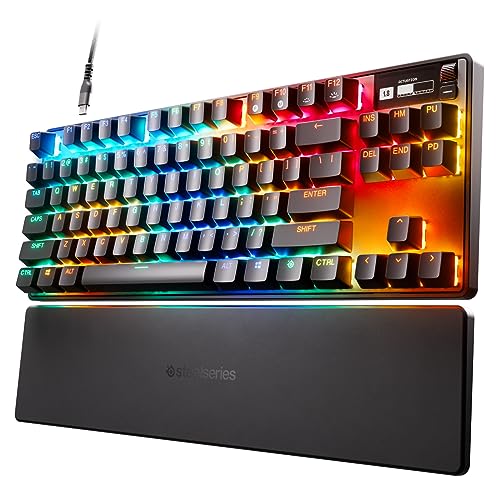
The Apex Pro TKL is the most adjustable board in this guide, and that adjustability maps neatly onto Minecraft. Its magnetic switches let you set actuation anywhere from a hair trigger for fast PvP clicking to a deeper press for deliberate building, and Rapid Trigger resets keys the instant you start lifting them, which keeps strafing and bridging responsive. The tenkeyless layout leaves generous mouse room, the OLED display shows your current profile and settings at a glance, and the aluminum top plate keeps the whole board steady during intense fights.
Specs
- OmniPoint 2.0 adjustable HyperMagnetic switches
- Actuation adjustable from 0.1 mm to 4.0 mm
- Rapid Trigger
- OLED Smart Display
- TKL esports layout
- Aircraft-grade aluminum Series 5000 top plate
- USB-C wired connection
- 14 x 5.04 x 1.65 inches, 2.9 pounds
Best for: Competitive PvP players who want to tune actuation per key and need fast resets for strafing and bridging.
Watch out for: This is a wired board with no wireless option, and the OLED display and deeper settings need the SteelSeries Engine app. A newer Gen 3 version exists, so confirm the listing is the 2023 model before ordering.
Logitech G PRO X TKL LIGHTSPEED

The PRO X TKL is the wireless pick for players who hate cable drag and want a tidy desk. LIGHTSPEED wireless keeps the connection fast enough for combat, while Bluetooth and a wired USB mode cover laptops, consoles, and shared computers. GX Brown tactile switches give a clear bump on each press without the sharp click of clicky switches, which suits late-night sessions. Double-shot PBT keycaps hold up to daily use, and the media controls and volume roller sit within easy reach when you want to adjust game audio mid-session.
Specs
- GX Brown tactile switches
- LIGHTSPEED wireless, Bluetooth, and USB connectivity
- LIGHTSYNC RGB lighting
- Double-shot PBT keycaps
- Media controls and volume roller
- Game mode control
- Programmable keys
- 13.86 x 5.91 x 1.34 inches
- Model 920-012127
Best for: Players who want wireless freedom and a board that also works well for typing and everyday computer use.
Watch out for: The listing publishes a weight figure that looks wrong, so it is left out here. GX Brown is a tactile switch, not a linear one, and wireless play means keeping an eye on the battery between sessions.
Razer Huntsman Mini

The Huntsman Mini is the smallest board here, and its 60-percent footprint is the point. With the number pad, function row, and arrow keys removed, your mouse gets the whole right side of the desk, which matters for the wide sweeps of low-sensitivity PvP. The clicky optical switches register with light-based actuation, and the Rapid Trigger mode plus Snap Tap make counter-strafing and bunny hopping feel immediate. Doubleshot PBT keycaps keep legends readable, onboard memory holds five profiles, and the aluminum frame survives being tossed in a bag for a LAN session.
Specs
- Razer clicky optical switches
- Rapid Trigger Mode
- Snap Tap
- Chroma RGB lighting
- Doubleshot PBT keycaps
- Onboard memory for up to 5 profiles
- Detachable USB-C cable
- Aluminum construction
- 11.56 x 4.07 x 1.45 inches, 1.1 pounds
- Model RZ03-03393300-R3U1
Best for: Players on small desks and PvP fighters who want the fastest possible key registration in the smallest footprint.
Watch out for: Clicky switches are loud, so this board is a poor fit for shared rooms. The 60-percent layout puts arrow keys and the function row on a function layer, which takes practice if you use them often.
Corsair K70 RGB PRO
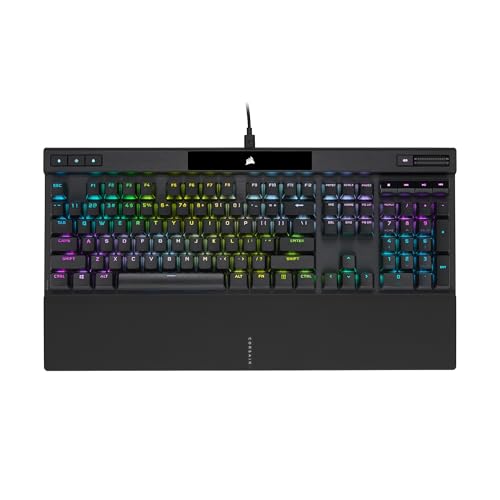
The K70 RGB PRO is the full-size workhorse for players who want every key within reach. CHERRY MX Red linear switches travel smoothly for rapid clicking, and the 8,000Hz hyper-polling rate keeps input latency low during combat. Dedicated media keys and an aluminum volume roller make it easy to control music and voice chat without leaving the game, and the tournament switch locks the board to standard behavior for competitive play. The iCUE software handles macro programming and key remaps, with onboard storage for up to fifty profiles, so a survival layout and a PvP layout can live side by side.
Specs
- CHERRY MX Red linear switches
- 8,000Hz hyper-polling
- CORSAIR AXON hyper-processing technology
- PBT double-shot keycaps
- Per-key RGB backlighting
- Dedicated media keys and aluminum volume roller
- Tournament switch
- Onboard storage for up to 50 profiles
- Detachable USB-C cable
- 17.48 x 6.54 x 1.57 inches, 2.53 pounds
- Model CH-9109410-NA
Best for: Players who use the number pad for hotbar slots or macros and want a full-size board with deep software control.
Watch out for: The full-size footprint eats mouse space on small desks. The iCUE software is needed for full macro control, so players who skip software setup will not use the board’s best features.
HyperX Alloy Origins 65

The Alloy Origins 65 splits the difference between tiny and tenkeyless. Its 65-percent layout keeps dedicated arrow keys, Page Up and Down, Home, and Delete, so you can navigate menus and chat without a function layer, while still freeing up more mouse room than a tenkeyless board. HyperX Red linear switches feel smooth and fast for combat clicking, the aluminum body keeps the board planted during intense sessions, and the switches are rated for eighty million keypresses. NGENUITY software handles macros and per-key lighting, and the detachable braided USB-C cable makes the board easy to pack.
Specs
- HyperX Red linear switches
- 65-percent form factor with dedicated arrow keys
- Double-shot PBT keycaps
- Aircraft-grade aluminum body
- Per-key RGB backlighting
- HyperX NGENUITY macro support
- Detachable braided USB-C cable
- Switches rated for 80 million keypresses
- 34.8 x 14.5 x 4.6 cm, 1.02 kg
- Model 4P5D6AA
Best for: Players who want a compact board without giving up arrow keys, and who value a sturdy aluminum build.
Watch out for: The US listing was confirmed through mirrors and a November 2026 buying guide rather than a direct US product page, so confirm the Red switch variant before ordering. There is no dedicated function row, so function keys live on a layer.
Which One Fits Your Situation
You Play Competitive PvP
Pick the SteelSeries Apex Pro TKL or the Razer Huntsman Mini. The Apex Pro lets you set a feather-light actuation for the keys you spam in combat, while the Huntsman Mini pairs Rapid Trigger with Snap Tap for fast counter-strafing. Both are compact, so your mouse has room for the wide sweeps low-sensitivity aiming needs. For adjustability above all, take the Apex Pro; for the smallest footprint, take the Huntsman Mini.
You Build and Play for Hours
Pick the Corsair K70 RGB PRO or the Logitech G PRO X TKL. The K70 gives you a full-size layout with a number pad for hotbar slots and fifty onboard profiles for different play styles. The PRO X TKL trades the number pad for wireless freedom and a quieter tactile switch that stays comfortable through long building sessions. Either board survives years of daily use thanks to its PBT keycaps and solid frame.
Your Desk Is Small
Pick the Razer Huntsman Mini or the HyperX Alloy Origins 65. The Huntsman Mini is the smallest board in this guide and leaves the most room for your mouse. The Alloy Origins 65 is only slightly larger and keeps dedicated arrow keys, which helps if you navigate chat and menus often. Both have detachable cables and sturdy frames, so they travel well to a friend’s house or a LAN event.
You Want One Board for Play and Homework
Pick the Logitech G PRO X TKL LIGHTSPEED. Its tactile switches feel good for typing essays as well as gaming, the wireless connection keeps your desk clean, and Bluetooth lets you switch between a gaming PC and a laptop. The media controls and volume roller are genuinely useful outside games, and the tenkeyless layout keeps the function row for shortcuts in other apps.
Common Mistakes
- Buying a membrane keyboard and expecting the fast, consistent response of mechanical or optical switches.
- Picking loud clicky switches for a shared bedroom or late-night play without thinking about the noise.
- Choosing a full-size board for a small desk and then crowding the mouse into a narrow strip.
- Ordering the wrong switch variant of a model that is sold under several different listings.
- Skipping the software setup and never using the macros, profiles, or key remaps you paid for.
Frequently Asked Questions
Do I need a mechanical keyboard for Minecraft?
No, Minecraft runs fine on any keyboard, but a mechanical or optical board registers presses faster and more consistently than a membrane board. The difference shows up in PvP, where a missed or delayed click can cost a fight, and in long building sessions, where consistent key feel reduces finger fatigue. If you play casually, a basic board works; if you play daily or competitively, the upgrade is worth it.
Are 60-percent keyboards good for Minecraft?
Yes, for most players. A 60-percent board frees up a large area for mouse movement, which helps aiming and fast turns, and Minecraft rarely needs the number pad or function row during play. Arrow keys, function keys, and navigation keys move to a function layer, which takes a week or two to learn. If you use arrow keys constantly, a 65-percent board is a safer middle ground.
What switch type is best for Minecraft PvP?
Linear switches are the usual PvP pick because they travel smoothly and reset quickly, which suits rapid clicking and strafing. Hall effect switches with adjustable actuation go further, letting you set a light trigger point, and Rapid Trigger modes reset keys when you lift them. Tactile switches work well if you prefer feedback on each press, while clicky switches are fast too but loud enough to bother anyone nearby.
Can I use a wireless keyboard for Minecraft?
Yes, modern gaming wireless is fast enough for Minecraft, including PvP. Look for a board with a dedicated 2.4 GHz wireless mode rather than Bluetooth alone, since the dedicated mode has lower latency. Keep the board charged or keep a cable nearby, and use wired mode for tournament play if you want to remove any doubt about the connection.
FAQ
Do I need a mechanical keyboard for Minecraft?
Are 60-percent keyboards good for Minecraft?
What switch type is best for Minecraft PvP?
Can I use a wireless keyboard for Minecraft?
More from Amazon
Programs that pair well with the guide above. Offers and eligibility are set by Amazon and may change.
Free shipping on eligible items, Prime Video and more. Eligible new members can start with a free trial.
Start a Prime free trialAd-free music streaming. Eligible new subscribers can start with a free trial.
Try Music Unlimited freeA Prime membership for ages 18-24 with a trial period. Eligibility is set by Amazon.
See Prime for Young AdultsAudiobooks and podcasts to listen to on the go. Eligible new members can start with a free trial.
Try Audible freeAs an Amazon Associate we earn from qualifying purchases.