Our Short List of 3

- Best for: Retouchers who want app-built macros and three-device switching on a full-size board.
- Full-size low-profile layout, model 920-011558 (Graphite)
- Programmable keys; Smart Actions via Logi Options+ on Windows and macOS
- Bluetooth Low Energy or included Logi Bolt USB receiver; pairs with up to 3 devices
- Backlit keys with hand-proximity and ambient-light sensors, single colour

- Best for: Editors with limited desk space who want a programmable knob and board-stored macros.
- 75 percent layout in a full metal (CNC aluminium) body
- Programmable knob; QMK/VIA key remapping and macros
- Gateron Jupiter Red switches, hot-swappable with 3-pin and 5-pin MX-style switches
- 2.4 GHz wireless, Bluetooth 5.1 or wired USB-C; 1000 Hz polling on 2.4 GHz and wired modes
- Best for: Cataloguers and batch editors who need a number pad and a programmable knob together.
- 96 percent layout with number pad, 97 keys
- Programmable aluminium rotary encoder knob; QMK/VIA remapping and macros
- Gateron Jupiter Banana switches, hot-swappable
- 2.4 GHz wireless, Bluetooth 5.1 or wired USB-C connections
All 4 Picks at a Glance
| Product | Specs | Action |
|---|---|---|
| Logitech MX Keys S |
| Check price on Amazon |
| Keychron Q1 Max |
| Check price on Amazon |
| Keychron V5 Max |
| Check price on Amazon |
 Razer Pro Type Ultra |
| Check price on Amazon |
Our Top Picks
Photo editing is mostly repetition: flagging keepers, nudging sliders, pasting the same settings across a batch, then typing filenames and keywords. The keyboard decision is therefore not about typing speed. It is about how much of that repetition the board can absorb — a programmable knob for fine adjustments, macro keys that collapse multi-step commands into one press, and a layout that keeps the number pad close if your cataloguing work needs it.
This roundup suits hobbyists culling large shoots, retouchers who live on shortcuts, and cataloguers who type metadata all day. Every pick below was chosen from its Amazon listing, using only what that listing states about programmability, layout, switches and connections, so the differences that matter are easy to compare side by side before you commit to one board.
Quick Picks
As an Amazon Associate we earn from qualifying purchases.
| Product | Best for | Key spec from title |
|---|---|---|
| Logitech MX Keys S | Shortcut macros on a full-size board | Programmable keys with Smart Actions in Logi Options+ |
| Keychron Q1 Max | A compact desk that still wants a knob | Programmable knob with QMK/VIA remapping |
| Keychron V5 Max | Editors who need the number pad daily | 96 percent layout with knob and number pad |
| Razer Pro Type Ultra | Quiet editing in a shared room | Silent linear switches, connects to 4 devices |
How to Choose
Check that the knob is actually programmable
A rotary knob only speeds up editing if you can assign it. On some boards the knob is fixed to volume, which does nothing for exposure or brush-size adjustments. The listings that matter say the knob is programmable or customizable through the maker’s software, the way the Keychron listings describe assigning keys and macros to the knob through VIA. Read the listing wording closely: “programmable knob” and “rotary encoder you can customize” are the phrases that count, while a bare mention of a volume wheel is not the same feature.
Decide how deep your macros need to go
There are two levels of shortcut control here. App-based systems, such as Logitech Smart Actions in Logi Options+, record a sequence of steps and fire it from one keystroke, which suits export routines and window juggling. Firmware-level systems, such as QMK and VIA on the Keychron boards, remap any key and store macros on the keyboard itself, so your layout travels between computers. Editors who always work on one machine can live happily with the app route; editors who switch machines usually prefer macros stored on the board.
Match the layout to your cataloguing habits
Layout decides your desk footprint and your metadata speed. A 75 percent board like the Q1 Max keeps the function row and arrow keys but drops the number pad, which is fine if your editing is mostly sliders and shortcuts. If you type capture dates, file numbers, flag values or keyword lists for hours, the number pad on a full-size or 96 percent board earns its space back. The V5 Max squeezes that pad into a narrower body, while the MX Keys S and Pro Type Ultra keep the traditional full-size spread.
Confirm connections and system support before ordering
Editing desks often run two machines, so multi-device pairing matters: the listings here range from three Bluetooth channels to four connected devices. Check the operating systems named on the listing, not just the connector. Keychron includes both Mac and Windows keycaps in the box, which removes a common annoyance for mixed setups. Logitech’s customization runs through Logi Options+ on Windows and macOS, so a Linux-only desk should lean toward the boards whose remapping works through QMK or VIA instead of an app.
The 4 Best Options
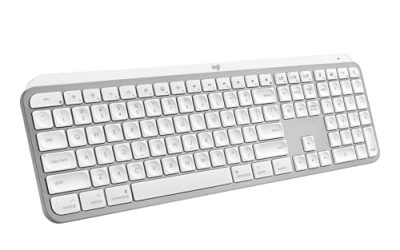
Logitech MX Keys S
- Best for: Retouchers who want app-built macros and three-device switching on a full-size board.
- Full-size low-profile layout, model 920-011558 (Graphite)
- Programmable keys; Smart Actions via Logi Options+ on Windows and macOS
- Bluetooth Low Energy or included Logi Bolt USB receiver; pairs with up to 3 devices
- Backlit keys with hand-proximity and ambient-light sensors, single colour
Retouchers who want app-built macros and three-device switching on a full-size board.
There is no knob or dial, and Smart Actions need the Logi Options+ app installed.
The MX Keys S fits editors who want a calm, low-profile board whose shortcut system lives in an app rather than in firmware. Its listing highlights Smart Actions in Logi Options+, which let a single keystroke run a recorded multi-step routine — handy for the export, rename and filing sequences that end every editing session. The full-size layout keeps the number pad for metadata entry, the backlit keys respond to hand proximity, and Easy-Switch keys move between three computers, which suits a desktop-plus-laptop retouching desk.
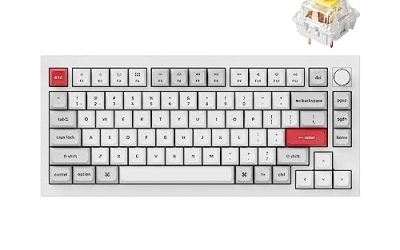
Keychron Q1 Max
- Best for: Editors with limited desk space who want a programmable knob and board-stored macros.
- 75 percent layout in a full metal (CNC aluminium) body
- Programmable knob; QMK/VIA key remapping and macros
- Gateron Jupiter Red switches, hot-swappable with 3-pin and 5-pin MX-style switches
- 2.4 GHz wireless, Bluetooth 5.1 or wired USB-C; 1000 Hz polling on 2.4 GHz and wired modes
Editors with limited desk space who want a programmable knob and board-stored macros.
No number pad, so heavy metadata typing means adding a separate pad later.
The Q1 Max is the compact option for editors who want a knob without giving up a function row. Its listing describes a programmable metal knob and full QMK/VIA support, so you can assign the knob and build macro keys that stay stored on the keyboard when you move between machines. The CNC-machined metal body, gasket design and double-shot PBT keycaps make it the heaviest-feeling board here despite its small footprint, and the hot-swappable sockets let you change the typing feel later without soldering or replacing the whole keyboard.
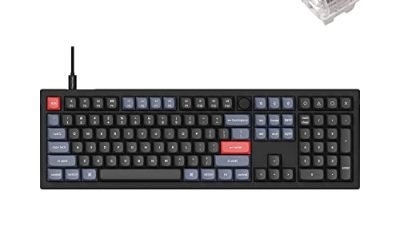
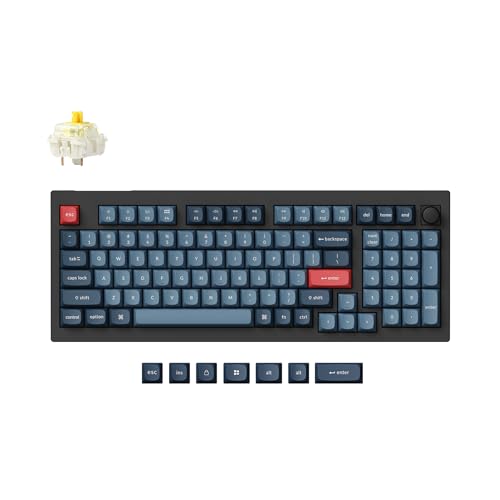
Keychron V5 Max
- Best for: Cataloguers and batch editors who need a number pad and a programmable knob together.
- 96 percent layout with number pad, 97 keys
- Programmable aluminium rotary encoder knob; QMK/VIA remapping and macros
- Gateron Jupiter Banana switches, hot-swappable
- 2.4 GHz wireless, Bluetooth 5.1 or wired USB-C connections
Cataloguers and batch editors who need a number pad and a programmable knob together.
The compressed 96 percent layout crowds the arrow and navigation cluster, which takes adjustment.
The V5 Max answers the layout complaint that compact boards usually raise: it keeps a number pad inside a 96 percent body that is still narrower than a traditional full-size keyboard. Its listing describes the aluminium rotary encoder as a programmable knob you can set to your favourite keys and macros through VIA, and the same QMK/VIA system remaps every other key. For editors who alternate between slider work and typing capture data, filenames and keyword lists, that combination of knob plus pad in one board is the practical middle ground.
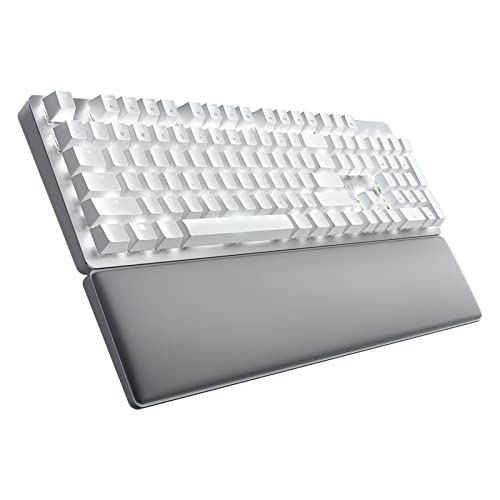
Razer Pro Type Ultra
- Best for: Editors in shared or quiet rooms who still want programmable keys and multi-device pairing.
- Full-size layout, 104 keys, model RZ03-04110200-R3U1
- Razer Yellow silent linear mechanical switches, rated for up to 80 million clicks
- Fully programmable keys, per the listing title
- Razer HyperSpeed wireless and Bluetooth; connects to up to 4 devices
Editors in shared or quiet rooms who still want programmable keys and multi-device pairing.
The listing names PC compatibility, so Mac users should confirm their setup before ordering.
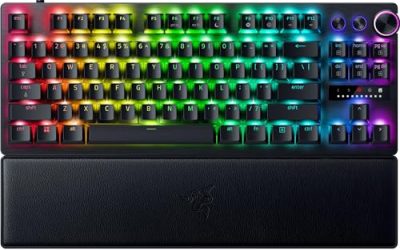
The Pro Type Ultra is built for editors who share a room and cannot have a loud mechanical board clicking through a long retouching session. Its listing pairs silent linear Razer Yellow switches with sound-dampening foam, and rates the switches for up to 80 million clicks. The listing title also promises fully programmable keys, so your shortcut layer is covered, and the board connects to up to four devices across Razer’s HyperSpeed dongle and Bluetooth. A plush leatherette wrist rest is built in, which long culling sessions tend to appreciate.
Which One Fits Your Situation
You cull hundreds of frames after every shoot
Choose the Keychron Q1 Max. Culling is a rhythm of advance, flag, advance, and a programmable knob plus board-stored macros let you put that whole rhythm under one hand without reaching for the mouse. Its compact body also leaves more desk room for a graphics tablet, which is where most culling setups end up once the keyboard shrinks.
You split editing between a desktop and a laptop
Choose the Logitech MX Keys S or the Razer Pro Type Ultra. The MX Keys S switches between three devices with its Easy-Switch keys and keeps your macros in one app on both machines. The Pro Type Ultra stretches to four connected devices, which helps if a work laptop, home desktop and tablet all share one desk and one pair of hands.
You type metadata, dates and file numbers all day
Choose the Keychron V5 Max. Its 96 percent layout keeps a real number pad beside the programmable knob, so data entry and slider-style adjustments live on the same board. Full-size alternatives work too, but they take more desk width to deliver the same pad, and the V5 Max is the narrower route to it.
You edit late in a room other people use
Choose the Razer Pro Type Ultra. Silent linear switches and dampening foam keep key noise down while everyone else sleeps or works nearby, and the built-in wrist rest supports the long, slow sessions that retouching tends to become. The backlighting is a plain single colour, which suits a dim room without turning the desk into a light show.
Common Mistakes
- Assuming a knob controls editing sliders out of the box — most knobs arrive mapped to volume, and the useful assignments are ones you create in the maker’s software.
- Expecting the listing to name your editing app — these listings describe programmable keys and macros in general terms, so plan to assign your own shortcuts rather than look for a ready-made profile.
- Buying a compact board and then discovering your metadata work needs a number pad, which means a second purchase and a more crowded desk.
- Ignoring the software platform: app-based customization such as Logi Options+ covers Windows and macOS, while QMK and VIA boards are the safer pick for Linux desks.
- Overlooking what is in the box — spare Mac and Windows keycaps, a wrist rest or a wireless receiver are included on some of these listings and sold separately for others.
Frequently Asked Questions
Will these keyboards work with my photo editing software?
The listings describe these boards as programmable keyboards rather than naming specific editing applications. In practice, any editing program that accepts ordinary keyboard shortcuts can use the remapped keys and macros these boards create. What you are buying is the shortcut hardware — the knob, the macro keys and the software that assigns them — not an app-specific integration promised on the listing.
Is a programmable knob better than extra macro keys?
They solve different problems. A knob suits continuous adjustments, where you turn rather than tap, while macro keys suit fixed sequences that should fire identically every time. Editors who spend their day on sliders usually get more from the knob; editors whose work is batch commands and filing routines usually get more from macros. Two boards here offer the knob, and all four offer programmable keys.
Should an editing keyboard be wireless or wired?
Wireless boards keep the desk clear for a tablet and let you switch between machines, which is why every pick here is wireless. The Keychron boards also run wired over USB-C, which removes any connection doubt during long sessions and charges the battery at the same time. If your desk never changes, wired mode on those two is the simplest setup; if you move between computers, stay wireless.
Do these keyboards include Mac keycaps?
The Keychron Q1 Max and V5 Max listings state that Mac and Windows keycaps are included, so the legends match either system. The Logitech MX Keys S is listed as compatible with macOS as well as Windows, and its customization app runs on both. The Razer Pro Type Ultra listing names PC compatibility, so Mac editors should treat the Keychron boards or the Logitech as safer choices.
FAQ
Will these keyboards work with my photo editing software?
Is a programmable knob better than extra macro keys?
Should an editing keyboard be wireless or wired?
Do these keyboards include Mac keycaps?
More from Amazon
Programs that pair well with the guide above. Offers and eligibility are set by Amazon and may change.
Free shipping on eligible items, Prime Video and more. Eligible new members can start with a free trial.
Start a Prime free trialAd-free music streaming. Eligible new subscribers can start with a free trial.
Try Music Unlimited freeA Prime membership for ages 18-24 with a trial period. Eligibility is set by Amazon.
See Prime for Young AdultsAudiobooks and podcasts to listen to on the go. Eligible new members can start with a free trial.
Try Audible freeAs an Amazon Associate we earn from qualifying purchases.