Our Short List of 3

- Best for: Full-size typists who want tactile feedback and deep key remapping.
- 108 keys, full-size layout with knob
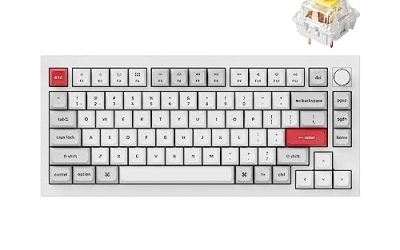
- Hot-swappable Keychron K Pro Brown tactile switches
- Switch lifespan listed up to 50 million keystrokes
- Double-shot PBT keycaps, OSA profile

- Best for: Small desks that need arrows, a volume knob, and a soft, quiet landing.
- 75 percent layout with aluminum CNC volume knob
- Wired connection with detachable USB-C cable
- Hot-swappable pre-lubed silver Pro linear switches
- Gasket mount with IXPE pad, foam layers, and silicone dampener

- Best for: Long-document typists who need a natural wrist angle above all else.
- Split keyboard layout with curved key arrangement
- Cushioned wrist and palm rest
- Wired USB connection
- Integrated number pad
All 4 Picks at a Glance
| Product | Specs | Action |
|---|---|---|
| Keychron V6 Knob Version |
| Check price on Amazon |
| RK Royal Kludge R75 |
| Check price on Amazon |
| Microsoft Ergonomic Keyboard |
| Check price on Amazon |
 CHERRY Stream Keyboard |
| Check price on Amazon |
Key takeaways
- Compare five wired keyboards built for daily typing, from tactile full-size boards to a split ergonomic model and a whisper-quiet scissor design.
Typing all day on the wrong board is a slow drain: a mushy bottom-out blurs accuracy, a loud switch set annoys everyone nearby, and a flat layout leaves wrists angled for hours. The real decision is which wired board matches your hands, your desk, your daily workload, and the sound your room can tolerate, because the cable already settles connection worries for good once and for all.
This guide serves writers, coders, data-entry workers, and office typists who want a fixed desk setup with no charging and no pairing. The five picks below were chosen from their Amazon listings by switch type, keycap material, layout, and ergonomic shape, covering tactile mechanical feel, cushioned gasket typing, a split design, and one very quiet scissor board.
Quick Picks
As an Amazon Associate we earn from qualifying purchases
| Product | Best for | Key spec from title |
|---|---|---|
| Keychron V6 Knob Version | Full-size tactile typing with custom keys | Hot-swappable Keychron K Pro Brown switch |
| Keychron C3 Pro | Compact desks that still type all day | Gasket mount TKL wired mechanical board |
| RK Royal Kludge R75 | Small layout with soft, quiet key feel | Gasket mounted with MDA profile PBT keycaps |
| Microsoft Ergonomic Keyboard | Wrist comfort on long documents | Split keyboard with cushioned palm rest |
| CHERRY Stream Keyboard | Quiet shared offices and focused work | SX scissor mechanism, whisper-quiet keystroke |
How to Choose
Switch Feel and Feedback
Switch choice decides how each keystroke lands. Tactile brown switches give a small bump that confirms the press without a loud click, which suits fast typists who touch type and correct by feel. Linear switches travel smoothly with no bump, and many typists find them tiring over long documents because missed presses are harder to sense. Scissor mechanisms, like the CHERRY SX design, use short travel and a precise, low landing. Read the listing switch name carefully, since one board family often ships in several switch options with very different sound and feel.
Layout and Desk Space
Full-size boards keep a number pad for spreadsheet and data work, but they push the mouse farther right and can angle the shoulders during long sessions. Tenkeyless layouts drop the pad and free desk room while keeping arrows and a function row, a balance many writers prefer. A 75 percent board packs keys tighter still, which helps small desks yet demands an adjustment period for anyone who relies on dedicated navigation keys. Split ergonomic layouts go further, letting each hand rest at its own angle. Measure your desk and note which keys you truly use daily before choosing.
Keycaps, Mounting, and Sound
Keycap material shapes both grip and longevity. Double-shot PBT resists shine and keeps legends crisp through heavy use, while ABS feels smooth at first and can polish down under busy fingers. Profile matters too: taller sculpted caps guide fingertips, and lower MDA or OSA shapes spread contact across the pad of the finger. Mounting changes the landing as well. Gasket mounts and foam layers soften the bottom-out and quiet the case, which helps shared rooms. In a home office, sound may be a minor concern; in an open office, it can decide the pick.
Ergonomics and Typing Angle
Comfort over eight hours comes from wrist position more than any single feature. Adjustable feet that offer two tilt angles, like the six and nine degree steps on some Keychron boards, let you flatten the board if your wrists bend upward. A cushioned palm rest supports the heel of the hand during pauses, though it should never press into the wrist while you type. Split and curved layouts reduce inward wrist angle for broad-shouldered typists. Whichever shape you pick, keep elbows near ninety degrees and let the keys come to your fingers.
The 5 Best Options
Keychron V6 Knob Version
- Best for: Full-size typists who want tactile feedback and deep key remapping.
- 108 keys, full-size layout with knob
- Hot-swappable Keychron K Pro Brown tactile switches
- Switch lifespan listed up to 50 million keystrokes
- Double-shot PBT keycaps, OSA profile
Full-size typists who want tactile feedback and deep key remapping.
The listing advises a direct cable connection rather than a hub, and suggests turning the backlight off when linked to a tablet.
This full-size board suits typists who want a tactile bump, a number pad, and the freedom to reshape the layout around their work. Its pre-lubed Keychron K Pro Brown switches deliver a clear tactile response, the double-shot PBT keycaps in the OSA profile give fingertips a broad, stable landing, and the acoustic silicone pad softens each press. QMK and VIA support let you remap keys and set macros for repeated phrases, while the knob handles volume without leaving the home row. A system toggle and extra keycaps cover both Mac and Windows desks in one purchase.
Keychron C3 Pro
Writers with a compact desk who still type for hours will feel at home here. The tenkeyless frame keeps arrows and function keys while freeing mouse room, and the gasket mount design works with sound-absorbing foam and case foam to give a quieter, smoother landing than a rigid tray board. Its Keychron mechanical red switches are linear, so keystrokes feel even and light, and QMK/VIA support means every key can be remapped for editing shortcuts or text expansion. Shine-through double-shot ABS keycaps keep legends readable under the red LED backlight during evening sessions.
Specs
- 87 keys, compact tenkeyless layout
- Gasket mount with sound-absorbing foam and case foam
- Keychron mechanical red switches
- QMK/VIA programmable, every key remappable
- 1000 Hz polling and NKRO
- Shine-through double-shot ABS keycaps
- Red LED backlight, north-facing
- Wired connection for Mac, Windows, and Linux
Best for: Compact desks where a softer, quieter mechanical landing matters most.
Watch out for: The linear red switches have no tactile bump, so touch typists who rely on that bump for accuracy may prefer a brown switch board.
ASIN: B0CBWH8VPN — View on Amazon
RK Royal Kludge R75
- Best for: Small desks that need arrows, a volume knob, and a soft, quiet landing.
- 75 percent layout with aluminum CNC volume knob
- Wired connection with detachable USB-C cable
- Hot-swappable pre-lubed silver Pro linear switches
- Gasket mount with IXPE pad, foam layers, and silicone dampener
Small desks that need arrows, a volume knob, and a soft, quiet landing.
The compact layout clusters navigation keys tightly, so confirm the arrangement suits your editing habits before ordering.
This 75 percent board fits typists who want a small footprint without giving up arrow keys or a volume control. Its aluminum CNC knob adjusts audio at your fingertips, while the gasket mounted build layers an IXPE switch pad, foam, and a silicone dampener to keep key sound low and creamy. The pre-lubed silver Pro linear switches are hot-swappable with 3-pin and 5-pin replacements, and the MDA profile PBT keycaps use a spherical dish that guides fingers toward the center of each key, which the listing links to reduced wrist strain during long work.
Microsoft Ergonomic Keyboard
- Best for: Long-document typists who need a natural wrist angle above all else.
- Split keyboard layout with curved key arrangement
- Cushioned wrist and palm rest
- Wired USB connection
- Integrated number pad
Long-document typists who need a natural wrist angle above all else.
The split layout takes an adjustment period, and the dedicated Office and emoji keys are aimed at Windows users.
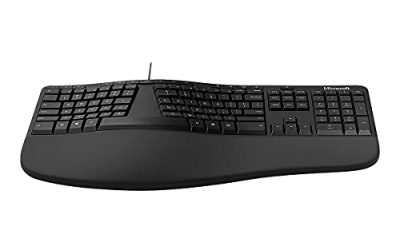
Anyone whose wrists ache by mid-afternoon should look closely at this split wired board. The improved split design encourages a more natural hand, wrist, and forearm position, and the curved key layout makes keys easier to reach without stretching. A cushioned palm rest supports your hands through long documents, while the integrated number pad keeps data work on the same board. Dedicated shortcut keys cover Office 365, emoji, search, and media controls, saving repeated trips to the mouse. The wired connection is described as built for reliable speed and accuracy over the long haul, with no batteries to manage.
CHERRY Stream Keyboard
- Best for: Quiet shared spaces where key sound must stay low all day.
- CHERRY SX scissor mechanism
- Wired USB connection
- Whisper-quiet, silent keystroke design
- Service life listed up to 20 million operations
Quiet shared spaces where key sound must stay low all day.
There is no backlight listed, and the scissor travel is short, so typists who love deep mechanical travel should pick a mechanical board instead.
Shared offices and quiet homes call for a board that stays nearly silent, and this is the quietest design in the group. The CHERRY SX scissor mechanism gives a precise tactile feel with a whisper-quiet keystroke, and the listing notes the sound is reduced even further than the previous model. An integrated metal plate and eight rubber pads keep the slim frame stable and torsionally stiff, so the board does not flex or wander mid-sentence. Ten extra keys handle office and media tasks, and status LEDs sit inside the Caps, Num, and Scroll keys themselves.
Which One Fits Your Situation
You Type Reports and Code All Day
Pick the Keychron V6 Knob Version. The tactile brown switches confirm each press, the full layout keeps the number pad close, and QMK/VIA remapping lets you place editing commands where your fingers already rest. The PBT keycaps and silicone pad also hold up well under heavy daily volume, and the wired link stays steady through long sessions without any battery checks.
Your Desk Is Small but Your Workload Is Not
Choose between the Keychron C3 Pro and the RK Royal Kludge R75. Both use gasket mounting and foam to soften long sessions in a compact frame. The C3 Pro keeps a familiar tenkeyless spread with shine-through caps, while the R75 goes smaller, adds an aluminum volume knob, and fits MDA profile PBT keycaps that cradle fingertips during extended drafting.
Your Wrists or Shoulders Complain by Lunch
The Microsoft Ergonomic Keyboard is the clear pick. Its split shape and curved layout let each hand sit at a natural angle, the cushioned palm rest supports pauses between paragraphs, and the integrated pad means you never reach sideways for numbers. Give yourself a week of documents to adjust, and most typists find the new hand position becomes automatic.
You Share a Room or Take Calls While Typing
Take the CHERRY Stream Keyboard. The SX scissor mechanism keeps keystrokes whisper-quiet, so microphones and nearby coworkers pick up far less clatter than a mechanical board produces. The metal plate keeps the slim frame planted, and the extra office keys handle volume and calculator tasks without extra software. It is the calmest option here for open offices and shared home workspaces.
Common Mistakes
- Choosing a switch by name alone without checking whether it is tactile, linear, or clicky on the exact listing, since one model often ships in several switch options.
- Buying a full-size board for a narrow desk, then typing with shoulders rolled inward for months because the mouse sits too far to the right.
- Ignoring keycap material, then watching ABS legends shine and fade under heavy daily typing when double-shot PBT would have lasted far longer.
- Raising keyboard feet to the steepest angle by habit, which bends wrists upward and adds strain during long documents.
- Picking a compact layout without confirming the arrow and navigation key arrangement your editing work depends on every day.
Frequently Asked Questions
Are wired keyboards better for typing than wireless ones?
For a fixed desk, a wired board removes charging, pairing drops, and battery swaps from your routine, and polling stays consistent through long sessions. Wireless models suit moving between rooms, but if your keyboard never leaves one desk, the cable is the simpler and more dependable choice for daily typing work.
Which switch type suits long typing sessions?
Tactile switches suit most touch typists because the bump confirms a press without bottoming out hard, which reduces finger effort over thousands of keystrokes. Linear switches feel smooth but give no confirmation point. Clicky switches add sound many offices dislike. Your room, your accuracy habits, and your noise tolerance should guide the final call.
Is a split ergonomic keyboard hard to learn?
Most typists need several days of regular documents before the split angle feels natural, and accuracy often dips during that first week. After the adjustment, many people report less wrist and shoulder tension on long days. If you hunt and peck rather than touch type, the benefit shrinks, since your hands move across the whole board anyway.
How long should a typing keyboard last?
Listings in this guide cite figures from 20 million operations for the scissor model up to 50 million keystrokes for the mechanical switches. Real lifespan also depends on keycap material, dust, and how hard you type. A board with hot-swappable switches or durable PBT caps gives you the easiest path to years of daily service.
FAQ
Are wired keyboards better for typing than wireless ones?
Which switch type suits long typing sessions?
Is a split ergonomic keyboard hard to learn?
How long should a typing keyboard last?
More from Amazon
Programs that pair well with the guide above. Offers and eligibility are set by Amazon and may change.
Free shipping on eligible items, Prime Video and more. Eligible new members can start with a free trial.
Start a Prime free trialAd-free music streaming. Eligible new subscribers can start with a free trial.
Try Music Unlimited freeA Prime membership for ages 18-24 with a trial period. Eligibility is set by Amazon.
See Prime for Young AdultsAudiobooks and podcasts to listen to on the go. Eligible new members can start with a free trial.
Try Audible freeAs an Amazon Associate we earn from qualifying purchases.