Our Short List of 3

- Best for: All-day typing at a Mac desk with one board shared across Apple devices.
- Low-profile full-size Bluetooth keyboard with a Mac key layout
- 104 keys, QWERTY layout
- Rechargeable Li-Po 1500 mAh battery, USB-C charging cable included
- Smart backlighting that adjusts to the environment
- Best for: A native Apple desk setup where Touch ID login and a numeric keypad matter most.
- Wireless Bluetooth keyboard, rechargeable
- Touch ID and numeric keypad
- Works with Mac computers with Apple silicon
- US English layout, Black Keys

- Best for: Mac owners who want clicky mechanical switches and a compact board that keeps its arrow keys.
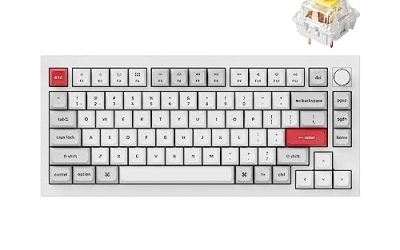
- 75 percent layout, 84 keys, RGB LED backlit
- Gateron G Pro Blue switch
- Bluetooth and USB wired connection, aluminium frame
- Mac layout with Mac function keys, compatible with Windows
All 5 Picks at a Glance
| Product | Specs | Action |
|---|---|---|
| Logitech MX Keys S for Mac |
| Check price on Amazon |
| Apple Magic Keyboard with Touch ID and Numeric Keypad |
| Check price on Amazon |
| Keychron K2 Version 2 |
| Check price on Amazon |
 Logitech K380 for Mac |
| Check price on Amazon |
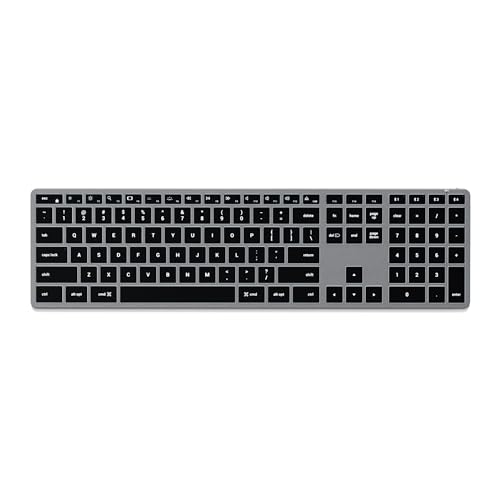 Satechi Slim X3 |
| Check price on Amazon |
Our Top Picks
A keyboard that works with a Mac is not the same as a keyboard made for one. The real decision is whether the keys in front of you match what macOS expects: Command and Option sitting where your thumbs reach them, function keys that control brightness and media instead of launching Windows shortcuts, and a layout that never forces you to remap keys just to type normally. A board that ignores those details turns every workday into a string of small corrections.
This guide is for MacBook, iMac, Mac mini and iPad owners who want a keyboard that fits Apple hardware without friction, from quiet full-size boards for a desk setup to compact travel picks. Every option below was chosen from the name and specifications shown on its Amazon product page, with Mac compatibility stated on the listing itself, so you can compare layout, connection and typing feel on equal terms.
Quick Picks
As an Amazon Associate we earn from qualifying purchases
| Product | Best for | Key spec from title |
|---|---|---|
| Logitech MX Keys S for Mac | All-day typing at a Mac desk | Backlit, Bluetooth, USB-C rechargeable |
| Apple Magic Keyboard with Touch ID and Numeric Keypad | A native Apple setup with secure login | Touch ID and numeric keypad |
| Keychron K2 Version 2 | Mechanical feel in a compact frame | 75 percent layout, RGB backlit |
| Logitech K380 for Mac | Travel and switching between Apple devices | Multi-device Bluetooth, compact |
| Satechi Slim X3 | A full-size Mac board with a numeric keypad | Backlit, numeric keypad, multi-device sync |
How to Choose
Start with the Mac layout, not the logo
A keyboard earns the Mac label when its keycaps and firmware speak macOS. Look for Command and Option keys in Apple positions, a globe or function key that opens macOS shortcuts, and media keys labelled for brightness, Mission Control and playback. Some boards ship with a physical Mac and Windows switch, while others include spare keycaps so you can swap the layout yourself. If a listing only says the board works with a computer and never names macOS, treat that as a warning sign. The boards in this guide all state Mac or macOS compatibility on their Amazon listings, which keeps setup to pairing and typing rather than remapping.
Match the connection to how you work
Bluetooth is the natural fit for MacBook and iPad owners, since it leaves ports free and works across the room, while a USB-C cable gives a wired fallback when a battery runs low or a login screen refuses a wireless connection. Multi-device switching matters if you move between a Mac, an iPad and a phone during the day: a board that pairs with three devices lets you jump between them with one keypress instead of re-pairing each time. One caution from Logitech listings is worth remembering: if FileVault is enabled, Bluetooth may not accept a password at startup, so a receiver or cable connection covers that moment.
Decide on size and typing feel before you buy
Full-size boards with a numeric keypad suit spreadsheet work and data entry, while compact 75 percent layouts keep arrow keys and shortcuts in a much smaller footprint that fits a crowded desk or a bag. Low-profile scissor keys feel close to a MacBook keyboard and stay quiet in shared rooms, whereas mechanical switches give a deeper travel and a distinct tactile bump that many writers and coders prefer. Think about where the board will live: a slim aluminium frame looks at home beside an iMac, but a heavier mechanical board stays planted when you type hard.
Check power, backlighting and the extras you will actually use
Rechargeable boards charge over USB-C and run for days on a charge, which suits a fixed desk, while a board with a long-life replaceable battery can sit untouched for months and suits a travel bag. Backlighting helps in dim rooms, and adjustable brightness keeps the glow from distracting you at night. Extras should solve a real need: Touch ID turns login and payment approval into one touch, programmable keys automate repetitive steps, and a numeric keypad speeds up number-heavy work. Skip features you will never touch, because they add cost and complexity without improving a single keystroke.
The 5 Best Options
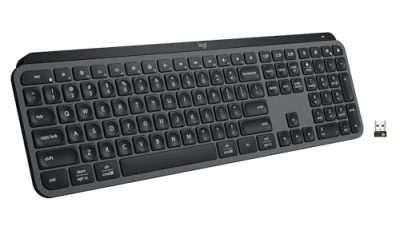
Logitech MX Keys S for Mac
- Best for: All-day typing at a Mac desk with one board shared across Apple devices.
- Low-profile full-size Bluetooth keyboard with a Mac key layout
- 104 keys, QWERTY layout
- Rechargeable Li-Po 1500 mAh battery, USB-C charging cable included
- Smart backlighting that adjusts to the environment
All-day typing at a Mac desk with one board shared across Apple devices.
The Logi Bolt receiver is not included with this Mac version, and FileVault may block Bluetooth password entry at startup. Confirm it is still sold before buying.
The MX Keys S for Mac is the most complete desk keyboard here for someone who types for hours on a Mac. Its low-profile full-size frame carries a Mac key layout, smart backlighting that lights up as your hands approach, and programmable keys that can automate repetitive steps through the Logi Options+ app. It pairs with up to three Apple devices and charges over USB-C, so it moves easily between a MacBook, an iPad and a desktop without a cable tangle. The Pale Grey finish blends with Apple hardware, and the spherically dished keycaps keep fingers centred during long sessions.
Watch out for: The Logi Bolt receiver is not included with this Mac version, and FileVault may block Bluetooth password entry at startup. Confirm it is still sold before buying.
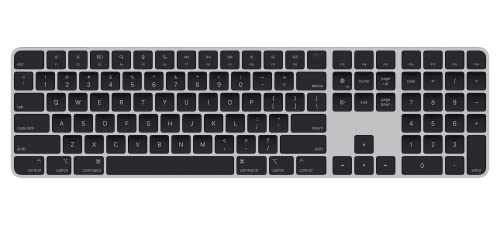
Apple Magic Keyboard with Touch ID and Numeric Keypad
- Best for: A native Apple desk setup where Touch ID login and a numeric keypad matter most.
- Wireless Bluetooth keyboard, rechargeable
- Touch ID and numeric keypad
- Works with Mac computers with Apple silicon
- US English layout, Black Keys
A native Apple desk setup where Touch ID login and a numeric keypad matter most.
Touch ID only works with Mac computers running Apple silicon, so check your model first. Confirm it is still sold before buying.
This is the keyboard for a buyer who wants the most native Mac experience possible, with nothing to configure. Touch ID sits in the top row for login and payment approval, the numeric keypad covers number-heavy work, and the wireless Bluetooth connection pairs with Mac computers running Apple silicon. The slim aluminium body matches Apple desktops, the rechargeable battery removes disposable batteries from the routine, and the US English layout keeps every key exactly where macOS labels suggest. If your desk already runs on Apple hardware, this board disappears into the setup and simply works.
Watch out for: Touch ID only works with Mac computers running Apple silicon, so check your model first. Confirm it is still sold before buying.
Keychron K2 Version 2
- Best for: Mac owners who want clicky mechanical switches and a compact board that keeps its arrow keys.
- 75 percent layout, 84 keys, RGB LED backlit
- Gateron G Pro Blue switch
- Bluetooth and USB wired connection, aluminium frame
- Mac layout with Mac function keys, compatible with Windows
Mac owners who want clicky mechanical switches and a compact board that keeps its arrow keys.
Clicky blue switches are louder than the low-profile boards here, so they suit a private room better than a shared office. Confirm it is still sold before buying.
The K2 Version 2 is the pick for Mac owners who want a mechanical keyboard without giving up half the desk. Its 75 percent layout keeps 84 keys, including arrow keys and shortcuts, inside a compact aluminium frame, and the Mac layout provides the Mac function keys while staying compatible with Windows. Gateron G Pro Blue switches give a clicky, tactile response, RGB backlighting brightens the keys in dim rooms, and Bluetooth or wired USB-C covers both a fixed desk and a laptop that moves around. It is the most tactile board here, and the one most likely to turn typing into something you notice.
Watch out for: Clicky blue switches are louder than the low-profile boards here, so they suit a private room better than a shared office. Confirm it is still sold before buying.
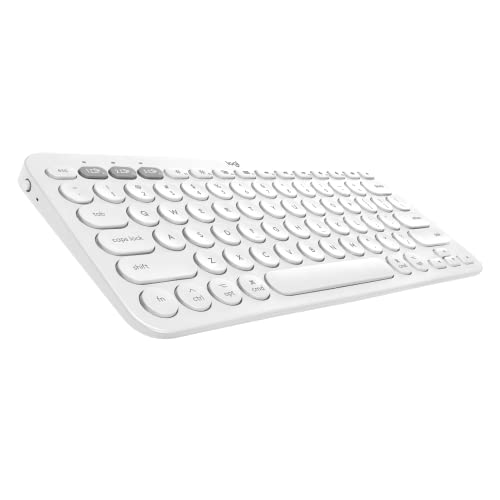
Logitech K380 for Mac
- Best for: Travel, iPad typing and hopping between Apple devices with one lightweight board.
- Multi-device Bluetooth keyboard for Mac, iPad compatible
- Compact slim profile
- Easy-Switch between paired devices
- 2-year battery life stated on the listing
Travel, iPad typing and hopping between Apple devices with one lightweight board.
The compact layout has no numeric keypad and no backlighting, so number-heavy work in dim rooms is slower. Confirm it is still sold before buying.
The K380 for Mac is the smallest board in this guide and the easiest to carry, built for people whose Mac setup moves between rooms, offices and bags. Its compact slim profile holds a full set of keys in a round-key design, Easy-Switch jumps between paired devices, and the listing states compatibility with MacBook Pro, MacBook Air, iMac and iPad. Bluetooth keeps it cable-free, and the long-life battery means it can sit in a bag for weeks and still be ready. For iPad owners who type on the go, this is the most practical companion in the lineup.
Watch out for: The compact layout has no numeric keypad and no backlighting, so number-heavy work in dim rooms is slower. Confirm it is still sold before buying.
Satechi Slim X3
- Best for: A full-size Mac desk board with a numeric keypad and backlighting at a glance.
- Backlit Bluetooth keyboard for Mac, illuminated keys
- Extended layout with numeric keypad and macOS function keys
- 104-key layout
- 10 levels of adjustable backlighting
A full-size Mac desk board with a numeric keypad and backlighting at a glance.
The listing describes the layout as optimised for macOS, so Windows-specific shortcuts are not its strength. Confirm it is still sold before buying.
The Slim X3 is a full-size Mac keyboard for buyers who want a numeric keypad, backlighting and a slim aluminium body in one board. Its extended layout pairs macOS function keys with a numeric keypad and navigational arrows, while multi-device Bluetooth sync moves between a MacBook, an iPad and a desktop without re-pairing. Backlit keys adjust across ten brightness levels for late sessions, and the Space Gray finish sits naturally beside Apple hardware. It is the most desk-like alternative here to the Magic Keyboard, with a wider layout and more visible keys.
Watch out for: The listing describes the layout as optimised for macOS, so Windows-specific shortcuts are not its strength. Confirm it is still sold before buying.
Which One Fits Your Situation
You work at an iMac or Mac mini desk all day
Choose the Logitech MX Keys S for Mac or the Satechi Slim X3. Both give you a full-size layout with room for every key, backlighting for evening work, and multi-device pairing if an iPad sits beside the monitor. The MX Keys S adds programmable Smart Actions for repetitive tasks, while the Slim X3 adds a numeric keypad for number-heavy days.
You want the most native Apple experience
Choose the Apple Magic Keyboard with Touch ID and Numeric Keypad. Touch ID handles login and approvals without a password, the layout matches macOS exactly, and the aluminium body looks like it shipped with the Mac. Just confirm your Mac runs Apple silicon first, since Touch ID depends on it.
You want mechanical keys without a huge board
Choose the Keychron K2 Version 2. Its 75 percent frame keeps arrow keys and shortcuts while freeing desk space, and the Gateron G Pro Blue switches deliver the tactile click that low-profile boards cannot. It suits writers and coders who type hard and want feedback from every keypress, and the wired USB-C option covers long sessions at a fixed desk.
You type on the move or across several Apple devices
Choose the Logitech K380 for Mac. It fits a bag, pairs over Bluetooth with a MacBook, iPad or iPhone, and its long-life battery means you rarely think about charging. The trade-off is a compact layout with no numeric keypad, which matters less when portability is the priority, and the round keys stay comfortable across short bursts of typing.
Common Mistakes
- Buying a Windows-layout keyboard and assuming macOS will fix the keys: check for Command and Option placement and macOS function keys on the listing before ordering.
- Ignoring FileVault: Bluetooth may not accept a password at startup, so keep a cable or receiver handy for login screens.
- Choosing a compact board for spreadsheet work: without a numeric keypad, number entry slows down fast.
- Picking clicky mechanical switches for a shared office: the sound carries, and a quiet low-profile board fits shared rooms better.
- Assuming Touch ID works on every Mac: it needs a Mac with Apple silicon, so Intel Mac owners should pick a different board.
Frequently Asked Questions
Do I need a Mac-specific keyboard, or will any keyboard work with a Mac?
Any USB or Bluetooth keyboard can type on a Mac, but a Mac-specific board places Command and Option where macOS expects them and labels function keys for brightness, media and Mission Control. A Windows board forces you to remap keys or memorise swapped positions, which slows everyday work. The boards in this guide all state Mac or macOS compatibility on their Amazon listings.
Can one keyboard switch between a Mac, an iPad and an iPhone?
Yes, if the board supports multi-device Bluetooth pairing. The MX Keys S for Mac, K380 for Mac and Slim X3 all pair with several devices and switch between them with a keypress, while the Magic Keyboard pairs with one Mac at a time. Check the listing for the number of paired devices before you buy, since that figure decides how smooth switching feels.
Is a mechanical keyboard a good choice for a Mac?
It can be, as long as the board offers a Mac layout or a Mac and Windows switch. The Keychron K2 Version 2 ships with Mac function keys and spare Windows keycaps, so it types naturally on macOS while keeping mechanical switches. The main trade-off is noise: clicky switches suit a private room, while quiet low-profile boards suit shared spaces.
What should I check before ordering a Mac keyboard?
Confirm the listing names macOS or Mac compatibility, check whether the layout is full-size or compact, and note the connection type and battery arrangement. If you use FileVault, plan for a wired or receiver connection at login. For Touch ID boards, confirm your Mac runs Apple silicon, and always confirm the exact ASIN is still sold before buying.
FAQ
Do I need a Mac-specific keyboard, or will any keyboard work with a Mac?
Can one keyboard switch between a Mac, an iPad and an iPhone?
Is a mechanical keyboard a good choice for a Mac?
What should I check before ordering a Mac keyboard?
More from Amazon
Programs that pair well with the guide above. Offers and eligibility are set by Amazon and may change.
Free shipping on eligible items, Prime Video and more. Eligible new members can start with a free trial.
Start a Prime free trialAd-free music streaming. Eligible new subscribers can start with a free trial.
Try Music Unlimited freeA Prime membership for ages 18-24 with a trial period. Eligibility is set by Amazon.
See Prime for Young AdultsAudiobooks and podcasts to listen to on the go. Eligible new members can start with a free trial.
Try Audible freeAs an Amazon Associate we earn from qualifying purchases.