Our Short List of 3

All 5 Picks at a Glance
| Product | Specs | Action |
|---|---|---|
 1. Microsoft Ergonomic Keyboard (LXM-00001) — Microsoft-branded | Check price on Amazon | |
| 2. Microsoft Designer Compact Keyboard (21Y-00001) — Microsoft-branded | Check price on Amazon | |
 3. Microsoft Surface Keyboard (WS2-00025) — Microsoft-branded | Check price on Amazon | |
 4. Incase Sculpt Ergonomic Keyboard (5KV-00001) — Incase Designed by Microsoft | Check price on Amazon | |
 5. Incase Wired Keyboard 600 (ANB-00001) — Incase Designed by Microsoft | Check price on Amazon |
Key takeaways
- Five Microsoft keyboards still worth buying, from the wired Ergonomic board to the Surface Keyboard, plus the Incase Designed by Microsoft successors.
As an Amazon Associate, we earn from qualifying purchases made through links on this page.
Microsoft keyboards built their reputation on two things: some of the most carefully shaped ergonomic boards ever sold for office work, and clean, quiet typing boards that matched Windows perfectly. If you are shopping for one today, you need to know that the range has changed hands. Microsoft wound down its own-brand PC accessories line, and since 2024 the designs have been made and sold by Incase under the “Designed by Microsoft” name. That split shapes everything about buying one now, so this guide keeps the two groups clearly separated.
The first group is genuine Microsoft-branded stock: the Ergonomic Keyboard, the Designer Compact Keyboard and the Surface Keyboard. These are finished production runs, sold on Amazon US by Amazon itself and by third-party sellers while units remain. The second group is the Incase continuation line, which keeps the same model numbers and designs in production: the Sculpt Ergonomic Keyboard and the Wired Keyboard 600. Both groups are legitimate ways to buy a Microsoft-designed board, but they differ in who provides support and how secure future stock is, and each pick below states which group it belongs to.
What to look for
Which badge is on the box. A Microsoft-branded board is remaining stock of a discontinued line. The design and firmware are final, support sits with Microsoft, and once a listing sells through it may not return. An Incase “Designed by Microsoft” board is current production of the same design, with support and warranty handled by Incase. Neither is a lesser product, but the model number matters more than the badge, because both lines reuse the same numbers.
Layout and wrist position. Microsoft’s ergonomic boards use a split keyset that angles each hand outward, with a cushioned palm rest and, on the Sculpt design, a domed profile and reverse tilt. Flat boards like the Designer Compact and Surface Keyboard suit shorter sessions and smaller desks. Decide first whether you want the split shape, because it changes your typing for a week or two while you adjust.
Connection. The wired boards never need batteries and never drop a connection, which suits a fixed desk. The Bluetooth boards pair with laptops, tablets and phones, and the Designer Compact can hold three pairings at once. The Sculpt uses a 2.4 GHz USB transceiver instead of Bluetooth, which is simple and dependable but ties up a USB port and cannot pair with a phone or tablet that lacks one.
Number pad. The Ergonomic Keyboard and Surface Keyboard integrate a full number pad. The Sculpt includes a separate number pad you can place where you like or leave in a drawer. The Designer Compact drops the pad entirely, which keeps the board narrow and leaves room for a mouse close to your hand.
Battery type and life. Published battery life ranges from up to 12 months on the Surface Keyboard to up to 36 months on the Designer Compact. Check the cell type before buying: the Designer Compact runs on two CR2032 coin cells, while the Surface Keyboard and Sculpt take AAA cells that are easier to keep in a desk drawer.
Windows-first keys. Every board here is laid out for Windows, with shortcut keys for Microsoft 365, search, media control and expressive input. Most models also connect to macOS and mobile systems for basic typing, but the shortcut keys and any companion software are Windows-only, so Mac users should expect plain typing and little else.
The picks
1. Microsoft Ergonomic Keyboard (LXM-00001) — Microsoft-branded
This is the wired split board Microsoft launched as the successor to its long-running Natural line, and it remains the reference pick for anyone who types all day on Windows. The split keyset angles both halves toward their hands, the cushioned palm rest is covered in a durable fabric, and the layout keeps a full number pad on the right. A dedicated Microsoft 365 key, an expressive input key, and search, media and calculator keys sit along the top. Microsoft documents dimensions of 19.13 by 10.31 by 2.79 inches and a weight of about 1,020 grams, so measure your desk before ordering: this is a wide board that wants a keyboard tray or a deep desktop.
Because it is wired over USB, there are no batteries to manage and no pairing step; you plug it in and type. The trade-offs follow from the same spec sheet. There is no backlight and no Bluetooth, the membrane keys feel softer than a mechanical board, and the size makes it a poor travel companion. It suits a fixed Windows desk where wrist comfort is the priority and the board never moves. This is Microsoft-branded remaining stock, so listings come and go as sellers work through their units.
2. Microsoft Designer Compact Keyboard (21Y-00001) — Microsoft-branded
The Designer Compact is the opposite end of the Microsoft range: a slim, flat Bluetooth board built for small desks and multi-device work. Microsoft specifies Bluetooth 5.0 Low Energy, pairing with up to three devices with a key press to switch between them, and battery life of up to 36 months from two CR2032 coin cells. The 110-key layout includes an expressive input key and a screen snipping key, and the board measures just 284.07 by 110.77 by 9.05 mm at 288 grams, so it slips into a laptop bag without complaint.
The limitations are the compact layout itself. There is no number pad, which rules it out for heavy spreadsheet entry, and the flat profile gives your wrists no support beyond the desk surface. It also needs a host with Bluetooth 4.0 or higher, and its wireless range is documented at 10 meters in open space and about 5 meters in a typical office, so it belongs on the desk rather than across the room. It suits laptop users who move between a PC, a tablet and a phone and want one quiet board for all three. Like the Ergonomic Keyboard above, it is discontinued Microsoft-branded stock.
3. Microsoft Surface Keyboard (WS2-00025) — Microsoft-branded
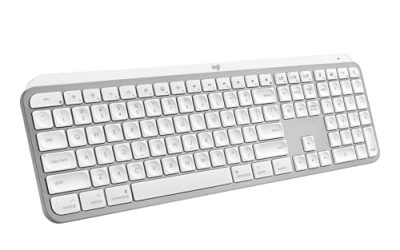
Designed to match the Surface Studio and Surface laptops, the Surface Keyboard is a full-size flat board in a grey finish, with a number pad and a notably solid feel for its slim 19.3 mm profile. Microsoft’s spec sheet lists Bluetooth Low Energy 4.0 or 4.1, a wireless range of up to 50 feet in open air and up to 23 feet in a typical office environment, and up to 12 months of use from two AAA batteries. It measures 420.9 by 112.6 mm and weighs 419.3 grams with batteries fitted. Microsoft documents a QWERTY key life of 5,000,000 actuations per key, which speaks to why so many of these boards are still in daily service.
The spec-based limits are real. There is no backlight, no wired fallback if Bluetooth misbehaves, and the documented system support tops out at older versions of Windows, macOS and Android, although basic Bluetooth typing works far more broadly in practice. It suits a tidy desk where a full-size board with a number pad should disappear visually and just work for a year at a time between battery changes. It is the oldest design in this guide and pure remaining stock, so check the seller and the model number WS2-00025 carefully before buying.
4. Incase Sculpt Ergonomic Keyboard (5KV-00001) — Incase Designed by Microsoft
The Sculpt is the design that defined Microsoft’s ergonomic reputation, and Incase now manufactures it under the Designed by Microsoft line with the same model number, 5KV-00001. The split keyset sits on a domed frame with a cushioned palm rest, and a removable riser enables reverse tilt so the front of the board sits higher than the back. The number pad is a separate wireless unit, which is a genuine ergonomic advantage: data-entry work can place it on either side, and everyone else can leave it off the desk. Connection is a 2.4 GHz USB transceiver with AES 128-bit encryption, the board carries 104 keys, and published battery life runs up to 18 months for the keyboard.
Two limitations deserve emphasis. The transceiver is matched to its keyboard, so a lost dongle cannot simply be replaced with a generic one; keep it in the storage slot when travelling. And because the connection is a USB receiver rather than Bluetooth, phones and tablets are out. Stock of the Incase production run has been intermittent, so availability changes faster here than for any other pick. It suits committed split-layout typists who want the classic Sculpt shape with a current maker behind it.
5. Incase Wired Keyboard 600 (ANB-00001) — Incase Designed by Microsoft
The Wired Keyboard 600 is the simplest board in this guide and the direct continuation of Microsoft’s long-running budget wired model, keeping model number ANB-00001 under the Incase badge. It is a full-size board with an integrated number pad, spill-resistant construction, and Quiet Touch keys that keep noise down in shared rooms. Four hot keys cover play and pause, volume up, volume down and mute, and there are dedicated keys for the calculator and the Windows menu. It connects by USB and works the moment it is plugged in, with no software, batteries or pairing.
Its limits are the limits of its class: no backlight, no wireless connection, no ergonomic shaping, and a plain membrane feel. Incase also notes that this model is not compatible with the Microsoft Mouse and Keyboard Center or Microsoft Accessory Center utilities, so every key does what it is labelled to do and nothing is reassignable. It suits a shared family PC, a school or office fleet, or anyone who wants a Microsoft-layout board that asks for nothing in return.
Also worth knowing about
Two Incase models are named here without links because their Amazon US availability could not be confirmed to the standard this guide requires. The Incase Ergonomic Keyboard carries the same LXM-00001 model number and design as the first pick under the Incase badge; signals for its listing conflicted during research, and since it duplicates the Microsoft-branded pick, the original listing is the safer route. The Incase Compact Ergonomic Keyboard, a newer split design with a dedicated Copilot key, is documented by Incase and its model number MI9-00007 is on record, but no live Amazon US listing for it could be verified. Finally, several Microsoft and Incase desktop sets bundle a keyboard with a mouse; those are a different purchase from a standalone keyboard and are outside the scope of this guide.
Comparison table
| Model | Line | Connection | Layout | Battery | Number pad |
|---|---|---|---|---|---|
| Microsoft Ergonomic Keyboard (LXM-00001) | Microsoft | Wired USB | Split, palm rest | None | Integrated |
| Microsoft Designer Compact Keyboard (21Y-00001) | Microsoft | Bluetooth 5.0 LE | Flat, compact | 2 CR2032, up to 36 months | None |
| Microsoft Surface Keyboard (WS2-00025) | Microsoft | Bluetooth 4.0 LE | Flat, full-size | 2 AAA, up to 12 months | Integrated |
| Incase Sculpt Ergonomic Keyboard (5KV-00001) | Incase Designed by Microsoft | 2.4 GHz USB receiver | Split, domed, palm rest | AAA and coin cell, up to 18 months | Separate unit |
| Incase Wired Keyboard 600 (ANB-00001) | Incase Designed by Microsoft | Wired USB | Flat, full-size | None | Integrated |
Frequently asked questions
Is Microsoft still making keyboards?
No. Microsoft ended its own-brand PC accessories line, and the designs moved to Incase, which has made and sold them under the “Designed by Microsoft” name since 2024. Microsoft-branded keyboards on Amazon US today are remaining stock of finished production runs, while Incase-badged versions of the same model numbers are current production.
Who handles warranty and support for the Incase models?
Incase does. The design, layout and model numbers carry over from the Microsoft originals, but the seller, warranty and support channel are Incase. On the Microsoft-branded boards, support sits with Microsoft, and the Ergonomic Keyboard’s listing documents a three-year limited warranty.
Will these keyboards work with a Mac?
For basic typing, most of them will connect, the Bluetooth models most easily. The shortcut keys for Microsoft 365, search and expressive input are Windows features, companion software is Windows-only, and the Sculpt’s USB receiver design is aimed at Windows PCs. Treat Mac use as plain typing and you will not be disappointed.
Which pick is best for wrist comfort?
The two split designs, the Microsoft Ergonomic Keyboard and the Incase Sculpt Ergonomic Keyboard, are the comfort picks. The Sculpt adds a domed profile, reverse tilt and a separate number pad; the Ergonomic Keyboard adds a wider cushioned palm rest and the certainty of a wired connection. Flat boards in this guide make no ergonomic claims beyond a slim profile.
What should I check before buying remaining Microsoft stock?
Confirm the exact model number against the table above, since both lines reuse the same numbers under different badges. Check which seller is behind the listing, whether the unit is new or used, and which company provides the warranty. Stock of discontinued models is finite, and a listing that disappears may not return.
Conclusion
A Microsoft keyboard is still a sound purchase, as long as you buy it with open eyes. For a wired split board with a full number pad, the Microsoft Ergonomic Keyboard remains the benchmark, and the Incase Sculpt keeps the most loved ergonomic shape in production with a separate number pad and a wireless link. For compact and clean-desk setups, the Designer Compact and Surface Keyboard cover multi-device and full-size needs respectively, and the Incase Wired Keyboard 600 is the honest, no-maintenance option. Pick by layout first, then by connection, and verify the model number and badge on the listing before you check out.
More from Amazon
Programs that pair well with the guide above. Offers and eligibility are set by Amazon and may change.
Free shipping on eligible items, Prime Video and more. Eligible new members can start with a free trial.
Start a Prime free trialAd-free music streaming. Eligible new subscribers can start with a free trial.
Try Music Unlimited freeA Prime membership for ages 18-24 with a trial period. Eligibility is set by Amazon.
See Prime for Young AdultsAudiobooks and podcasts to listen to on the go. Eligible new members can start with a free trial.
Try Audible freeAs an Amazon Associate we earn from qualifying purchases.