Our Short List of 3

- Best for: A compact custom board with open QMK/VIA remapping and a solid metal case.
- QMK/VIA programmable with full key remapping
- Full aluminum body with compact layout
- Bluetooth and wired USB-C connection
- Hot-swappable Keychron K Pro Banana switches

- Best for: Full-size play with six macro keys and deep iCUE control.
- Cherry MX Speed switches with 1.2 mm actuation
- Six dedicated macro keys with Elgato Stream Deck software integration
- PBT double-shot keycaps
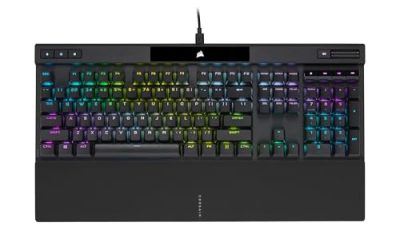
- Per-key RGB backlighting with 19-zone LightEdge

- Best for: A dial, macro keys, and media controls in one full-size board.
- Green Tactile switches, tactile and clicky
- Programmable command dial
- Eight dedicated macro keys
- Doubleshot ABS keycaps
All 4 Picks at a Glance
| Product | Specs | Action |
|---|---|---|
| Keychron Q1 Pro Wireless Custom Mechanical Keyboard, QMK/VIA Programmable Full Aluminum Layout Bluetooth/Wired with Hot-swappable Keychron K Pro Banana Switch Compatible with Mac Windows Linux |
| Check price on Amazon |
| Corsair K95 RGB Platinum XT Mechanical Wired Gaming Keyboard – Cherry MX Speed Switches – PBT Double-Shot Keycaps – iCUE Compatible – QWERTY NA Layout – Black |
| Check price on Amazon |
| Razer BlackWidow V4 Pro Mechanical Gaming Keyboard, Green Tactile Switches |
| Check price on Amazon |
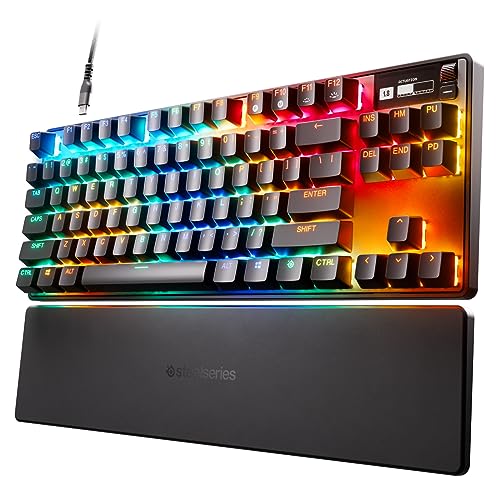 SteelSeries Apex Pro TKL HyperMagnetic Gaming Keyboard – Adjustable Actuation – Esports Tenkeyless – OLED Screen – RGB – PBT Keycaps – USB-C – 2023 Edition,Black |
| Check price on Amazon |
Key takeaways
- Five programmable keyboards with macro keys and full key remapping, compared on switches, layout, software, build quality, and comfort for long sessions.
A programmable keyboard earns its place when the keys do more than type letters. With remapping and macros, one key can launch an app, paste a long phrase, mute a call, or fire a chain of game commands. The hard part is choosing: switch feel, layout, software, and build all shape daily comfort, and a board that suits a fast-paced game may feel wrong for long writing days. This guide compares five boards that all offer real programmability, so you can match the feature set to your routine.
Gamers who lean on macros, writers who want a compact custom board, and hybrid workers who split time between play and work will all find a fit here. The five picks run from the open QMK/VIA remapping of the Keychron Q1 Pro to the dial and macro keys of the Razer BlackWidow V4 Pro, with the Corsair K95 RGB Platinum XT, SteelSeries Apex Pro TKL, and Logitech G915 X covering full-size, tenkeyless, and low-profile layouts.
Quick Picks
As an Amazon Associate we earn from qualifying purchases
| Product | Best for | Key spec from title |
|---|---|---|
| Keychron Q1 Pro Wireless Custom Mechanical Keyboard, QMK/VIA Programmable Full Aluminum Layout Bluetooth/Wired with Hot-swappable Keychron K Pro Banana Switch Compatible with Mac Windows Linux | For a compact custom board with open remapping | QMK/VIA programmable, Banana switches |
| Corsair K95 RGB Platinum XT Mechanical Wired Gaming Keyboard – Cherry MX Speed Switches – PBT Double-Shot Keycaps – iCUE Compatible – QWERTY NA Layout – Black | For six dedicated macro keys in a full-size frame | Cherry MX Speed switches, PBT double-shot keycaps |
| Razer BlackWidow V4 Pro Mechanical Gaming Keyboard, Green Tactile Switches | For a command dial plus eight macro keys | Green Tactile switches, mechanical gaming keyboard |
| SteelSeries Apex Pro TKL HyperMagnetic Gaming Keyboard – Adjustable Actuation – Esports Tenkeyless – OLED Screen – RGB – PBT Keycaps – USB-C – 2023 Edition,Black | For adjustable actuation in a tenkeyless frame | Adjustable actuation, OLED screen, PBT keycaps |
| Logitech G915 X Lightspeed Low-Profile Wireless Gaming Keyboard, Double-Shot PBT Keycaps, Fully Programmable Keys, RGB Backlighting, Sleek Aluminum Finishing, GL Brown Tactile Switches-PC/Mac – Black | For a thin wireless board with full remapping | Fully programmable keys, GL Brown Tactile switches |
How to Choose
Match the software to your macro habits
Software decides how much of a board you can truly reshape. QMK and VIA let you remap any key and build macros in an open tool that works across systems, while brand apps such as iCUE, Synapse, SteelSeries GG, and G HUB tie macros, lighting, and profiles to one maker and often add onboard memory so settings travel with the board. Before you buy, map your daily shortcuts: chat commands, app launches, media controls, and game chains each need a home. A board with six or eight dedicated macro keys suits heavy chains, while full remapping alone may serve a tidy desk where every key already has a job.
Pick switches and layout for long days
Switch feel shapes every hour at the desk, so match it to your main use. Tactile switches give a clear bump that suits typing and mixed work, linear switches glide with little resistance for rapid game input, and clicky switches add sound that some typists love and some households do not. Layout matters just as much: a full-size board keeps the number pad close, a tenkeyless board frees mouse room, and a compact 75 layout keeps arrows and function keys in a smaller frame. Sit with your hand position in mind, and favor a layout that leaves your wrist straight and your mouse free to move.
Weigh wired, wireless, and battery life
Connection choice shapes how a board fits your desk. A wired board draws power from the cable and never needs a charge, which suits a fixed desk where the cable can stay put. A wireless board cuts cable clutter and moves between a desk and a lap with ease, and tri-mode boards add Bluetooth for a tablet or laptop alongside a low-lag wireless link for play. If you go wireless, check the battery figure on the listing and the charge time, and keep the cable handy for long play days. A board that charges over USB-C slots into the same cable you already use for a phone or headset.
Check build, keycaps, and desk fit
Build quality decides whether a board still feels solid after months of daily use. An aluminum frame adds weight and resists flex, while double-shot PBT keycaps keep legends crisp and resist shine far longer than thin ABS caps. Check the wrist rest, the tilt feet, and the cable routing, since small comfort details add up across long days. Measure your desk before you buy: a full-size board with a palm rest needs far more depth than a tenkeyless board, and a thick frame can crowd a keyboard tray. A board that fits the desk leaves room for the mouse, a notebook, and a drink.
The 5 Best Options
Keychron Q1 Pro Wireless Custom Mechanical Keyboard, QMK/VIA Programmable Full Aluminum Layout Bluetooth/Wired with Hot-swappable Keychron K Pro Banana Switch Compatible with Mac Windows Linux
- Best for: A compact custom board with open QMK/VIA remapping and a solid metal case.
- QMK/VIA programmable with full key remapping
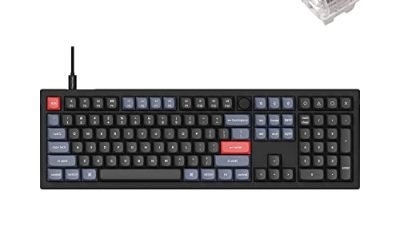
- Full aluminum body with compact layout
- Bluetooth and wired USB-C connection
- Hot-swappable Keychron K Pro Banana switches
A compact custom board with open QMK/VIA remapping and a solid metal case.
The board is heavy for its size, so it suits a fixed desk more than a bag.
The Keychron Q1 Pro brings open programmability to a compact metal board. QMK and VIA let you remap any key and build macros without brand-locked software, and the hot-swappable sockets accept most MX-style switches when you want a different feel. The full aluminum case and gasket mount give a solid, cushioned typing feel, while Bluetooth and a wired USB-C link cover a laptop, a desktop, and a tablet. K Pro Banana switches add a smooth tactile bump, and the 4000 mAh battery keeps the board going for long wireless days.
Corsair K95 RGB Platinum XT Mechanical Wired Gaming Keyboard – Cherry MX Speed Switches – PBT Double-Shot Keycaps – iCUE Compatible – QWERTY NA Layout – Black
- Best for: Full-size play with six macro keys and deep iCUE control.
- Cherry MX Speed switches with 1.2 mm actuation
- Six dedicated macro keys with Elgato Stream Deck software integration
- PBT double-shot keycaps
- Per-key RGB backlighting with 19-zone LightEdge
Full-size play with six macro keys and deep iCUE control.
The wide frame needs a deep desk, and the cable setup suits a fixed desk.
The Corsair K95 RGB Platinum XT is a full-size board built around dedicated macro keys. Six macro keys sit along the left edge and pair with iCUE for macros, key remaps, and lighting, plus Elgato Stream Deck software integration for stream controls. Cherry MX Speed switches actuate at 1.2 mm for rapid input, and the anodized aluminum frame, PBT double-shot keycaps, and detachable cushioned palm rest suit long play days. Eight MB of onboard storage holds five profiles, so your setup follows the board.
Razer BlackWidow V4 Pro Mechanical Gaming Keyboard, Green Tactile Switches
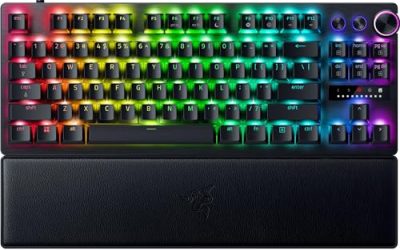
- Best for: A dial, macro keys, and media controls in one full-size board.
- Green Tactile switches, tactile and clicky
- Programmable command dial
- Eight dedicated macro keys
- Doubleshot ABS keycaps
A dial, macro keys, and media controls in one full-size board.
Green switches are loud, and the soldered switches mean a faulty switch needs a repair rather than a quick swap.
The Razer BlackWidow V4 Pro packs the most controls of any board in this set. A programmable command dial sits beside eight dedicated macro keys, four media keys, and a volume roller, so game commands, app shortcuts, and media stay within reach. Green Tactile switches give a crisp click with each press, and doubleshot ABS keycaps pair with per-key Chroma RGB and underglow for a bright desk presence. A magnetic wrist rest adds comfort for long days, and the wired USB-A link keeps input steady.
SteelSeries Apex Pro TKL HyperMagnetic Gaming Keyboard – Adjustable Actuation – Esports Tenkeyless – OLED Screen – RGB – PBT Keycaps – USB-C – 2023 Edition,Black
- Best for: Tunable actuation and macros in a compact tenkeyless frame.
- OmniPoint 2.0 Adjustable HyperMagnetic switches
- Adjustable actuation with Rapid Trigger
- 2-in-1 action keys
- OLED screen
Tunable actuation and macros in a compact tenkeyless frame.
The wired-only link and small frame leave no number pad for spreadsheet work.
The SteelSeries Apex Pro TKL 2023 Edition suits players who want actuation they can tune. OmniPoint 2.0 HyperMagnetic switches let you set the actuation point for each key, with Rapid Trigger and 2-in-1 action keys for rapid input and dual actions on one press. SteelSeries GG handles remapping, macros, and lighting, and the small OLED screen shows settings at a glance. The tenkeyless frame saves desk room, PBT keycaps resist shine, and the USB-C cable keeps the link wired and steady.
Logitech G915 X Lightspeed Low-Profile Wireless Gaming Keyboard, Double-Shot PBT Keycaps, Fully Programmable Keys, RGB Backlighting, Sleek Aluminum Finishing, GL Brown Tactile Switches-PC/Mac – Black
The Logitech G915 X LIGHTSPEED is the thin wireless pick of the set. Low-profile GL Brown Tactile switches give a gentle bump in a frame only 23 mm high, and double-shot PBT keycaps sit over a sleek aluminum finish. G HUB unlocks full programmability, with KeyControl setting up to 15 functions per key and nine G keys for macros and shortcuts. Tri-mode links cover LIGHTSPEED wireless, Bluetooth, and wired USB-C, and the battery runs up to 36 hours before a recharge.
Specs
- GL Brown Tactile switches, low-profile
- Double-shot PBT keycaps
- Fully programmable keys with KeyControl, up to 15 functions per key
- LIGHTSPEED wireless, Bluetooth, and wired USB-C
- Up to 36 hours of battery life
- Sleek aluminum finishing, only 23 mm high
- Nine G keys with media keys and volume roller
Best for: A thin wireless board with deep remapping for work and play.
Watch out for: Low-profile keys feel different from full-height switches, so allow time to adjust.
ASIN: B0DB1WNZJY
Which One Fits Your Situation
You play games that need many macros
Pick a board with dedicated macro keys and a dial or roller close at hand. The Corsair K95 RGB Platinum XT gives six macro keys for chat and build chains, while the Razer BlackWidow V4 Pro adds eight macro keys and a command dial for app and game shortcuts. Set each chain in the brand app, keep the most-used actions on the nearest keys, and leave one key free for mute or push-to-talk.
You type and work across Mac and Windows
Choose a board with open remapping and wide system support. The Keychron Q1 Pro works with Mac, Windows, and Linux, and QMK/VIA remapping carries across systems without brand-locked software. Add a compact layout if your desk is small, and keep a wired link handy for days when Bluetooth feels slow to wake. The Logitech G915 X also covers PC and Mac with tri-mode links.
You want a small desk footprint
Go tenkeyless or compact and let the mouse breathe. The SteelSeries Apex Pro TKL drops the number pad for a shorter frame, while the Keychron Q1 Pro keeps arrows and function keys in a compact three-quarter layout. Both leave room for a large mouse pad and a notebook, and both keep the keys you use most within easy reach.
You want a thin wireless board for a clean desk
Pick a low-profile wireless board and hide the cable. The Logitech G915 X LIGHTSPEED pairs a 23 mm frame with LIGHTSPEED wireless, Bluetooth, and a wired USB-C link, so one board covers a desktop, a laptop, and a tablet. Keep the receiver close for a steady link, charge over USB-C, and use G HUB to map media and app shortcuts to the G keys.
Common Mistakes
- Buying for looks alone and ignoring the software: a bright board with weak remapping will not carry your macros.
- Picking loud clicky switches for a shared room without checking how the sound carries.
- Choosing a full-size board for a small desk, then crowding the mouse to the edge.
- Forgetting the number pad: a tenkeyless board suits play, but spreadsheet work may miss the pad.
- Skipping the manual: many boards hide macro layers and onboard profiles behind a key combo you must set first.
Frequently Asked Questions
Can I remap every key on a programmable keyboard?
Most boards in this guide allow full remapping of the main keys through QMK/VIA or a brand app such as iCUE, Synapse, SteelSeries GG, or G HUB. A few keys, such as a dial or a dedicated media key, may keep a fixed role on some boards, so check the listing when one control matters most to you.
Do macro keys need software running all the time?
Not always. Boards with onboard memory, such as the Corsair K95 RGB Platinum XT, can hold profiles on the board itself, so macros keep working when the app is closed. Boards that rely on cloud profiles or a live app may need the software open, so check the listing for onboard storage before you buy.
Are hot-swappable switches useful?
Yes, when you like to change feel without soldering. The Keychron Q1 Pro accepts most MX-style switches, so you can swap a tactile set for a linear set in minutes. The Razer BlackWidow V4 Pro uses soldered switches instead, so a change there needs a repair rather than a quick swap.
Can I use these keyboards with a Mac?
Yes, with care. The Keychron Q1 Pro ships with Mac and Windows keycaps and a system toggle, and the Logitech G915 X lists PC and Mac support. Other boards in this set are built mainly for Windows, so check the listing for Mac support and confirm the software runs on your system before you buy.
FAQ
Can I remap every key on a programmable keyboard?
Do macro keys need software running all the time?
Are hot-swappable switches useful?
Can I use these keyboards with a Mac?
More from Amazon
Programs that pair well with the guide above. Offers and eligibility are set by Amazon and may change.
Free shipping on eligible items, Prime Video and more. Eligible new members can start with a free trial.
Start a Prime free trialAd-free music streaming. Eligible new subscribers can start with a free trial.
Try Music Unlimited freeA Prime membership for ages 18-24 with a trial period. Eligibility is set by Amazon.
See Prime for Young AdultsAudiobooks and podcasts to listen to on the go. Eligible new members can start with a free trial.
Try Audible freeAs an Amazon Associate we earn from qualifying purchases.