Our Short List of 3
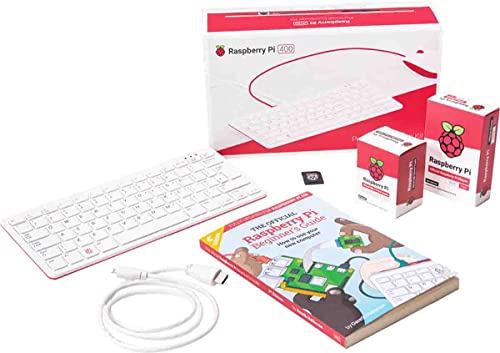
- Best for: A first Pi desktop for learning, coding, and everyday tasks in a single purchase.
- Quad-core 64-bit processor, listed at 1.8 GHz
- 4GB RAM built into the keyboard unit
- Dual-band Wi-Fi and Bluetooth 5.0 BLE
- Dual 4K display output; 1 m micro-HDMI to HDMI cable included
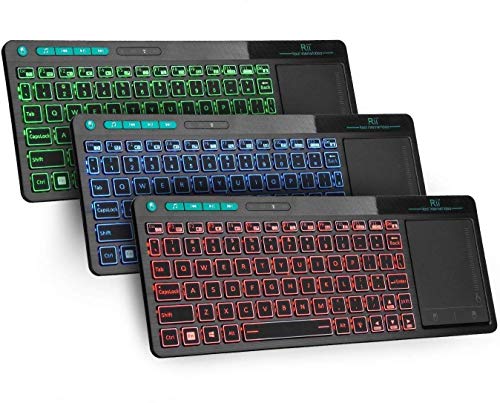
- Best for: A desk-based Pi that doubles as a media machine, where one board handles typing and pointing.
- 2.4GHz wireless link through a USB receiver stored inside the keyboard
- Backlight in three colors: red, blue, and green
- Large multi-touch trackpad with two-finger zoom
- Built-in rechargeable battery; listing states about two weeks per charge

- Best for: Couch control of a Kodi or retro gaming Pi where typing arrives in short bursts.
- 92-key QWERTY layout in a handheld body
- 2.4GHz wireless with USB receiver; plug and play as listed
- Touchpad with adjustable DPI and a 360-degree flip design
- LED backlit keys for low-light rooms
All 4 Picks at a Glance
| Product | Specs | Action |
|---|---|---|
| Raspberry Pi 400 Computer Kit |
| Check price on Amazon |
| Rii K18 Plus |
| Check price on Amazon |
| Rii i8+ Mini |
| Check price on Amazon |
 Vilros 15 Inch USB Keyboard with Touchpad |
| Check price on Amazon |
Key takeaways
- Four keyboards whose listings name Raspberry Pi support outright, from the Pi 400 keyboard computer to a backlit mini touchpad board for sofa duty.
A Raspberry Pi rarely lives in just one place. The same board might sit on a desk for coding in the morning, move behind a television as a media center at night, and end the week on a workbench wired to sensors. The keyboard decision follows that movement: a board with no touchpad means carrying a mouse as well, a wireless dongle claims a USB port that smaller Pi models can ill afford to lose, and a wired board tethers a setup you may want to run from the sofa.
This guide serves Pi owners choosing a keyboard that will stay with the board rather than be borrowed from a desktop PC. Every pick below names Raspberry Pi support on its own Amazon listing, and the four were chosen from the names and specs printed there: the official keyboard computer, a full-width wireless board with a large trackpad, a palm-size mini controller, and a wired 15-inch board from a Pi accessory maker.
Quick Picks
As an Amazon Associate we earn from qualifying purchases
| Product | Best for | Key spec from title |
|---|---|---|
| Raspberry Pi 400 Computer Kit | A first Pi desktop in one box | Quad-core 64-bit chip, 4GB RAM, dual 4K output |
| Rii K18 Plus | Desk typing with a large trackpad | Big multi-touch trackpad, 3-color backlight |
| Rii i8+ Mini | Couch control of a media center Pi | 92 keys with touchpad, LED backlit |
| Vilros 15 Inch USB Keyboard | A wired bench board, no charging | USB wired, built-in touchpad |
How to Choose
Decide whether the Pi lives inside the keyboard
One route skips the separate board entirely: a keyboard computer puts a full Pi inside the keyboard body, with the GPIO pins still exposed along the back. That suits a first desktop or a tidy classroom seat. The trade is fixed hardware, because the board inside cannot be swapped for a higher-memory model later. If you already own a Pi you like, a plain keyboard keeps the two purchases independent, so either half can be replaced on its own schedule.
Match the connection to your Pi model
A 2.4GHz dongle board pairs itself the moment the receiver lands in a USB port, and it works in setup screens before the desktop loads. Bluetooth frees that port but needs a working desktop to complete pairing, which is awkward on a fresh install. Wired USB never pairs and never fades with distance, but it does tether the setup to one spot. Check the small boards before ordering: Pi Zero models carry micro USB ports, so a full-size receiver or cable needs an adapter the listing may not include.
Choose between a touchpad and a separate mouse
An integrated touchpad turns the keyboard into the whole input story, which is why mini boards dominate media center setups: one handset covers typing, pointing, and media keys from the sofa. Desk work is different. Full-width keys and your own mouse beat a small pad across a long coding session, and a cramped mini layout slows text entry badly. Decide where the Pi spends most of its hours, then pick the pointing style that matches that place rather than the occasional one.
Weigh charging against a plain cable
Rechargeable mini boards run for days or weeks per charge, but they still go flat at the least convenient moment, and each one wants its own cable kept nearby. Boards on replaceable cells trade that cable for a drawer of spares. A wired keyboard removes the question entirely and draws a small amount of power from the Pi itself. Read the listing closely for what it states about charge time and what sits in the box, because receivers and cables are easy to assume and annoying to miss.
The 4 Best Options
Raspberry Pi 400 Computer Kit
- Best for: A first Pi desktop for learning, coding, and everyday tasks in a single purchase.
- Quad-core 64-bit processor, listed at 1.8 GHz
- 4GB RAM built into the keyboard unit
- Dual-band Wi-Fi and Bluetooth 5.0 BLE
- Dual 4K display output; 1 m micro-HDMI to HDMI cable included
A first Pi desktop for learning, coding, and everyday tasks in a single purchase.
The board is fixed inside the keyboard with no swap path to a higher-memory model, and seller bundles vary, so confirm the exact kit contents on the listing before ordering.
This is the pick for a buyer who has not yet chosen a board, because the computer is the keyboard. A modified Pi 4 with 4GB of memory lives inside the body, the GPIO header stays open along the back edge for project wiring, and the kit adds the mouse, power supply, and a card loaded with Raspberry Pi OS. It behaves like a small desktop the moment a screen is attached, yet still works as a project machine. The honest trade is that keyboard and computer are one unit, so a failure or an upgrade means replacing both together.
Rii K18 Plus
- Best for: A desk-based Pi that doubles as a media machine, where one board handles typing and pointing.
- 2.4GHz wireless link through a USB receiver stored inside the keyboard
- Backlight in three colors: red, blue, and green
- Large multi-touch trackpad with two-finger zoom
- Built-in rechargeable battery; listing states about two weeks per charge
A desk-based Pi that doubles as a media machine, where one board handles typing and pointing.
This 2.4G version has no Bluetooth, so the receiver always occupies a Pi USB port, and the listing notes some media functions may not work on Mac systems.
The K18 Plus is the full-width wireless option for a Pi that lives at a desk but still pulls media duty. Its large central trackpad replaces the mouse, the backlight offers three colors for dim rooms, and the USB receiver hides inside the body when the board travels. The listing names Raspberry Pi among its supported devices, and the dongle link means it answers in setup screens as well as on the desktop. It is the biggest board in this guide, which helps long typing sessions and hurts portability in equal measure.
Rii i8+ Mini
- Best for: Couch control of a Kodi or retro gaming Pi where typing arrives in short bursts.
- 92-key QWERTY layout in a handheld body
- 2.4GHz wireless with USB receiver; plug and play as listed
- Touchpad with adjustable DPI and a 360-degree flip design
- LED backlit keys for low-light rooms
Couch control of a Kodi or retro gaming Pi where typing arrives in short bursts.
The receiver ships inside the battery cover, so check there before reporting it missing, and expect the small keys to slow any long document work.
The i8+ is a palm-size controller shaped for two hands, built for a Pi that lives behind a television. A small QWERTY row set surrounds a central touchpad, the keys are backlit for dark rooms, and the whole unit runs from a USB dongle with no pairing routine, so it works with a media center install from the first boot. Text entry is thumb work here: fine for search boxes, passwords, and terminal commands in short bursts, and the wrong tool for an afternoon of writing. Its title names Raspberry Pi among the devices it supports.
Vilros 15 Inch USB Keyboard with Touchpad
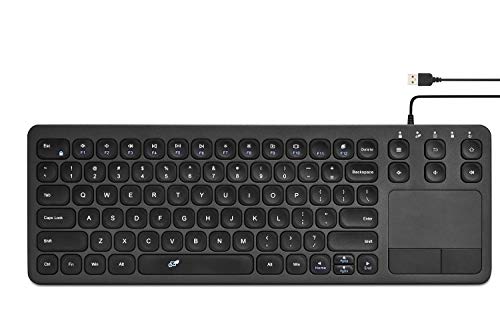
- Best for: A bench or classroom Pi where a cable is a feature, since it works at first boot and never needs charging.
- Wired USB connection over USB-A as listed
- Built-in touchpad, named as the special feature on the listing
- 15-inch full-size body
- QWERTY layout
A bench or classroom Pi where a cable is a feature, since it works at first boot and never needs charging.
The listing’s own fields give conflicting key counts, so study the layout photos on the listing before ordering, and remember the cable rules out sofa use.
Vilros builds accessories around the Pi, and this wired board says so in its own title. The 15-inch body gives full-size spacing for longer sessions, the built-in touchpad removes the mouse from a crowded bench, and the cable means it answers at the very first boot screen of a fresh card, with no charge level to check and no receiver to lose. It is a plain tool rather than a clever one: no backlight, no wireless freedom, and a tether that fixes the Pi to one spot on the desk while it is attached.
Which One Fits Your Situation
You have no Pi yet and want one box on the desk
Take the Raspberry Pi 400 kit. It removes the board, case, and keyboard decisions in a single purchase, includes the mouse and power supply, and still leaves the GPIO header open for project work later. Add a screen and the setup is complete on the day the box arrives, with nothing left to hunt down.
Your Pi runs the television
Pick the Rii i8+ if the Pi only plays media, since its handheld shape and backlit keys suit a dark room and short searches. Choose the K18 Plus instead when the same Pi also handles browsing and light desk work, because its full-width keys and large trackpad cover both jobs without a mouse.
You code on a desk Pi every day
The K18 Plus and the Vilros board are the two full-size options here. The K18 Plus adds wireless freedom and a backlight for evening sessions, while the Vilros trades both away for a cable that never needs attention. Either way, full-width spacing matters more than extras across a long day of typing.
You look after several Pis on a bench
Keep the wired Vilros board as the house keyboard. It works in early setup screens, moves between boards without any pairing, and cannot be left uncharged before a rebuild. A dongle board is the second choice here, since its little receiver has to travel with it from board to board and is easily misplaced.
Common Mistakes
- Buying a Bluetooth-only board for a first install, then having no working keyboard to complete the pairing with.
- Forgetting that a 2.4GHz receiver claims a USB port, which is a real loss on a Pi Zero or an older board.
- Ordering a mini handheld board and expecting it to carry long coding or writing sessions comfortably.
- Ignoring the printed layout: US and UK legends differ, and the mismatch shows up on symbol keys until the system layout is set to match.
- Assuming one keyboard suits every Pi in the house, when the desk board and the sofa board solve different problems.
Frequently Asked Questions
Does any USB keyboard work with a Raspberry Pi?
In general, yes: the Pi treats a standard USB keyboard as a plain input device, and most boards work the moment they are plugged in. The picks in this guide go one step further, because each listing names Raspberry Pi support outright. Fancy extras are the weak point, since companion software for macros or lighting usually targets Windows and will not run on the Pi.
Is a 2.4GHz dongle keyboard better than Bluetooth for a Pi?
For most Pi setups, yes. A dongle board pairs itself, works in setup screens before the desktop loads, and behaves the same on every boot. Bluetooth frees a USB port, which matters on smaller boards, but pairing needs a working desktop session first, so keep a wired or dongle board nearby for fresh installs and recovery work.
Can these keyboards work with a Raspberry Pi Zero?
Yes, with one errand first. The Zero boards carry micro USB ports rather than full-size ones, so a dongle or a standard USB cable needs a small OTG adapter, which most listings do not include. Once adapted, dongle and wired boards behave as they do on a full-size Pi, including in setup screens.
Does the Raspberry Pi 400 still expose the GPIO pins?
Yes. The listing describes the I/O connectors running along the back of the keyboard, the GPIO header among them, so jumper wires and add-on boards connect much as they do on a bare Pi 4. That openness is what keeps the 400 useful as a project machine rather than only a small desktop.
FAQ
Does any USB keyboard work with a Raspberry Pi?
Is a 2.4GHz dongle keyboard better than Bluetooth for a Pi?
Can these keyboards work with a Raspberry Pi Zero?
Does the Raspberry Pi 400 still expose the GPIO pins?
More from Amazon
Programs that pair well with the guide above. Offers and eligibility are set by Amazon and may change.
Free shipping on eligible items, Prime Video and more. Eligible new members can start with a free trial.
Start a Prime free trialAd-free music streaming. Eligible new subscribers can start with a free trial.
Try Music Unlimited freeA Prime membership for ages 18-24 with a trial period. Eligibility is set by Amazon.
See Prime for Young AdultsAudiobooks and podcasts to listen to on the go. Eligible new members can start with a free trial.
Try Audible freeAs an Amazon Associate we earn from qualifying purchases.