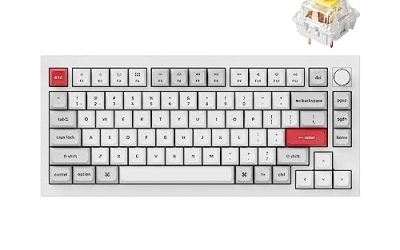
Our Short List of 3

- Best for: Competitive players who want Rapid Trigger, Snap Tap and adjustable actuation in a tenkeyless board.
- Analog Optical Switches
- Rapid Trigger and Snap Tap
- Adjustable actuation
- Media keys and dial
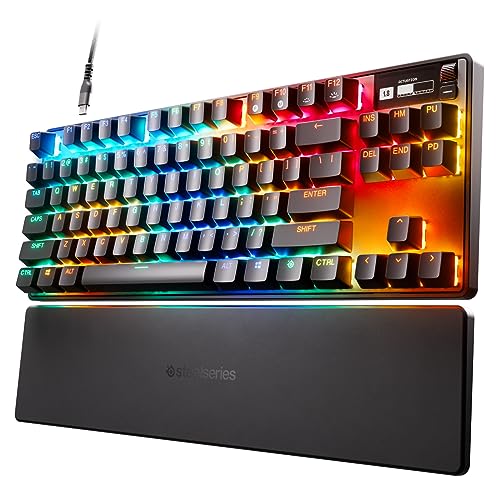
- Best for: Players who want per-key actuation tuning with an onboard display.
- OmniPoint 2.0 HyperMagnetic switches
- Rapid Trigger
- Adjustable actuation
- 8000Hz polling rate

- Best for: Full-size players who want magnetic switches, Rapid Trigger and a wrist rest.
- CORSAIR MGX magnetic-mechanical switches
- Adjustable actuation from 0.4mm to 3.6mm
- Rapid Trigger
- Dual-point actuation
All 5 Picks at a Glance
| Product | Specs | Action |
|---|---|---|
| Razer Huntsman V3 Pro TKL |
| Check price on Amazon |
| SteelSeries Apex Pro TKL (2023) |
| Check price on Amazon |
| Corsair K70 MAX RGB |
| Check price on Amazon |
 Logitech G PRO X TKL Rapid |
| Check price on Amazon |
 ASUS ROG Falchion Ace HFX |
| Check price on Amazon |
Key takeaways
- Five performance keyboards compared by switch speed, polling rate, Rapid Trigger and layout, with specs taken from Amazon listings to help you choose.
A keyboard earns the word performance when a press lands when your finger expects it to, not a fraction later. The real choice is not between brands or lighting effects. It is between switch systems: magnetic and analog optical switches that sense travel instead of waiting for metal contacts to close, polling rates that report each press thousands of times a second, and reset behaviour that lets a key fire again the moment you lift it. Get those three right and the board disappears beneath your hands. Get them wrong and no amount of colour will hide the lag. A slow board turns clean aim into misses.
This guide is for competitive players chasing faster strafe control, typists who want a light, repeatable press, and anyone replacing a board that feels slow. Each keyboard below was picked from the switches, polling rate and trigger features stated on its Amazon listing, so you can compare the input hardware itself instead of marketing promises.
Quick Picks
As an Amazon Associate we earn from qualifying purchases
| Product | Best for | Key spec from title |
|---|---|---|
| Razer Huntsman V3 Pro TKL | Competitive players who want Snap Tap and adjustable actuation | Analog optical switches with Rapid Trigger |
| SteelSeries Apex Pro TKL (2023) | Players who want an OLED display with adjustable actuation | OmniPoint 2.0 switches with 8000Hz polling |
| Corsair K70 MAX RGB | Full-size players who want magnetic switches and a wrist rest | MGX switches with 8000Hz polling |
| Logitech G PRO X TKL Rapid | Tournament players who want analog switches and media controls | Magnetic analog switches with Rapid Trigger |
| ASUS ROG Falchion Ace HFX | Compact-desk players who want a 65 percent board with Speed Tap | ROG HFX switches with 8000Hz polling |
How to Choose
Switch Type and Actuation Depth
Magnetic and analog optical switches measure how far a key has travelled instead of waiting for a contact to close, which removes the debounce pause built into ordinary mechanical switches. Adjustable actuation lets you set a shallow point for movement keys and a deeper one for abilities, so a light touch strafes while a deliberate press fires. Look for the actuation range printed on the listing: a board that adjusts from a fraction of a millimetre to several millimetres gives you room to tune. Fixed switches can still feel fast, but they leave that tuning on the table. Test a shallow setting for movement first, then deepen the keys you hit by accident.
Polling Rate and Connection
Polling rate counts how often the keyboard reports its state to the computer, and an 8000Hz board reports eight times as often as a standard 1000Hz board. The gap shows up as a shorter delay between press and action, which matters most in fast shooters where a single frame decides a duel. Wired USB keeps that rate steady, while wireless boards sometimes drop to a lower rate to save battery. Check the listing for the polling figure in both modes before you buy, and remember that a high rate needs a capable computer to make full use of it. A capable computer matters too, since an overloaded system cannot process reports any faster than its own limits allow.
Rapid Trigger and Reset Behaviour
Rapid Trigger resets a key the instant it starts moving upward, instead of waiting for it to cross a fixed release point. That change makes repeated presses and counter-strafing feel immediate, because the next press can register before the key has fully returned. Some boards add a second action at a deeper press, or a Snap Tap style feature that favours the most recent direction key. Read the listing to confirm which of these the board actually offers, since names differ between brands. A board without any reset feature can still be quick, yet it will never match the repeat speed of a true Rapid Trigger design. Double-tap players in fast games feel the change at once.
Layout, Build and Keycaps
Layout decides how much desk space the board takes and which keys stay within reach. Tenkeyless and 65 percent boards free room for wide mouse movement, while full-size boards keep the number pad for work and macros. Build matters over long sessions: an aluminium top plate resists flex, doubleshot PBT keycaps keep their legends from wearing smooth, and a detachable cable survives travel better than a fixed one. Sound dampening foam softens the hollow ping some metal boards produce. Weigh these against the switch system, since a sturdy board with slow switches still loses the contest that matters. A board that survives travel and daily use protects the investment behind its switches.
The 5 Best Options
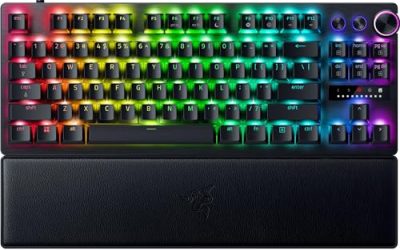
Razer Huntsman V3 Pro TKL
- Best for: Competitive players who want Rapid Trigger, Snap Tap and adjustable actuation in a tenkeyless board.
- Analog Optical Switches
- Rapid Trigger and Snap Tap
- Adjustable actuation
- Media keys and dial
Competitive players who want Rapid Trigger, Snap Tap and adjustable actuation in a tenkeyless board.
Wired only, so check your cable routing first. Confirm it is still sold before buying.
The Huntsman V3 Pro TKL suits competitive players who want every speed feature in one tenkeyless board. Its analog optical switches support Rapid Trigger and Snap Tap, so counter-strafing feels sharp and the most recent direction key wins the contest. Adjustable actuation lets movement keys sit shallow while ability keys stay deep, and the media keys with a dial keep volume within reach without leaving the game. Doubleshot PBT keycaps and a magnetic wrist rest round out a board built for long ranked sessions. The tenkeyless frame also leaves more room for broad mouse sweeps at low sensitivity.
Watch out for: Wired only, so check your cable routing first. Confirm it is still sold before buying.
SteelSeries Apex Pro TKL (2023)
- Best for: Players who want per-key actuation tuning with an onboard display.
- OmniPoint 2.0 HyperMagnetic switches
- Rapid Trigger
- Adjustable actuation
- 8000Hz polling rate
Players who want per-key actuation tuning with an onboard display.
Wired only, with no wireless mode. Confirm it is still sold before buying.
The Apex Pro TKL (2023) fits players who like to tune every key and check settings at a glance. Its OmniPoint 2.0 switches adjust actuation per key, Rapid Trigger sharpens repeated presses, and the OLED Smart Display shows profiles and game information without opening software. An 8000Hz polling rate keeps reports frequent, while the tenkeyless frame leaves room for low-sensitivity mouse movement. PBT keycaps and a USB-C connection complete a board that feels engineered rather than decorated. Onboard profiles mean your settings travel with the board to another computer. That matters at LAN events and shared setups.
Watch out for: Wired only, with no wireless mode. Confirm it is still sold before buying.
Corsair K70 MAX RGB
- Best for: Full-size players who want magnetic switches, Rapid Trigger and a wrist rest.
- CORSAIR MGX magnetic-mechanical switches
- Adjustable actuation from 0.4mm to 3.6mm
- Rapid Trigger
- Dual-point actuation
Full-size players who want magnetic switches, Rapid Trigger and a wrist rest.
Full-size frame needs a wide desk. Confirm it is still sold before buying.
The K70 MAX RGB is the full-size pick for players who refuse to give up the number pad. Its MGX magnetic-mechanical switches adjust actuation across a wide range, Rapid Trigger resets keys the moment they lift, and dual-point actuation can bind two actions to a single press. An 8000Hz polling rate keeps input reports frequent, sound dampening foam quiets the aluminium frame, and the magnetic wrist rest supports long sessions. PBT double-shot keycaps finish a board that treats speed and comfort as equals. A detachable USB-C cable and onboard profiles make the big frame easier to move than its size suggests.
Watch out for: Full-size frame needs a wide desk. Confirm it is still sold before buying.
Logitech G PRO X TKL Rapid
- Best for: Tournament players who want analog switches, KEYCONTROL and media controls.
- Magnetic analog switches
- Rapid Trigger
- Actuation at 35g force
- Adjustable actuation
Tournament players who want analog switches, KEYCONTROL and media controls.
No wireless mode and no number pad. Confirm it is still sold before buying.
The PRO X TKL Rapid suits tournament players who want analog control with straightforward media keys. Its magnetic analog switches offer Rapid Trigger and adjustable actuation, with a light 35g actuation force that keeps repeated presses easy on the fingers. KEYCONTROL assigns commands and multi-action combos across layers on every key, while LIGHTSYNC RGB syncs lighting with on-screen action. Dual-shot PBT keycaps, a volume roller and a detachable USB-C cable make it a practical board to carry between setups. The plastic frame keeps the board light enough to carry between desks without feeling flimsy.
Watch out for: No wireless mode and no number pad. Confirm it is still sold before buying.
ASUS ROG Falchion Ace HFX
- Best for: Compact-desk players who want a 65 percent board with Rapid Trigger and Speed Tap.
- ROG HFX magnetic switches
- Adjustable actuation from 0.1mm to 4.0mm
- Rapid Trigger
- Speed Tap
Compact-desk players who want a 65 percent board with Rapid Trigger and Speed Tap.
65 percent layout drops the function row and number pad. Confirm it is still sold before buying.
The Falchion Ace HFX is the compact pick for players with little desk space and no patience for slow input. Its ROG HFX magnetic switches adjust actuation across a wide range, Rapid Trigger sharpens repeat presses, and Speed Tap favours the latest direction key during fast movement. An 8000Hz polling rate cuts the report delay to a fraction of a millisecond, while the touch panel handles media without extra keys. Dual USB-C ports, a protective cover and PBT keycaps make the 65 percent frame easy to carry. The protective cover doubles as a guard against dust when the board sits unused.
Watch out for: 65 percent layout drops the function row and number pad. Confirm it is still sold before buying.
Which One Fits Your Situation
Competitive Shooter Players
Pick the Razer Huntsman V3 Pro TKL or the SteelSeries Apex Pro TKL. Both pair Rapid Trigger with adjustable actuation, so strafing and counter-strafing register the moment your fingers move. The Razer adds Snap Tap for direction changes, while the SteelSeries adds its OLED display for profile checks between rounds. Either board keeps up with low-sensitivity aim, where wide mouse sweeps demand desk space the tenkeyless frame provides.
Small Desks and Travel Setups
Pick the ASUS ROG Falchion Ace HFX. Its 65 percent frame frees the most mouse room of any board here, dual USB-C ports switch between two computers, and the protective cover guards it in a bag. Rapid Trigger and an 8000Hz polling rate mean the small size costs nothing in speed. Wired USB keeps the polling rate steady, which matters when every millisecond counts in a duel.
Full Desks That Need a Number Pad
Pick the Corsair K70 MAX RGB. It is the only full-size board in this guide, so the number pad stays available for work, macros and in-game binds. Magnetic switches with adjustable actuation and Rapid Trigger keep it fast, while the wrist rest and sound dampening foam suit long sessions at a wide desk. Onboard profiles store your actuation settings, so the board behaves the same on any computer you plug it into.
Mixed Gaming and Typing
Pick the Logitech G PRO X TKL Rapid. Its light 35g actuation force and adjustable actuation keep long typing sessions comfortable, while Rapid Trigger and KEYCONTROL cover competitive play. Media controls and a volume roller switch the board from game to music without reaching for another device. A detachable cable makes the board easy to pack when the same setup moves between rooms.
Common Mistakes
- Buying for lighting effects while ignoring the switch system, which decides how fast a press registers.
- Assuming every wireless board keeps its top polling rate on battery, so check the listing for the wireless figure before you buy.
- Choosing the smallest layout without checking whether you miss the function row, arrow keys or number pad.
- Setting the shallowest actuation everywhere, then fighting accidental presses during normal typing.
- Skipping the return policy and software requirements, then finding the tuning app needs a system you do not run.
Frequently Asked Questions
What makes a keyboard a performance keyboard?
A performance keyboard uses switches and firmware built for speed: magnetic or analog optical switches, a high polling rate, and Rapid Trigger style reset behaviour. Ordinary boards register presses through metal contacts with a fixed actuation point, which adds delay. The boards in this guide state those speed features on their Amazon listings. Look for those three features together on the listing before comparing anything else.
Is an 8000Hz polling rate worth it?
An 8000Hz polling rate cuts the report delay from one millisecond to an eighth of a millisecond, which competitive players can feel in fast shooters. Casual players may notice little difference, since monitor speed and reaction time matter too. Treat it as one part of the package alongside switches and Rapid Trigger, not the whole decision. Players on slower monitors gain less, since the display itself becomes the bottleneck.
Do I need Rapid Trigger for casual games?
No, but it helps in any game with repeated presses or quick direction changes. Rapid Trigger shines in shooters and rhythm games, where keys reset and fire again in rapid succession. For slow strategy games and typing, adjustable actuation matters more than reset speed, so weigh your main games first. Start with the default reset behaviour and enable Rapid Trigger only where it helps your main game.
Can a performance keyboard work for typing and office tasks?
Yes, if you tune it for typing. Set a deeper actuation point to avoid accidental presses, and pick a board with doubleshot PBT keycaps for durability. Magnetic switches feel light and consistent, though the click of some boards may disturb nearby colleagues, so check the sound dampening features first. A quieter board with foam dampening suits shared rooms better than a bare metal frame.
FAQ
What makes a keyboard a performance keyboard?
Is an 8000Hz polling rate worth it?
Do I need Rapid Trigger for casual games?
Can a performance keyboard work for typing and office tasks?
More from Amazon
Programs that pair well with the guide above. Offers and eligibility are set by Amazon and may change.
Free shipping on eligible items, Prime Video and more. Eligible new members can start with a free trial.
Start a Prime free trialAd-free music streaming. Eligible new subscribers can start with a free trial.
Try Music Unlimited freeA Prime membership for ages 18-24 with a trial period. Eligibility is set by Amazon.
See Prime for Young AdultsAudiobooks and podcasts to listen to on the go. Eligible new members can start with a free trial.
Try Audible freeAs an Amazon Associate we earn from qualifying purchases.