Our Short List of 3
All 4 Picks at a Glance
| Product | Specs | Action |
|---|---|---|
| 1. Corsair K70 RGB PRO — Best Full-Size Borderless Gaming Keyboard | Check price on Amazon | |
 2. Razer Huntsman Mini — Best Compact Borderless Keyboard | Check price on Amazon | |
 3. Logitech MX Keys S — Best Borderless Keyboard for Work | Check price on Amazon | |
 4. Keychron K3 Pro — Best Ultra-Slim Borderless Mechanical Keyboard | Check price on Amazon |
Our Top Picks
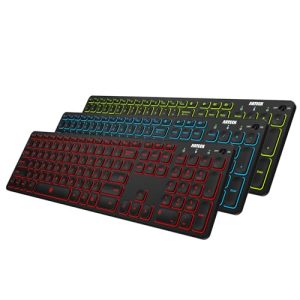
The best borderless keyboards do away with the wide plastic frame that surrounds the keys on a traditional board. Instead, the switches sit on top of a flat plate, the keycaps stand proud of the chassis, and the edge of the keyboard ends almost where the keys end. The result is a cleaner desk, a board that is easier to wipe down, and a modern look that suits gaming setups and tidy workspaces alike.
Borderless does not mean the same thing on every product page. Some makers use the word for a frameless mechanical board with exposed switches. Others use it for a low-profile office keyboard with a slim metal top plate and almost no raised edge. Both approaches count here, because both give you the same practical benefit: less dead space around the keys, less dust trapped in a recessed tray, and a keyboard that looks smaller than its layout suggests.
This guide explains what to look for, then compares four boards that earn a place on a shortlist for different reasons. One is a full-size gaming classic, one is a compact 60 percent board, one is a quiet wireless board for long typing days, and one is an ultra-slim mechanical board that bridges work and play. Choose by layout first, switch type second, and connection third, and the right borderless keyboard will be obvious.
How to Choose a Borderless Keyboard
Understand the frameless design
A true borderless mechanical keyboard mounts its switches on an exposed plate. You can see the sides of the switches and the gap between the keycaps and the base. That open design makes crumbs and dust easy to brush away, and it lets backlighting spill out around each keycap, which many people find attractive in a dark room. The trade-off is that there is less plastic to protect the switches from a knock, and the board can sound a little more open and clicky than a board with a deep case.
A low-profile borderless keyboard takes a different route. Its keys are short, its top plate is flat, and its edges are thin. It does not have exposed mechanical switches, but it still has almost no border. These boards are usually quieter, lighter, and better suited to shared offices and long documents.
Pick the layout before the brand
Full-size boards include a number pad and a full row of function and navigation keys. They suit spreadsheets, data entry, and anyone who uses a numpad every day. Tenkeyless boards drop the numpad and save several inches of desk width, which leaves more room for the mouse. Compact 60 percent boards drop the function row, navigation cluster, and numpad as well, keeping only the main typing keys and reaching the rest through a function layer. They are excellent for small desks and travel, but they demand a short adjustment period.
Choose switches for typing, not for marketing
Linear switches travel straight down with no bump and no click. They are fast for gaming and smooth for typing, but they give less feedback about when a key has registered. Tactile switches add a small bump partway down, which many typists prefer for accuracy. Clicky switches add a bump and an audible click, which is satisfying at home and distracting in a shared room. Low-profile scissor switches, found on most office boards, are quiet and shallow, with a short, laptop-like stroke.
If you type all day, favour tactile or scissor switches and a board with a comfortable keycap shape. If you play fast competitive games, favour linear or optical switches with a quick response. There is no switch that is best for everyone, and the switch you enjoy for an hour is the one you will still enjoy after a year.
Check connectivity and software
Wireless boards should pair with at least two devices if you move between a desktop, a laptop, and a tablet. Bluetooth is convenient for mobile devices, while a dedicated 2.4 GHz receiver usually gives a more stable connection for gaming. A detachable USB-C cable is a useful fallback and makes a wired board easier to pack. Also check whether the software you need runs on your operating system, because macro programming, lighting control, and remapping often depend on a companion app.
Do not ignore build quality
A borderless board shows its frame, so the frame matters. Brushed aluminium feels solid, resists flex, and stays looking good for years. Thin plastic can flex under heavy typing and can creak. PBT keycaps resist shine better than ABS keycaps, which tend to go glossy on the most-used keys after months of use. A detachable cable, a stable set of feet, and a wrist rest in the box are small details that make a daily difference.
Top Picks
1. Corsair K70 RGB PRO — Best Full-Size Borderless Gaming Keyboard
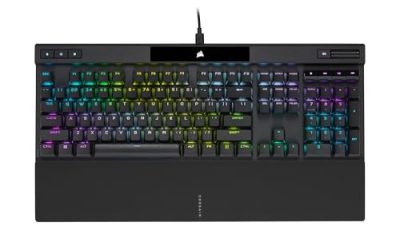
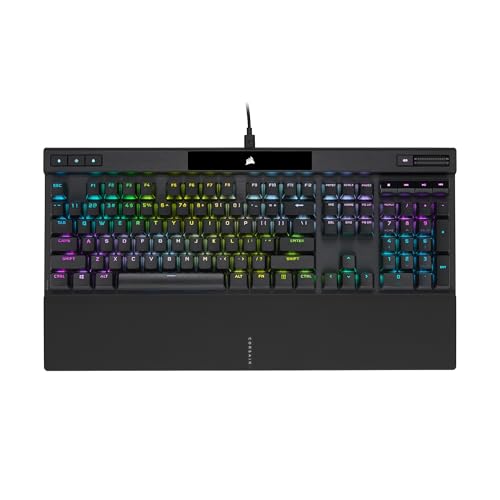
The Corsair K70 RGB PRO is the classic example of a borderless mechanical keyboard, and it remains the safest full-size pick in this category. Its Cherry MX switches sit on an exposed brushed aluminium frame, with no raised plastic border around them, so the board looks open and is easy to clean. Per-key RGB lighting shines between the keycaps and around the edges, and the effect is far more striking than on a board with a deep case.
This version uses Cherry MX Red linear switches, which travel smoothly and reset quickly, making them a natural fit for gaming and fast typing. It also offers 8,000 Hz hyper-polling, PBT double-shot keycaps that resist shine, a detachable braided USB-C cable, dedicated media keys, a volume roller, and a soft-touch palm rest. Corsair iCUE software handles lighting, macros, and profiles, and onboard memory stores settings so the board keeps its configuration on another computer.
The K70 RGB PRO is a wired board, so it suits a fixed desk rather than a travel bag. It is also a full-size board, so it needs a wide desk. If you want a numpad, dedicated media controls, and a proven gaming layout with a genuinely frameless look, this is the board to beat.
View the Corsair K70 RGB PRO on Amazon
2. Razer Huntsman Mini — Best Compact Borderless Keyboard
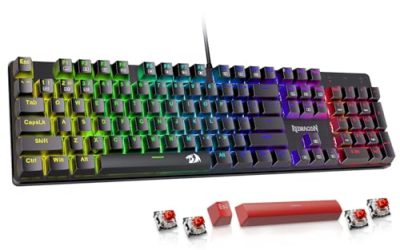
The Razer Huntsman Mini takes the borderless idea and shrinks it to a 60 percent layout. Its aluminium top plate ends close to the outer keys, its optical switches sit exposed above the frame, and its detachable USB-C cable makes it easy to carry. The board is small enough to leave generous mouse space on a crowded desk, and it is a popular choice for competitive play and minimalist setups.
This version uses Razer Purple clicky optical switches, which register with light and a crisp click. Optical switches use a beam of light rather than a metal contact to register a press, which gives a fast, consistent response. Doubleshot PBT keycaps resist wear, Chroma RGB lighting is controlled per key, and onboard memory stores lighting and key settings. The 60 percent layout means the function keys, arrow keys, and numpad live on a second layer, reached with the function key, so allow a few days to learn the layout.
The Huntsman Mini is best for gamers and minimalists who want a tiny footprint and a clean, borderless frame. It is not the right pick if you need a numpad or dedicated arrow keys every day, and the clicky switches are loud enough to bother people in a quiet room.
View the Razer Huntsman Mini on Amazon
3. Logitech MX Keys S — Best Borderless Keyboard for Work
The Logitech MX Keys S is the work-focused pick in this guide. It is not a mechanical board, and it does not have exposed switches, but its low-profile design and slim metal top plate give it the same clean, almost borderless appearance. The keys sit close to the edge of the chassis, the board is thin, and the whole package looks at home next to a laptop or a slim monitor.
Its Perfect Stroke scissor keys are spherically dished to cup your fingertips, and the stroke is quiet and precise, which suits long writing sessions and shared offices. Smart backlighting brightens as your hands approach and dims when you move away, and the board pairs with up to three devices over Bluetooth or the included Logi Bolt receiver, switching between them with a single keypress. It charges over USB-C, works across Windows, macOS, Linux, and ChromeOS, and supports programmable Smart Actions through Logi Options Plus software.
The MX Keys S is full-size, including a numpad, yet it stays compact for a full-size board because its border is so slim. It is the right choice if you type for a living, switch between computers, and want a quiet board that looks understated rather than gamer-styled. Mechanical enthusiasts who want a tactile switch and hot-swappable parts should look at the other picks instead.
View the Logitech MX Keys S on Amazon
4. Keychron K3 Pro — Best Ultra-Slim Borderless Mechanical Keyboard
The Keychron K3 Pro is the middle ground between a gaming board and an office board. It is a 75 percent mechanical keyboard with a slim aluminium frame, low-profile Gateron switches, and a layout that keeps the function row and arrow keys while dropping the numpad. The keys sit close to the edge of the case, the board is thin for a mechanical keyboard, and it looks equally at home in an office or a gaming setup.
It connects over Bluetooth, 2.4 GHz wireless, or a wired USB-C connection, and it supports QMK and VIA firmware, which lets you remap keys and build layers without installing a heavy companion app. The switches are hot-swappable, so you can change to a different low-profile switch later without soldering, and the board works with Mac and Windows layouts, with keycaps for both in the box. RGB backlighting is included, and the battery is large enough for long wireless sessions at modest brightness.
The 75 percent layout is a good compromise: you keep the keys you use most, lose the numpad you may not need, and save a useful amount of desk space. The K3 Pro is the pick for someone who wants a mechanical feel in a slim, borderless package and values open firmware over brand-specific software.
View the Keychron K3 Pro on Amazon
Comparison Table
| Keyboard | Layout | Switch Type | Connection | Best For |
|---|---|---|---|---|
| Corsair K70 RGB PRO | Full-size | Cherry MX Red linear mechanical | Wired USB-C | Full-size gaming with a numpad |
| Razer Huntsman Mini | 60 percent | Razer Purple clicky optical | Wired USB-C, detachable | Compact desks and competitive play |
| Logitech MX Keys S | Full-size | Perfect Stroke scissor | Bluetooth and Logi Bolt, USB-C charging | Quiet all-day typing and multi-device work |
| Keychron K3 Pro | 75 percent | Gateron low-profile mechanical, hot-swappable | Bluetooth, 2.4 GHz, wired USB-C | Slim mechanical typing with open firmware |
What Borderless Really Means for Cleaning and Durability
The open design is the main practical advantage of a borderless keyboard. On a traditional board, dust and crumbs fall into a recessed tray and collect under the keycaps, where they are hard to reach. On a frameless board, the same debris sits on a flat plate where a soft brush or a quick wipe can remove it. Pulling a keycap is still the best way to clean thoroughly, but day-to-day cleaning is noticeably easier.
Durability depends on the frame, not on the absence of a border. An aluminium plate resists bending and protects the switches from side impacts better than thin plastic. A board with a detachable cable also lasts longer in practice, because a damaged cable can be replaced instead of retiring the whole keyboard. Check the feet and the cable port as well: wobbly feet and a loose connector are more annoying over time than any difference in switch brand.
Backlighting also behaves differently on a borderless board. Light escapes around the keycaps and across the plate, so the glow is more visible from the side. That is attractive in a dark room, but it can be distracting if you work in a bright office and leave the lighting at full brightness. Most companion apps let you dim or turn off the lighting, so this is a settings issue rather than a reason to avoid the design.
FAQ
Are borderless keyboards good for typing?
Yes, for most people. The typing feel comes from the switches and keycaps, not from the frame, so a borderless board with switches you like will type as well as a framed board with the same switches. The open design can make the sound a little brighter, and some typists notice more light spill from backlit keys, but neither affects accuracy. Try to match the switch to your work: quiet scissor or tactile switches for offices, linear or optical switches for fast gaming.
Do borderless keyboards break more easily?
Not necessarily. The switches are the same as on a framed board, and the plate underneath them carries the load. A board with an aluminium frame is generally sturdier than a board with a thin plastic case, borderless or not. The main risk is a side impact on an exposed switch, so handle the board with the same care you would give any keyboard, and use a sleeve or case when you carry it in a bag.
What is the difference between borderless and frameless?
The two words describe the same idea: a keyboard with little or no raised frame around the keys. Makers use them interchangeably, and neither term is a formal standard. When you compare boards, look at photos of the edges and the sides of the switches rather than trusting the label alone. If the keycaps stand proud of a flat plate and you can see the switches from the side, the board is borderless in practice.
Is a 60 percent borderless keyboard hard to use?
It takes a few days to learn, because the arrow keys, function keys, and navigation keys are on a second layer. Most people adapt quickly, especially if they already use keyboard shortcuts, and the extra mouse space is a real benefit on a small desk. If you rely on a numpad or dedicated arrow keys all day, a full-size or 75 percent board is a safer choice.
Can I use a borderless keyboard with a laptop?
Yes. Wireless borderless boards pair over Bluetooth and work well as a laptop companion, and wired boards connect over USB-C. A slim board such as the Logitech MX Keys S or the Keychron K3 Pro is a natural match for a laptop, while a full-size gaming board is better suited to a fixed desk with an external monitor. Check that the board supports your operating system and that any software you need is available for it.
Conclusion
The best borderless keyboards prove that a keyboard does not need a wide plastic frame to be practical. The Corsair K70 RGB PRO is the full-size gaming standard, with exposed Cherry MX switches, an aluminium frame, and a complete layout. The Razer Huntsman Mini is the compact choice, packing a borderless frame and fast optical switches into a 60 percent body. The Logitech MX Keys S is the quiet workhorse, with a slim metal plate, smart backlighting, and multi-device pairing for long typing days. The Keychron K3 Pro sits between them, offering a slim mechanical board with open firmware and a space-saving 75 percent layout.
Start with the layout you need, then choose the switch that matches how you type and play. A borderless keyboard chosen that way will look cleaner, clean up faster, and feel right every day, whether it sits on a gaming desk or in a quiet office.
Disclosure: As an Amazon Associate, we earn from qualifying purchases.
FAQ
Are borderless keyboards good for typing?
Do borderless keyboards break more easily?
What is the difference between borderless and frameless?
Is a 60 percent borderless keyboard hard to use?
Can I use a borderless keyboard with a laptop?
More from Amazon
Programs that pair well with the guide above. Offers and eligibility are set by Amazon and may change.
Free shipping on eligible items, Prime Video and more. Eligible new members can start with a free trial.
Start a Prime free trialAd-free music streaming. Eligible new subscribers can start with a free trial.
Try Music Unlimited freeA Prime membership for ages 18-24 with a trial period. Eligibility is set by Amazon.
See Prime for Young AdultsAudiobooks and podcasts to listen to on the go. Eligible new members can start with a free trial.
Try Audible freeAs an Amazon Associate we earn from qualifying purchases.