Our Short List of 3

All 3 Picks at a Glance
| Product | Specs | Action |
|---|---|---|
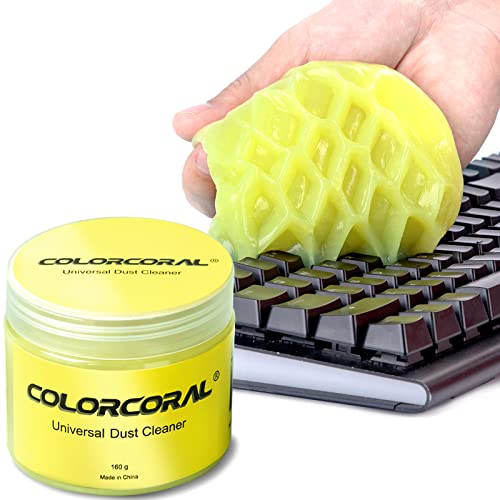 1. ColorCoral Cleaning Gel — Best Gel for Crumbs Between Keys | Check price on Amazon | |
 2. Hagibis 5-in-1 Cleaning Brush Kit — Best All-in-One Kit | Check price on Amazon | |
| 4. MagicFiber Microfiber Cleaning Cloths — Best Cloths for Keycaps and Surfaces | Check price on Amazon |
Key takeaways
- The best cleaning products for Mac keyboards lift dust and crumbs from between keys without damage. Compare gels, brushes, air dusters, and cloths for MacBook.
The best cleaning products for Mac keyboards remove dust, crumbs, and fingerprints from between the keys without forcing liquid under them or scratching the keycaps. Mac keyboards are not like mechanical boards: MacBook keys sit low with a scissor mechanism, the keys are not designed to be pulled off, and moisture trapped under a key can cause sticking or damage. That means the right cleaning kit is a gentle one, built around soft brushes, dry air, cleaning gel, and lint-free cloths rather than harsh solvents or stiff tools.
A dirty Mac keyboard is more than a cosmetic problem. Dust and crumbs collect under the keys, food residue makes keys feel sticky, and oily fingerprints build up on the keycaps and the palm rest. Regular light cleaning keeps the keys feeling crisp and the keyboard looking new, and it takes only a few minutes when the right products are on hand. The four picks below cover the full job: a gel for crumbs between keys, a brush kit for daily dust, a compressed air duster for debris under the keys, and microfiber cloths for the final wipe.
How to Choose Cleaning Products for a Mac Keyboard
Match the product to the type of dirt
Loose dust and crumbs respond best to dry methods: a soft brush, a burst of compressed air, or a cleaning gel pressed between the keys. Oily fingerprints and smudges need a lightly damp microfiber cloth, never a soaking wet one. Sticky residue from a spill is the hardest case, and it usually needs a cloth barely dampened with plain water, wiped gently and dried at once. Buying one product for each kind of dirt covers the keyboard better than buying four versions of the same tool.
Avoid liquids near the keys
The golden rule for any Mac keyboard is to keep liquid out of the gaps between keys. Never spray cleaner directly onto the keyboard, and never use a dripping cloth. Spray or dampen the cloth first, then wipe the keycaps. Cleaning gels are safe for this reason: they are solid, they pick up debris without flowing, and they leave no moisture behind. If a product is a liquid spray, use it on the cloth only, and keep the cloth only slightly damp.
Choose soft tools that cannot scratch
MacBook keycaps have a smooth matte finish that shows scratches easily, and the aluminium around the keyboard scratches too. Brushes should have soft bristles, cloths should be microfiber, and any scraping tool should be plastic or silicone rather than metal. A metal keycap puller belongs with a mechanical keyboard, not a MacBook: MacBook keys are not meant to be removed, and pulling one can break the scissor mechanism underneath. If a cleaning kit includes a keycap puller, use it only on an external mechanical keyboard, never on a built-in MacBook keyboard.
Check that the product is safe for electronics
Cleaning products for keyboards should be free of harsh solvents, ammonia, and abrasive particles. A gel should be non-toxic and reusable, a spray should be safe for electronics, and a duster should be moisture-free. Read the label before the first use, and test any new product on one key or a corner of the keyboard before using it across the whole board. If a product leaves residue or a strong chemical smell, stop using it.
Think about the keyboard model
A MacBook keyboard and a standalone Magic Keyboard need slightly different care. A MacBook keyboard is fixed in place, so cleaning happens with the laptop open and powered off, and crumbs fall into a shallow well that is hard to reach. A Magic Keyboard can be turned upside down and shaken gently, and its keys have a little more room around them. Both benefit from the same products, but a duster and a gel are especially useful on a MacBook, where the gaps are tight and the keyboard cannot be flipped over.
How to Clean a Mac Keyboard Safely
Before using any product, shut the Mac down or lock the keyboard so no keys are pressed during cleaning. On a MacBook, shut it down fully and unplug it. On a Magic Keyboard, switch it off. Turn the keyboard upside down and shake it gently over a bin or a desk to drop loose crumbs, then hold it at an angle and use short bursts of compressed air to push debris out from between the keys. Brush the gaps with a soft brush, press cleaning gel between the keys to lift what remains, and finish by wiping the keycaps with a dry or barely damp microfiber cloth. Let everything dry for a few minutes before switching the Mac back on.
Never use a vacuum cleaner directly on a MacBook keyboard, because strong suction can pull a keycap loose. Never pour or spray liquid onto the keys, and never use paper towels, which shed fibres and can scratch the finish. If a spill happens, shut the Mac down immediately, turn it upside down, and let it drain rather than pressing keys to see if they still work.
Top Picks
1. ColorCoral Cleaning Gel — Best Gel for Crumbs Between Keys
ColorCoral cleaning gel is the simplest way to pull crumbs and dust out of the tight gaps on a Mac keyboard. The gel is a soft, reusable putty that presses down between the keys, moulds around each keycap, and lifts debris away when it is pulled back up. It reaches places a brush cannot, and it does so without any liquid, which makes it one of the safest options for a MacBook keyboard.
The gel comes in a sealed jar, and a single jar lasts for many cleaning sessions if it is stored with the lid on and kept away from heat. Knead it briefly before use so it is soft and even, press it gently over a section of keys, and lift it straight up rather than dragging it across the board. When the gel starts to look dark or stops picking up dust, it is time to replace it. It also works on car vents, remote controls, and other fiddly surfaces, so the jar earns its place on a desk beyond keyboard duty.
For a Mac keyboard, the gel is the best first purchase. It handles the most common problem, crumbs and dust between low-profile keys, with no risk of moisture and no need to touch the keycaps with a hard tool.
Check the ColorCoral Cleaning Gel on Amazon
2. Hagibis 5-in-1 Cleaning Brush Kit — Best All-in-One Kit
The Hagibis 5-in-1 cleaning kit is a compact set built around a soft brush, a cleaning pen, and a keycap puller, and it is the best all-in-one option for a Mac keyboard and the rest of a desk setup. The large soft brush sweeps dust off the keycaps and out of the gaps, the smaller brush and pen tip reach into corners and around individual keys, and the flocked sponge head cleans the edges of the keyboard and the palm rest.
The kit is small enough to keep beside a MacBook, and it covers daily maintenance in a single tool rather than a drawer full of separate brushes. Use the large brush first for a quick pass over the whole keyboard, then the pen tip for stubborn dust around a single key. The keycap puller in the kit is meant for external mechanical keyboards only: do not use it on a MacBook keyboard, where the keys are not designed to come off and the scissor mechanism underneath can break.
For anyone who wants one kit that handles the keyboard, the screen edges, and earbuds, the Hagibis set is the practical choice. It is inexpensive, it replaces several single-purpose tools, and the soft bristles are safe for Mac keycaps.
Check the Hagibis 5-in-1 Cleaning Brush Kit on Amazon
3. Falcon Dust-Off Compressed Gas Duster — Best for Blowing Out Dust
Falcon Dust-Off is the classic compressed gas duster, and it is the best tool for pushing dust and crumbs out from under MacBook keys. A short burst of gas drives debris out of the gaps far more effectively than a brush alone, and the can reaches under keys that no tool can touch. The 10 oz can is a good size for a desk, lasting through many cleaning sessions.
Technique matters with a gas duster. Hold the can upright at all times, keep it a few inches from the keyboard, and use short bursts rather than one long spray. Never shake the can, never tilt it while spraying, and never spray it upside down, because liquid propellant can come out and leave moisture on the keyboard. Hold the MacBook at a slight angle so the debris blows out of the keyboard instead of deeper into it, and work in a ventilated room. The duster is moisture-free when used correctly, and it is safe for electronics as long as the can stays upright.
Pair the duster with a brush or a gel: blow the loose debris out first, then brush or lift what remains. Used on its own it moves dust around, but used as the first step in a routine it is the fastest way to clear a keyboard that has collected weeks of dust.
Check the Falcon Dust-Off Compressed Gas Duster on Amazon
4. MagicFiber Microfiber Cleaning Cloths — Best Cloths for Keycaps and Surfaces
MagicFiber microfiber cloths are the finishing tool every Mac keyboard routine needs. The 13-pack gives a fresh cloth for each cleaning session, and the fine microfiber lifts fingerprints and skin oils from keycaps without scratching the matte finish. The cloths are lint-free, washable, and reusable, so a pack lasts a long time.
Use a cloth dry for everyday fingerprints, or barely damp with plain water for smudges and sticky residue. Never spray liquid onto the keyboard itself: dampen the cloth, wring it out until it is only slightly moist, and wipe each key gently. The cloths also clean the MacBook screen, the palm rest, and the Magic Keyboard casing, so one pack covers the whole Mac setup. Wash them regularly with mild detergent and no fabric softener, which coats the fibres and reduces their cleaning ability.
Microfiber is the only wipe material recommended for Mac keycaps. Paper towels shed fibres and can scratch, cotton rags leave lint, and household wipes often contain chemicals that are too harsh for the keyboard finish. A clean microfiber cloth is the safe default, and this pack is the best value way to keep several on hand.
Check the MagicFiber Microfiber Cleaning Cloths on Amazon
Comparison Table
| Product | Best For | Type | Safe for MacBook Keys | Key Caution |
|---|---|---|---|---|
| ColorCoral Cleaning Gel | Crumbs between keys | Reusable gel | Yes | Replace when dark or less sticky |
| Hagibis 5-in-1 Kit | Daily dust and corners | Brush and pen set | Yes | Do not use its keycap puller on a MacBook |
| Falcon Dust-Off Duster | Debris under keys | Compressed gas | Yes | Keep can upright, short bursts only |
| MagicFiber Cloths | Fingerprints and smudges | Microfiber cloths | Yes | Dampen the cloth, never the keyboard |
Cleaning Routine for a Mac Keyboard
A light routine once a week keeps a Mac keyboard in good shape and takes about five minutes. Shut the Mac down, shake out loose crumbs, blow the gaps with the duster, brush the keycaps, press the gel between the keys, and finish with a dry microfiber cloth. A deeper clean once a month adds a barely damp cloth pass for smudges and a check of the palm rest and the edges of the keyboard. Sticking to the routine matters more than the effort of any single session: dust that is removed weekly never gets the chance to work its way under a key and make it stick.
If a key does start sticking, do not force it or pry it up. Clean around it with the brush and the duster, press the gel gently around its edges, and try the key again after the keyboard is dry. If the key still sticks after cleaning, or if a spill has reached the keyboard, it is time to contact Apple support rather than opening the keyboard, because the mechanism underneath is delicate and easy to damage.
FAQ
Can I use cleaning gel on a MacBook keyboard?
Yes. Cleaning gel is one of the safest options for a MacBook keyboard because it is solid and leaves no moisture behind. Press it gently between the keys and lift it straight up. Store it with the lid on and keep it away from heat, and replace it when it stops picking up dust or looks dark.
Is compressed air safe for a Mac keyboard?
Yes, when used correctly. Hold the can upright, keep it a few inches away, and use short bursts. Never shake the can or spray it upside down, because liquid propellant can escape and leave moisture on the keyboard. Hold the MacBook at an angle so debris blows out rather than deeper in.
Can I remove MacBook keys to clean underneath?
No, MacBook keys are not designed to be removed, and pulling one can break the scissor mechanism underneath. Clean around and under the keys with a duster, a soft brush, and cleaning gel instead. A keycap puller is only for external mechanical keyboards.
What should I never use on a Mac keyboard?
Never spray liquid directly onto the keyboard, never use paper towels, and never use household cleaners, solvents, or abrasive wipes. Keep water away from the gaps between keys, and use only a barely damp microfiber cloth for smudges. A vacuum cleaner should not be used directly on the keys either, because suction can pull a keycap loose.
How often should I clean my Mac keyboard?
A light clean once a week is enough for most people, with a deeper clean once a month. Anyone who eats at the desk or uses the Mac in a dusty room should clean more often. Regular light cleaning prevents crumbs and dust from building up under the keys, where they are much harder to remove.
Conclusion
The best cleaning products for Mac keyboards work with the low-profile design of a MacBook or Magic Keyboard rather than against it. ColorCoral cleaning gel lifts crumbs from between the keys without any liquid. The Hagibis 5-in-1 kit covers daily dust and corners in one compact set. Falcon Dust-Off blows debris out from under the keys. MagicFiber microfiber cloths finish the job on fingerprints and smudges without scratching.
Buy the gel first if crumbs are the main problem, add the duster and the brush kit for a complete routine, and keep a stack of microfiber cloths on the desk for daily wiping. Clean with the Mac shut down, keep liquid off the keyboard, and never pull a MacBook key. A few minutes a week with the right products keeps the keyboard feeling crisp and looking new for the life of the Mac.
Disclosure: As an Amazon Associate, we earn from qualifying purchases.
FAQ
Can I use cleaning gel on a MacBook keyboard?
Is compressed air safe for a Mac keyboard?
Can I remove MacBook keys to clean underneath?
What should I never use on a Mac keyboard?
How often should I clean my Mac keyboard?
More from Amazon
Programs that pair well with the guide above. Offers and eligibility are set by Amazon and may change.
Free shipping on eligible items, Prime Video and more. Eligible new members can start with a free trial.
Start a Prime free trialAd-free music streaming. Eligible new subscribers can start with a free trial.
Try Music Unlimited freeA Prime membership for ages 18-24 with a trial period. Eligibility is set by Amazon.
See Prime for Young AdultsAudiobooks and podcasts to listen to on the go. Eligible new members can start with a free trial.
Try Audible freeAs an Amazon Associate we earn from qualifying purchases.