
Our Short List of 3
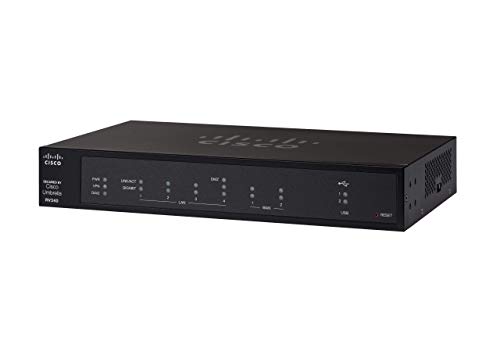
- Best for: Small offices that need dual WAN failover and VPN on a compact wired network.
- Brand: Cisco
- Model: RV340-K9-NA
- Type: VPN Router
- LAN ports: 4 Gigabit Ethernet (GbE) ports, as stated in the listing title

- Best for: Larger small offices with many wired desks that still want dual WAN and VPN in one box.
- Brand: Cisco
- Model: RV345-K9-NA
- Type: VPN Router
- LAN ports: 16 Gigabit Ethernet (GbE) ports, as stated in the listing title

- Best for: Offices that want sixteen ports plus PoE for phones or access points from the router itself.
- Brand: Cisco
- Model: RV345P-K9-NA
- Type: VPN Router
- LAN ports: 16 Gigabit Ethernet (GbE) ports, as stated in the listing title
All 5 Picks at a Glance
| Product | Specs | Action |
|---|---|---|
| Cisco RV340 VPN Router (RV340-K9-NA) |
| Check price on Amazon |
| Cisco RV345 VPN Router (RV345-K9-NA) |
| Check price on Amazon |
| Cisco RV345P VPN Router (RV345P-K9-NA) |
| Check price on Amazon |
 Cisco Systems Gigabit VPN Router (RV320K9NA) |
| Check price on Amazon |
 Cisco Meraki Go Router Firewall Plus (GX50HW-US) |
| Check price on Amazon |
Key takeaways
- Compare Cisco routers for business use, from dual-WAN VPN models to a cloud-managed firewall, using only specs stated in each Amazon listing.
Choosing a Cisco router for a business is really a decision about failure and access, not about headline speed. What happens when the main internet line drops during card payments, and how do remote staff reach office files without exposing the whole network? The models below answer those questions differently, through dual WAN ports, VPN support, extra LAN ports, PoE, or cloud management.
This guide is for small office owners, branch managers, shop and restaurant operators, and the part-time IT helper who keeps their network running. Every pick is a Cisco router sold on Amazon, selected from the model name and specifications stated in its listing title and product details, with business wording such as small business, VPN, dual WAN, or cloud managed taken from that listing itself.
Quick Picks
As an Amazon Associate we earn from qualifying purchases
| Product | Best for | Key spec from title |
|---|---|---|
| Cisco RV340 VPN Router (RV340-K9-NA) | Small offices needing a second internet line | 4 Gigabit Ethernet ports plus Dual WAN |
| Cisco RV345 VPN Router (RV345-K9-NA) | Larger wired offices with many desks | 16 Gigabit Ethernet ports plus Dual WAN |
| Cisco RV345P VPN Router (RV345P-K9-NA) | Offices powering phones or access points | 16 Gigabit Ethernet ports, PoE, Dual WAN |
| Cisco Systems Gigabit VPN Router (RV320K9NA) | Compact sites wanting gigabit VPN routing | Gigabit VPN Router |
| Cisco Meraki Go Router Firewall Plus (GX50HW-US) | Owners who want cloud-managed control | Cloud Managed, VPN |
How to Choose
Decide whether you need one WAN line or two
A single WAN port leaves the business offline whenever the provider fails, while a dual WAN model can use a second connection for failover or load balancing, as stated for the RV340, RV345, and RV345P listings. A shop taking card payments, a clinic using cloud records, or an office running video calls should weigh that second port seriously. A tiny site with one broadband line and no backup service gains less, because dual WAN hardware cannot create a second connection you have not ordered.
Count wired ports before you buy
Port count decides whether you also need a separate switch on day one. The RV340 listing states four Gigabit Ethernet ports, which suits a handful of wired devices beside wireless access points. The RV345 and RV345P listings state sixteen Gigabit Ethernet ports, enough for a row of desks, printers, and a server without extra hardware. Count every wired endpoint you actually have, including tills, phones, cameras, and network storage, then leave spare ports for the next hire or device rather than filling the router immediately.
Match the VPN wording to how people connect
Each listing here mentions VPN, but the job behind that word varies. Site-to-site VPN links two buildings so they behave like one network, while remote-access VPN lets individual staff connect from home. Check the exact VPN wording in the listing you choose and picture your real case: a branch sending traffic back to head office is different from five homeworkers opening files. Also confirm who will configure the tunnels, because a VPN feature that nobody sets up correctly protects nothing.
Choose between local control, PoE, and cloud management
The Meraki Go listing is described as cloud managed, which fits an owner who wants to check the network from elsewhere through that managed service. The RV models are conventional routers managed as local business hardware. PoE is the other dividing line: only the RV345P listing states PoE among these picks, which matters if IP phones or access points should draw power from the router ports. If nothing needs powered ports, paying attention to PoE adds little; if several devices do, it removes separate injectors and cabling clutter.
The 5 Best Options
Cisco RV340 VPN Router (RV340-K9-NA)
- Best for: Small offices that need dual WAN failover and VPN on a compact wired network.
- Brand: Cisco
- Model: RV340-K9-NA
- Type: VPN Router
- LAN ports: 4 Gigabit Ethernet (GbE) ports, as stated in the listing title
Small offices that need dual WAN failover and VPN on a compact wired network.
Four LAN ports fill quickly, so count wired devices carefully and plan a switch if you expect growth.
The RV340 suits a small office that wants business routing without jumping to a sixteen-port chassis. Its listing states four Gigabit Ethernet ports plus dual WAN, so a second internet service can sit behind the same router for continuity when the first line fails. The VPN wording in the product name fits offices linking remote workers or a small branch back to the main site. It is the balanced starting point here for a business that has outgrown a home router but still runs a compact wired network.
Cisco RV345 VPN Router (RV345-K9-NA)
- Best for: Larger small offices with many wired desks that still want dual WAN and VPN in one box.
- Brand: Cisco
- Model: RV345-K9-NA
- Type: VPN Router
- LAN ports: 16 Gigabit Ethernet (GbE) ports, as stated in the listing title
Larger small offices with many wired desks that still want dual WAN and VPN in one box.
Confirm the physical space and cabling for a sixteen-port unit, and check the exact listing variant before ordering.
The RV345 is the step up for an office where most desks, printers, and shared devices are wired. Sixteen Gigabit Ethernet ports in the listing title remove the immediate need for a separate switch in many small premises, and dual WAN again gives a path for a backup connection. Its VPN router positioning suits a business connecting sites or supporting remote access from a central office router. Choose it over the RV340 when the port count, not the routing idea itself, is what your current setup keeps running out of.
Cisco RV345P VPN Router (RV345P-K9-NA)
- Best for: Offices that want sixteen ports plus PoE for phones or access points from the router itself.
- Brand: Cisco
- Model: RV345P-K9-NA
- Type: VPN Router
- LAN ports: 16 Gigabit Ethernet (GbE) ports, as stated in the listing title
Offices that want sixteen ports plus PoE for phones or access points from the router itself.
Check which of your devices actually need PoE and confirm the listing details for the powered ports before relying on them.
The RV345P keeps the sixteen Gigabit Ethernet ports and dual WAN of the RV345 and adds the PoE wording that separates it in the listing title. That matters in an office where IP phones, wireless access points, or similar powered devices can take power from the network port instead of a separate adapter at every desk. It fits a business building its wired core and its powered devices around one router. If your phones and access points already have their own power arrangement, the plainer RV345 covers the same port count without that focus.
Cisco Systems Gigabit VPN Router (RV320K9NA)
- Best for: Compact business sites that want a straightforward Cisco gigabit VPN router.
- Brand: Cisco Systems
- Model: RV320K9NA
- Type: Gigabit VPN Router, as stated in the listing title
- Speed wording in title: Gigabit
Compact business sites that want a straightforward Cisco gigabit VPN router.
The short listing title leaves port and WAN details unstated here, so verify them on the product page before buying.
The RV320 listing is the simplest name on this page: a Cisco Systems Gigabit VPN Router, model RV320K9NA. That plain positioning suits a small site that wants gigabit VPN routing without selecting between the larger port counts and PoE options above. A single-location business, a small professional office, or a compact branch that mainly needs a VPN-capable Cisco router at the edge of its network is the natural audience. Because the listing title states fewer specifics than the RV340 family titles, read its full product details carefully to confirm the ports and features your setup requires.
Cisco Meraki Go Router Firewall Plus (GX50HW-US)
- Best for: Owner-managed small businesses that want a cloud-managed router firewall with VPN.
- Brand: CISCO DESIGNED
- Model: GX50-HW-US, also shown as GX50HW-US in the listing title
- Type: Meraki Go Ethernet Router Firewall Plus
- Management: Cloud Managed, as stated in the listing title
Owner-managed small businesses that want a cloud-managed router firewall with VPN.
Cloud management is the core idea here, so confirm you are comfortable managing the device that way before choosing it over a local RV model.
The Meraki Go Router Firewall Plus takes a different route from the RV models. Its listing describes a cloud-managed Ethernet router firewall with VPN, under the Cisco Designed and Meraki Go names, model GX50HW-US. That fits an owner or small team who would rather manage the gateway through a cloud service than log into a traditional local router for every change. It is aimed at the small business setting where ease of remote oversight matters most, such as a shop group, a small office without on-site IT, or a owner-managed site.
Which One Fits Your Situation
Your shop cannot afford to lose card payments
Pick the RV340 and use its dual WAN layout with a second internet service. The listing states four Gigabit Ethernet ports plus dual WAN, which is enough wired capacity for tills, a back-office computer, and a printer in many small shops, while the second WAN path addresses the failure that actually stops trading. Add separate wireless hardware if customers or staff need Wi-Fi, since this choice is about the wired gateway.
You are wiring a growing office floor
Choose the RV345 when the device count is the problem. Sixteen Gigabit Ethernet ports, as stated in its listing, let desks, printers, and shared equipment connect without stacking a switch into the plan immediately. Dual WAN still gives the office a backup-connection option, and the VPN router positioning covers links back to another site. It is the straightforward pick when four ports would be filled in the first week.
Your phones and access points need powered ports
Go with the RV345P, the only pick whose listing title states PoE alongside sixteen Gigabit Ethernet ports and dual WAN. Powering compatible phones or access points from the router simplifies cabling at desks and ceilings and keeps adapters out of the way. Before ordering, list which devices will actually use powered ports so the PoE feature is solving a real wiring problem rather than sitting unused.
You have no on-site IT and want remote oversight
The Meraki Go Router Firewall Plus fits this case because its listing centres on cloud management with VPN. An owner running a small site from elsewhere can treat the gateway as a managed service device instead of a box that needs someone in the room. It suits a café, boutique, or small office that values simple remote visibility over the traditional local-router approach of the RV range.
Common Mistakes
- Buying a dual WAN router but never ordering a second internet service, so the failover port has nothing to fail over to.
- Counting only computers and forgetting tills, printers, phones, cameras, and access points that also need wired ports.
- Choosing PoE hardware when no connected device needs powered ports, or skipping PoE when every phone needs an adapter.
- Assuming a router listing that says VPN will be configured automatically, without planning who sets up the tunnels and accounts.
- Picking a cloud-managed model when the business actually wants purely local administration, or the reverse.
Frequently Asked Questions
Do these Cisco routers provide Wi-Fi by themselves?
The listings used here describe wired router and firewall functions, with Gigabit Ethernet ports, dual WAN, VPN, or cloud management stated in their titles. They do not present these models as the wireless access point for the office. Most businesses will pair the router with separate access points, chosen for the building layout, while the Cisco router handles the internet connection, routing, and VPN duties.
What does dual WAN actually do for a business?
Dual WAN, stated in the RV340, RV345, and RV345P listing titles, means the router can use two internet connections. A business can treat the second line as a backup when the first fails, keeping payments, cloud tools, and calls running, or share traffic across both. It only helps if a second service is installed and configured, so arrange that connection as part of the same project.
Which model should a very small office start with?
The RV340 is the natural starting point in this group for a compact office. Its listing states four Gigabit Ethernet ports plus dual WAN and names it a VPN router, covering the core business needs without a sixteen-port chassis. Start there when wired devices are few. Move to the RV345 family when a honest count of desks and equipment shows four ports will not last.
Is cloud management better than a locally managed router?
Neither approach is automatically better; they suit different owners. The Meraki Go listing is cloud managed, which helps an owner who wants to oversee a site remotely and has no IT person in the building. The RV models follow the traditional local router model, which some businesses prefer for direct on-site control. Decide based on who will administer the network and from where, not on the label alone.
FAQ
Do these Cisco routers provide Wi-Fi by themselves?
What does dual WAN actually do for a business?
Which model should a very small office start with?
Is cloud management better than a locally managed router?
More from Amazon
Programs that pair well with the guide above. Offers and eligibility are set by Amazon and may change.
Free shipping on eligible items, Prime Video and more. Eligible new members can start with a free trial.
Start a Prime free trialAd-free music streaming. Eligible new subscribers can start with a free trial.
Try Music Unlimited freeA Prime membership for ages 18-24 with a trial period. Eligibility is set by Amazon.
See Prime for Young AdultsAudiobooks and podcasts to listen to on the go. Eligible new members can start with a free trial.
Try Audible freeAs an Amazon Associate we earn from qualifying purchases.
