
Our Short List of 3
All 4 Picks at a Glance
| Product | Specs | Action |
|---|---|---|
 XGIMI MoGo 2 Pro Portable Projector | Check price on Amazon | |
 NEBULA Mars 3 Portable Projector | Check price on Amazon | |
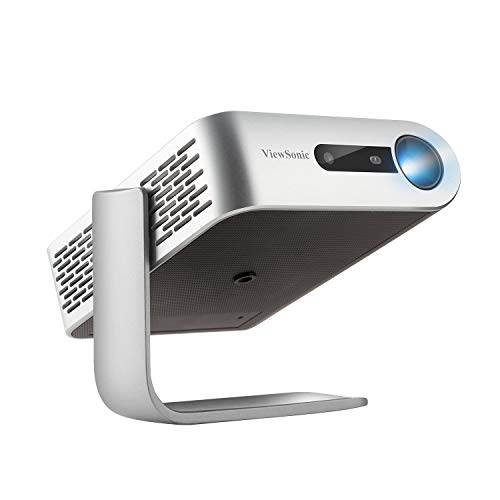 ViewSonic M1 Portable Projector | Check price on Amazon | |
 Epson Home Cinema 1080 Projector | Check price on Amazon |
Key takeaways
- Find the best college projectors for dorm rooms, class presentations, and movie nights. Compare portable, bright, and budget-friendly picks for campus.
The best college projectors fit a life that a television does not: a dorm room with no space for a big screen, a presentation in a classroom or study group, and a movie night with friends in a common room. A projector turns a blank wall into a screen that can be far larger than any display a student can carry, and a portable model packs into a backpack when the semester ends or the study group moves to the library. For a student, that flexibility matters more than the absolute brightest image or the largest screen size.
College use has its own priorities. A dorm room is small, so the projector needs to work from a short distance and produce a watchable image on a wall that may not be perfectly white or perfectly dark. Portability matters because the projector may move between a dorm, a classroom, and a friend’s apartment in the same week. Built-in speakers matter because a separate speaker system is one more thing to buy, carry, and find space for. Battery power is a bonus for outdoor movie nights and rooms without a convenient outlet. And budget matters more than it does for a home theatre buyer, because a projector competes with textbooks, a laptop, and everything else a semester demands.
This guide covers projectors that suit college life from different angles: compact portable models for a backpack, a bright home model for dorm movie nights and presentations, and a budget mini projector for students who want the biggest screen possible for the least money. Every pick is judged on how it fits a student routine, not on how it compares to a dedicated home theatre setup. A projector that needs a dark room, a fixed mount, and a separate sound system may be excellent in a living room, but it is the wrong tool for a dorm.
Brightness, resolution, and throw distance are the three specifications that decide whether a projector works in a dorm. Brightness decides whether the image stays visible with the lights on or the curtains open. Resolution decides whether text in a presentation stays sharp and readable. Throw distance decides how big the image gets from the few feet of space between a desk and a wall. The guide below explains each of those in plain terms, then compares five projectors that cover the range of what a student might need.
How to Choose
1. Match brightness to the room
Brightness is measured in lumens, and more lumens means a more visible image in a bright room. A dorm room with windows and overhead lights needs more brightness than a darkened room at night. Portable projectors are usually dimmer than large home models, which is the trade-off for their size and battery. If most use will be presentations in lit classrooms, prioritise brightness. If most use will be movies at night with the lights off, a dimmer portable model is fine.
2. Check the resolution for text and slides
Resolution decides how sharp the image looks. For movies, a lower resolution is watchable, but for presentations the text on slides needs to be crisp enough to read from the back of a room. A native 1080p projector shows slides and documents clearly. A native 720p projector is acceptable for casual movie nights and video, but small text can look soft. Always check the native resolution, not the supported resolution: a projector that accepts a 1080p signal but displays it at 720p is a 720p projector.
3. Measure the throw distance
Throw distance is how far the projector sits from the wall for a given image size. A dorm room may only offer six to eight feet between the desk and the wall, so a projector that needs twelve feet for a large image will never reach its full size. Short-throw and portable models produce a large image from a short distance, which suits small rooms. Before buying, measure the space where the projector will sit and check the throw specifications for the image size wanted.
4. Decide how portable it needs to be
A portable projector with a built-in battery and a compact body can move from a dorm to a classroom to an outdoor gathering without a power cable. A larger home projector needs an outlet and a stable surface, but it is brighter and sharper. For a student who presents in different rooms, portability is worth more than brightness. For a student whose projector mostly stays in one dorm room, a larger and brighter model is the better value.
5. Listen to the built-in speakers
Most college projectors will be used without external speakers, so the built-in sound matters. A projector with a decent built-in speaker is enough for a small room and a study group. A projector with weak speakers will need a Bluetooth speaker or headphones, which adds cost and hassle. Check the speaker specifications and whether the projector supports Bluetooth audio output, which lets it send sound to a portable speaker wirelessly.
6. Look at connectivity and autofocus
A projector should connect easily to a laptop, a phone, and a streaming stick. HDMI is the standard connection for laptops. Wi-Fi and Bluetooth allow wireless casting from a phone and audio to a speaker. Autofocus and automatic keystone correction are genuinely useful in a dorm, because the projector will be set up quickly on a desk or a stack of books rather than carefully aligned on a mount. Automatic correction saves several minutes of fiddling every time the projector moves.
7. Set a realistic budget and weight
A projector for college should be judged on value for a student budget, not on home theatre performance. A budget mini projector can be the right choice for movie nights even if its image is not as sharp as a premium model. Weight matters too: a projector under a few pounds is easy to carry in a backpack, while a heavier home model is better left in one room. Decide which matters more before comparing specifications.
Top Picks
XGIMI MoGo 2 Pro Portable Projector
XGIMI MoGo 2 Pro Portable Projector
The XGIMI MoGo 2 Pro is a compact portable projector and the most versatile pick in this guide for college life. It is small enough to carry in a backpack, produces a native 1080p image, and includes automatic focus and automatic keystone correction, so setting it up on a dorm desk or a classroom table takes moments rather than minutes. That speed matters when a presentation starts in five minutes and the projector has just come out of a bag.
The MoGo 2 Pro includes built-in speakers and supports wireless casting from a phone, which covers both movie nights and quick slide presentations without extra cables or accessories. Its brightness suits a dimmed room best, so it performs best for evening movies and presentations with the lights low. For a student who needs one projector that can move between a dorm, a study group, and a friend’s apartment, it is the most flexible option here.
Who it is for: students who want a portable 1080p projector for movies, presentations, and study groups in different rooms, and who value fast automatic setup over maximum brightness.
Caveats: as a portable model it is dimmer than a large home projector, so it is not the best choice for a brightly lit classroom at midday. Confirm the listing is the original MoGo 2 Pro, not a newer variant under a different listing.
NEBULA Mars 3 Portable Projector
NEBULA Mars 3 Portable Projector
The NEBULA Mars 3 is a portable projector built for use away from a desk, and it is the best pick in this guide for outdoor movie nights and common-room gatherings. It has a built-in battery, so it runs without a power outlet, and its rugged design handles being carried around campus and set up on uneven surfaces. The built-in speaker is strong enough for a small group outdoors, which is where most portable projectors fall short.
The Mars 3 produces a 1080p image and includes autofocus and keystone correction, so it adapts quickly when it is moved. Its brightness is designed for evening use, and it performs best once the sun has gone down. For a student who wants a projector for lawn movie nights, rooftop gatherings, and weekend trips as well as dorm use, the battery and the durable build make it the most adventurous pick here.
Who it is for: students who want a battery-powered projector for outdoor movie nights, group gatherings, and use away from an outlet, and who value durability and strong built-in sound.
Caveats: battery life limits how long a session can run without charging, so a long movie marathon may need a power source nearby. Confirm the listing is the standalone Mars 3, not the travel-case bundle under a different code.
TMY V08 Mini Projector
The TMY V08 is a budget mini projector and the most affordable pick in this guide. It is a compact 1080p-capable projector with a native 720p display, which keeps the cost low while still producing a large image on a dorm wall. For a student whose main goal is a big screen for movies and casual video in a darkened room, it delivers the core experience at a fraction of the cost of a premium portable model.
The V08 connects by HDMI to a laptop or streaming stick and includes a built-in speaker for small-room use. Its small size and light weight make it easy to carry between rooms, and its simple controls mean there is little to learn before the first use. It is best understood as a movie-night projector: it shines in a dark room with friends, and it is not the right tool for reading fine text in a bright classroom.
Who it is for: students on a tight budget who want the largest possible screen for movie nights in a dark dorm room, and who do not need presentation-grade text sharpness.
Caveats: native 720p resolution means small text on slides can look soft, so it is a weak choice for classroom presentations. Its brightness suits dark rooms; a lit room will wash the image out. Confirm the listing is the V08 model, since similar budget mini projectors share the same brand name.
ViewSonic M1 Portable Projector
ViewSonic M1 Portable Projector
The ViewSonic M1 is a palm-sized portable projector with a built-in battery and a built-in stand, and it is the most pocketable pick in this guide. The integrated smart stand props the projector up at the right angle and doubles as a lens cover, which is a clever design for a device that will be tossed into a backpack several times a week. It produces a 720p image, which is enough for movies and casual video on a dorm wall.
The M1 includes Harman Kardon speakers, which are unusually good for a projector this small, and it supports USB-C and HDMI connections as well as a microSD card slot for playing media without a laptop. Its battery allows a full movie without a power cable. For a student who wants the smallest possible projector that still sounds good, it is the easiest to carry of all the picks here.
Who it is for: students who prioritise size and sound above all, who want a projector that fits in a jacket pocket or a small bag, and who mostly watch video rather than present slides.
Caveats: 720p resolution limits its use for text-heavy presentations. A conflicting code circulates for this model on regional listings, so confirm the listing is the US model before ordering.
Epson Home Cinema 1080 Projector
Epson Home Cinema 1080 Projector
The Epson Home Cinema 1080 is a full-size home projector and the brightest pick in this guide. It produces a native 1080p image with strong colour and white brightness, which means it stays visible in a lit room and shows presentation slides clearly from across a room. For a student whose projector mostly stays in one dorm room or a shared apartment living room, and who uses it for both presentations and movie nights, it is the most capable image in this guide.
The Home Cinema 1080 connects by HDMI and is designed to sit on a shelf or table at a fixed distance from the wall. It is larger and heavier than the portable picks, so it is not a backpack projector, but it rewards a fixed spot with a sharper and brighter picture. Its built-in speaker covers a small room, and it can also connect to external speakers for a bigger movie-night sound.
Who it is for: students with a fixed dorm or apartment setup who want the brightest and sharpest image for presentations and movies, and who do not need to carry the projector around campus.
Caveats: it needs an outlet and a stable surface, so it is not suited to outdoor use or frequent moves between rooms. It is the largest and heaviest pick here, so measure the room and the shelf space before ordering.
Comparison Table
| Projector | Native resolution | Portable | Battery | Best for |
|---|---|---|---|---|
| XGIMI MoGo 2 Pro | 1080p | Yes | No | All-round dorm and study group use |
| NEBULA Mars 3 | 1080p | Yes | Yes | Outdoor movie nights, gatherings |
| TMY V08 | 720p | Yes | No | Budget movie nights in a dark room |
| ViewSonic M1 | 720p | Yes, pocket-size | Yes | Smallest size, good built-in sound |
| Epson Home Cinema 1080 | 1080p | No | No | Brightest image, fixed dorm setup |
Which One Is Right for You?
Start with how the projector will move. If it travels between rooms and buildings, choose a portable model: the XGIMI MoGo 2 Pro for the best all-round balance of resolution and automatic setup, the NEBULA Mars 3 for outdoor use and battery power, or the ViewSonic M1 for the smallest possible size and the best built-in sound. If it stays in one room, the Epson Home Cinema 1080 gives the brightest and sharpest image, and the TMY V08 gives the biggest screen for the least money.
Then consider what will be shown. Presentations with text need 1080p and good brightness, which points to the MoGo 2 Pro, the Mars 3, or the Epson Home Cinema 1080. Movies in a dark room are more forgiving, and the TMY V08 and ViewSonic M1 are both fine for that. A student who does both should pick a 1080p model rather than saving money on a 720p one and regretting it during the first group presentation.
Finally, think about the room. A small dorm with a short distance to the wall favours a portable projector with autofocus and keystone correction, since it will be set up quickly in different spots. A shared apartment living room with a fixed seating distance suits the Epson. Whatever the choice, a blank light-coloured wall works well as a screen, and a simple white sheet can improve the image further if the wall is textured or coloured.
Frequently Asked Questions
Can I use a projector in a small dorm room?
Yes. Most dorm rooms have enough wall space for a large image from a short distance, especially with a portable projector that has autofocus and keystone correction. Measure the distance from where the projector will sit to the wall, and check the throw specifications for the image size wanted. A white or light-coloured wall works as a screen, and the room does not need to be fully dark for evening use.
Is a portable projector bright enough for class presentations?
It depends on the room. In a dimmed classroom or a study room with the lights low, a portable 1080p projector shows slides clearly. In a brightly lit lecture hall at midday, a portable model may look washed out, and a brighter home projector is a better choice. For most student presentations in small rooms, a portable projector with 1080p resolution is enough.
Do I need a separate screen for a college projector?
No. A smooth, light-coloured wall is enough to start, and many students never buy a screen. A portable pull-up screen can improve the image and is useful if the wall is textured, dark, or covered in posters, but it is an optional accessory rather than a requirement. A white sheet hung flat can also work as a simple screen for movie nights.
What is the difference between native resolution and supported resolution?
Native resolution is the actual number of pixels the projector displays. Supported resolution is the highest signal the projector can accept, which it then scales down to its native resolution. A projector that supports 1080p input but has a native 720p display shows a 720p image. For presentations with text, native resolution is the number that matters.
Disclosure: As an Amazon Associate, we may earn from qualifying purchases.
FAQ
Which One Is Right for You?
Can I use a projector in a small dorm room?
Is a portable projector bright enough for class presentations?
Do I need a separate screen for a college projector?
What is the difference between native resolution and supported resolution?
More from Amazon
Programs that pair well with the guide above. Offers and eligibility are set by Amazon and may change.
Free shipping on eligible items, Prime Video and more. Eligible new members can start with a free trial.
Start a Prime free trialAd-free music streaming. Eligible new subscribers can start with a free trial.
Try Music Unlimited freeA Prime membership for ages 18-24 with a trial period. Eligibility is set by Amazon.
See Prime for Young AdultsAudiobooks and podcasts to listen to on the go. Eligible new members can start with a free trial.
Try Audible freeAs an Amazon Associate we earn from qualifying purchases.









